❌

Normal view

System76’s Oryx Pro Is the First Linux Laptop to Ship with the COSMIC Desktop

8 October 2025 at 23:33

Oryx Pro COSMIC laptop

System76 announces a new Oryx Pro laptop that comes preinstalled with the COSMIC Beta desktop environment on top of Pop!_OS 24.04 LTS.

The post System76’s Oryx Pro Is the First Linux Laptop to Ship with the COSMIC Desktop appeared first on 9to5Linux - do not reproduce this article without permission. This RSS feed is intended for readers, not scrapers.

System76 Oryx Pro: The First Linux Laptop Shipping with the COSMIC Desktop

9 October 2025 at 01:20

Linux hardware vendor System76 has announced a new Oryx Pro model, making it the first laptop to ship with the company’s new COSMIC desktop environment. The machine targets professionals and enthusiasts in engineering, machine learning, AI, and gaming with a suite of high-performance hardware. System76 highlighted the laptop’s mission, stating it offers β€œthe best combination […]

The post System76 Oryx Pro: The First Linux Laptop Shipping with the COSMIC Desktop appeared first on UbuntuPIT.

WinBoat 0.8.7 Released with Multi-Monitor Support and Custom Install Paths

8 October 2025 at 21:16

The WinBoat project has released version 0.8.7, a significant update that enhances user control and functionality for running Windows applications inside a Docker container on Linux. This new version introduces crucial improvements, most notably customizable installation locations that are no longer restricted to the /var directory, and expanded multi-monitor support. The release continues to build […]

The post WinBoat 0.8.7 Released with Multi-Monitor Support and Custom Install Paths appeared first on UbuntuPIT.

Kdenlive 25.08.1 Released With Major Crash and Rendering Fixes

8 October 2025 at 17:47

The Kdenlive project has released version 25.08.1, the first maintenance update in the 25.08 series, delivering a significant number of fixes with a dedicated focus on stability and the user experience. Announced by Farid Abdelnour on September 22, 2025, the update targets a broad range of bugs, crashes, and usability regressions. The release, which was […]

The post Kdenlive 25.08.1 Released With Major Crash and Rendering Fixes appeared first on UbuntuPIT.

Development Release: AlmaLinux OS 9.7 Beta

9 October 2025 at 03:40
The DistroWatch news feed is brought to you by TUXEDO COMPUTERS. The AlmaLinux OS team have announced the availability of a new beta for the 9.x series. AlmaLinux OS 9.7 beta includes a range of small improvements to enhance security and patch issues. The release announcement states: "AlmaLinux 9.7 Beta introduces performance enhancements, updated development tools, and improved security.....

Distribution Release: Exton Linux 251008 "PuppEX"

8 October 2025 at 23:32
The DistroWatch news feed is brought to you by TUXEDO COMPUTERS. Arne Exton has announced the availability of a new "PuppEX" release of Exton Linux. The project's newest PuppEX is based on the long-term supported Ubuntu 24.04 and uses a recent 6.16 Linux kernel. "This Puppy Linux derivative is made by me. It is built from Ubuntu 24.04 'Noble....

Distribution Release: T2 SDE 25.10

8 October 2025 at 20:44
The DistroWatch news feed is brought to you by TUXEDO COMPUTERS. T2 SDE is an open-source system development environment (or distribution build kit if you are more familiar with that term). T2 allows the creation of custom distributions with bleeding-edge technology. The project's latest release is version 25.10 and the release announcement shares the new version's highlights: "We are....

Python 3.14 Released with Free-threading & Template string literals

By:Ji m
9 October 2025 at 00:09

Python announced the new 3.14 version yesterday! See what’s new and how to install guide for Ubuntu users.

Python 3.14 is the latest stable release of the Python programming language, with 5 years support until 2030.

Since the release, the free-threaded build of Python is officially supported and no longer experimental. It’s so far optional, though will be make default in next phase.

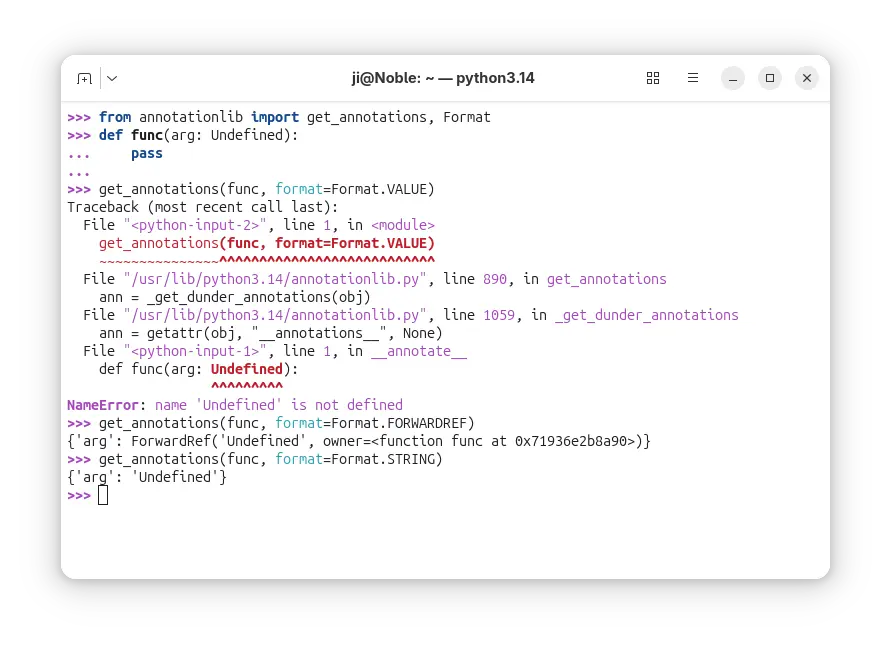
In Python 3.14, the evaluation of annotations is now deferred. It introduced the new annotationlib module, providing tools for inspecting deferred annotations. And, annotations may be evaluated in the VALUE format, the FORWARDREF format, and the STRING format. See PEP 649 for more.

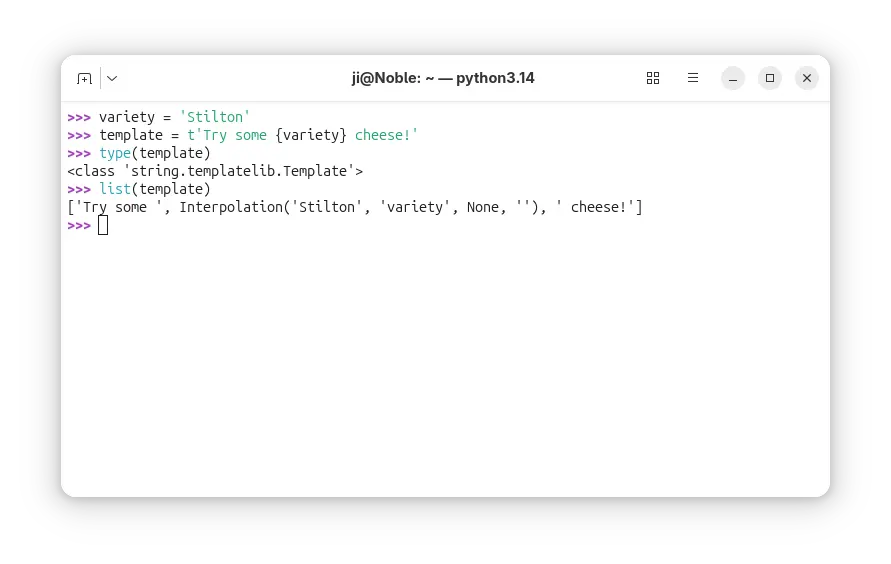
It added Template string literals (PEP 750), new mechanism for custom string processing. The new t-strings use the familiar syntax of f-strings, but return an object representing the static and interpolated parts of the string.

Python 3.14 finally added multiple interpreters in the standard library (PEP 734). With the new concurrent.interpreters module, it now supports running multiple copies of Python in the same process simultaneously without C-API.

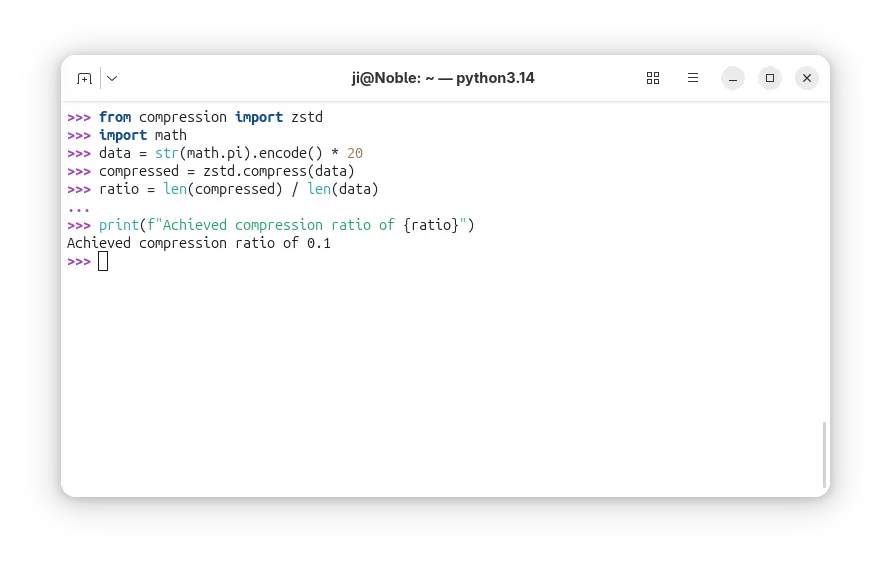
It as well introduced new compression package contains compression.lzma, compression.bz2, compression.gzip, compression.zlib, as well as compression.zstd modules.

Besides compression and decompression for the Zstandard format (PEP 784), the support for reading and writing Zstandard compressed archives has been added to the tarfile, zipfile, and shutil modules.

The release also introduced a zero-overhead debugging interface for CPython, that allows debuggers and profilers to safely attach to running Python processes without stopping or restarting them.

A new command-line interface is added to inspect running Python processes using asynchronous tasks, available via python -m asyncio ps PID or python -m asyncio pstree PID.

And the pdb module now supports remote attaching to a running Python process using a new -p PID command-line option. For example, run python -m pdb -p 1234 will connect to the Python process with the given PID and allow you to debug it interactively.

Other changes include:

  • PEP 758: Allow except and except* expressions without brackets.
  • PEP 765: Disallow return/break/continue that exit a finally block.
  • PEP 741: Add a C API to configure the Python initialization without relying on C structures and the ability to make ABI-compatible changes in the future.
  • Syntax highlighting in PyREPL, and support for color in unittest, argparse, json and calendar CLIs.
  • UUID versions 6-8 are now supported by the uuid module, and generation of versions 3-5 are up to 40% faster.
  • Add a new type of interpreter to CPython, which provides significantly better performance for certain newer compilers.
  • Add a built-in implementation for HMAC (RFC 2104) using formally verified code from the HACL* project.
  • Improve error messages, and more.

For more details about Python 3.14, see the official docs.

Install Python 3.14

The source tarball for Python 3.14 is available to download via the link below:

Ubuntu has made Python 3.14 in system repository in 25.10. For Ubuntu 22.04 and Ubuntu 24.04, the popular Deadsnakes PPA has been updated with the package for the 2 LTS releases.

To add the PPA and install the package, run commands below one by one:

sudo add-apt-repository ppa:deadsnakes/ppa
sudo apt update
sudo apt install python3.14-full

For other Ubuntu releases, it’s not hard to build from source. And, I’ve written a step by step guide for all current Ubuntu releases.

ClamAV 1.5 Open-Source Antivirus Engine Released with Major New Features

7 October 2025 at 23:30

ClamAV 1.5

ClamAV 1.5 open-source antivirus engine is now available for download with major new features, improvements, and bug fixes. Here's what's new!

The post ClamAV 1.5 Open-Source Antivirus Engine Released with Major New Features appeared first on 9to5Linux - do not reproduce this article without permission. This RSS feed is intended for readers, not scrapers.

10 MySQL Interview Questions Every DBA Must Know

The post 10 MySQL Interview Questions Every DBA Must Know first appeared on Tecmint: Linux Howtos, Tutorials & Guides .

In our previous articles, we’ve covered MySQL interview questions for beginners and intermediate users, and the response has been overwhelming.

The post 10 MySQL Interview Questions Every DBA Must Know first appeared on Tecmint: Linux Howtos, Tutorials & Guides.

Bringing Desktop Linux GUIs to Android: The Next Step in Graphical App Support

Bringing Desktop Linux GUIs to Android: The Next Step in Graphical App Support

Introduction

Android has long been focused on running mobile apps, but in recent years, features aimed at developers and power users have begun pushing its boundaries. One exciting frontier: running full Linux graphical (GUI) applications on Android devices. What was once a novelty is now gradually becoming more viable, and recent developments point toward much smoother, GPU-accelerated Linux GUI experiences on Android.

In this article, we’ll trace how Linux apps have run on Android so far, explain the new architecture changes enabling GPU rendering, showcase early demonstrations, discuss remaining hurdles, and look at where this capability is headed.

The State of Linux on Android Today

The Linux Terminal App

Google’s Linux Terminal app is the core interface for running Linux environments on Android. It spins up a virtual machine (VM), often booting Debian or similar, and lets users enter a shell, install packages, run command-line tools, etc.

Initially, the app was limited purely to text / terminal-based Linux programs; graphical apps were not supported meaningfully. More recently, Google introduced support for launching GUI Linux applications in experimental channels.

Limitations: Rendering & Performance

Even now, most GUI Linux apps on Android are rendered in software,Β that is, all drawing happens on the CPU (via a software renderer) rather than using the device’s GPU. This leads to sluggish UI, high CPU usage, more thermal stress, and shorter battery life.

Because of these limitations, running heavy GUI apps (graphics editors, games, desktop-level toolkits) has been more experimental than practical.

What’s Changing: GPU-Accelerated Rendering

The big leap forward is moving from CPU rendering to GPU-accelerated rendering, letting the device’s graphics hardware do the heavy lifting.

Lavapipe (Current Baseline)

At present, the Linux VM uses Lavapipe (a Mesa software rasterizer) to interpret GPU API calls on the CPU. This works, but is inefficient, especially for complex GUIs or animations.

Introducing gfxstream

Google is planning to integrate gfxstream into the Linux Terminal app. gfxstream is a GPU virtualization / forwarding technology: rather than reinterpreting graphics calls in software, it forwards them from the guest (Linux VM) to the host’s GPU directly. This avoids CPU overhead and enables near-native rendering speeds.

❌