Normal view

Received before yesterday Programming

Laravel 12 REST API with Sanctum Authentication

Download

In this tutorial, we will walk you through creating a Laravel 12 REST API with Sanctum authentication. You will learn how to build a complete Laravel 12 REST API step by step using a simple and beginner-friendly approach.

Laravel continues to be one of the most popular PHP frameworks for building powerful and scalable APIs. In this tutorial, we’ll guide you through the essential steps to develop a modern Laravel 12 REST API with ease and clarity.

Readers Also Read: Laravel 12 User Registration and Login

Steps to Create a Laravel 12 REST API Using Sanctum Authentication

Follow the simple, step-by-step guide below to create a Laravel 12 REST API with Sanctum authentication using a practical example application.

  1. Install Laravel 12 App and Sanctum API
  2. Add HasApiTokens Trait in User Model
  3. Create API Response Trait
  4. Create LoginRegister Controller
  5. Create Product Resource, Model with Migration and API Resource Controller
  6. Define API Routes in routes/api.php
  7. Test API on Postman

Readers Also Read: Laravel 12 CRUD Application Tutorial

Step 1. Install Laravel 12 App and Sanctum API

If you don’t have Laravel 12 installed, start by creating a new Laravel 12 application named laravel-12-api-sanctum using the following command:

composer create-project --prefer-dist laravel/laravel laravel-12-api-sanctum
cd laravel-12-api-sanctum

Enable api.php and install Sanctum in Laravel 12 by running the following command:

php artisan install:api

Step 2. Add HasApiTokens Trait in User Model

Add the following in your User model  \app\Models\User.php

use Laravel\Sanctum\HasApiTokens;

class User extends Authenticatable
{
    use HasApiTokens, HasFactory, Notifiable;
....

Step 3. Create API Response Trait

First, create the API Response trait. Run the following command in your terminal to generate the ApiResponseTrait.php file inside the Traits directory:

php artisan make:trait Traits\ApiResponseTrait

Next, add the following code to the file.

<?php

namespace App\Traits;
use Illuminate\Http\JsonResponse;

trait ApiResponseTrait
{
    protected function successResponse($data = null, $message = 'Success', $code = 200): JsonResponse
    {
        return response()->json([
            'success' => true,
            'message' => $message,
            'data'    => $data,
        ], $code);
    }

    protected function errorResponse($message = 'Error', $code = 400, $errors = null): JsonResponse
    {
        return response()->json([
            'success' => false,
            'message' => $message,
            'errors'  => $errors,
        ], $code);
    }
}

Step 4. Create LoginRegister Controller

Now we need to create the LoginRegister controller. Simply run the command below in your terminal.

php artisan make:controller Api\LoginRegisterController

Copy and paste the following code in app/Http/Controllers/Api/LoginRegisterController.php

<?php

namespace App\Http\Controllers\Api;

use App\Models\User;
use App\Http\Controllers\Controller;
use App\Traits\ApiResponseTrait;
use Illuminate\Http\Request;
use Illuminate\Support\Facades\Validator;
use Illuminate\Support\Facades\Hash;

class LoginRegisterController extends Controller
{
    use ApiResponseTrait;

    /**
     * Register a new user.
     *
     * @param  \Illuminate\Http\Request  $request
     * @return \Illuminate\Http\Response
     */

    public function register(Request $request)
    {
        $validator = Validator::make($request->all(), [
            'name'     => 'required|string|max:255',
            'email'    => 'required|string|email:rfc,dns|unique:users,email|max:250',
            'password' => 'required|string|min:6|confirmed',
        ]);

        if ($validator->fails()) {
            return $this->errorResponse('Validation Error!', 422, $validator->errors());
        }

        $user = User::create($request->all());

        $data['token'] = $user->createToken($request->email)->plainTextToken;
        $data['user'] = $user;

        return $this->successResponse($data, 'User is registered successfully', 201);
    }

    /**
     * Authenticate the user.
     *
     * @param  \Illuminate\Http\Request  $request
     * @return \Illuminate\Http\Response
     */
    public function login(Request $request)
    {
        $validator = Validator::make($request->all(), [
            'email'    => 'required|string|email',
            'password' => 'required|string',
        ]);

        if ($validator->fails()) {
            return $this->errorResponse('Validation Error!', 422, $validator->errors());
        }

        // Check email exist
        $user = User::where('email', $request->email)->first();

        // Check password
        if (! $user || ! Hash::check($request->password, $user->password)) {
            return $this->errorResponse('Invalid credentials', 401);
        }

        $data['token'] = $user->createToken($request->email)->plainTextToken;
        $data['user'] = $user;

        return $this->successResponse($data, 'Login successful');
    }

    public function logout(Request $request)
    {
        $request->user()->currentAccessToken()->delete();

        return $this->successResponse(null, 'Logged out successfully');
    }
}

Step 5. Create Product Resource, Model with Migration and API Resource Controller

Simply run the commands below in your terminal.

php artisan make:model Product -mcr --api
php artisan make:resource ProductResource

Now, navigate to the database/migrations directory and locate your product migration file named something like YYYY_MM_DD_TIMESTAMP_create_products_table.php. Open it and replace its contents with the following code.

<?php

use Illuminate\Database\Migrations\Migration;
use Illuminate\Database\Schema\Blueprint;
use Illuminate\Support\Facades\Schema;

return new class extends Migration
{
    /**
     * Run the migrations.
     */
    public function up(): void
    {
        Schema::create('products', function (Blueprint $table) {
            $table->id();
            $table->string('name');
            $table->text('description')->nullable();
            $table->decimal('price', 10, 2);
            $table->timestamps();
        });
    }

    /**
     * Reverse the migrations.
     */
    public function down(): void
    {
        Schema::dropIfExists('products');
    }
};

Run the migration:

php artisan migrate

Now, navigate to app/Models/Product.php and update the Product model with the following code.

<?php

namespace App\Models;

use Illuminate\Database\Eloquent\Model;

class Product extends Model
{
    protected $fillable = [
        'name',
        'description',
        'price'
    ];
}

Now, go to app/Http/Resources/ProductResource.php and update it with the following code.

<?php

namespace App\Http\Resources;

use Illuminate\Http\Request;
use Illuminate\Http\Resources\Json\JsonResource;

class ProductResource extends JsonResource
{
    /**
     * Transform the resource into an array.
     *
     * @return array<string, mixed>
     */
    public function toArray(Request $request): array
    {
        return [
            'id'          => $this->id,
            'name'        => $this->name,
            'description' => $this->description,
            'price'       => $this->price,
            'created_at'  => $this->created_at->format('d M, Y'),
        ];
    }
}

And finally, go to app/Http/Controllers and update the ProductController.php file with the following code.

<?php

namespace App\Http\Controllers;

use App\Models\Product;
use App\Traits\ApiResponseTrait;
use App\Http\Resources\ProductResource;
use Illuminate\Http\Request;
use Illuminate\Support\Facades\Validator;

class ProductController extends Controller
{
    use ApiResponseTrait;
    /**
     * Display a listing of the resource.
     */
    public function index()
    {
        $products = ProductResource::collection(Product::latest()->get());
        if (is_null($products->first())) {
            return $this->errorResponse('No product found!', 404);
        }
        return $this->successResponse($products);
    }

    /**
     * Store a newly created resource in storage.
     */
    public function store(Request $request)
    {

        $validator = Validator::make($request->all(), [
            'name'     => 'required|string|max:255',
            'description' => 'nullable|string',
            'price'       => 'required|numeric|min:0',
        ]);

        if ($validator->fails()) {
            return $this->errorResponse('Validation Error!', 422, $validator->errors());
        }

        $product = Product::create($request->all());

        return $this->successResponse(new ProductResource($product), 'Product is created', 201);
    }

    /**
     * Display the specified resource.
     */
    public function show($id)
    {
        $product = Product::find($id);

        if (! $product) {
            return $this->errorResponse('Product not found', 404);
        }

        return $this->successResponse(new ProductResource($product));
    }

    /**
     * Update the specified resource in storage.
     */
    public function update(Request $request, $id)
    {

        $validator = Validator::make($request->all(), [
            'name'        => 'sometimes|required|string|max:255',
            'description' => 'nullable|string',
            'price'       => 'sometimes|required|numeric|min:0',
        ]);

        if ($validator->fails()) {
            return $this->errorResponse('Validation Error!', 422, $validator->errors());
        }

        $product = Product::find($id);

        if (! $product) {
            return $this->errorResponse('Product not found', 404);
        }

        $product->update($request->all());

        return $this->successResponse(new ProductResource($product), 'Product is updated');
    }

    /**
     * Remove the specified resource from storage.
     */
    public function destroy($id)
    {
        $product = Product::find($id);

        if (! $product) {
            return $this->errorResponse('Product not found', 404);
        }

        $product->delete();

        return $this->successResponse(null, 'Product is deleted');
    }
}

Step 6. Define API Routes in routes/api.php

Now, we need to define the API routes (endpoints) for user registration, login, logout, and product CRUD operations.

Simply copy and paste the code below into routes/api.php.

<?php

use Illuminate\Http\Request;
use Illuminate\Support\Facades\Route;
use App\Http\Controllers\ProductController;
use App\Http\Controllers\Api\LoginRegisterController;

// Public routes of authtication
Route::controller(LoginRegisterController::class)->group(function() {
    Route::post('/register', 'register');
    Route::post('/login', 'login');
});

Route::apiResource('products', ProductController::class)->only(['index', 'show']);

// Protected routes of product and logout
Route::middleware('auth:sanctum')->group(function () {
    Route::post('/logout', [LoginRegisterController::class, 'logout']);

    Route::apiResource('products', ProductController::class)->except(['index', 'show']);
});

Step 7. Test API on Postman

It’s time to run the development server and test the Laravel 12 REST APIs built using Sanctum authentication.

Run the below command in terminal.

php artisan serve

Make sure to add Accept: application/json in the header of all API requests, as shown in the screenshot below.
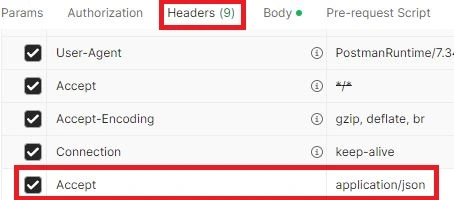
Postman Header Accept JSON

List of API Endpoints and Methods

Below is a list of our API endpoints with their corresponding HTTP methods.

MethodEndpointAuthDescription
POST/api/registerNoRegister user and receive token
POST/api/loginNoLogin and receive token
POST/api/logoutYesInvalidate token
GET/api/productsNoGet all products
GET/api/products/{id}NoGet a specific product
POST/api/productsYesCreate a new product
PATCH/api/products/{id}YesUpdate product
DELETE/api/products/{id}YesDelete a product

Now, open your Postman application, click on the New button, and select HTTP.

1) User Registration API URL: http://127.0.0.1:8000/api/register

This is a public route. Enter the required fields and click the Send button to get a response from the Laravel user registration API. The response will appear in the Body section, as shown in the screenshot below.
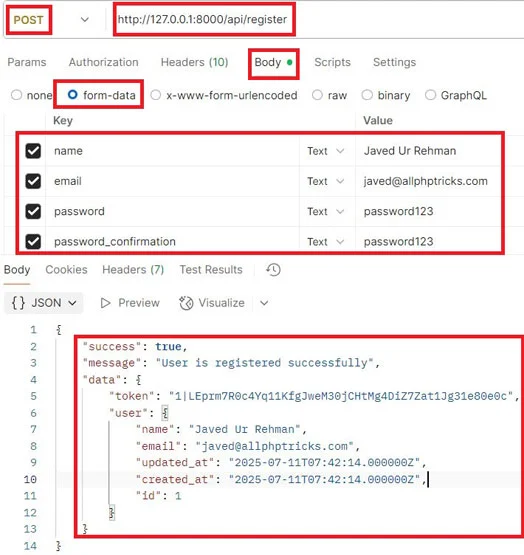
User Registration API

Note: In the data object, a token is generated, which will be used to access the protected routes.

Once the user is registered, you can log in anytime using the same credentials via the login route.

2) User Login API URL: http://127.0.0.1:8000/api/login

This is also a public route. Enter the required fields and click the Send button to get a response from the Laravel user login API. See the sample response in the screenshot below.
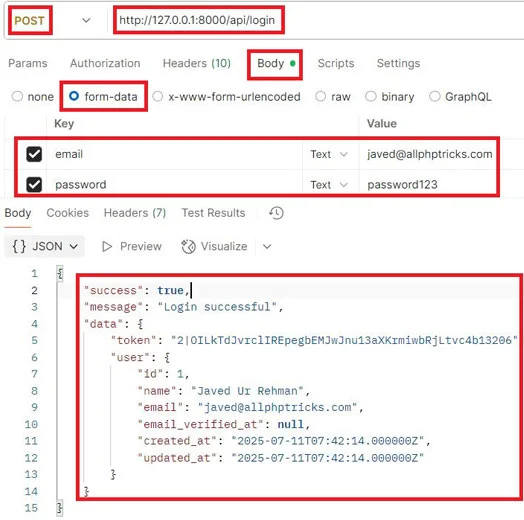
User Login API

The login API also returns a token, which we’ll use to access the protected product routes for creating, reading, updating, and deleting a product.

Make sure to include the token with all protected routes by setting it in the Authorization header: choose Bearer Token as the Auth Type and paste the token into the token field, as shown in the screenshot below.
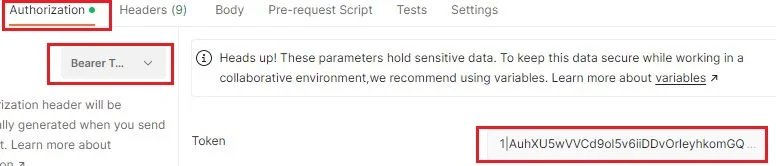
Add Bearer Token in Authorization

3) Create Product API URL: http://127.0.0.1:8000/api/products

This is a protected route. Add the token, enter the required fields, then click the Send button. See the sample response in the screenshot below.
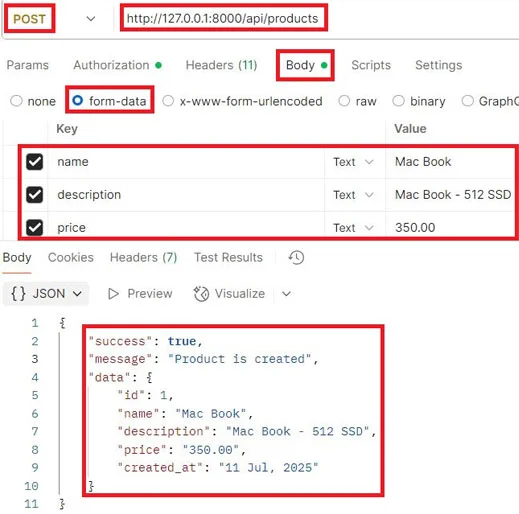
Create Product API

4) Show All Products API URL: http://127.0.0.1:8000/api/product

This is a public route. Simply click the Send button and check the sample response in the screenshot below.
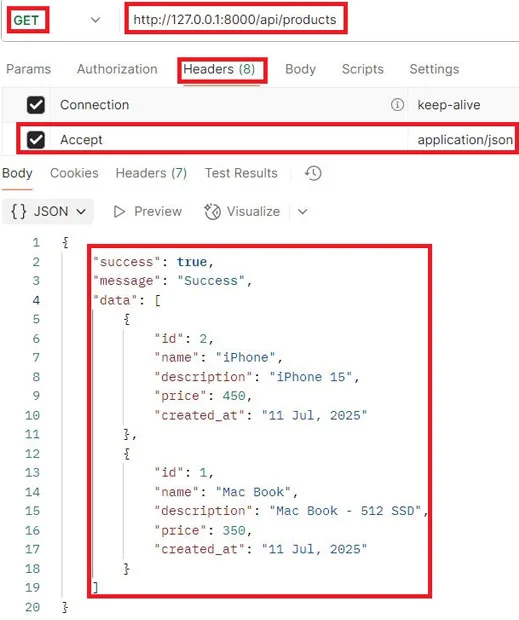
Show All Products API

5) Show Single Product API URL: http://127.0.0.1:8000/api/products/{id}

This is a public route. Just pass the ID in the end of endpoint and click the Send button and refer to the sample response in the screenshot below.
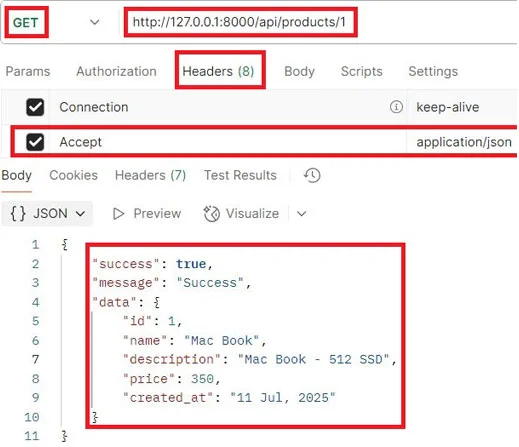
Show Single Product API

6) Update Product API URL: http://127.0.0.1:8000/api/products/{id}

This is a protected route. Pass the ID in the end of endpoint and add the token, enter the required fields, then click the Send button and check the sample response in the screenshot below.
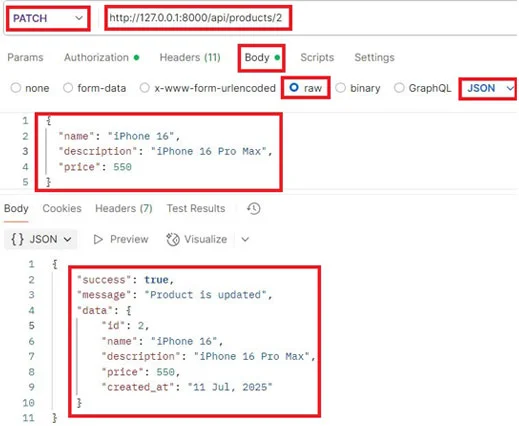
Update Product API

7) Delete Product API URL: http://127.0.0.1:8000/api/products/{id}

This is a protected route. Just pass the ID in the end of endpoint and add the token, click the Send button, and check the sample response in the screenshot below.
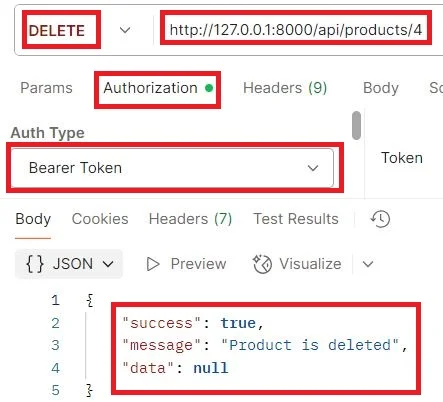
Delete Product API

Conclusion

We hope you’ve now learned how to create a Laravel 12 REST API with Sanctum authentication by following the step-by-step guide above.

If you found this tutorial helpful, please share it with your friends and developer groups.

I spent several hours creating this tutorial. If you’d like to say thanks, consider liking my pages on Facebook, Twitter, and GitHub — and don’t forget to share it!

Download

The post Laravel 12 REST API with Sanctum Authentication appeared first on All PHP Tricks - Web Development Tutorials and Demos.
Simple Laravel 12 CRUD Application Tutorial

Download

In this tutorial, I will show you how to create a Laravel 12 CRUD application by developing a complete system with a step-by-step guide.

CRUD stands for Create, Read, Update, and Delete — the four basic operations used in managing data in persistent storage.

I will create a simple products table and store product details in five columns: code (VARCHAR), name (VARCHAR), quantity (INT), price (DECIMAL), and description (TEXT).

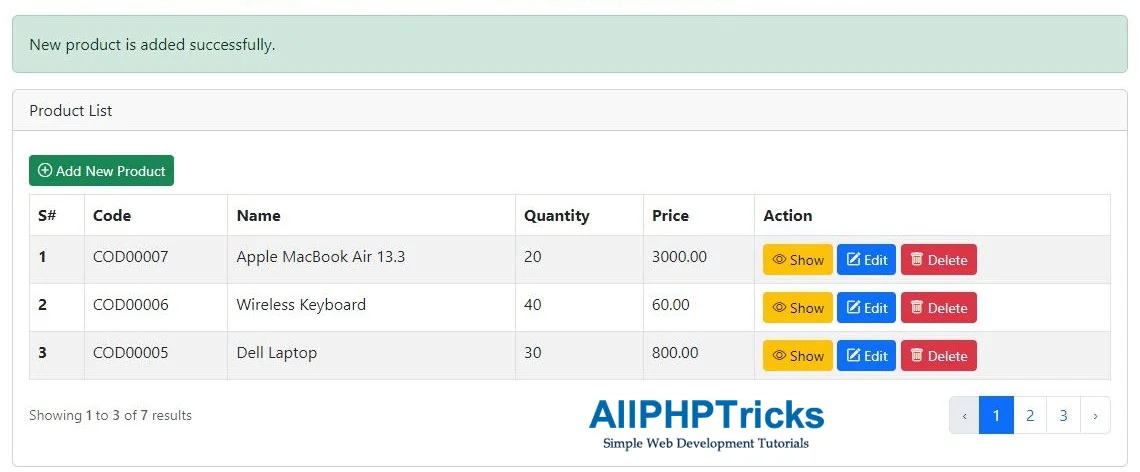
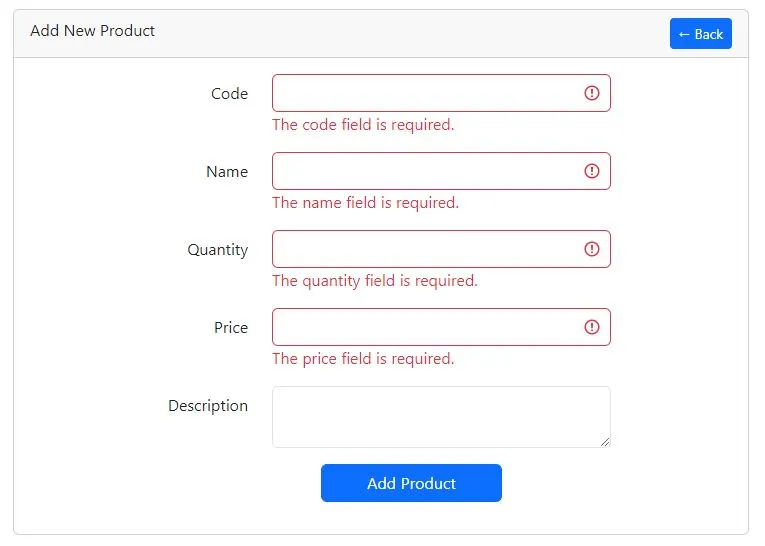
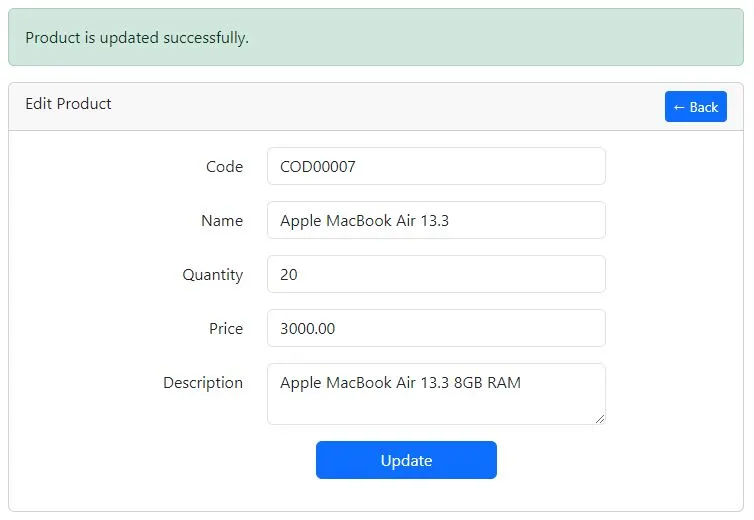
The following screenshots show the Laravel 12 CRUD application, which can store, view, update, and delete products from the products table.

Product List Page

Product List Page

Add New Product Page

Add New Product Page

Edit Product Page

Edit Product Page

Show Product Page

Show Product Page

Readers Also Read: Laravel 12 Custom User Registration and Login Tutorial

Now, let’s begin building a Laravel 12 CRUD application with a straightforward example using a products table.

Steps to Create Laravel 12 CRUD Application

Follow the step-by-step guide below to create a Laravel 12 CRUD application.

  1. Install and Set Up Laravel 12 App
  2. Create a Model with Migration, Resource Controller and Requests for Validation
  3. Update Product Migration & Migrate Tables to Database
  4. Define Product Resource Routes
  5. Update Code in Product Model
  6. Update Code in Product Controller
  7. Update Code in Product Store and Update Requests
  8. Enable Bootstrap 5 in AppServiceProvider
  9. Create Layout and Product Resource Blade View Files
  10. Run Laravel Development Server

Step 1. Install and Set Up Laravel 12 App

If you don’t have Laravel 12 installed, start by creating a new Laravel 12 application named crud_app using the following command:

composer create-project --prefer-dist laravel/laravel crud_app

Now, navigate to the crud_app directory using the following command.

cd crud_app

By default, Laravel 12 uses SQLite. However, in this tutorial, we will use MySQL.

First, create a database named crud_app, and then configure your database credentials in the .env file as shown below:

DB_CONNECTION=mysql
DB_HOST=127.0.0.1
DB_PORT=3306
DB_DATABASE=crud_app
DB_USERNAME=your_db_username
DB_PASSWORD=your_db_password

Step 2. Create a Model with Migration, Resource Controller and Requests for Validation

In this step, we need to create a Model, Migration, Resource Controller, and Form Request for validating the products table.

Although we can create each of them individually, Laravel also allows us to generate them all at once using a single Artisan command.

Simply run the following command in your terminal:

php artisan make:model Product -mcr --requests

In the above command, the -m flag generates a migration for the model, the -cr flag creates a resource controller, and the --requests flag generates custom form request classes for the resource controller.

Step 3. Update Product Migration & Migrate Tables to Database

Now, we need to update the product migration file.

Navigate to the crud_app/database/migrations directory, where you will find the product migration file named something like:

YYYY_MM_DD_TIMESTAMP_create_products_table.php

Open this file and replace its content with the following code:

<?php

use Illuminate\Database\Migrations\Migration;
use Illuminate\Database\Schema\Blueprint;
use Illuminate\Support\Facades\Schema;

return new class extends Migration
{
    /**
     * Run the migrations.
     */
    public function up(): void
    {
        Schema::create('products', function (Blueprint $table) {
            $table->id();
            $table->string('code')->unique();
            $table->string('name');
            $table->integer('quantity');
            $table->decimal('price', 8, 2);
            $table->text('description')->nullable();
            $table->timestamps();
        });
    }

    /**
     * Reverse the migrations.
     */
    public function down(): void
    {
        Schema::dropIfExists('products');
    }
};

Once the product migration file is updated, we need to migrate all tables into our database.

Run the following Artisan command in the terminal to perform the migration:

php artisan migrate

Step 4. Define Product Resource Routes

In this step, we need to define the product resource routes for our application in the web.php file.

Simply copy and paste the following code into your routes/web.php file:

<?php

use Illuminate\Support\Facades\Route;
use App\Http\Controllers\ProductController;

Route::get('/', function () {
    return view('welcome');
});
Route::resource('products', ProductController::class);

After defining the application routes, you can verify them by running the following Artisan command in the terminal:

php artisan route:list

Step 5. Update Code in Product Model

Now, we need to allow mass assignment in the Product model.

Navigate to app/Models/Product.php and update the file with the following code:

<?php

namespace App\Models;

use Illuminate\Database\Eloquent\Model;

class Product extends Model
{
    protected $fillable = [
        'code',
        'name',
        'quantity',
        'price',
        'description'
    ];
}

Step 6. Update Code in Product Controller

In this step, we need to update our ProductController, which includes seven different methods to perform Laravel Eloquent CRUD operations in our Laravel 12 CRUD application.

By default, a resource controller comes with the following methods, and we will use all of them in our Laravel 12 CRUD app:

  1. index() – Displays a list of all products from the products table.
  2. create() – Shows the form to add a new product.
  3. store() – Handles the submission of the new product form and stores the data in the products table.
  4. show() – Displays the details of a single product.
  5. edit() – Shows the form to edit an existing product.
  6. update() – Updates the product data in the products table.
  7. destroy() – Deletes a product from the database.

Now, copy and paste the following code into the app/Http/Controllers/ProductController.php file.

<?php

namespace App\Http\Controllers;

use App\Models\Product;
use App\Http\Requests\StoreProductRequest;
use App\Http\Requests\UpdateProductRequest;
use Illuminate\View\View;
use Illuminate\Http\RedirectResponse;

class ProductController extends Controller
{
    /**
     * Display a listing of the resource.
     */
    public function index() : View
    {
        return view('products.index', [
            'products' => Product::latest()->paginate(3)
        ]);
    }

    /**
     * Show the form for creating a new resource.
     */
    public function create() : View
    {
        return view('products.create');
    }

    /**
     * Store a newly created resource in storage.
     */
    public function store(StoreProductRequest $request) : RedirectResponse
    {
        Product::create($request->validated());

        return redirect()->route('products.index')
                ->withSuccess('New product is added successfully.');
    }

    /**
     * Display the specified resource.
     */
    public function show(Product $product) : View
    {
        return view('products.show', compact('product'));
    }

    /**
     * Show the form for editing the specified resource.
     */
    public function edit(Product $product) : View
    {
        return view('products.edit', compact('product'));
    }

    /**
     * Update the specified resource in storage.
     */
    public function update(UpdateProductRequest $request, Product $product) : RedirectResponse
    {
        $product->update($request->validated());

        return redirect()->back()
                ->withSuccess('Product is updated successfully.');
    }

    /**
     * Remove the specified resource from storage.
     */
    public function destroy(Product $product) : RedirectResponse
    {
        $product->delete();

        return redirect()->route('products.index')
                ->withSuccess('Product is deleted successfully.');
    }
}

Step 7. Update Code in Product Store and Update Requests

In this step, we will update the code in our product store and update request classes.

First, copy and paste the following code into the app/Http/Requests/StoreProductRequest.php file.

<?php

namespace App\Http\Requests;

use Illuminate\Foundation\Http\FormRequest;

class StoreProductRequest extends FormRequest
{
    /**
     * Determine if the user is authorized to make this request.
     */
    public function authorize(): bool
    {
        return true;
    }

    /**
     * Get the validation rules that apply to the request.
     *
     * @return array<string, \Illuminate\Contracts\Validation\ValidationRule|array<mixed>|string>
     */
    public function rules(): array
    {
        return [
            'code' => 'required|string|max:50|unique:products,code',
            'name' => 'required|string|max:250',
            'quantity' => 'required|integer|min:1|max:10000',
            'price' => 'required',
            'description' => 'nullable|string'
        ];
    }
}

After that, copy and paste the following code into the app/Http/Requests/UpdateProductRequest.php file.

<?php

namespace App\Http\Requests;

use Illuminate\Foundation\Http\FormRequest;

class UpdateProductRequest extends FormRequest
{
    /**
     * Determine if the user is authorized to make this request.
     */
    public function authorize(): bool
    {
        return true;
    }

    /**
     * Get the validation rules that apply to the request.
     *
     * @return array<string, \Illuminate\Contracts\Validation\ValidationRule|array<mixed>|string>
     */
    public function rules(): array
    {
        return [
            'code' => 'required|string|max:50|unique:products,code,'.$this->product->id,
            'name' => 'required|string|max:250',
            'quantity' => 'required|integer|min:1|max:10000',
            'price' => 'required',
            'description' => 'nullable|string'
        ];
    }
}

Both of these form request files are responsible for validating the data before adding or updating records in the products table of our database.

Step 8. Enable Bootstrap 5 in AppServiceProvider

Since we are using Bootstrap v5.3.7 via CDN, some of its features—such as pagination—won’t work properly unless explicitly enabled in the App\Providers\AppServiceProvider.php file.

To fix this, we need to call Paginator::useBootstrapFive(); inside the boot() method.

Simply copy and paste the following code into your AppServiceProvider.php file:

<?php

namespace App\Providers;

use Illuminate\Support\ServiceProvider;
use Illuminate\Pagination\Paginator;

class AppServiceProvider extends ServiceProvider
{
    /**
     * Register any application services.
     */
    public function register(): void
    {
        //
    }

    /**
     * Bootstrap any application services.
     */
    public function boot(): void
    {
        Paginator::useBootstrapFive();
    }
}

Step 9. Create Layout and Product Resource Blade View Files

In this step, we need to create /layouts and /products directories inside the resources/views/ directory, and then create the necessary Blade view files within them.

These files can be created manually or by using Artisan commands. In this tutorial, we’ll use Artisan to generate them.

Simply run the following Artisan commands, and all five Blade view files will be created in their respective directories:

php artisan make:view layouts.app
php artisan make:view products.index
php artisan make:view products.create
php artisan make:view products.edit
php artisan make:view products.show

The above commands will generate the following Blade view files:

  1. app.blade.php
  2. index.blade.php
  3. create.blade.php
  4. edit.blade.php
  5. show.blade.php

Now, we need to update each of these view files with the appropriate code.

Starting with app.blade.php, which serves as the main layout view file for our Laravel 12 CRUD application:

Copy and paste the following code into resources/views/layouts/app.blade.php:

<!DOCTYPE html>
<html lang="{{ str_replace('_', '-', app()->getLocale()) }}">
<head>
    <meta charset="UTF-8">
    <meta name="viewport" content="width=device-width, initial-scale=1.0">
    <meta http-equiv="X-UA-Compatible" content="ie=edge">
    <title>Simple Laravel 12 CRUD Application Tutorial - AllPHPTricks.com</title>
    <link rel="stylesheet" href="https://cdn.jsdelivr.net/npm/[email protected]/dist/css/bootstrap.min.css" crossorigin="anonymous">
    <link rel="stylesheet" href="https://cdn.jsdelivr.net/npm/[email protected]/font/bootstrap-icons.css" crossorigin="anonymous">
</head>
<body>   

    <div class="container">
        <h3 class=" mt-3">Simple Laravel 12 CRUD Application Tutorial - <a href="https://www.allphptricks.com/">AllPHPTricks.com</a></h3>
            @yield('content')
            <div class="row justify-content-center text-center mt-3">
                <div class="col-md-12">
                    <p>Back to Tutorial: 
                        <a href="https://www.allphptricks.com/simple-laravel-12-crud-application-tutorial/"><strong>Tutorial Link</strong></a>
                    </p>
                    <p>
                        For More Web Development Tutorials Visit: <a href="https://www.allphptricks.com/"><strong>AllPHPTricks.com</strong></a>
                    </p>
                </div>
            </div>
    </div>

<script src="https://cdn.jsdelivr.net/npm/[email protected]/dist/js/bootstrap.bundle.min.js" crossorigin="anonymous"></script>
</body>
</html>

index.blade.php is the main landing page of the Laravel 12 CRUD application. It displays a list of all products from the database along with pagination.

Copy and paste the following code into the resources/views/products/index.blade.php file:

@extends('layouts.app')

@section('content')

<div class="row justify-content-center mt-3">
    <div class="col-md-12">

        @session('success')
            <div class="alert alert-success" role="alert">
                {{ $value }}
            </div>
        @endsession

        <div class="card">
            <div class="card-header">Product List</div>
            <div class="card-body">
                <a href="{{ route('products.create') }}" class="btn btn-success btn-sm my-2"><i class="bi bi-plus-circle"></i> Add New Product</a>
                <table class="table table-striped table-bordered">
                    <thead>
                      <tr>
                        <th scope="col">S#</th>
                        <th scope="col">Code</th>
                        <th scope="col">Name</th>
                        <th scope="col">Quantity</th>
                        <th scope="col">Price</th>
                        <th scope="col">Action</th>
                      </tr>
                    </thead>
                    <tbody>
                        @forelse ($products as $product)
                        <tr>
                            <th scope="row">{{ $loop->iteration }}</th>
                            <td>{{ $product->code }}</td>
                            <td>{{ $product->name }}</td>
                            <td>{{ $product->quantity }}</td>
                            <td>{{ $product->price }}</td>
                            <td>
                                <form action="{{ route('products.destroy', $product->id) }}" method="post">
                                    @csrf
                                    @method('DELETE')

                                    <a href="{{ route('products.show', $product->id) }}" class="btn btn-warning btn-sm"><i class="bi bi-eye"></i> Show</a>

                                    <a href="{{ route('products.edit', $product->id) }}" class="btn btn-primary btn-sm"><i class="bi bi-pencil-square"></i> Edit</a>   

                                    <button type="submit" class="btn btn-danger btn-sm" onclick="return confirm('Do you want to delete this product?');"><i class="bi bi-trash"></i> Delete</button>
                                </form>
                            </td>
                        </tr>
                        @empty
                            <td colspan="6">
                                <span class="text-danger">
                                    <strong>No Product Found!</strong>
                                </span>
                            </td>
                        @endforelse
                    </tbody>
                  </table>

                  {{ $products->links() }}

            </div>
        </div>
    </div>    
</div>
    
@endsection

create.blade.php is the Blade view file used to add a new product.

Simply copy and paste the following code into resources/views/products/create.blade.php:

@extends('layouts.app')

@section('content')

<div class="row justify-content-center mt-3">
    <div class="col-md-8">

        <div class="card">
            <div class="card-header">
                <div class="float-start">
                    Add New Product
                </div>
                <div class="float-end">
                    <a href="{{ route('products.index') }}" class="btn btn-primary btn-sm">&larr; Back</a>
                </div>
            </div>
            <div class="card-body">
                <form action="{{ route('products.store') }}" method="post">
                    @csrf

                    <div class="mb-3 row">
                        <label for="code" class="col-md-4 col-form-label text-md-end text-start">Code</label>
                        <div class="col-md-6">
                          <input type="text" class="form-control @error('code') is-invalid @enderror" id="code" name="code" value="{{ old('code') }}">
                            @error('code')
                                <span class="text-danger">{{ $message }}</span>
                            @enderror
                        </div>
                    </div>

                    <div class="mb-3 row">
                        <label for="name" class="col-md-4 col-form-label text-md-end text-start">Name</label>
                        <div class="col-md-6">
                          <input type="text" class="form-control @error('name') is-invalid @enderror" id="name" name="name" value="{{ old('name') }}">
                            @error('name')
                                <span class="text-danger">{{ $message }}</span>
                            @enderror
                        </div>
                    </div>

                    <div class="mb-3 row">
                        <label for="quantity" class="col-md-4 col-form-label text-md-end text-start">Quantity</label>
                        <div class="col-md-6">
                          <input type="number" class="form-control @error('quantity') is-invalid @enderror" id="quantity" name="quantity" value="{{ old('quantity') }}">
                            @error('quantity')
                                <span class="text-danger">{{ $message }}</span>
                            @enderror
                        </div>
                    </div>

                    <div class="mb-3 row">
                        <label for="price" class="col-md-4 col-form-label text-md-end text-start">Price</label>
                        <div class="col-md-6">
                          <input type="number" step="0.01" class="form-control @error('price') is-invalid @enderror" id="price" name="price" value="{{ old('price') }}">
                            @error('price')
                                <span class="text-danger">{{ $message }}</span>
                            @enderror
                        </div>
                    </div>

                    <div class="mb-3 row">
                        <label for="description" class="col-md-4 col-form-label text-md-end text-start">Description</label>
                        <div class="col-md-6">
                            <textarea class="form-control @error('description') is-invalid @enderror" id="description" name="description">{{ old('description') }}</textarea>
                            @error('description')
                                <span class="text-danger">{{ $message }}</span>
                            @enderror
                        </div>
                    </div>
                    
                    <div class="mb-3 row">
                        <input type="submit" class="col-md-3 offset-md-5 btn btn-primary" value="Add Product">
                    </div>
                    
                </form>
            </div>
        </div>
    </div>    
</div>
    
@endsection

edit.blade.php is the Blade view file used for editing a product.

Simply copy and paste the following code into resources/views/products/edit.blade.php:

@extends('layouts.app')

@section('content')

<div class="row justify-content-center mt-3">
    <div class="col-md-8">

        @session('success')
            <div class="alert alert-success" role="alert">
                {{ $value }}
            </div>
        @endsession

        <div class="card">
            <div class="card-header">
                <div class="float-start">
                    Edit Product
                </div>
                <div class="float-end">
                    <a href="{{ route('products.index') }}" class="btn btn-primary btn-sm">&larr; Back</a>
                </div>
            </div>
            <div class="card-body">
                <form action="{{ route('products.update', $product->id) }}" method="post">
                    @csrf
                    @method("PUT")

                    <div class="mb-3 row">
                        <label for="code" class="col-md-4 col-form-label text-md-end text-start">Code</label>
                        <div class="col-md-6">
                          <input type="text" class="form-control @error('code') is-invalid @enderror" id="code" name="code" value="{{ $product->code }}">
                            @error('code')
                                <span class="text-danger">{{ $message }}</span>
                            @enderror
                        </div>
                    </div>

                    <div class="mb-3 row">
                        <label for="name" class="col-md-4 col-form-label text-md-end text-start">Name</label>
                        <div class="col-md-6">
                          <input type="text" class="form-control @error('name') is-invalid @enderror" id="name" name="name" value="{{ $product->name }}">
                            @error('name')
                                <span class="text-danger">{{ $message }}</span>
                            @enderror
                        </div>
                    </div>

                    <div class="mb-3 row">
                        <label for="quantity" class="col-md-4 col-form-label text-md-end text-start">Quantity</label>
                        <div class="col-md-6">
                          <input type="number" class="form-control @error('quantity') is-invalid @enderror" id="quantity" name="quantity" value="{{ $product->quantity }}">
                            @error('quantity')
                                <span class="text-danger">{{ $message }}</span>
                            @enderror
                        </div>
                    </div>

                    <div class="mb-3 row">
                        <label for="price" class="col-md-4 col-form-label text-md-end text-start">Price</label>
                        <div class="col-md-6">
                          <input type="number" step="0.01" class="form-control @error('price') is-invalid @enderror" id="price" name="price" value="{{ $product->price }}">
                            @error('price')
                                <span class="text-danger">{{ $message }}</span>
                            @enderror
                        </div>
                    </div>

                    <div class="mb-3 row">
                        <label for="description" class="col-md-4 col-form-label text-md-end text-start">Description</label>
                        <div class="col-md-6">
                            <textarea class="form-control @error('description') is-invalid @enderror" id="description" name="description">{{ $product->description }}</textarea>
                            @error('description')
                                <span class="text-danger">{{ $message }}</span>
                            @enderror
                        </div>
                    </div>
                    
                    <div class="mb-3 row">
                        <input type="submit" class="col-md-3 offset-md-5 btn btn-primary" value="Update">
                    </div>
                    
                </form>
            </div>
        </div>
    </div>    
</div>
    
@endsection

show.blade.php is the Blade view file used to display a single product’s details.

Simply copy and paste the following code into resources/views/products/show.blade.php:

@extends('layouts.app')

@section('content')

<div class="row justify-content-center mt-3">
    <div class="col-md-8">

        <div class="card">
            <div class="card-header">
                <div class="float-start">
                    Product Information
                </div>
                <div class="float-end">
                    <a href="{{ route('products.index') }}" class="btn btn-primary btn-sm">&larr; Back</a>
                </div>
            </div>
            <div class="card-body">

                    <div class="row">
                        <label for="code" class="col-md-4 col-form-label text-md-end text-start"><strong>Code:</strong></label>
                        <div class="col-md-6" style="line-height: 35px;">
                            {{ $product->code }}
                        </div>
                    </div>

                    <div class="row">
                        <label for="name" class="col-md-4 col-form-label text-md-end text-start"><strong>Name:</strong></label>
                        <div class="col-md-6" style="line-height: 35px;">
                            {{ $product->name }}
                        </div>
                    </div>

                    <div class="row">
                        <label for="quantity" class="col-md-4 col-form-label text-md-end text-start"><strong>Quantity:</strong></label>
                        <div class="col-md-6" style="line-height: 35px;">
                            {{ $product->quantity }}
                        </div>
                    </div>

                    <div class="row">
                        <label for="price" class="col-md-4 col-form-label text-md-end text-start"><strong>Price:</strong></label>
                        <div class="col-md-6" style="line-height: 35px;">
                            {{ $product->price }}
                        </div>
                    </div>

                    <div class="row">
                        <label for="description" class="col-md-4 col-form-label text-md-end text-start"><strong>Description:</strong></label>
                        <div class="col-md-6" style="line-height: 35px;">
                            {{ $product->description }}
                        </div>
                    </div>
        
            </div>
        </div>
    </div>    
</div>
    
@endsection

Step 10. Run Laravel Development Server

Finally, we’ve completed all the steps of our Laravel 12 CRUD application tutorial. Now it’s time to test the application.

Start the Laravel development server by running the following Artisan command:

php artisan serve

After starting the development server, visit the following URL to test your Laravel 12 CRUD application:

http://127.0.0.1:8000/products

Download

Conclusion

We hope that by following the steps above, you have learned how to easily create a simple Laravel 12 CRUD application.

If you found this tutorial helpful, please share it with your friends and developer groups.

I spent several hours creating this tutorial. If you’d like to say thanks, consider liking my pages on Facebook, Twitter, and GitHub — and don’t forget to share it!

The post Simple Laravel 12 CRUD Application Tutorial appeared first on All PHP Tricks - Web Development Tutorials and Demos.
How to Find the Right Learning Path When You’re Switching to a Tech Career

27 August 2025 at 08:00

Sometimes, when we make major life decisions, they do not always go as planned. One day, you graduate with a degree in marketing, but end up working professionally as a chef decades later, realizing that a path in corporate just wasn’t for you. It occurs more commonly than you think.

Many switch careers later on in life for various reasons. Some change their career path when they no longer feel fulfilled in their day-to-day lives, while others are hit with the sobering reality that the field they chose may not be as well-compensated as other, more lucrative careers.

Such is the reality for a lot of the working class. One of the more popular career shifts today is a shift to a career in tech. It’s a fast-growing field, and as a result, the opportunities for growth are plentiful, in terms of the roles and compensation. 

{{ advertisement }}

Hence, it’s no surprise that many are making the shift to tech today. The explosion of bootcamps, online courses, and affordable learning platforms has made skills more accessible, but it’s also led to an oversupply of entry-level talent. That’s why the dream of finding a job in tech today is a lot harder than it was five years ago. 

Is making the switch to tech still possible in today’s job market? Absolutely. All it takes is finding the right learning path.

1. Assess Your Transferable Skills

Before zeroing in on coding tutorials or signing up for an expensive bootcamp, take note of the skills you already have. Some soft skills and hard skills are transferable, even if you didn’t come from a tech background yourself:

  • Project management experience in another industry can still be useful in project management, product management, or tech operations roles.
  • Data handling and analysis from finance or research work translates well into data science or analytics.
  • Communication and collaboration skills are vital for client-facing roles like solutions engineering or UX research.

By already knowing what’s in demand in tech, you can shorten your learning curve and avoid wasting time on unrelated topics.

2. Identify Your Target Role

You might think that casting a wide net might make you more likely to find a job in tech, but it’s quite the opposite. Jumping in without a clear goal can lead to scattered learning that doesn’t prepare you for any specific job.

Take your time to research a career path in tech that well suits your skill set. For example, software engineering, UX design, data analysis, or cybersecurity. Look into the daily responsibilities of these roles, tools commonly  and hiring requirements.

This research phase doesn’t need to take months, but it helps in narrowing your focus. A targeted approach will save you time and ensure the projects you work on are relevant to your future applications.

3. Choose the Right Learning Format

Once you figure out the best role for you, you can move forward and learn the necessary skills. Some people thrive in self-paced online courses that allow flexibility, while others do better in structured bootcamps with fixed schedules. 

If you work best with structure and accountability, academic-style coaching—though often designed for younger students—can be just as effective for adult learners. 

Its core principles of personalized learning, mentorship, and structured support adapt well to helping you build targeted skills based on your goals, background, and available time. 

With the right coach, you get feedback, encouragement, and help avoiding common pitfalls—something especially valuable when transitioning to a tech career.

4. Build a Practical Portfolio

In tech, you increase your chances of landing a job if you have a portfolio, as it serves as proof. Employers want to see that you can apply what you’ve learned, not just that you’ve completed a course. 

A strong portfolio features projects that solve real-world problems and use tools recognized by the industry.

Don’t wait until you’ve completed a course or certification program before you start building. It’s better to create smaller projects as you go and improve them over time. This way, you have tangible results to show recruiters even before your learning is complete.

5. Stay Current With Industry Trends

Technology moves fast, and so much so that the trendiest framework today might be outdated in a few years. If you don’t stay up to date and frequently upskill, then you will get left behind.

Make it a habit to read tech news, subscribe to industry newsletters, and follow leaders in your chosen field. 

Participating in open-source projects can also expose you to new tools and practices before they hit the mainstream. Staying current helps you remain competitive long after you land your first role.

Final Thoughts

Though these are all useful steps in switching to a career in tech, remember that it’s also about the mindset. You have to stay persistent, adapt easily to new changes, and keep the willingness to learn alive. Couple that with the five steps above, and a career shift to tech will be highly achievable.

The Hidden Challenges in Software Development Projects: Key Insights from Our Latest Survey

27 August 2025 at 08:00

Software development powers the modern world, but behind every app, system, or service lies a story of challenges that teams must overcome. Our latest Developer Nation survey with over 10,500 responses from 127 countries reveals where these struggles really come from and how they impact developers across organisations of all sizes.

This post highlights some of the most eye-opening findings. For the full picture (and strategies to navigate these challenges), you can download the complete report here and become part of the Developer Nation community to contribute in our upcoming surveys. Let’s begin!

{{ advertisement }}

1. Almost Every Developer Faces Challenges

A striking 88% of professional developers say they face at least one major challenge in their projects. This makes it clear that these problems are not outliers, they’re systemic across the industry.

Think of it this way: whether you’re in a startup of 5 or an enterprise with 5,000 engineers, you’ll encounter roadblocks. What changes is which challenges dominate, and how severely they affect progress.

2. Code and Documentation: The Top Pain Points

Nearly one-third of developers (31%) cited two issues as their biggest headaches:

  • Unreadable or hard-to-maintain code (“as devs call it : the spaghetti code”)
  • Insufficient or outdated documentation

Poor coding practices don’t just slow teams down, they create technical debt that makes future updates, debugging, and scaling far harder. Without proper documentation, onboarding new developers becomes a nightmare, often forcing reliance on senior engineers and dragging projects behind schedule.

Real-world takeaway: Companies that set strong coding and documentation practices early save themselves years of friction later.

3. The Challenge Multiplier: Team Size

The survey shows a direct correlation: the bigger the dev team, the more challenges they face.

  • Small teams (up to 10 developers): 2.4 challenges on average
  • Very large teams (over 1,000 developers): 3.0 challenges on average

For instance, 46% of developers in very large organisations say poor documentation is a key issue compared to just one-third of those in smaller teams. As systems and codebases grow, scaling without strong practices only compounds problems.

4. The Age Factor: Younger vs Older Organisations

Interestingly, younger organisations (under 5 years old) are more likely overall to face challenges (92%), often due to limited resources and the push for speed over process.

But there’s a twist: the average number of challenges per developer rises with company age. Developers in firms older than 30 years face 2.9 challenges each, compared to 2.3 in the youngest companies.

This suggests two truths:

  • Younger companies feel the heat due to rapid growth and lack of structure.
  • Older companies that don’t modernise accumulate technical debt and struggle to adapt their legacy systems.

Why This Matters for You

Whether you’re a solo dev in a startup or managing a thousand-strong engineering team, these findings highlight one clear reality: software development challenges are universal, but not unmanageable.

With the right processes, tools, and culture, organisations can reduce the friction points that stall innovation and create a healthier developer experience.

Want the Full Report?

This blog only scratches the surface – covering just about 40% of the insights. The full report dives deeper into:

  • The role of third-party tools and outdated libraries
  • How testing practices (or the lack of them) impact software quality
  • Which industries and team setups face the biggest risks

👉 Download the complete report here to get the full breakdown and access exclusive insights.

And if you haven’t already, join the Developer Nation community a space where 100,000+ developers learn, share, and grow together.

Developer News This Week: AI Speed Trap, GitHub Copilot Agents, iOS 26 Beta Updates & More (Aug 22, 2025)

22 August 2025 at 08:00

Here’s your roundup of the biggest updates developers need to know this week.

AI Speed Trap: Quality vs. Velocity

TechRadar warns of a growing “AI speed trap.” As teams rush to ship generative AI–powered features, software quality is suffering. Key findings:

  • Two-thirds of organizations face elevated outage risks
  • Nearly half report $1M+ annual losses due to quality issues

 Read full TechRadar report

{{ advertisement }}

GitHub Copilot “Agents Panel” (Preview)

GitHub has launched a new Agents Panel for Copilot (preview). Developers can now:

  • Launch and manage coding-agent tasks directly from GitHub.com
  • Assign repositories and track progress
  • Receive pull requests generated by agents

See GitHub’s announcement

iOS 26 Developer Beta 7 & Public Beta 4

Apple released fresh iOS 26 betas on August 18. Updates include:

  • Latest SDKs available in Xcode
  • Public testers now on Beta 4
  • Good checkpoint for validating app behavior (permissions, widgets, push notifications)

Read more on MacRumors

GitLab 18.2.4 Patch

Linux Kernel USNs (Ubuntu)
Canonical has issued new Ubuntu kernel updates addressing multiple CVEs across:

  • Ubuntu 24.04 LTS
  • Ubuntu 22.04 LTS
  • Ubuntu 20.04 LTS

Security notice details

Gemini Live Upgrades

Google rolled out fresh Gemini Live features:

  • Camera sharing for visual context/awareness
  • Deeper integrations with Calendar, Tasks, and Keep

Google’s Gemini blog post

From AI risks to powerful new dev tools, this week’s updates remind us: innovation is moving fast – don’t let quality or security slip behind.

Developer News This Week: GitHub GPT-5, VS Code 1.103 & Chrome 139 (Aug 8, 2025)

8 August 2025 at 08:00

If your sprint blurred into code reviews and hotfixes, this roundup catches you up fast. We cover GitHub’s GPT-5 in Models, arm64 hosted runners for GitHub Actions, VS Code 1.103, Chrome 139, iOS 26 dev beta 5, and AWS’s weekly updates – plus OpenAI’s GPT-5 announcement and Google’s latest on AI in software engineering.

OpenAI introduces GPT-5

OpenAI formally announced GPT-5, describing it as a unified model tuned for deeper reasoning and longer context windows. Now integrated across ChatGPT and partner ecosystems, GPT-5 sets a new bar for agentic and complex information workflows but invites teams to approach migrations methodically, assessing results against their own metrics and requirements.

{{ advertisement }}

GitHub Models adds GPT-5 (GA)

GitHub took a big step forward by bringing GPT-5 to its Models platform, opening up new possibilities for developers to evaluate and integrate the latest LLMs without jumping between different providers. With general availability now in place, users can experiment with task-relevant evaluations or compare accuracy and costs directly in GitHub-native workflows.

GitHub Actions: arm64 hosted runners (GA for public repos)

Developers targeting ARM architectures got a boost as GitHub Actions rolled out general availability for arm64 hosted runners in public repositories. This long-awaited feature unlocks native Apple silicon and Graviton CI builds, eliminating the need for emulation or self-hosted runners and promising more reliable performance for open-source projects.

VS Code 1.103 (July release)

Visual Studio Code’s July update (version 1.103) introduced several highly anticipated features, including integrated GPT-5 in the AI Chat experience, expanded Git worktrees support for streamlined multi-branch workflows, and a new agent session interface. The improvements aim to tighten the development loop and reduce friction in daily code review and refactoring tasks.

Chrome 139 Stable

Google released Chrome 139 (Stable and Extended Stable), rolling out an array of developer-facing updates and fixes. As with every browser update, frontend engineers and CI/CD maintainers are advised to keep an eye out for subtle shifts that may affect testing suites or key functionality in web apps.

iOS 26 developer beta 5

Apple continued its summer platform cycle by shipping iOS 26 developer beta 5 on August 5, packaged with refreshed SDKs in Xcode. This latest beta sets the stage for the public beta and comes with the usual set of permissions and UI tweaks that will keep iOS developers and QA teams busy preparing for the fall release.

AWS weekly roundup

Amazon’s latest AWS Weekly Roundup, posted August 4, put the spotlight on several new and expanded cloud services. Serverless Amazon DocumentDB promises to lower operational overhead for high-variance workloads, while Lambda now supports streaming payloads up to 200MB, simplifying data-heavy and batch processing pipelines. The update also includes enhanced SNS filtering and more granular CloudFront timeout controls.

Google: AI in Software Engineering – progress & path ahead

Google shared findings from internal studies on AI in software engineering, reporting measurable productivity gains and faster code review cycles in select scenarios. As more organizations consider AI assistants for development workflows, these data points provide valuable perspective on rollout strategies and expected impact.

That’s it for this week’s updates.

You can now publish your blogs on the Developer Nation site. Whether it’s your side project, a tutorial, or an opinion piece your post could be seen by tens of thousands of developers. Bonus: earn 20 community points for every blog we publish. It’s a great way to build your online portfolio and increase your luck surface area. Just email your blog draft or topic you want to write about and we will take it forward. 

Building Scalable B2B Ecommerce Solutions: Architecture And Frameworks

8 August 2025 at 08:00

B2B ecommerce is a $4.2 trillion market in the United States, accounting for 14% of business-to-business sales nationwide. These numbers are expected to rise as buyers become more comfortable on digital platforms and these platforms mature. For both digitally native companies and those expanding from brick-and-mortar into ecommerce, the growing market speaks to the need for solutions that can keep pace.  

In practice, this means building scalable B2B ecommerce solutions that can handle daily transaction values and manage sudden sales upticks, all while providing a seamless experience for users. But this is often easier said than done. Here’s a look at some of the key architectures and frameworks organizations need to meet burgeoning buyer expectations. 

{{ advertisement }}

The B2B Trifecta: Integration, Transactions, and Growth

Three components are critical for B2B systems to streamline purchases, deliver consistent performance, and keep companies coming back. 

Integration: Ecommerce solutions don’t exist in a vacuum. Instead, they need to work seamlessly with other tools, including customer relationship management (CRM), enterprise resource planning (ERP), and emerging technologies such as generative AI interfaces that provide natural language processing (NLP) to enhance the user experience. Even the best ecommerce platform won’t benefit B2B sales if it can’t capture and share data across multiple sources. For example, using GenAI and CRM tools, companies can create evolving customer profiles that leverage historical data to recommend future purchases. 

Transactions: Here, both volume and complexity play a role. Consider a large B2B partner that orders thousands of products with differing specifications in a single order. If platforms can’t handle both the number of transactions and individual order requirements, orders are either delayed as businesses work out the details or arrive incomplete and potentially inaccurate.  

Growth: As the B2B market expands, companies must be prepared to handle rising demand without sacrificing speed or accuracy. This demand may be both local and global, in turn necessitating systems that can handle complex logistics and custom requirements without sacrificing performance or accuracy. 

Overlaying all three of these requirements is compliance. Consider a B2B ecommerce company processing an overseas order. Compliance starts with transactions. Customer data must be securely collected, stored, and processed. Depending on where companies operate, local regulations may apply. For example, businesses in California are subject to CCPA, while those in the EU must satisfy GDPR requirements. B2B businesses must consider customs regulations, both when goods leave their country of origin and when they arrive at their destination. This becomes even more complicated if components are produced in one country, assembled in another, and then shipped to customers.  

For companies to drive revenue and improve customer retention, they need B2B ecommerce platforms that consistently deliver this operational trifecta.  

Four Components of Effective B2B Ecommerce Environments

It’s one thing to understand the requirements of effective B2B ecommerce environments; it’s another to deliver them in practice. Four components are critical: 

1. Microservices Architecture

Historically, ecommerce platforms used large-scale applications that provided multiple business functions. While this allowed companies to process transactions and compile customer data, it also created a problem: interdependency. 

Because systems were monolithic, any disruptions affected all systems simultaneously. In addition, functions were fixed rather than portable. For example, an inventory management tool could only be used in conjunction with its larger software suite, and could not be updated or managed independently, creating challenges in both complexity and consistency. 

Microservices offer a different approach. Using containerization and orchestration technologies such as Docker, Kubernetes, or OpenShift, key functions can be separated into independent microservices that do not depend on a larger system to function.  

This approach offers multiple benefits for businesses. First, services are portable; they can be easily moved to and integrated with other environments. Next, they are fault tolerant. If one service goes down, it does not affect others because they are not interdependent. Finally, these services are easier to deploy, manage, and update than traditional applications since they are smaller and simpler than their monolithic counterparts. 

2. API-first Design

Application programming interfaces (APIs) facilitate the interaction of microservices architecture. They also enable connections between traditional tools and microservices to help streamline B2B operations. 

The key to successful API deployment is taking an API-first approach. This means building an API layer before deploying ecommerce functionality. Think of it like building a house. If the framing, drywalling, and external components of the house are installed before the electrical wiring, adding these necessary connections becomes both difficult and time-consuming. If wiring and outlets are installed as soon as possible, the entire process is simplified.  

This is the key to successful API-first design. By considering connections first, companies can layer on ecommerce functionality and create future-proof platforms capable of expanding as required. 

3. Headless Commerce

Headless ecommerce separates front-end and back-end functions, in turn promoting greater flexibility.  

Front-end facing services are those seen by customers. They include websites, mobile applications, and ecommerce storefronts. These services are supported by back-end architecture that handles order processing, inventory management, and IT support. 

In a traditional framework, these functions are connected. This means that any changes made to the back end immediately affect the front-end experience. As a result, any updates or improvements to back-end processes required companies to take their ecommerce sites offline until changes were implemented, tested, and approved. 

By taking a headless approach, B2B ecommerce companies can get the best of both worlds: A consistent buyer experience coupled with the ability to update and improve back-end functions as required. 

4. Robust Data Management

Data management supports all other functions. A robust management approach ensures that data is protected while remaining accessible and allows the application of data analytics at scale to pinpoint both individual customer preferences and large-scale market trends. 

Effective management starts with storage. In many cases, secure cloud services are the preferred choice for B2B ecommerce data storage. This is because public and private clouds enable companies to store and access large data volumes without sacrificing security. In addition, cloud platforms are often more cost-effective than their on-site counterparts.   

Along with storage, ecommerce companies need data functionality. Data insight and analysis can make all the difference in keeping customers satisfied and ensuring that B2B buyers come back. Solutions such as Microsoft Dynamics 365 Business Central empower companies to create custom pricing, develop unique product catalogs, and offer personalized, buyer-specific discounts. 

Building Scalable B2B Ecommerce Systems

Scalable B2B systems help companies meet the changing demands of business ecommerce buyers. Creating a scalable approach requires a methodical approach to building, testing, and integrating systems to ensure maximum flexibility and performance.  

Author bio

Stephanie Burke is a seasoned B2B tech marketer and the Marketing Director at k-ecommerce, a B2B online commerce and payment solution. She has extensive expertise in the ecommerce space and specializes in developing strategic marketing plans, building high-performing teams, and aligning them under a unified vision. Burke believes that while marketing tactics may not be unique, the right words and visuals can set a brand apart, empower sales teams, and shape a lasting reputation.

7 Proven Strategies to Skyrocket Your Open Source Project’s Visibility

31 July 2025 at 08:00

Building an amazing open source project is only half the battle. With over 200 million repositories on GitHub competing for attention, even technically superior projects can struggle to gain traction without strategic visibility efforts. The difference between projects that thrive and those that remain hidden often comes down to how effectively they market themselves to the developer community.

The most successful open source maintainers understand that great code needs great promotion. They’ve mastered the art of building authentic relationships, creating compelling content, and leveraging the proper channels to reach their target audience. Here are seven battle-tested strategies that consistently help open source projects break through the noise and build thriving communities.

1. Master the Art of Documentation-Driven Marketing

Your documentation isn’t just a reference guide; it’s your most powerful marketing tool. Exceptional documentation creates viral moments that traditional advertising never could. Look at how Stripe’s API docs or Tailwind CSS’s guides get shared across developer communities purely because they make complex topics instantly accessible.

Start with a README that hooks readers in the first 30 seconds. Include a compelling project description, a clear value proposition, and a quick-start guide that gets users to their first success within 10 minutes. Add visual elements like GIFs or screenshots showing your project in action.

Create tutorial content that extends beyond basic usage. Write guides for advanced use cases, integration patterns, and real-world applications. These comprehensive resources often rank well in search results and serve as evergreen traffic drivers that bring new users to your project months or years after publication.

2. Build Strategic Content Around Your Problem Domain

Smart open source maintainers think beyond project-specific content. They position themselves as thought leaders in their entire problem space, attracting developers who might not initially know they need their specific solution.

Write technical blog posts about industry challenges your project addresses. If you’ve built a database tool, create content about database optimization, scaling strategies, or performance benchmarking. Share architecture decisions, lessons learned during development, and comparisons with alternative approaches.

Create case studies showing real-world implementations of your project. Interview users who’ve achieved significant results, document their implementation approaches, and quantify the impact. These stories resonate strongly with potential adopters who want proof of practical value.

3. Leverage Video Content for Maximum Engagement

Video content consistently outperforms text-only materials for developer tools. YouTube has become a surprisingly effective discovery channel, with many projects gaining substantial traction through well-produced technical videos.

Record screencast tutorials demonstrating your project solving real problems. Keep videos focused and actionable, most developers prefer 5-10 minute tutorials over hour-long deep dives. Create playlists that guide users from beginner concepts to advanced implementations.

Consider live streaming development sessions, Q&A calls, or community discussions. Platforms like Twitch, YouTube Live, and even Twitter Spaces provide opportunities to engage directly with your community while creating shareable content that showcases your project’s capabilities.

4. Execute Strategic Community Outreach

Effective outreach requires identifying where your target users already spend time and contributing genuine value before promoting your project. The most successful maintainers become respected community members first, project promoters second.

Participate actively in relevant Reddit communities, Discord servers, and specialized forums. Answer questions thoughtfully, share insights, and build relationships. When you do mention your project, it should feel like a natural solution recommendation rather than promotional content.

Engage on Stack Overflow by providing detailed answers that demonstrate your expertise. Include your project as a solution when genuinely relevant, but focus on solving the user’s immediate problem first. Well-crafted Stack Overflow answers create lasting value and continue attracting users long after posting.

Professional digital marketing strategies can amplify these organic efforts, particularly when targeting specific developer communities or technical decision-makers who need visibility into innovative solutions.

5. Maximize Conference and Event Opportunities

Speaking at conferences establishes credibility while exposing your project to engaged technical audiences. Even local meetup presentations can lead to valuable connections and project adoption.

Apply to speak at relevant conferences with talks that provide genuine value beyond project promotion. Share lessons learned, architectural insights, or industry analysis that happens to showcase your project as part of the solution. Audiences respond better to educational content than sales pitches.

Participate in or sponsor hackathons related to your project’s domain. Offer mentorship, provide prizes for innovative implementations, or create challenges that encourage creative use of your tools. Many breakthrough adoption stories begin with hackathon projects that evolve into production applications.

6. Optimize Distribution and Discovery Channels

Package managers serve as crucial discovery points where developers search for solutions to specific problems. Optimize your presence on npm, PyPI, Maven Central, or relevant repositories with compelling descriptions, comprehensive metadata, and clear installation instructions.

Craft descriptions that immediately communicate value and differentiate your project from alternatives. Use relevant tags and keywords that match how developers search for solutions in your category. Include links to documentation, community resources, and example implementations.

Monitor trending sections and featured project opportunities within these platforms. Understanding their recommendation algorithms helps optimize your project’s visibility within these critical distribution channels where developers actively seek new tools.

7. Implement Partnership and Cross-Promotion Strategies

The most explosive growth often comes from strategic partnerships with complementary projects or integration showcases with popular tools. React’s ecosystem expansion accelerated through excellent integration examples with complementary libraries.

Identify projects that serve similar audiences or integrate naturally with your solution. Collaborate on joint tutorials, cross-promote in documentation, or create comprehensive integration guides that showcase both projects. These partnerships provide mutual value while expanding both projects’ reach.

Build relationships with maintainers of popular projects in adjacent spaces. Contributing to their projects, offering integration support, or simply engaging constructively in their communities can lead to valuable cross-promotion opportunities and technical collaborations.

Measuring Success and Iterating Your Strategy

Sustainable visibility growth requires tracking meaningful metrics beyond GitHub stars. Monitor active usage patterns, community contribution rates, and integration examples created by others. Set up analytics for documentation sites and track referral traffic sources to understand which strategies drive genuine adoption.

For developers looking to understand broader industry trends and benchmark their projects against ecosystem patterns, participating in community research initiatives like the Developer Nation surveys provides valuable context while contributing to industry knowledge that benefits the entire developer community.

The most successful open source projects evolve from individual efforts into community-driven ecosystems. This requires intentional leadership development, clear governance structures, and recognition programs that transform users into advocates who amplify your project within their own networks.

Building open source project visibility demands patience, consistency, and genuine commitment to community value creation. Projects that achieve lasting impact solve real problems, maintain high-quality standards, and invest continuously in relationship building. By combining technical excellence with strategic visibility efforts, your open source project can build the recognition and thriving community it deserves.

Building Business Applications with Embedded Payroll APIs: A Developer’s Guide to Modern Financial Integration

31 July 2025 at 08:00

The landscape of business software development has evolved dramatically, with developers increasingly expected to create comprehensive platforms that handle every aspect of their users’ operations. One area that has traditionally remained siloed is payroll processing, until now. The emergence of embedded payroll APIs is transforming how developers approach financial functionality, offering opportunities to build more integrated, valuable solutions.

For developers working on business management platforms, the ability to seamlessly integrate payroll processing directly into existing workflows represents a significant competitive advantage. Rather than forcing users to juggle multiple systems, modern applications can now handle everything from employee onboarding to tax compliance within a single interface.

Understanding the Embedded Payroll Revolution

Traditional payroll integration meant connecting two separate systems, your application and a payroll provider’s platform. Users would still need to navigate between different interfaces, manually sync data, and manage inconsistencies across platforms. This approach, while functional, created friction and increased the likelihood of errors.

Embedded payroll APIs fundamentally change this paradigm. Instead of integration, developers can incorporate complete payroll functionality directly into their applications. This means handling gross and net pay calculations, tax filing, benefit deductions, and direct deposit processing all within your existing user interface. The difference is like comparing a bridge between two islands to actually expanding one island to encompass the other.

Technical Architecture Benefits

The technical architecture behind embedded payroll relies on comprehensive APIs that abstract away the complexity of payroll processing. Developers can leverage these APIs to customize the user experience while the payroll provider handles the intricate backend processes like tax compliance, regulatory updates, and financial transactions. This division of labor allows developers to focus on creating exceptional user experiences rather than becoming experts in employment law and tax regulations.

Modern platforms implementing embedded solutions often report dramatic improvements in user engagement and retention. When users can complete their entire business workflow within a single application, they’re less likely to seek alternative solutions. This stickiness becomes particularly valuable for SaaS platforms looking to increase their annual contract values and reduce churn rates.

Technical Implementation Strategies

When architecting an embedded payroll solution, developers need to consider both the API integration patterns and the user experience flow. Most embedded payroll providers offer flexible implementation options, ranging from fully customizable API endpoints to pre-built UI components that can be white-labeled and embedded directly into existing applications.

The API-first approach provides maximum flexibility for developers who want complete control over the user interface. This method involves integrating payroll calculations, tax processing, and compliance management through REST APIs, allowing for custom interfaces that match your application’s existing design language. However, this approach requires more development time and ongoing maintenance as regulations change.

Pre-Built Components vs Custom Development

Alternatively, many platforms now offer pre-built UI flows that you can embed like iframes. These components leverage years of user experience research and handle complex workflows like employee onboarding, tax form completion, and benefit enrollment. While less customizable, this approach enables faster deployment, often within weeks rather than months.

When planning your application integration strategy, security considerations remain paramount. Automated payroll processing systems handle sensitive financial and personal data, requiring robust encryption, secure API authentication, and compliance with standards like SOC 2 Type II. Developers must ensure their implementation maintains these security standards throughout the entire data flow.

Addressing Compliance and Regulatory Challenges

One of the most significant advantages of embedded payroll APIs is how they handle the complex regulatory landscape surrounding payroll processing. Employment laws, tax regulations, and compliance requirements vary dramatically across jurisdictions and change frequently. For individual developers or small teams, staying current with these requirements would be nearly impossible.

Embedded payroll providers maintain direct relationships with tax agencies and continuously monitor regulatory changes. This means your application automatically benefits from updates to tax tables, new compliance requirements, and regulatory modifications without requiring any development work on your part. The provider handles federal, state, and local tax calculations, ensuring accuracy and compliance across all jurisdictions where your users operate.

Multi-Jurisdiction Support

The compliance benefits extend beyond tax processing. Worker classification rules, minimum wage requirements, overtime calculations, and benefit administration all fall under the embedded payroll umbrella. This comprehensive coverage protects both your application and your users from potential legal issues while reducing the development burden significantly.

For developers building applications that serve multiple geographic regions, embedded payroll APIs can provide the infrastructure needed to expand without hiring specialized compliance teams. The API provider’s expertise becomes your application’s expertise, enabling rapid market expansion with confidence in regulatory compliance.

Business Model Impact and Revenue Opportunities

Integrating embedded payroll functionality creates new revenue streams and strengthens existing business models. Many developers implementing payroll features report increased annual contract values, as payroll processing becomes a significant value-add that justifies higher pricing tiers. Users are often willing to pay premium rates for integrated solutions that eliminate the need for multiple vendor relationships.

The recurring nature of payroll processing also creates predictable revenue streams. Unlike one-time purchases or sporadic usage-based billing, payroll happens consistently, typically bi-weekly or monthly. This predictability helps stabilize cash flow and makes business planning more straightforward.

Data Insights and Competitive Advantages

Beyond direct revenue, embedded payroll generates valuable data insights that can inform product development and customer success efforts. Understanding payroll patterns, employee growth trends, and financial health indicators provides opportunities for additional services like business intelligence dashboards, cash flow management tools, or growth planning features.

The competitive advantages of offering integrated payroll extend beyond immediate revenue. Applications with comprehensive financial functionality tend to have lower customer acquisition costs, as word-of-mouth referrals increase when users can recommend a single solution that handles multiple business needs. For developers building a SaaS application from scratch, this organic growth becomes particularly valuable as customer acquisition costs continue rising across most software categories.

Future-Proofing Your Development Strategy

The trend toward embedded financial services shows no signs of slowing. As developers and businesses increasingly expect comprehensive platforms rather than point solutions, the ability to integrate complex functionality like payroll processing becomes a competitive necessity rather than a nice-to-have feature.

Looking ahead, the most successful business applications will likely be those that thoughtfully integrate financial services while maintaining focus on their core value proposition. Embedded payroll APIs provide a pathway to this integration without requiring developers to become experts in financial services or regulatory compliance.

For developers evaluating whether to implement embedded payroll, consider your users’ broader workflows and pain points. If your application serves businesses that employ people, payroll integration probably makes sense. The question becomes not whether to integrate, but how quickly you can implement a solution that enhances rather than complicates your existing user experience.

The embedded payroll ecosystem continues evolving rapidly, with new features and capabilities emerging regularly. Staying connected with provider roadmaps and user feedback ensures your implementation remains current and continues delivering value as the technology landscape evolves. The investment in embedded payroll today positions your application for the increasingly integrated future of business software.

Bridging Intelligence Studies and Developer Careers: Your Pathway to Cybersecurity and AI Roles

31 July 2025 at 08:00

The convergence of traditional intelligence work and modern software development has created exciting career opportunities that many developers haven’t fully explored. As cyber threats evolve and AI becomes central to national security, professionals with both technical skills and analytical intelligence training are increasingly valuable. Intelligence studies programs now offer developers unique pathways into high-demand fields like cybersecurity, threat analysis, and AI-driven security solutions.

Understanding how intelligence education complements developer skills can open doors to specialized roles in both government and private sector organizations. These positions often combine the analytical rigor of intelligence work with the technical expertise that developers bring to the table.

The Tech Intelligence Revolution

Intelligence work has fundamentally transformed from paper-based analysis to data-driven, algorithmic processes. Today’s intelligence professionals rely heavily on automated systems, machine learning algorithms, and massive data processing capabilities to identify patterns and threats. This shift has created a natural bridge between traditional developer skills and intelligence work.

Cybersecurity represents the most obvious intersection, where developers with intelligence training become invaluable assets. These professionals understand both the technical vulnerabilities that attackers exploit and the broader strategic context of cyber threats. They can build defensive systems while anticipating how adversaries might evolve their tactics.

The private sector increasingly seeks professionals who understand intelligence methodologies but can also implement technical solutions. Financial institutions, healthcare organizations, and technology companies all need experts who can analyze complex threat landscapes while building robust security infrastructures. Graduates of intelligence studies graduates find diverse career opportunities across government agencies, private industry, and law enforcement sectors, with many transitioning into technical roles that leverage their analytical training.

Essential Skills That Bridge Both Worlds

Developers interested in intelligence-focused careers should cultivate specific analytical and technical competencies that employers value most. Critical thinking and pattern recognition form the foundation of both effective coding and intelligence analysis. The ability to examine complex systems, identify anomalies, and predict potential failure points applies equally to debugging software and analyzing security threats.

Data manipulation and visualization skills become critical in intelligence contexts. While developers often work with structured datasets, intelligence work frequently involves messy, incomplete, or deliberately obfuscated information. Learning to clean, correlate, and extract insights from disparate data sources can set you apart in the field. Understanding essential technical and soft skills for modern developers becomes crucial when transitioning into specialized intelligence roles.

Communication skills cannot be overlooked, as intelligence professionals must translate complex technical findings into actionable recommendations for decision-makers. Developers who can explain technical vulnerabilities in strategic terms become highly sought after in both government and corporate environments. Language skills also provide significant advantages, especially for developers interested in international cyber threat analysis.

Security clearance requirements often determine access to the most interesting opportunities in this field. While obtaining clearance requires time and thorough background checks, it opens doors to projects and roles that aren’t available elsewhere in the tech industry.

High-Demand Career Paths

Cyber threat intelligence analysts represent one of the fastest-growing career paths for technically-minded professionals. These specialists combine traditional intelligence gathering with cutting-edge technical analysis to identify, track, and predict cyber threats. They develop and implement monitoring systems, analyze attack patterns, and create intelligence reports that guide organizational security strategies. Success in these roles requires developing both technical expertise and emotional intelligence to collaborate with diverse teams and communicate findings to stakeholders effectively.

AI and machine learning engineers working in intelligence contexts face unique challenges that differ significantly from commercial AI development. They must build systems that can operate with incomplete information, resist adversarial attacks, and maintain security while processing sensitive data. These roles often involve developing novel algorithms for pattern recognition, natural language processing for intelligence analysis, and computer vision for satellite imagery interpretation.

Penetration testers and ethical hackers with intelligence backgrounds bring a strategic perspective to security testing. They understand not just how to find vulnerabilities, but how real adversaries might exploit them within broader campaign strategies. This comprehensive understanding makes them invaluable for organizations facing sophisticated threats.

Specialized Technical Roles

Digital forensics investigators combine deep technical knowledge with investigative methodologies to analyze cyber incidents. They recover deleted data, trace network intrusions, and reconstruct attack timelines. This work requires both programming skills and an understanding of legal procedures for evidence handling.

Security architects in intelligence contexts design systems that must withstand targeted attacks from well-resourced adversaries. They integrate threat modeling, risk assessment, and technical implementation to create comprehensive security solutions. These professionals often work on classified systems with requirements that don’t exist in commercial software development.

Building Your Intelligence-Tech Career

Start by identifying your current technical strengths and how they align with intelligence needs. Web developers can transition into cyber threat intelligence by learning about network security and attack patterns. Data scientists can apply their skills to intelligence analysis by studying threat attribution and predictive modeling techniques. Mobile developers might focus on securing communications and detecting surveillance malware.

Consider pursuing relevant certifications that demonstrate your commitment to the field. Security-focused certifications like CISSP, CEH, or GCIH provide credibility, while intelligence-specific training through professional development programs can fill knowledge gaps. Many universities now offer online intelligence studies courses that working professionals can complete while maintaining their current positions.

Networking within the intelligence community requires a different approach than typical tech networking. Professional associations like the International Association for Intelligence Education or local security meetups provide opportunities to connect with professionals already working in the field. Government agencies often participate in university career fairs and industry conferences, where you can learn about specific opportunities and requirements.

Building Your Portfolio

Building a portfolio that demonstrates your analytical capabilities alongside technical skills can set you apart from other candidates. Contributing to open-source security tools, writing an analysis of public cyber incidents, or developing threat detection algorithms shows potential employers your practical abilities. Many intelligence agencies value candidates who can demonstrate both technical competence and analytical thinking through concrete examples.

Future-Proofing Your Career

The intersection of intelligence and technology will continue evolving as new threats emerge and defensive capabilities advance. Artificial intelligence will increasingly automate routine analysis tasks, making human analysts focus on more complex strategic questions. Developers who understand both the technical implementation and strategic implications of AI systems will find themselves well-positioned for senior roles.

Quantum computing represents an emerging challenge that will require professionals who understand both the technical possibilities and intelligence implications. As quantum technologies mature, organizations will need experts who can assess their impact on current security systems and develop quantum-resistant solutions. The growing importance of private sector intelligence work creates opportunities for developers interested in intelligence methodologies but seeking alternatives to government employment.

Staying current requires continuous learning in both technical and analytical domains. Following threat intelligence publications, participating in capture-the-flag competitions, and engaging with the broader security community helps maintain the diverse skill set that intelligence-focused tech roles require. The most successful professionals in this field combine deep technical knowledge with a broad understanding of geopolitical and strategic contexts that shape the threat landscape.

How AI Tools Are Building Software Components in Record Time

31 July 2025 at 08:00

The way we build software is changing fast. Developers once spent days or even weeks writing boilerplate code, migrating between frameworks, or debugging repetitive logic. Today, AI coding tools are stepping in to handle many of these time-consuming tasks.

According to Jellyfish’s 2025 State of Engineering Management report, AI coding tool usage surged from just 14% of pull requests (PRs) in June 2024 to 51% by May 2025. Teams using AI saw average PR cycle times improve by 16% compared to those without AI, translating to 13.7 hours saved per PR. Code quality also remained consistent, with no meaningful increase in bugs.

The increase in AI usage can be attributed to the huge leap in AI capability. These tools have gone from basic syntax suggestions to full-on code generation. At first, tools like Tabnine and Kite offered intelligent code completion. Then GitHub Copilot introduced prompt-driven coding. Now, we’re seeing a new wave of AI platforms that don’t just suggest code, but build components, refactor architecture, and even migrate entire codebases.

This evolution means developers no longer need to start from scratch or wade through mountains of documentation. Instead, they can describe the component or feature they want and let the AI do the heavy lifting.

How AI Tools Build Software Components

AI tools build software components by learning from billions of lines of public and proprietary code. With enough training data and fine-tuning, they can generate entire frontend components (buttons, forms, etc.), set up APIs and backend logic, automate testing and much more.

Want to build a login form with two-factor authentication? Describe it in natural language, and a modern AI coding assistant can scaffold the frontend component, set up backend API routes, and even suggest appropriate database models. Some platforms integrate directly with dev environments to allow for faster testing and debugging.

A prime example can be taken from component migration, a task that traditionally consumes significant dev hours. AutonomyAI’s CEO, Adir Ben-Yehuda, shared a case study during an interview with Eqvista, in which he describes the successful deployment of his company’s autonomous front-end coding platform to Deeto, an AI-powered customer marketing platform:

“One of our clients needed to migrate a substantial application from Angular to React—a daunting task that was estimated to take two months… We completed the migration in just five days. Not only was the turnaround remarkable, but the quality met production standards with minimal human revision. The client was thrilled, and it’s become one of our flagship proof points.”

Deeto helps businesses accelerate growth through customer storytelling. By cutting down the migration timeline from two months to just five days, it was able to roll out key features faster and without losing product momentum.

This kind of turnaround is becoming more common as dev teams integrate AI deeper into their workflows.

Balancing Speed With Context

The main advantage AI tools provide is speed. According to the Jellyfish report, 62% of engineering teams experienced at least a 25% boost in speed, while 8% claimed their output has doubled thanks to AI-assisted coding. This frees up a significant amount of developer time that can be redirected towards more high-impact and strategic tasks. 

Equally as important, this productivity boost has not come at the cost of code quality. The same report found no meaningful increase in bugs for teams using AI tools. That said, it’s still best practice to have skilled developers review AI-generated output, especially in critical systems or when dealing with sensitive data. 

That’s because while AI can generate production-grade code, it may lack enough business context to be able to make more informed architectural decisions. This also depends on the AI tool in use. Tools that are integrated directly into the development environment and have access to the full codebase, documentation, and workflows are generally better at producing context-aware output. 

Real-Life Success Stories

The impact of AI in software development isn’t just theoretical. Aside from AutonomyAI, there are many other examples of engineering teams benefiting from AI in their workflows.

Zoominfo, a leading Go-to-Market Intelligence platform, recently rolled out GitHub Copilot across its engineering organization of more than 400 developers. As a result, 20% of all new code comes directly from Copilot-generated content. At the same time, developer satisfaction has improved, with three-quarters of developers reporting that the tool has positively impacted their productivity.  

The financial giant, Morgan Stanley, has also implemented an in-house AI solution in an effort to modernize its COBOL-based legacy systems. Since its January 2025 launch, the tool has processed over 9 million lines of code, saving an estimated 280,000 developer hours.

Final Word

AI in software development is not an investment for the future, but for now. It’s already here, and real companies are seeing real results from integrating AI into their engineering workflows. In the not so distant future, we are likely to see AI agents embedded in every stage of the SDLC. 

If you’re not already exploring how AI can support your development process, you risk falling behind as the rest of the industry moves faster and delivers more with less.

Developer News This Week – T-Mobile & Starlink Launch, iOS 26 Beta, Gemini Drops, Python 3.14 RC1, SharePoint Zero-Day – July 25, 2025

25 July 2025 at 08:00

Stay in the loop with the most significant updates shaking up the tech and developer landscape this week! From breakthroughs in satellite connectivity to major OS releases and urgent security alerts, let’s dive into what matters most for developers right now.

T-Mobile & Starlink Launch Nationwide Satellite Texting

T-Mobile, in partnership with SpaceX’s Starlink, has launched “T-Satellite”—the nation’s first direct-to-cell satellite texting service. Now, users across the US can send text messages (including to 911) from virtually any location, directly via their smartphone. Available for T-Mobile subscribers and, for a fee, other major carrier users, this service works without extra apps or hardware. Picture messaging is rolling out soon, and broader features are on the horizon.

{{ advertisement }}

iOS 26 Beta 4 Arrives: Liquid Glass & AI News Summaries

Apple has released iOS 26 beta 4, packed with refreshed Liquid Glass UI tweaks and the return of AI-powered news summary notifications. The update delivers enhanced customization and smarter, contextual news delivery, continuing Apple’s push into everyday automation for users and developers.

Google Debuts Gemini Drops – Monthly AI Feature Bundles

Google is rolling out “Gemini Drops,” bringing a wave of new AI-powered features every month. The first drop introduces Gems for workflow automation and a robust coding/math mode powered by Gemini 2.5 Pro. This modular, developer-friendly delivery speeds up innovation for both end-users and app builders.

Python 3.14 RC1: Final API Freeze for Library Authors

Python 3.14 RC1 is here, marking the final API freeze before the October release. Developers and library maintainers are urged to begin compatibility checks to ensure readiness for the new version. This is a key milestone for the Python community and future-ready projects.

Microsoft SharePoint “ToolShell” Zero-Day Under Active Exploit

Developers, sysadmins, and IT teams take notice: A new SharePoint “ToolShell” zero-day (CVE-2025-53770) is being actively exploited. CISA and Qualys have issued urgent guidance, with Microsoft releasing emergency security updates and recommendations for remediation. Prioritize patching and network monitoring!

That’s it for this week’s updates.

You can now publish your blogs on the Developer Nation site. Whether it’s your side project, a tutorial, or an opinion piece your post could be seen by tens of thousands of developers. Bonus: earn 20 community points for every blog we publish. It’s a great way to build your online portfolio and increase your luck surface area. Just email your blog draft or topic you want to write about and we will take it forward. 

Red-Team Thinking for Developers: Building More Secure Apps

25 July 2025 at 08:00

Most developers don’t get into programming because they want to think like hackers. But in today’s digital world, knowing how attackers think can be one of your best tools for writing secure code. If you’re building anything that connects to the internet—whether it’s a mobile app, web platform, or cloud-based service—security isn’t just a nice-to-have. It’s a necessity.

One of the most effective ways to stay ahead of potential threats is to borrow a page from the security playbook: red-team thinking. Traditionally used by cybersecurity pros, this mindset helps you spot weaknesses before bad actors do, and it’s something every developer can learn to apply.

{{ advertisement }}

What Is Red-Team Thinking?

Red-team thinking is a way of approaching problems with an attacker’s mindset. Instead of assuming everything will work as expected, you actively try to break things—to poke holes, exploit gaps, and uncover what could go wrong.

In cybersecurity, red teams are groups that simulate real-world attacks to test how well systems hold up under pressure. These teams are tasked with thinking creatively and strategically, finding the paths a malicious actor might take to bypass defenses or access sensitive data. Their goal isn’t to disrupt or destroy, but to help build stronger, more resilient systems by exposing weak spots.

For developers, adopting red-team thinking means incorporating these ideas early in the development process. It’s not about becoming a hacker, it’s about being aware of how attackers operate so you can write code that’s ready for them.

Why Developers Should Think Like Attackers

Security is often treated as a final step—something you worry about after the product works. But that’s like checking the locks after a burglar has already come through the window.

By thinking about security from the beginning, developers can prevent entire classes of vulnerabilities from ever making it into production. 

According to the Verizon 2024 Data Breach Investigations Report, 53% of breaches involved exploiting vulnerabilities in applications and systems. Many of these were caused by preventable issues like poor input validation, misconfigured access controls, or exposed APIs.

When you apply red-team thinking, you start asking questions like:

  • What could someone do with this endpoint if they had bad intentions?
  • Can this input be manipulated to run unexpected code?
  • If someone gains access to one part of the system, how far could they get?

These are the kinds of questions attackers are asking. Developers should ask them too.

How to Start Using Red-Team Thinking in Development

1. Build Security Into Your Design Process

Before you write a single line of code, take time to map out potential threats. One popular approach is threat modeling, which involves thinking through how your application might be attacked. Microsoft’s STRIDE model is a good starting point, covering common threat categories like spoofing, tampering, and elevation of privilege.

2. Break Your Own Code (Before Someone Else Does)

Don’t just test for whether your app works. Instead, test how it breaks. Try intentionally inputting unexpected values, changing parameters in URLs, or bypassing client-side validation. Use open-source tools like OWASP ZAP or Burp Suite Community Edition to scan for common vulnerabilities like cross-site scripting (XSS), SQL injection, or insecure headers.

You can even set up basic “red team exercises” with your team by assigning someone the role of attacker and having them try to bypass login flows, tamper with requests, or access restricted resources.

3. Follow the OWASP Top 10

If you do nothing else, get familiar with the OWASP Top 10, a list of the most critical security risks for web applications. It covers everything from broken access control to software and data integrity failures, and it’s regularly updated based on real-world data.

For each item on the list, ask yourself: Is my app vulnerable to this? If so, how can I fix it?

4. Think in Scenarios, Not Just Code

A big part of red-team thinking is looking beyond individual functions or components. It’s about how things connect—and how an attacker could use those connections to their advantage.

For example, a file upload feature might validate file type and size, but what happens if an attacker uploads a seemingly safe file that later executes a script on the server? Or imagine a forgotten admin endpoint left accessible after testing—how could someone find and exploit that?

Think in stories. Imagine what someone with bad intentions might do, step by step.

Making Security a Team Habit

Red-team thinking is most effective when it becomes part of your team culture. Encourage regular code reviews with a security focus. Run occasional internal “attack days” to test new features. Share security news or breach reports in Slack to stay aware of emerging threats.

The earlier you integrate this mindset, the less painful (and expensive) it will be to fix problems later. According to the IBM Cost of a Data Breach Report 2023, the average cost of a data breach was $4.45 million. That number alone makes a compelling case for building secure software from the start.

You don’t need to become a full-time security expert to protect your apps. But learning to think like someone who’s trying to break in? That’s a game-changer.

Red-team thinking empowers developers to stay ahead of threats, reduce risk, and build software that doesn’t just work—it withstands attack. By putting yourself in the attacker’s shoes, asking the tough questions early, and embracing a mindset of healthy paranoia, you’re doing more than writing code. You’re defending your users, your team, and your business.

And that’s something every developer can be proud of.

What AI Can’t See: How Human Bias Still Shapes Software Architecture

25 July 2025 at 08:00

Modern software architecture leans heavily on AI-powered tools that spot patterns, suggest smart configurations, and handle complex decisions automatically. Machine learning systems are great at crunching massive amounts of technical data, finding performance issues, and recommending solutions that have worked before.

AI tools still work within the boundaries you set as architects and developers, and those boundaries come loaded with your assumptions, preferences, and mental blind spots. Information bias, your habit of hunting down more data than you actually need or giving too much weight to certain types of information, quietly influences your architectural choices more than you might realize, even when you have sophisticated AI helping out.

{{ advertisement }}

The Limits of AI in Software Decision-Making

AI is really good at pattern recognition, performance tuning, and code analysis. Machine learning models can predict how busy your system will get, suggest database setups, and spot security holes faster than your team ever could. But AI can’t read the room when it comes to business context or office politics that actually drive your architectural decisions.

Say you’re choosing between microservices and a monolithic design. AI might crunch the numbers and recommend the technically superior option, but it has no clue about your team’s skill level, whether your company is ready for distributed systems, or if you’re under crazy deadline pressure that makes the simpler solution smarter. You’re the one who decides what trade-offs actually matter — speed of development, system reliability, or how easy it’ll be to maintain later.

The ethics side of software architecture is where AI really shows its blind spots. Automated tools can repeat biases from their training data, making choices that look perfect on paper while not benefitting actual users. Ensuring ethical AI practices requires you to watch out for discrimination, privacy problems, or accessibility barriers that automated tools completely miss. Ethical stuff requires your awareness of how your decisions affect real people, which is something AI just can’t figure out on its own.

How Cognitive Bias Creeps Into Architecture

Confirmation bias makes you gravitate toward architectural patterns you already know, even when something newer might work better for your project. Take an architect who’s been working with relational databases forever, for instance. They might write off NoSQL without really looking into it, unconsciously hunting for reasons why their familiar approach is still the right call. Information bias makes it worse because you end up researching extensively the technologies you already understand while giving alternatives a quick glance.

Your biases mess with your long-term planning in subtle ways. You might think you can handle complex distributed systems because you’re focused on the cool technical benefits while brushing off how much of a pain they’ll be to actually run. Or you stick with that old framework because switching feels scary, even though it’s clearly holding your project back.

Cognitive biases in software development are basically hardwired behaviors that mess with your decision-making at every step. Research breaks these down into predictable categories: availability heuristics that make recent experiences seem more important, anchoring effects that get you stuck on initial estimates, and overconfidence that makes you underestimate how complex things really are. Spotting these patterns helps you build some guardrails into how you make decisions.

Recognizing and Reducing Information Bias

Information bias happens when you keep digging for more data that won’t actually help you make a better choice. In software architecture, this looks like endless research phases, overanalyzing tiny differences between options, and getting paralyzed by having too many choices. You might burn weeks comparing database benchmarks when your app’s real usage patterns make those differences meaningless.

Information bias sneaks up on you and makes you overthink or focus on data that doesn’t really matter for your design decisions. You could spend time collecting detailed specs on every possible tech stack while ignoring obvious stuff like whether your team actually knows how to use it or how painful integration will be. The bias tricks you into feeling thorough while actually killing productivity and stalling important decisions.

Getting better at evaluation starts with figuring out what information actually matters for each choice. Set clear criteria before you start researching by pinpointing the three to five factors that will genuinely make or break your project. Put time limits on research to avoid endless analysis, and focus on what limits your options rather than getting lost in possibilities.

Strengthening Human Oversight in Tech Teams

Being emotionally aware during architectural discussions helps you catch when someone’s pet technology or office drama is masquerading as technical reasoning. You know the signs: someone gets defensive about their favorite database choice, or the team goes quiet because nobody wants to challenge the senior architect’s proposal. Emotional intelligence in development teams is generally what keeps technical decisions from getting hijacked by ego or politics.

Mix up who’s in the room when you’re making big architectural calls. Bring in developers who’ll actually build the thing, ops people who’ll keep it running, security folks who’ll find the holes, and business people who understand what users actually need. The junior dev who asks, “Why are we doing it this way?” often hits on something everyone else glossed over. People from different backgrounds see things you miss when you’re surrounded by people who think exactly like you do.

Write stuff down before you commit to it. Architecture decision records force you to spell out why you’re choosing one approach over another, which makes it harder to fool yourself about your real motivations. Retrospectives are where you can admit that microservices seemed like a good idea six months ago but turned into a maintenance nightmare.

Final Thoughts

AI tools are incredibly useful for software architecture, analyzing performance patterns, suggesting improvements, and handling routine decisions automatically. But your most important architectural choices still come down to human judgment about business priorities, what your team can actually handle, and which trade-offs you can live with. Those human decisions carry cognitive biases that can derail projects just as effectively as any technical problem. Information bias is just one example of how your unconscious mental patterns shape architectural outcomes, and recognizing these patterns helps you build better safeguards into your process.

How I Built an AI-Powered Quiz Generator Using Python, Flask, and GPT

11 July 2025 at 08:00

🧠 What’s This All About?

Okay so picture this:
You’re reading a massive Wikipedia article on something like “Photosynthesis” and you’re like…
“Ughhh, I wish someone could just turn this into a quiz.”

So I built that.
It’s called QuizifyAI, and it turns any topic into instant multiple-choice questions using Python, Flask, and the magic of GPT.

No more info overload. Just clean, AI-powered study mode. 🧪💥

{{ advertisement }}

🔧 Tools I Played With

Here’s the tech stack I used:

  • 🐍 Python – for the main engine
  • 🌐 Flask – backend web framework
  • 🧠 OpenAI GPT – to generate quiz questions
  • 📚 Wikipedia API – to fetch topic summaries
  • 💅 HTML/CSS + Bootstrap – for the frontend

Basically: small, powerful stack. Big brain energy. 💡

⚙️ How It Works (In Plain English)

  1. You type a topic (say, “Photosynthesis”)
  2. The app fetches summary from Wikipedia
  3. GPT turns it into 5 MCQs
  4. You get a quiz, instantly

Literally that simple.

📦 Code Glimpse (No Gatekeeping)

python

CopyEdit

python

CopyEdit

import wikipedia

from openai import OpenAI

topic = "Photosynthesis"

summary = wikipedia.summary(topic, sentences=5)

prompt = f"Create 5 multiple-choice questions with 4 options each based on the text: {summary}"

response = openai.ChatCompletion.create(

  model="gpt-3.5-turbo",

  messages=[{"role": "user", "content": prompt}]

)

💡 What I Learned (Real Talk)

  • GPT is wild but needs good prompts — vague = trash output
  • Flask is amazing for MVPs — fast, clean, no bloat
  • AI + web = ✨ magic ✨ if you keep things lightweight

🧪 Sample Output

Input: Photosynthesis
Generated Q:

What pigment helps in photosynthesis?
A) Hemoglobin
B) Chlorophyll ✅
C) Keratin
D) Melanin

Bro it actually works — and it feels like cheating (but smart cheating 😎).

🔮 Next Steps

  • Add Flashcard Mode
  • Deploy it on Vercel/Render
  • Let users save quiz history
  • Maybe drop a Chrome Extension?

Yup. I’m cooking.

🤝 Wrap Up

This was just a passion build. One weekend. No overthinking. Just me, Python, GPT, and a bunch of debugging.

If you’re into AI, learning tech, or just building weird useful stuff – try mixing APIs like this. You’ll be surprised at how far you can go with a simple idea and the right tools.

👋 Peace Out

Wanna connect or collab on cool stuff?

Let’s build something dope. 🚀

Ctrl+C, Ctrl+Q: Coding Skills from Classical to Quantum Computing

11 July 2025 at 08:00

There comes a point in every coder’s life when curiosity becomes the driver. For others, it’s a new technology. For others, it’s wondering what’s next after traditional computing, and coming to realize that the answer may involve qubits, complex numbers, and something called a Bloch sphere.

Welcome to the quantum age, where coders are swapping their “for loops” for superposition and venturing into a completely new level of coding. And to nobody’s surprise, it’s not only physicists with chalk-covered lab coats who are doing the switching. Every developer, yes, those same individuals who used to debug CSS in IE11, is joining the quantum world.So what’s it like to transition from classical software development into quantum computing? And why are so many programmers doing it?

{{ advertisement }}

Not Your Typical Career Swivel

As opposed to most tech career shifts,i.e., from front-end to DevOps, transitioning into quantum computing is more akin to trading novel writing for symphony composition in Morse code. The paradigm is entirely different. It’s not merely a new language; it’s a different cognition.

In traditional programming, you instruct a computer to perform things step by step, as you would follow a recipe. In quantum computing, you’re writing the recipe while it is cooking simultaneously across many universes.

And yet, it’s not quite as implausible as it is meant to seem.

Thanks to Python-based frameworks like Qiskit, Cirq, and PennyLane, developers don’t need a PhD in theoretical physics to get started. Familiarity with Python is already half the battle. The rest involves wrapping your head around concepts like qubits, entanglement, and interference, ideally without spiraling into an existential crisis.

Why Developers Are Making the Quantum Leap

For some, it’s the excitement of developing on the bleeding edge, cracking problems that may transform domains like cryptography, drug discovery, logistics, and climate modeling. For others, it’s practical: quantum expertise is a hot property, and early movers are setting themselves up for high-impact, high-return careers.

There’s also the attraction of being first in a space that’s still discovering its legs. While there are crowded areas where new concepts take a backseat to the din, quantum computing is an open book. Coders can define the discourse, work on foundational tools, and leave their mark on the universe, one qubit at a time.

The Learning Curve: Bizarre, Quirky, and Worth It

Let’s be honest: going to quantum computing isn’t like learning a new JavaScript library over the weekend. It’s akin to learning to play four-dimensional chess, with imaginary numbers. There is math involved, linear algebra and complex vectors in particular, and the reasoning is fundamentally counterintuitive.

But wait, here’s the catch: developers already have the ability to think abstractly. They’ve already grokked recursion, pointers, data structures, and state management. Quantum computing? It’s merely a new flavor. When the mental model is clicked, it becomes less “sci-fi” and just another advanced toolset.

The ecosystem is surprisingly supportive. Quantum frameworks come with generous documentation, interactive tutorials, and open-source communities eager to welcome newcomers. You’re not alone on this journey; plenty of devs are stumbling through it too, with a mixture of fascination, frustration, and Slack threads full of quantum memes.

How to Start Your Own Quantum Journey

Entering quantum computing doesn’t involve leaving your current job or returning to school (although some do). It can begin with some easy steps:

  • Review Linear Algebra: If you’ve ever asked when you’ll be using matrices, the reply is: now.
  • Experiment with Hands-On Platforms: IBM’s Quantum Lab, Microsoft’s Azure Quantum, and Xanadu’s PennyLane allow you to execute quantum circuits in your browser.
  • Contribute to Open Source: Even when you don’t grok the quantum math yet, good code, docs, and tests are always in demand.
  • Follow the Community: Reddit, Stack Exchange, and Discord channels are abuzz with others making the same transition, and what they learn along the way.

Final Thought: The Future Isn’t Binary

The jump from classical development to quantum computing may feel like diving into the unknown, but that’s sort of the idea. While our classical tools reach their limits, quantum provides something radically different. Not faster or better, but deeper.

Yes, the ideas are weird. Yes, debugging quantum circuits will make you wonder about your life choices. But for programmers who enjoy a taste of the frontier, there may be no more thrilling terrain to explore today.

So if you’ve ever fantasized about programming not only for machines but for the fabric of reality itself, it might be time to begin learning about qubits.

Because in the future, programming won’t be merely about logic. It’ll be about probability amplitudes.

And that’s kind of awesome.

Author’s Bio

Druti Banerjee

Content Writer

The Insight Partners

Contact: [email protected]

LinkedIn: Druti Banerjee

Druti Banerjee is a storyteller at heart, following the precision of research with the art of words. Druti, a content writer for The Insight Partners, combines creative flair with in-depth research to create words that bewitch. She approaches every piece she does with an academic yet approachable perspective, having a background in English Literature and Journalism.

Beyond the screen, Druti is a passionate art enthusiast whose love of creativity is rooted in the creations of great artists such as Vincent Van Gogh. An avid reader, dancer, and ever-ready to pen down thoughts, always up for binge-watching and chai on repeat. Preacher of the following vision by Vincent Van Gogh, “What is done in love, is done well”, draws inspiration from the realms of art, history, and storytelling to bring to life via writing the rich hues of culture and the complexity of human expression. The aim is to capture the nuance of the human experience—one carefully chosen word at a time.

How SaaS Companies Are Strengthening Email Data Security with AI-Powered Tools

11 July 2025 at 08:00

Email threats have gotten smarter, and the tools many teams still rely on haven’t kept up. It’s a problem, especially for SaaS providers handling sensitive data every day. More of them are now bringing in AI tools, not because it sounds impressive, but because the old systems keep missing things. The goal is simple: catch bad emails before anyone clicks, and do it without slowing people down.

{{ advertisement }}

The Email Security Challenge

SaaS teams send and receive email constantly—customer support, updates, credentials, shared files. Most of this happens through platforms like Google Workspace or Microsoft 365. It keeps work moving, but it also opens the door to risk.

The issue is, threats don’t always look suspicious. Some emails mimic coworkers or vendors. Others carry attachments that seem normal until they’re opened. Common problems include:

Phishing attempts

Some emails are designed to look trustworthy on purpose. They might copy a company logo or use a familiar sender name. One wrong click on a fake link can hand over login details or lead to a dangerous site.

Data leaks

Not every data leak is the result of an attack. An email might be misaddressed, or sensitive content could get exposed during transmission. Either way, it can put client data at risk and create issues with compliance.

Malware distribution

Infected attachments or links buried in email content can do serious damage. Once opened, they might install ransomware or quietly start pulling data from systems in the background.

How AI-Powered Tools Change the Game

The tools that used to catch email threats aren’t holding up anymore. Filters that block known phrases or domains are too easy to get around. That’s why more SaaS companies are turning to AI.

AI doesn’t follow a fixed checklist. It notices patterns and learns from what’s happened before. So instead of relying on someone to spot a problem, the system figures it out in real time.

Some of the ways companies are using AI in email security:

  1. It looks at the background of a message. Things like where it came from, how it got routed, and whether the sender’s domain matches the usual ones. Even if the email looks fine, AI can flag it if something’s off.
  1. It reads the content closely. Not just scanning for words, but picking up on tone or strange combinations—especially in attachments. That helps catch phishing emails that aren’t obvious.
  1. It takes action fast. If something seems risky, the message is pulled aside. A notification goes out, and the IT team can take it from there. No waiting, no digging through inboxes.

For teams managing a high volume of mail, this saves time. It also lowers the chances of something serious slipping through unnoticed. The system does the first sweep, so people can focus on what really needs their attention.

Core Features of AI-Driven Email Security

Today’s most effective AI-powered platforms offer a combination of advanced features that work together to guard against a wide range of risks:

  • Real-time threat detection

Continuous scanning helps identify new attack patterns as they emerge, instead of relying on known signatures.

  • Adaptive learning

Models are updated based on live data. They become more accurate over time by learning from attempted breaches, false positives, and real-time user behavior.

  • Behavioral analysis

Systems monitor user habits, such as login frequency, email forwarding behavior, and time of access, to detect anomalies that may indicate compromised accounts.

  • Advanced encryption

AI-based platforms pair detection tools with robust data protection protocols, including secure transmission methods and encryption at rest, which help guard sensitive information even if a breach occurs.

  • Specialized integrations

These ensure full compatibility with major cloud platforms. For example, protecting sensitive Gmail content has become a priority for many SaaS users, and integrations with Google Workspace allow AI tools to scan emails, flag threats, and secure inboxes without disrupting workflow.

Together, these tools offer layered protection that not only blocks immediate threats but also improves security posture over time.

Implementation Strategies for SaaS Providers

Setting up AI tools isn’t just a matter of switching them on. Without a plan, the process can get messy and might even overlook the issues it’s meant to solve. A slow, steady approach tends to work better, especially for SaaS teams that rely on cloud-based tools every day.

  1. Begin by reviewing your current setup. Which systems manage email today? Where is sensitive information kept? What kind of breaches or red flags have you seen before? These answers will shape where to focus first.
  1. Pick a vendor that fits your setup. Some tools work better with Google Workspace. Others are built around Microsoft 365. And not all AI models handle things the same way. Look for one that plays well with your stack.
  1. Test it with a small group. Don’t roll it out to everyone on day one. Try it with one department or team. Watch how it handles real messages and check how people respond to alerts or changes.
  1. Make sure it connects to what you already use. If you’ve got dashboards or reporting tools, those should show alerts from the AI system too. That way, you don’t have to jump between platforms to track what’s going on.
  1. Roll it out slowly. Once you’re confident it’s working, expand across the company. Use early feedback to tweak how strict the system is, and keep an eye on false positives or anything that’s being missed.

Looking Ahead

The future of email security will rely less on human monitoring and more on automated systems that act quickly and adapt with each threat. SaaS providers are expected to expand AI tools beyond email, applying the same logic to shared drives, chat apps, and third-party integrations. As these platforms grow smarter, they’ll help teams focus on strategy.

Developer News This Week – OpenAI Token Warning, Chrome 0-Day Patch & Microsoft AI Layoffs

4 July 2025 at 08:00

Here’s a look at what’s shook the software world this week.

{{ advertisement }}

OpenAI Condemns “OpenAI Token” on Robinhood

Robinhood briefly listed an unofficial crypto called “OpenAI Token.” OpenAI quickly published a statement disavowing any connection and stated the tokens do not confer equity or any official connection to OpenAI.

Robinhood offered these tokens via a special purpose vehicle (SPV) to give investors indirect exposure to private OpenAI shares, but OpenAI explicitly disavowed the product and warned consumers

Moon-Lighting Debate Goes Viral

Five U.S. CEOs publicly claimed Indian engineer Soham Parekh held several full-time roles simultaneously. They called the practice “moon-lighting on steroids” but also acknowledged his technical competence.

Parekh confirmed the allegations in interviews, stating he worked up to 140 hours a week. The viral debate centres on the ethics and logistics of overemployment in remote tech roles

Claude Writes a macOS App – Zero Local IDE

Indie developer Indragie Karunaratne shipped Tap Scroll, a macOS utility fully generated by Anthropic’s Claude 3.5 model. All Swift code, tests and even the App Store screenshots were AI-authored.

Indragie’s blog post explains the journey, how he chose his tools, which are good or bad for now, and how you can leverage them to maximise the quality of your generated code output.

Microsoft Layoffs to Fund AI Push

Microsoft announced layoffs of about 9,000 workers, primarily to offset rising AI infrastructure costs and fuel its AI ambitions. The layoffs affected multiple divisions, including Xbox and other legacy areas.

Actionable steps for developers:

  • Monitor the Azure Updates and Microsoft 365 Roadmap for Copilot and Azure changes.
  • Use the Service Retirement workbook in the Azure Portal to track which services you use are scheduled for deprecation and to plan migrations accordingly.
  • If your stack depends on less-common Azure services, proactively review product lifecycle documentation and set up alerts for service retirement to avoid disruption.
  • Microsoft’s current trajectory means Copilot features will arrive faster and legacy Azure services may be retired more aggressively, so vigilance is warranted for developers on niche or older stacks.

Chrome Emergency Update

Google shipped a high-severity Stable & Extended update fixing multiple use-after-free flaws (CVE-2025-5063 et al.).

Actionable steps for developers:

Force enterprise updates via MDM.

Re-bake Docker images that embed headless Chrome/Chromium.

That’s a wrap for the developer news this week!

Building for Compliance: Secure Development Practices for Fintech and Regtech Applications

3 July 2025 at 08:00

In the worlds of fintech and regtech, where software must operate within frameworks dictated by financial regulators, compliance is not an afterthought; it’s a foundational principle. Developers and tech creators working in these sectors are tasked with building systems that not only perform complex financial or regulatory tasks but also adhere to evolving standards around privacy, data protection, and digital identity. Failure to meet these expectations can result in severe legal, financial, and reputational consequences.

Secure development practices must be embedded throughout the entire software development lifecycle (SDLC), from planning and coding to deployment and maintenance. These practices are not merely technical requirements; they are strategic imperatives that help ensure your applications can meet the high compliance bar set by regulators and auditors.

{{ advertisement }}

Why Security Is Integral to Compliance in Fintech and Regtech

Compliance in fintech and regtech hinges on data integrity, transparency, user privacy, and the traceability of all operations. Unlike general-purpose software, applications in these fields often handle highly sensitive data — banking transactions, identity verification, financial risk modeling, or audit trails. Consequently, any security lapse can be viewed not just as a technical bug, but as a regulatory breach.

To achieve compliance, security needs to be treated as a core requirement. Security-by-design is a prerequisite for deployment, investor confidence, and customer trust.

Core Secure Development Principles for Regulated Applications

1. Shift Left on Security

The earlier security is introduced into the development lifecycle, the better. Waiting until testing or deployment stages to address vulnerabilities leads to costly rework and missed risks. Shifting security left means:

  • Performing threat modeling during the design phase
  • Identifying sensitive data flows and potential attack vectors upfront
  • Defining security requirements alongside functional ones

By involving security experts early and often, teams can reduce vulnerability windows and ensure compliance checkpoints are met continuously.

2. Adopt a Zero Trust Architecture

Zero trust assumes no system or user — internal or external — is automatically trustworthy. This model is ideal for fintech and regtech because of its rigorous access controls and audit-ready structure. Key principles include:

  • Strong identity verification: Multifactor authentication (MFA) and role-based access controls (RBAC)
  • Least privilege enforcement: Users and services should only have the access they need
  • Continuous monitoring: Real-time evaluation of access requests and data interactions

Implementing zero trust enhances your application’s ability to meet stringent compliance requirements around data access, user management, and breach containment.

3. Secure Your APIs

Fintech and regtech platforms often depend heavily on APIs for interoperability, especially with banks, government systems, or third-party vendors. Every exposed API is a potential attack surface. Ensure your APIs are:

  • Protected via OAuth 2.0 or similar authorization frameworks
  • Designed with rate limiting, input validation, and schema enforcement
  • Logged and monitored for unusual activity

Regular API penetration testing and version control can also help ensure these critical interfaces remain secure over time.

Data Handling and Storage Best Practices

Handling sensitive data — financial records, personal identification, and transaction logs — comes with its own security mandates. Here are several must-have practices:

Encrypt Everything

Encryption should be standard for data in transit and at rest. Use up-to-date, industry-approved algorithms (such as AES-256 or TLS 1.3). Avoid developing custom encryption schemes, which often fail under scrutiny.

  • Data at rest: Store encrypted data using secure key management systems (KMS)
  • Data in transit: Enforce HTTPS/TLS across all communication channels
  • Database security: Leverage column-level encryption for personally identifiable information (PII) and financial details

Log Intelligently, Not Excessively

Logging is essential for auditing and breach detection, but over-logging can create compliance risks. Sensitive information should never appear in logs.

  • Mask or exclude credentials, tokens, or financial details
  • Encrypt log storage and restrict log access
  • Implement centralized logging solutions for audit trails

Employ Virtual Data Room Software for Critical Data Exchanges

Virtual data room software is increasingly used in regtech environments where secure document sharing and collaborative auditing are critical. These platforms enable role-based access, activity tracking, and encrypted file storage — ideal for due diligence, regulatory filings, or high-risk internal reviews.

By integrating virtual data room capabilities, developers can offer their applications a secure, auditable layer of document management that meets both security and compliance standards.

Compliance-Aware Deployment and DevOps

Modern DevOps pipelines must align with compliance and security from the ground up. Automating secure configurations and compliance validations within CI/CD workflows reduces manual errors and speeds up release cycles without sacrificing integrity. Key practices include:

  • Infrastructure as Code (IaC): Enforce secure configurations for servers, databases, and networks from version-controlled scripts
  • Container Security: Use trusted images, perform regular vulnerability scans, and isolate environments using Kubernetes or similar platforms
  • Automated Compliance Checks: Integrate tools like OpenSCAP, Chef InSpec, or custom scripts to validate configurations against compliance benchmarks such as PCI-DSS or ISO/IEC 27001

DevSecOps goes further by embedding security testing into every stage of development and deployment, ensuring your product ships with compliance in mind.

Continuous Compliance: Auditing and Monitoring in Production

Achieving compliance is not a one-time milestone; it requires continuous monitoring and adaptability. Regulatory standards change, attack methods evolve, and user behavior shifts. Your production environment must support:

  • Real-time alerting for anomalies: Implement behavior analytics and rule-based alerts
  • Audit trail generation: Capture user actions, configuration changes, and data access logs
  • Regular third-party audits: External validation not only ensures compliance but builds trust with clients and partners

Monitoring tools should also support compliance reporting formats so teams can quickly respond to inquiries or demonstrate adherence during audits.

Empowering Teams Through Secure Culture and Training

The strongest security strategy will fail without an educated and vigilant development team. Empowering developers with secure coding practices and ongoing training helps create a culture where security is second nature. Invest in:

  • Secure coding certifications or workshops (e.g., OWASP Top 10)
  • Access to vulnerability databases and patch notes
  • Code review protocols with a security lens
  • Red/blue team exercises for security response readiness

Security training must evolve alongside your application, especially as it scales or incorporates new regulatory territories.

Building Toward Compliance as a Competitive Edge

Fintech and regtech are high-stakes industries. Regulators are watching, and so are your users. Secure development is no longer simply about preventing breaches; it’s about demonstrating a mature, compliance-oriented approach to software creation. By integrating security across the SDLC, leveraging tools like virtual data room software for sensitive operations, and staying ahead of regulatory shifts, developers can build trustworthy applications that meet the moment.

Whether you’re creating tools for digital banking, automated KYC, or real-time compliance monitoring, embedding these practices into your process will ensure not just a secure product, but a resilient and compliant business.

Author bio:  Josh Duncan is Senior Vice President for Product Management at Donnelley Financial Solutions™ (DFIN) , a global financial solutions company headquartered in Chicago. He is responsible for software and technology solutions for Global Capital Markets including ActiveDisclosure, for financial and disclosure reporting, and Venue, the leading Virtual Data Room for mergers and acquisitions. Josh earned his Bachelor of Science in engineering from the University of Wisconsin and holds an MBA in marketing and finance from Kellogg School of Management at Northwestern University.

AI in DevOps: Unpacking its Impact on Developer Performance

3 July 2025 at 08:00

As the landscape of software development continues to evolve at a breakneck pace, driven significantly by the rise of Generative AI tools, understanding their actual impact on our workflows is more critical than ever. Our latest “State of the Developer Nation, 29th Edition” report, Usage of AI Assistance Between DORA Performance Groups, delves into how AI tools are influencing software delivery performance, using the well-established DORA (DevOps Research and Assessment) framework.

Watch our latest meetup recording where we also discussed about this report and more here.

Since the mainstream emergence of generative AI tools like ChatGPT and GitHub Copilot, developers have rapidly adopted these technologies, promising a revolution in how we write code and solve problems. But how do these powerful tools truly affect key performance metrics like lead time, deployment frequency, time to restore service, and change failure rates? Let’s dive into the research! 

{{ advertisement }}

The Nuances of AI Adoption and Performance

Our report provides fascinating insights into the relationship between AI tool usage and developer performance across different DORA metrics:

  • Lead Time for Code Changes: A Minimal Impact? Surprisingly, our research shows that AI tools have a minimal impact on the lead time for code changes—the time it takes for code to go from committed to running in production. This suggests that factors like organizational practices and streamlined processes play a far more significant role than just the speed of code creation assisted by AI. In fact, increased AI usage might even prolong the review stage due to potential quality concerns.
  • Deployment Frequency: Where AI Shines This is where AI truly seems to empower high-performing teams. Elite performers in deployment frequency (those who deploy code frequently or on demand) show significantly higher adoption of AI-assisted development tools (47% vs. 29% for low performers). They are also more likely to use AI chatbots for coding questions (47% vs. 43%). This indicates that AI tools help these teams maintain their high velocity and produce deployable code more often. Elite performers also tend to integrate AI functionality through fully managed services, leveraging external vendors for reliability and functionality.
  • Time to Restore Service: Chatbots to the Rescue? For quick recovery from unplanned outages, elite performers exhibit higher usage of AI chatbots (50% vs. 42% for low performers). AI chatbots can rapidly retrieve information, which is invaluable during critical incidents. However, the report also notes that some elite and high performers (29% and 25% respectively) choose not to use AI tools, preferring deterministic processes for rapid service restoration, and potentially avoiding the added complexity AI services can introduce.
  • Change Failure Rate: A Cautious Approach to AI Perhaps the most intriguing finding relates to change failure rates. Elite performers in this metric (those with fewer changes leading to service impairment) are less likely to use AI chatbots or AI-coding assistant tools compared to lower-performing groups. The usage of AI-assisted development tools drops to 31% among elite groups, compared to around 40% for others. This suggests that a lower reliance on AI for coding assistance is associated with fewer deployment failures. Concerns about AI-generated code being poorly understood or introducing errors are prevalent, potentially leading to increased failures if not carefully managed. Industries with a low tolerance for failure, like financial services, energy, and government, often have strong governance that discourages AI usage, and these sectors also tend to have a higher proportion of elite performers in change failure rates.

Shaping the Future Responsibly

These insights highlight that while AI offers incredible potential to boost development velocity, its impact on other crucial performance metrics is nuanced. It’s not a silver bullet, and its integration requires careful consideration. For the Developer Nation community, this means:

  • Informed Adoption: Understand where AI can truly enhance your team’s performance and where a more traditional, meticulously managed approach might be better, especially concerning code quality and reliability.
  • Continuous Learning: Stay updated on the capabilities and limitations of AI tools, and develop strategies to mitigate risks like “hallucinations” or poorly understood AI-generated code.
  • Leveraging Community: Share your experiences, challenges, and successes with AI tools within our community. By collaborating and learning from each other, we can collectively navigate the complexities of this new era.

How are you balancing AI adoption with your team’s performance goals? Share your thoughts and strategies in the comments below!

Sources:

❌