
Normal view

Received before yesterday

VS Code 1.105 added GPT-5-Codex & Apple Account Sign in/up

By:Ji m
12 October 2025 at 19:55

A new monthly version of Microsoft’s code editor, Visual Studio Code 1.105, was released few days ago.

The release added 2 new AI chat models, GPT-5-Codex and Claude Sonnet 4.5. In addition to Google and Github account, it now allows to sign in or sign up GitHub Copilot with an Apple account, along with

The AI chat now supports fully qualified tool names for prompt files and chat modes, which can help to avoid naming conflicts between built-in tools and tools provided by MCP servers or extensions.

Support for AGENTS.md at the root of workspace is now generally available and enabled by default. There’s as well experimental support for nested AGENTS.md files in sub-folders of your workspace.

The release also improved the OS notifications for chat sessions. It now shows a notification with preview when a chat response is received, and selecting it brings focus to the chat input.
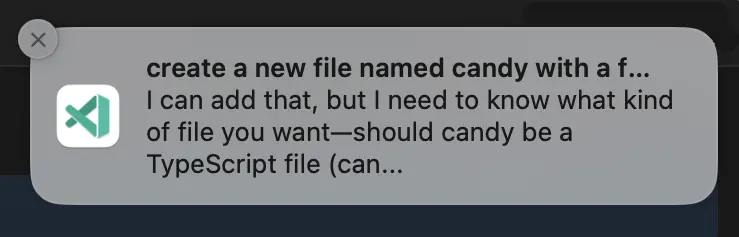

Other AI chat changes include:

  • Chain of thought (Experimental).
  • Show recent local chat conversations (Experimental).
  • Ability to keep or undo changes to files during an agent loop.
  • New Ctrl+Alt+Up/Down shortcut keys to navigate through your chat messages.
  • Platform-specific terminal profiles.
  • Add ‘learning’ mechanism to select the optimal tool set for custom models.
  • Auto-reply to terminal prompts (Experimental).

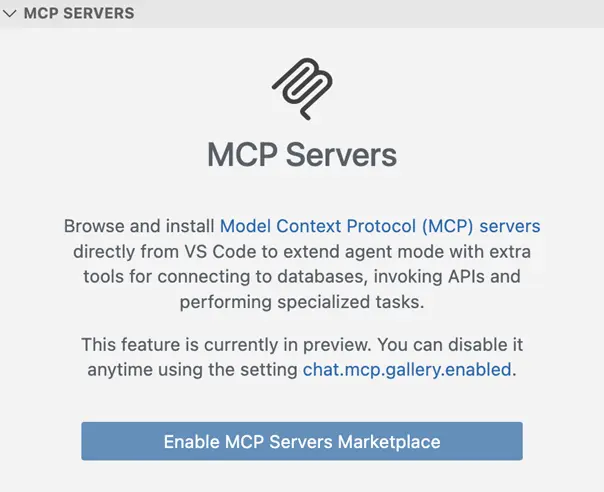
Besides that, VS Code 1.105 introduced built-in MCP marketplace, which enables users to browse and install MCP servers directly from the Extensions view, though disabled by default.

The new or outdated MCP servers are now started automatically when you send a chat message. There are as well 2 new MCP specification updates SEP-973 and SEP-1034.
The new vs code release also improved the editor experience, by adding ability to override the default keyboard shortcuts for the Quick Input controls, and possibility to disallow next edit suggestions (NES) to propose whitespace-only changes such as code formatting.

The runTests tool in Chat now also reports test code coverage to the agent, and it now shows notification when long-running task completes while the VS Code window is not focused.

Other changes in the release include:

  • Shell integration for pwsh on Windows support for screen readers.
  • Add ability to resolve merge conflicts with AI.
  • New “Start Dictation in Terminal” action to use voice dictation to input text into the terminal.
  • Native broker support for Microsoft Authentication on ARM-series macOS devices.
  • PKCE (Proof Key for Code Exchange) support for GitHub Authentication.
  • Add Copy Test Id command to run gutter icon context menu.

Get Visual Studio Code 1.105

For more about the release, as well as download links for Windows, MacOS, and Linux, go to its website via the link below:

For Ubuntu, besides download & install the deb package from the link above, there’s also Snap package available to install in App Center (or Ubuntu Software).

While, a community maintained flatpak package is also available for choice. See this guide for how to install them.

VS Code 1.104 Added Auto Model Selection & Sign in with Google Account

By:Ji m
13 September 2025 at 23:59

Visual Studio Code 1.104, the August release of Microsoft’s code editor, was released few days ago.

The new release introduced Auto AI model selection support (Preview feature), allowing to automatically choose between Claude Sonnet 4, GPT-5, GPT-5 mini, and GPT-4.1 models, to get the optimal performance and reduce rate limits.

And, user can view the selected model and the model multiplier by hovering over the response in the Chat view.

In agent mode, the agent now explicitly asks for user confirmation before making edits to certain files. And you can configure file patterns to indicate which files require confirmation with chat.tools.edits.autoApprove setting.

The release also improved GitHub coding agent integration with chat editor actions, seamless transitions, better session rendering, and performance boosts. And, it enhanced chat sessions view with status bar tracking, multi-session support, rich descriptions, and expanded context menus.

The #codebase tool has been updated to use a new embeddings model for semantic searching for code in workspace, providing better results, while using less storage space (only 6% compare to previous model).

Other AI changes in VS Code 1.104 include:

  • Support for AGENTS.md files (Experimental).
  • Use custom chat mode in prompt file.
  • Support changing font family and font size of chat messages.
  • Sign in or sign up to GitHub Copilot with Google account is GA.
  • Add warning first time to enable global auto approve.
  • New setting for disabling and hiding GitHub Copilot AI features.
  • Add more terminal tools to core.
  • Math rendering in chat responses is GA and enabled by default.
  • Enhance terminal auto-approve usability and security.
  • Enable or disable each tool individually.

Besides AI changes, the release also added support configuring the color of window borders in Windows. User can choose to respect color theme settings, Windows settings, disable border colors, and a specific color in Hex, RGB, RGBA, HSL, HSLA format.

It added Accounts: Manage Extension Account Preferences command to the Command Palette, new setting to show tab index, ability to toggle editor tab bar scoll-bar visibility, as well as new “Ceate on GitHub” and “Preview on Github” buttons in built-in issue reporter.

The code editor can now reads and includes MCP server instructions in base prompt. It includes new setting options to allow all MCP servers or disable MCP entirely. And, it now disables MCP auto discovery by default.

As well, it improved NES suggestion by adding new setting to allow the language model to access the entire notebook, thus it will generate more accurate and higher-quality next edit suggestions.

Other changes include:

  • add Focus Chat Confirmation action.
  • new setting to configure how quickly inline suggesstions appear after you type.
  • add “Compare with Workspace” context menu option for worktree file, and Migrate Worktree Changes… command
  • remove the built-in bower.json IntelliSense
  • add Python Environments extension support for Pipenv
  • new experimental AI hover summaries for Python with latest Pylance.
  • Pylance IntelliSense enabled in all Python documents
  • finalized Language Model Chat Provider API
  • And much more!

Get VS Code 1.104

The official release note, and download links for Windows, MacOS, and Linux are available via the link below:

Ubuntu users may either search & install the Snap package from App Center (or Ubuntu Software for 22.04), or download the deb package from the link above.

While, a community maintained flatpak available is available for choice. See this guide for how to install them.

❌