Reading view

SuperTuxKart 1.5 Released! New Skins, Egg Hunts, & Supersampling
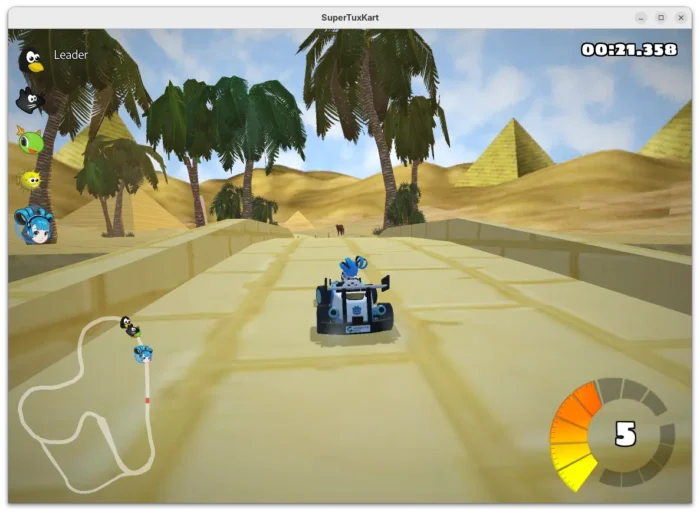
After almost three years of development, SuperTuxKart kart racing game finally released new major 1.5 version few days ago.

The new release of this game introduced Supersampling Anti-Aliasing (SSAA) support. Meaning that it can render game resolution higher than current screen size (even over maximum display resolution). It greatly improved the graphics quality, which is however extremely heavy that may lower frame rate.

You may enable this feature by going to “Graphics” setting page and set render resolution higher than 100%.
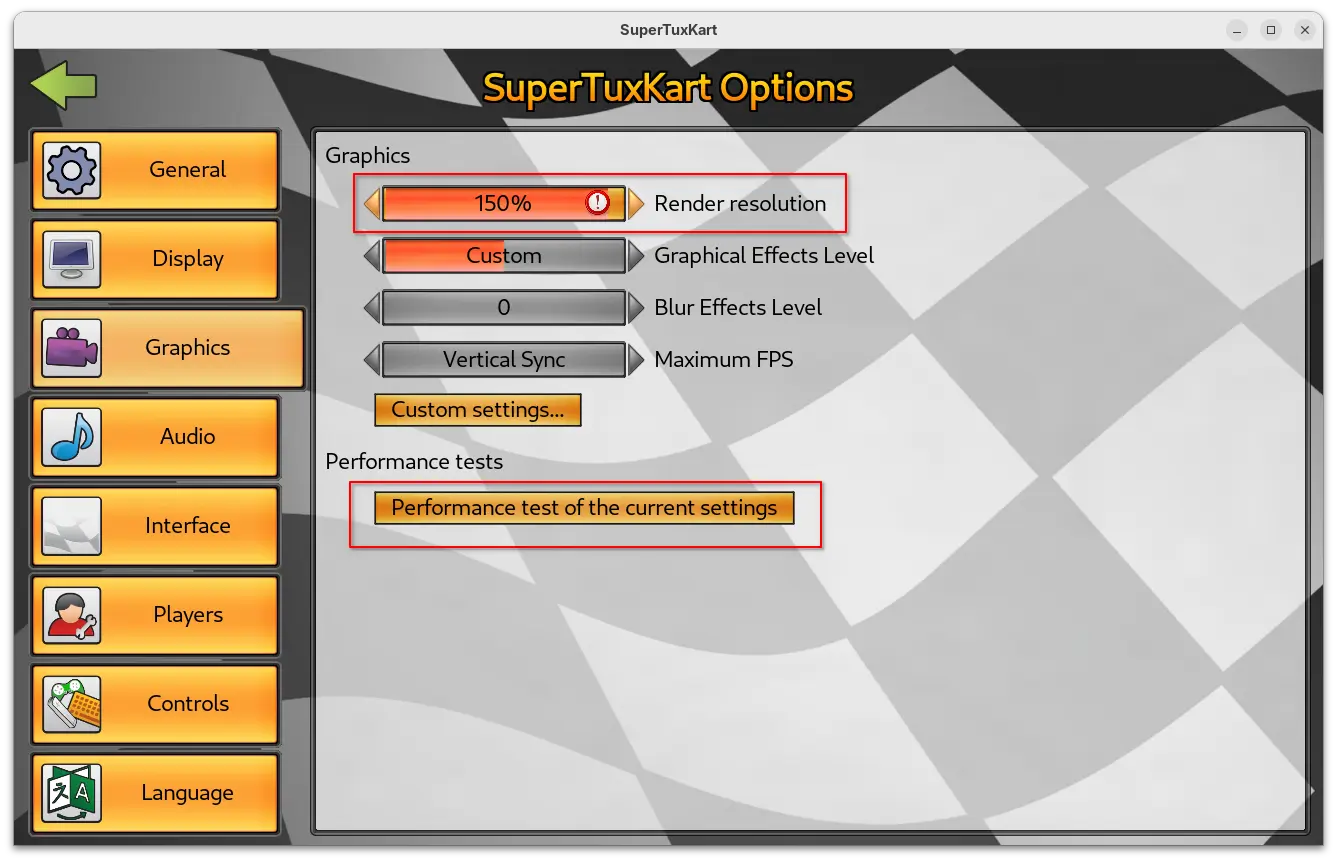
As you can see in the screenshot above, the setting page also added new “Performance test of the current settings” benchmark button. By clicking on the option, it starts a self-driving game with single loop track, and prints the performance test results, such as FPS, duration, and your current settings when it ends.

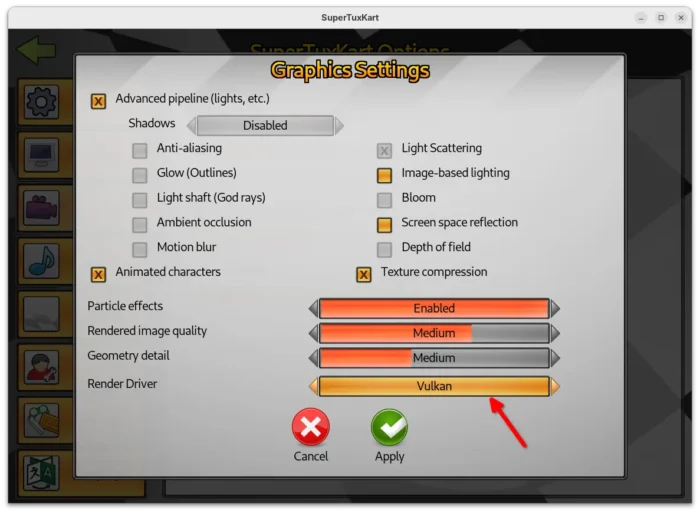
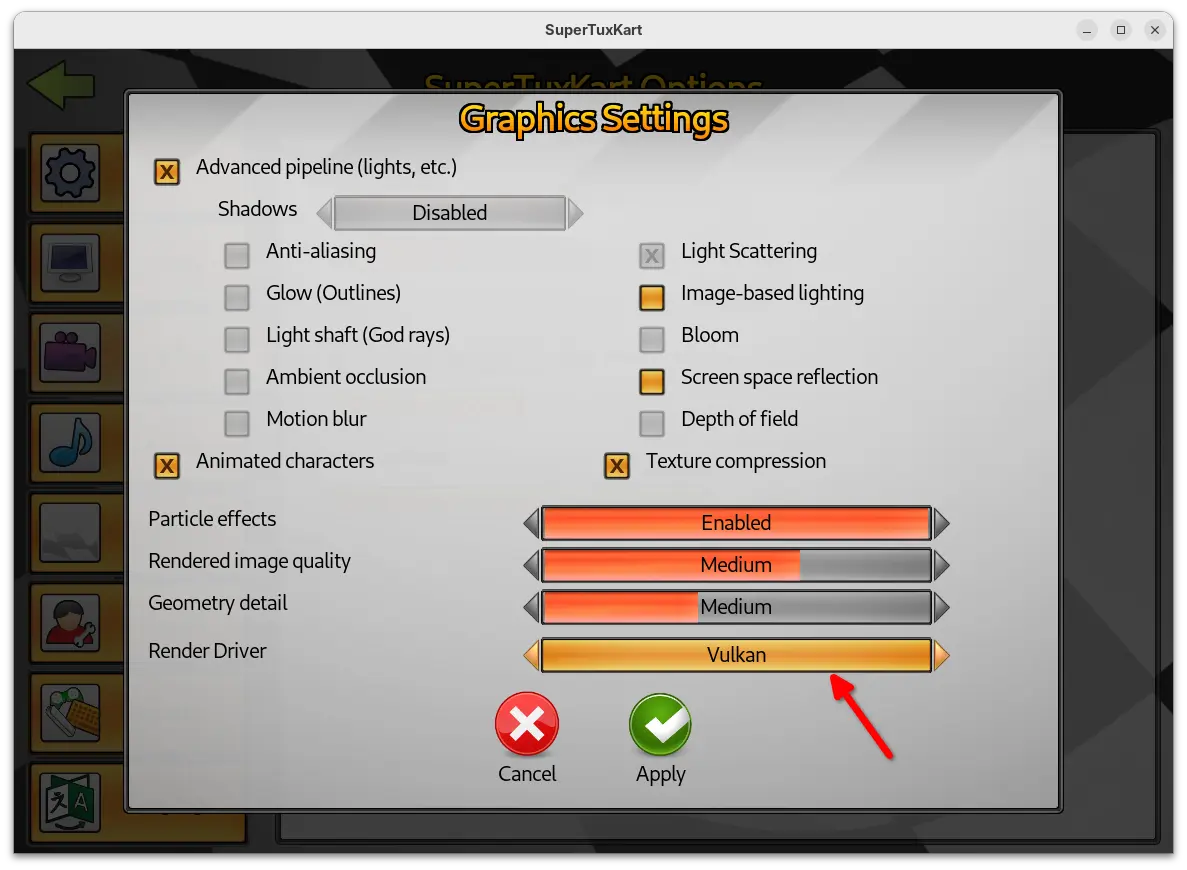
Besides that, the Vulkan support now goes stable. It added spotlight support and significant updates to the Vulkan renderer. And, user can now go to “Custom settings…” under Graphics to easily switch the render driver to Vulkan.
SuperTuxKart 1.5 as well improved level of details (LoD) and shadow mapping logic, which significantly reduce the occurrence of the sudden or abrupt appearance of game elements. And, it improved sound scale allowing headphone users to easily pick the ideal sound level.

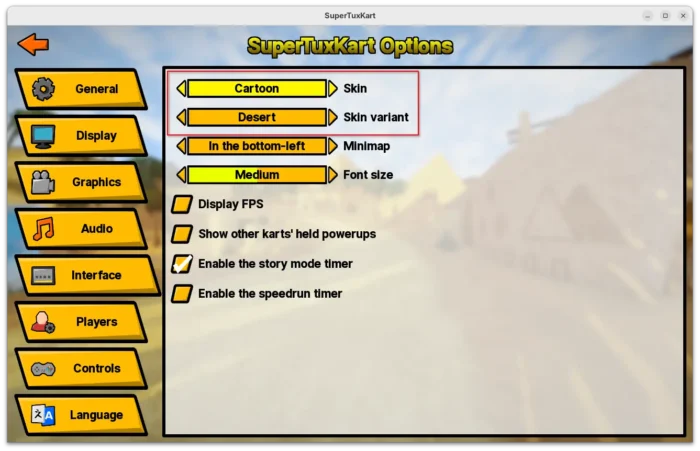
For the UI, the release added 6 new skins. The previous skins are now grouped as Classic with 5 variants, while a new Desert variant is added in this release. Cartoon theme now has five new variants, and each of them come with a background picture showing a scene from one of STK’s tracks.
Other changes in the release include three new egg hunts in Black Forest, Gran Paradisio Island and The Old Mine, and three new official fields in soccer mode. They are Oasis and XR-4R3N4 by CrystalDaEevee, and Hole Drop by CrystalDaEevee & Sven Andreas Belting.
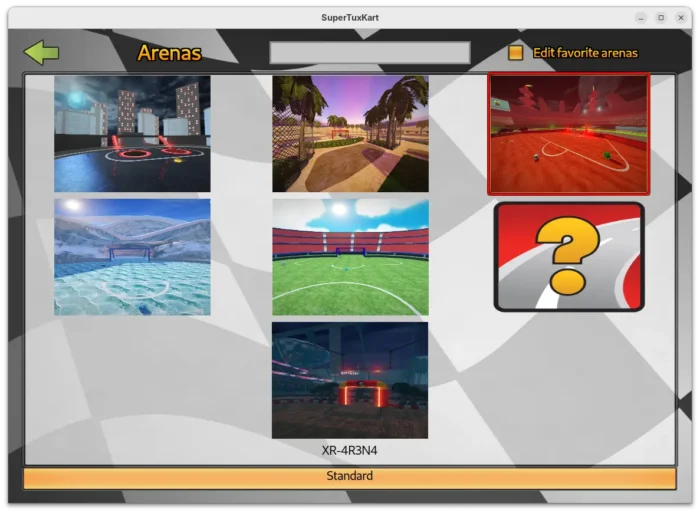
There are as well following changes in the release:

  • Move full-screen toogle, resoluation, and camera options into new Display setting page.
  • Add “Screen space reflection” setting option.
  • Redesign the game mode and track selection page, reducing the need for scrolling.
  • Add ability to mark tracks and karts as favorites.
  • Add new nicer spawn animation for Parachute and Bubblegums.
  • New spotlight lighting effect for karts in night tracks.
  • New music for Las Dunas Arena and Las Dunas Soccer.

For more about the release, see the official announcement.

How to Install SuperTuxKart 1.5 in Ubuntu

The new release packages as well as the source code are available to download via the link below:

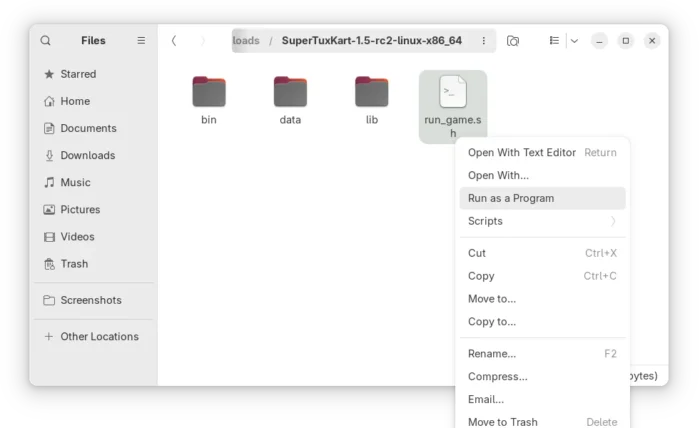
For Linux, it’s a portable tarball. Download and decompress it, then run the “run_game.sh” script to start the game.
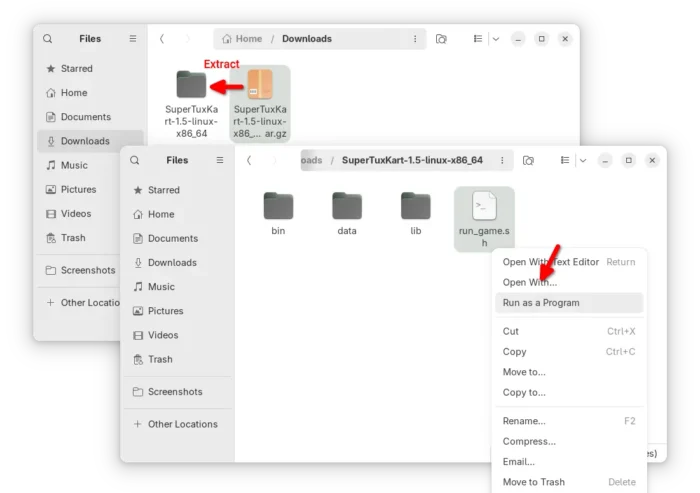
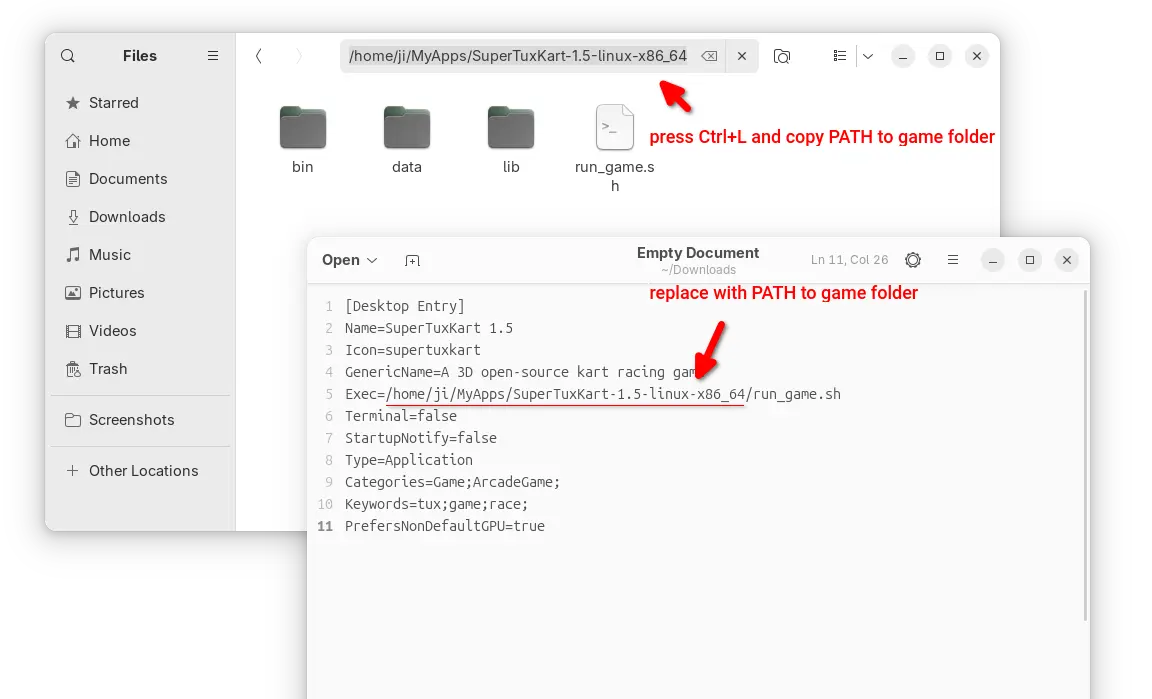
If you want to launch the game from app launcher (e.g., Gnome App Grid, overview search), then open Text Editor, create an empty document, then paste the following lines:

[Desktop Entry]
Name=SuperTuxKart 1.5
Icon=supertuxkart
GenericName=A 3D open-source kart racing game
Exec=/home/ji/MyApps/SuperTuxKart-1.5-linux-x86_64/run_game.sh
Terminal=false
StartupNotify=false
Type=Application
Categories=Game;ArcadeGame;
Keywords=tux;game;race;
PrefersNonDefaultGPU=true

Here you need to replace the game PATH that’s in bold, according to where you saved the folder to.

In my case, I created “MyApps” folder in user home, and put all portable apps/games folders into there.
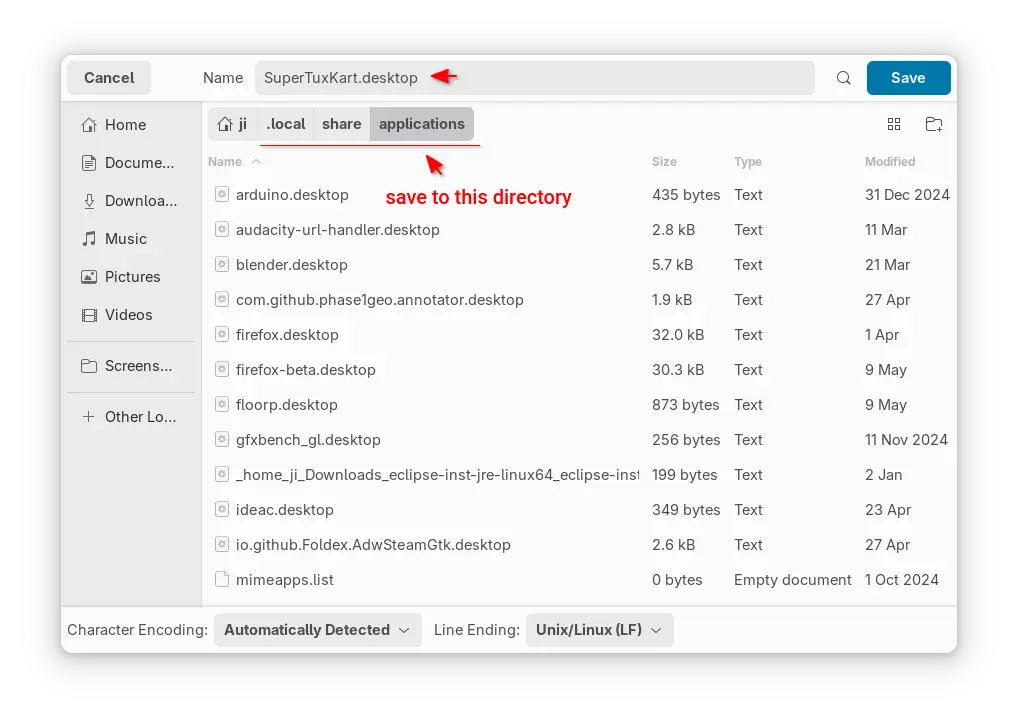
After that, save the file as “supertuxkart.desktop” into .local/share/applications directory. NOTE: .local is hidden by default, press Ctrl+H in file chooser dialog to view/hide it.
If everything goes well, you’ll be able to launch the game from start menu (or Gnome overview) few moments later.

Note for missing app icon, just grab one from the web, name it as supertuxkart (.PNG or .SVG), finally put it into .local/share/icons directory.
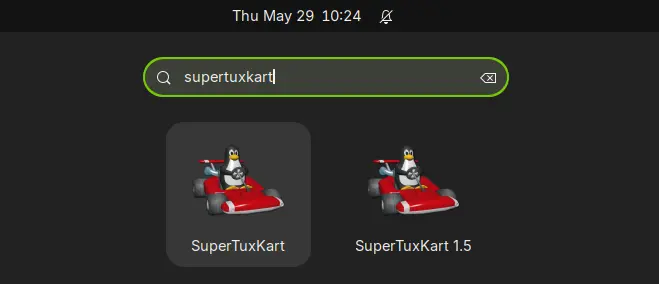
In my case, I have both SuperTuxKart 1.4 installed from system repository, and v1.5 via the Linux tarball. So, I have 2 game icons in launcher, but with different names.

Uninstall:

To uninstall the kart racing game installed via the steps above, simply delete the game folder using file manager.

Then, also delete the supertuxkart.desktop file from .local/share/applications, and delete the icons (if any) from .local/share/icons directory.


  •  

SuperTuxKart 1.5 Open-Source Kart Racing Game Released with Major Changes

SuperTuxKart 1.5

SuperTuxKart 1.5 free and open-source kart racing game is now available for download as a major update that brings awesome new features and many improvements. Here's what's new!

The post SuperTuxKart 1.5 Open-Source Kart Racing Game Released with Major Changes appeared first on 9to5Linux - do not reproduce this article without permission. This RSS feed is intended for readers, not scrapers.

  •  

Dolphin Emulator 2509 now Emulates Cars 2 & Disney Infinity Smoothly

Dolphin, the free open-source GameCube and Wii game emulator, released new 2509 version today after another 3 months of development.

The new release of this game emulator revamped the settings UI, added some new features, and, it can finally emulate Toy Story 3, Cars 2, and Disney Infinity on powerful hardware at full speed.

It seems that Avalanche Software, the team behind the 3 games, don’t like Dolphin Emulator.

However, we’re going to go out on a limb and say that Avalanche Software, the team behind the Trio of Destruction™, weren’t so fond of us. Not only did they leave crude messages hidden in game data for “hackers” to find, but we also suspect that someone on their team was actively monitoring us.
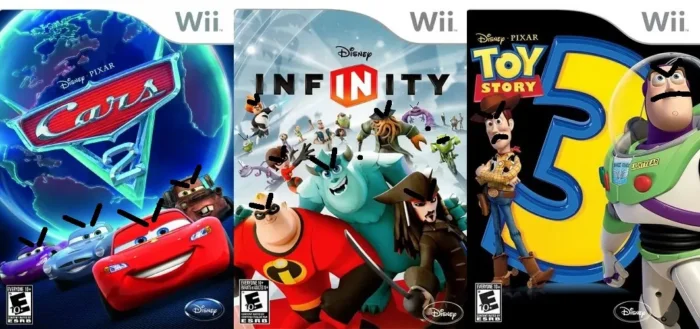
While Toy Story 3 took a few years to get working, the writing was on the wall for quite some time that eventually it would be solved. So, for Avalanche’s next two games, we believe that they left a trap specifically designed to defeat Dolphin: the dcache suicide pill.

As the announcement said, the team added a trap in the games designed to stop Dolphin from running them in PC or mobile phone. But with the 2509 release, it finally fixed the issue by adding a patch allowing to run the Trio of Destruction™ fluidly on powerful hardware.

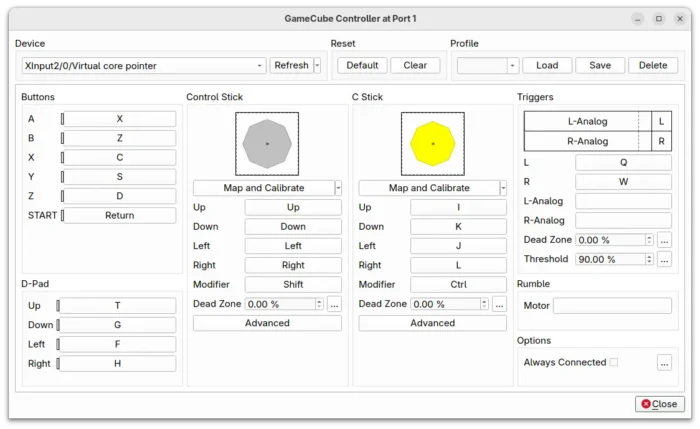
Besides that, the release revamped the settings UI, and introduced new “Map and Calibrate” button, allows to simply map and calibrate joystick at the same time.

It also added “Correct Time Drift” option under Advanced setting page. It pursues accurate overall elapsed time by running fast after stutters, which is useful for internet play.

Dolphin-emu 2509 also improved the general performance for Bluetooth Passthrough. It added the ability to load Realtek firmware, when trying to use a Realtek adapter with the feature for the first time.

Meaning now the Bluetooth Passthrough now supports modern Bluetooth adapters, such as TP-Link Bluetooth 5.3 Nano and Asus USB-BT500.

Other changes include:

  • Disable Dual Code mode by default for desktop, as it’s unstable and modern desktop PCs are overpowered for Dolphin. Though, there’s an option to turn it back.
  • Fix DSP-LLE Recompiler exception that could cause games not booting.
  • Add resource manager, which tracks the requests per frame for better performance loading textures, and tracks memory usage to prevent out of memory.
  • Load custom texture multi-threaded.

In addition, the Nintendo Switch 2 NSO GameCube Controller is not supported yet in the release, as it’s not fully implemented by the upstream SDL (Simple DirectMedia Layer).

Install Dolphin Emulater 2509

The software website provides official installer packages for Windows, macOS, Linux, and Android, which are available to download via the link below:

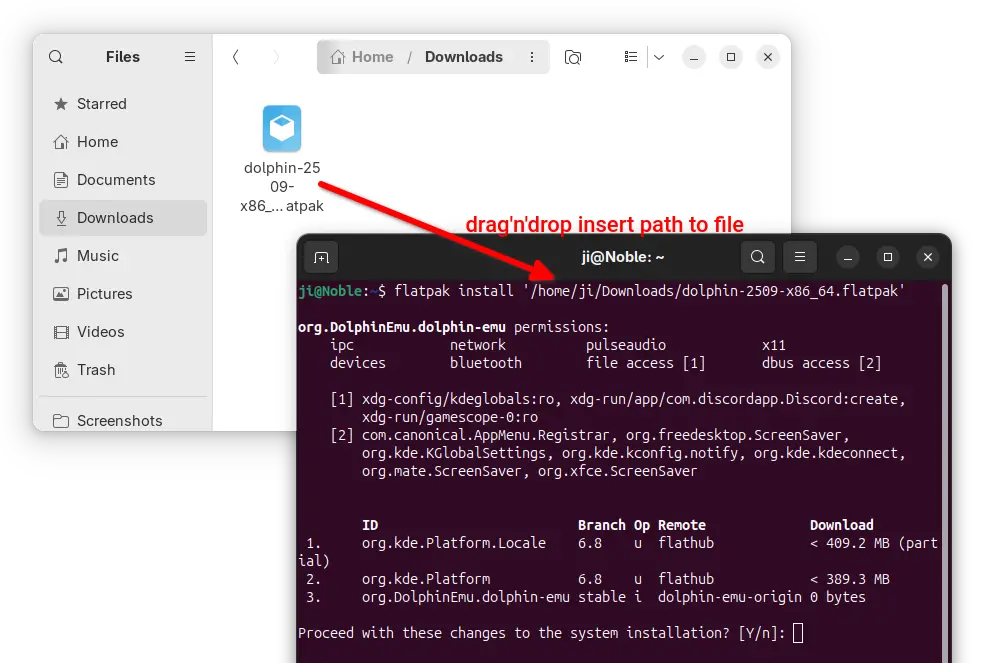
For Linux, it’s Flatpak package that runs in sandbox environment. Download either X86_64 for Intel/AMD or aarch64 for ARM64 platform, then install via command:

flatpak install /path/to/flatpak-file

NOTE: Ubuntu does NOT support Flatpak out-of-the-box, run the command below to install the daemon first:

sudo apt install flatpak

For Ubuntu users who prefer the native .deb package, I’ve made the packages into this unofficial PPA for Ubuntu 22.04, Ubuntu 24.04, and Ubuntu 25.04 on amd64 (Intel/AMD) and arm64 (e.g., Raspi, Snapdragon processors) platforms.

Simply open terminal (Ctrl+Alt+T) and run 3 commands below one by one to add PPA, refresh cache, and install the emulator:

sudo add-apt-repository ppa:ubuntuhandbook1/dolphin-emu
sudo apt update
sudo apt install dolphin-emu
  •  

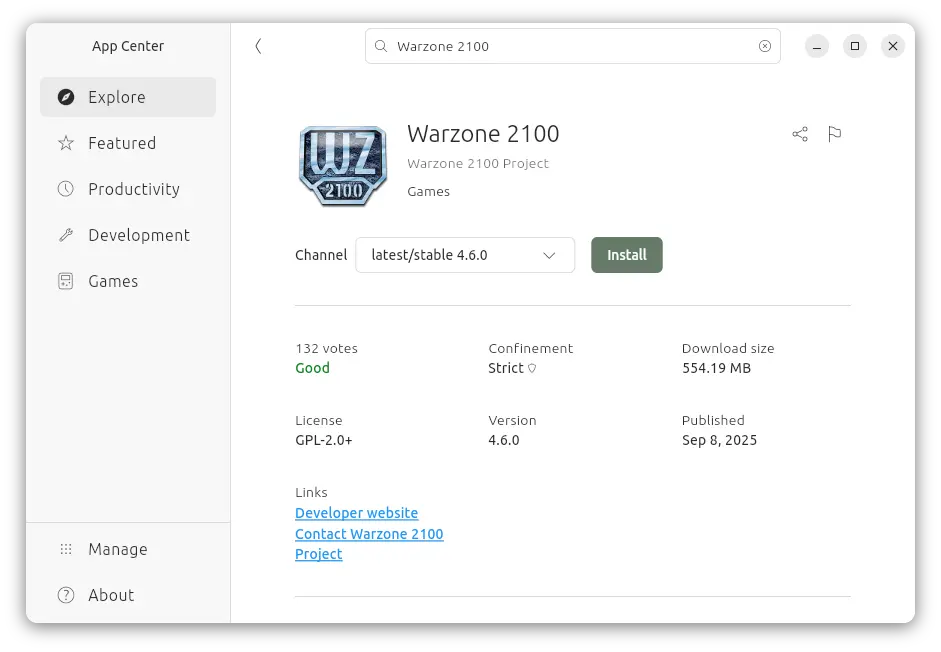
Warzone 2100 Released 4.6.0 with Spectator Host Mode

Warzone 2100, the free open-source 3D real-time strategy game, released new major 4.6.0 version few days ago.

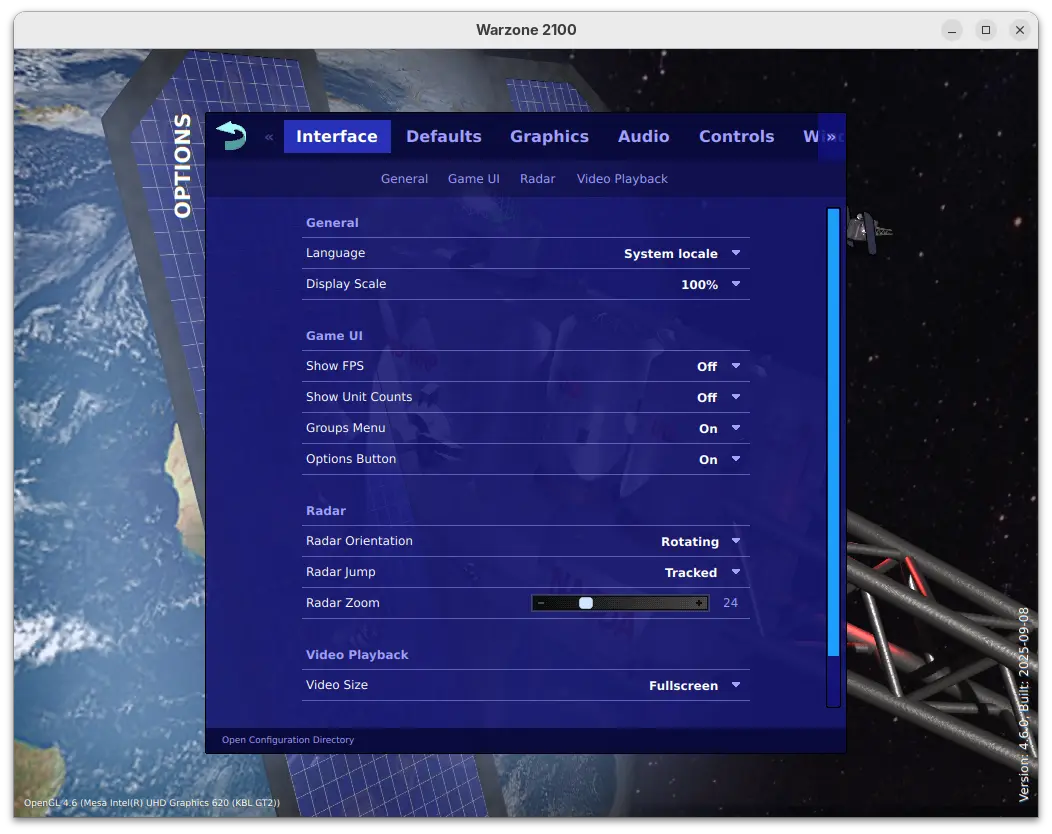
This is a big release that features revamped options menu. The options menu now has a clean design with reorganized options, which as well introduced many new toggle options, such as show FPS / Unit Counts, Group Reporting, Radar Zoom, default AI and more.

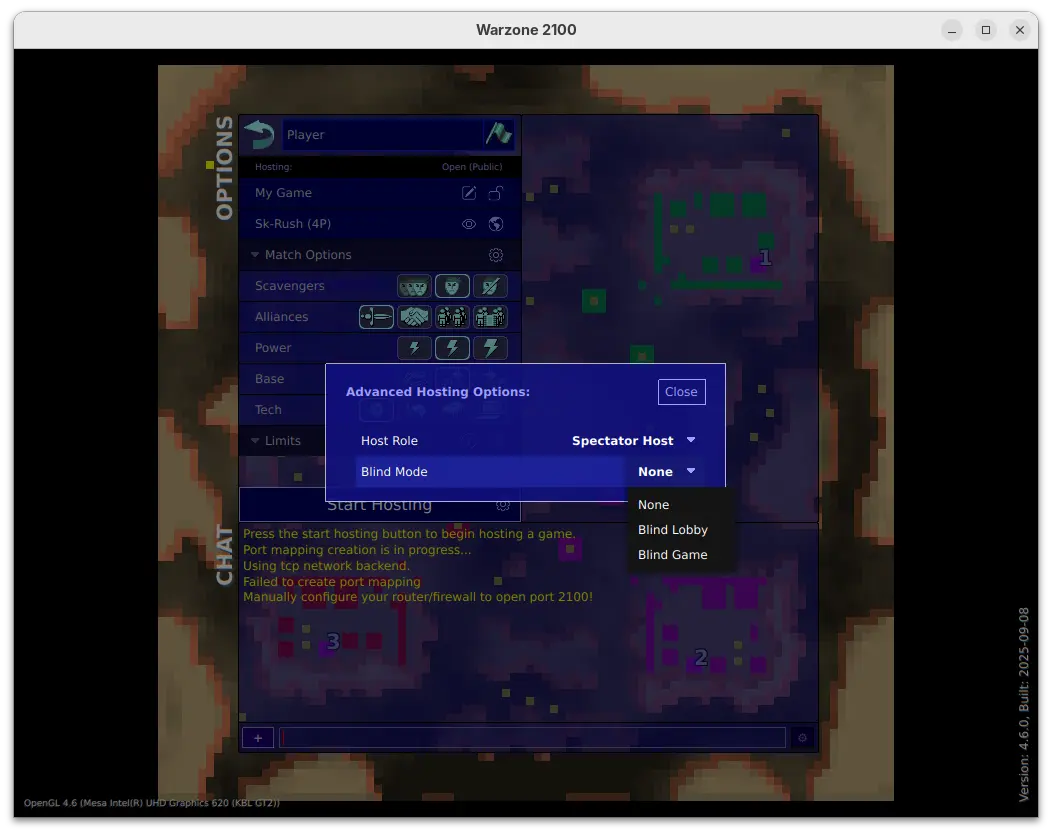
For multi-player mode, the release added option to start hosting in Spectator Host mode, in which case the host is a spectator in the game.

When start hosting in this mode, it also allows to set blind lobby mode to hide players’ true identities until the game starts, or blind game to hide players’ true identities until the game ends, while the host (as a spectator) can see them in both modes.

The 4.6.0 release also massively improved high-quality water effects, improved the performance for loading, path-finding, target selection, networking, and high-object-count situations.

It revamped Lobby game browser with new design, more filtering options, more room information, and increased responsiveness. And, it now automatically attempts multiple graphics backends on first-run, and defaults to Vulkan in more cases, when possible.

For Windows, it now provides single .exe installer (instead of three) to install the game on all the X86, X86_64, and ARM64 computers, along with option to choose install for either all users or current user only.

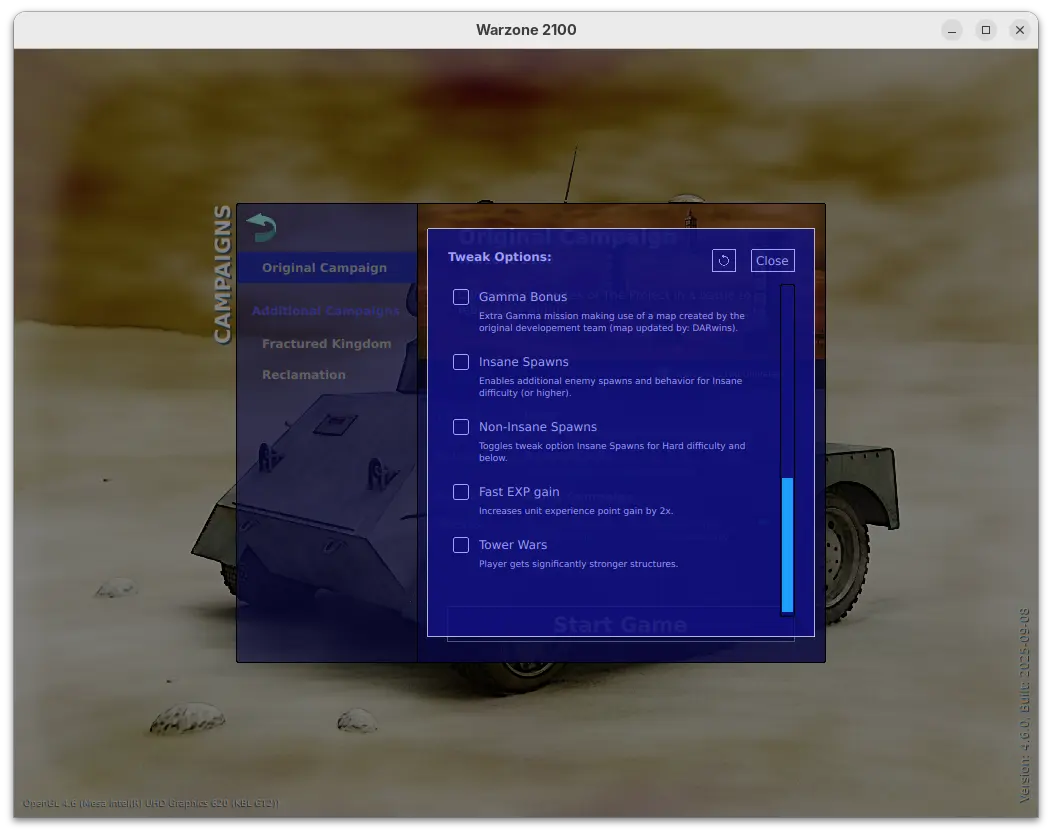
Warzone 2100 also introduced many additional tweak options for the Original Campaign. They include:

  • Infinite Time – missions have no timer when possible.
  • Victory Hints – displays a console message every few minutes showing victory related information.
  • Finale Fun – activate Final Gamma mission bonus content.
  • Insane Spawns – enable additional enemy spawns and behavior for Insane difficulty.
  • Non-Insane Spawns – toggle Insane Spawns for Hard difficulty and below.
  • Fast EXP gain – 2x unit experience point gain.
  • TowerWars – player gets significantly stronger structures.

There are as well many in game changes, including:

  • Bump repair spread area from 6 to 10 tiles.
  • Update Fractured Kingdom to v1.4.
  • Give ACs some basic splash damage.
  • Specify missing research names so research appears in the Stats objects.
  • Add “Defending Your Base” guide topic.
  • Add Particle Gun Laser weapon.
  • Adjust Emplacement-PlasmaCannon cost 200 -> 350, buildPoints 400 -> 500.
  • Increase spinAngle for Tracks in MP 45->65 to allow better unit packing.

For more, see the official release note.

Download & Install Warzone 2100 4.6.0

The official installers for Linux, macOS, ans Windows are available to download at the link below (under Assets section):

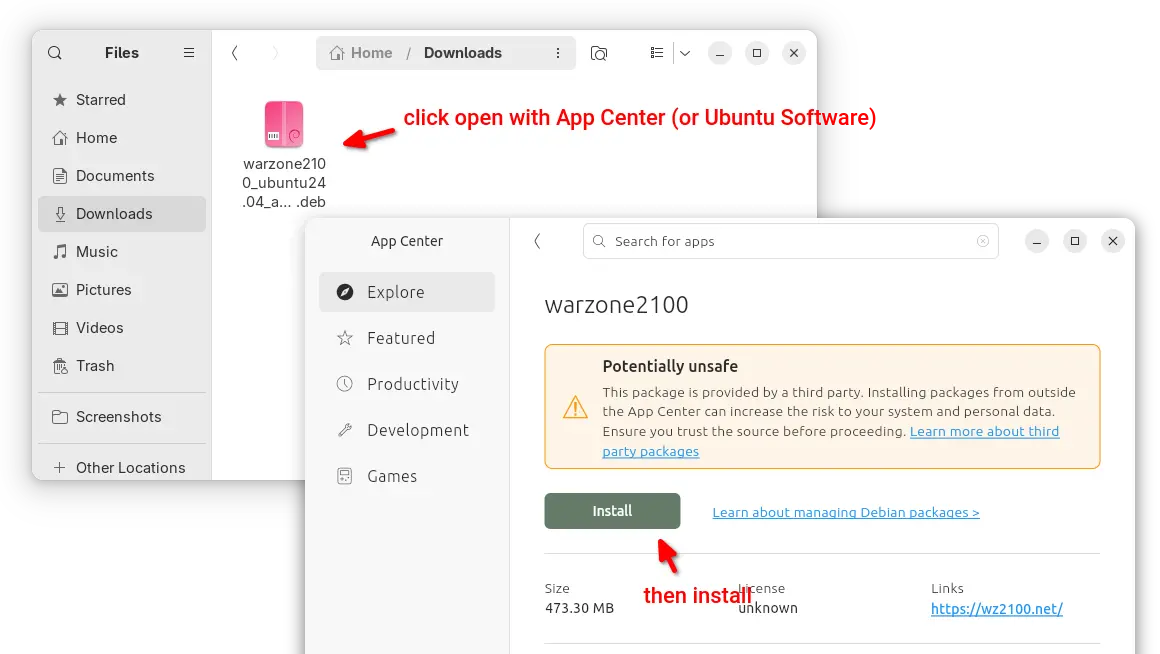
For Ubuntu 22.04 and Ubuntu 24.04 on modern Intel/AMD platform, select download the .deb package then click open & install via either Ubuntu Software or App Center.

Warzone 2100 DEB package

For all Ubuntu editions on Intel/AMD and ARM64, user may also choose install the Snap package (runs in sandbox) from App Center or Ubuntu Software.

warzone 2100 Snap package

While, there’s also Flatpak package (also runs in sandbox) available to install in most Linux desktops.

  •  

SuperTuxKart 1.5 RC2 added GUI option to Choose Vulkan or DirectX 9

SuperTuxKart, the 3D kart racing game, announced the second release candidate for the next 1.5 release few days ago.

Due to inner team disagreement, the release of version 1.5 was delayed. And, it explained the reason by announcing SuperTuxKart Evolution (the name of the next major release) few days ago.

Now the problem has been fixed. And, SuperTuxKart 1.5-rc2 is available as the first update afterwards.

The new release candidate introduced a graphical option in “Graphics” settings page, allowing to easily switch rendering driver to Vulkan or DirectX9 (Windows only), without having to edit the configuration file. While the default is still OpenGL.

In addition, the release migrated the online services to a new, more powerful server, which fixed occasional server disconnect issue due to sporadic overloads and improved server list loading performance.

As well, a new forum is introduced for sharing your tips, artistic creations, and discussing about the game’s development. For more, see the official announcement.

Download SuperTuxKart 1.5 RC2

The official packages for Windows, Linux, macOS, Switch, and Android, are available to download via the link below:

For Linux, select download the .tar.gz tarball depends on your CPU. They include x86_64 for modern Intel/AMD, x86 for old 32-bit CPU, arm64 for 64-bit ARM (e.g., Snapdragon processors), 32-bit armv7, and RISC-V processors.

If you don’t even know your CPU processor architecture type, open terminal and run uname -m command to tell.

After downloaded the tarball, decompress, then run the run_game.sh file to launch the game and enjoy!

  •