Reading view

Python Projects: 60+ Ideas for Beginners to Advanced (2025)

Quick Answer: The best Python projects for beginners include building an interactive word game, analyzing your Netflix data, creating a password generator, or making a simple web scraper. These projects teach core Python skills like loops, functions, data manipulation, and APIs while producing something you can actually use. Below, you'll find 60+ project ideas organized by skill level, from beginner to advanced.

Completing Python projects is the ultimate way to learn the language. When you work on real-world projects, you not only retain more of the lessons you learn, but you'll also find it super motivating to push yourself to pick up new skills. Because let's face it, no one actually enjoys sitting in front of a screen learning random syntax for hours on end―particularly if it's not going to be used right away.

Python projects don't have this problem. Anything new you learn will stick because you're immediately putting it into practice. There's just one problem: many Python learners struggle to come up with their own Python project ideas to work on. But that's okay, we can help you with that!

Best Starter Python Projects

Here are a few beginner-friendly Python projects from the list below that are perfect for getting hands-on experience right away:

Choose one that excites you and just go with it! You’ll learn more by building than by reading alone.

Are You Ready for This?

If you have some programming experience, you might be ready to jump straight into building a Python project. However, if you’re just starting out, it’s vital you have a solid foundation in Python before you take on any projects. Otherwise, you run the risk of getting frustrated and giving up before you even get going. For those in need, we recommend taking either:

  1. Introduction to Python Programming course: meant for those looking to become a data professional while learning the fundamentals of programming with Python.
  2. Introduction to Python Programming course: meant for those looking to leverage the power of AI while learning the fundamentals of programming with Python.

In both courses, the goal is to quickly learn the basics of Python so you can start working on a project as soon as possible. You'll learn by doing, not by passively watching videos.

Selecting a Project

Our list below has 60+ fun and rewarding Python projects for learners at all levels. Some are free guided projects that you can complete directly in your browser via the Dataquest platform. Others are more open-ended, serving as inspiration as you build your Python skills. The key is to choose a project that resonates with you and just go for it!

Now, let’s take a look at some Python project examples. There is definitely something to get you started in this list.

Animated GIF of a smiling blue robot interacting with a mobile app interface

Free Python Projects (Recommended):

These free Dataquest guided projects are a great place to start. They provide an embedded code editor directly in your browser, step-by-step instructions to help you complete the project, and community support if you happen to get stuck.

  1. Building an Interactive Word Game — In this guided project, you’ll use basic Python programming concepts to create a functional and interactive word-guessing game.

  2. Profitable App Profiles for the App Store and Google Play Markets — In this one, you’ll work as a data analyst for a company that builds mobile apps. You’ll use Python to analyze real app market data to find app profiles that attract the most users.

  3. Exploring Hacker News Posts — Use Python string manipulation, OOP, and date handling to analyze trends driving post popularity on Hacker News, a popular technology site.

  4. Learn and Install Jupyter Notebook — A guide to using and setting up Jupyter Notebook locally to prepare you for real-world data projects.

  5. Predicting Heart Disease — We're tasked with using a dataset from the World Health Organization to accurately predict a patient’s risk of developing heart disease based on their medical data.

  6. Analyzing Accuracy in Data Presentation — In this project, we'll step into the role of data journalists to analyze movie ratings data and determine if there’s evidence of bias in Fandango’s rating system.

Animated GIF of a laptop displaying a bar chart with a plant in the background

Table of Contents

More Projects to Help Build Your Portfolio:

  1. Finding Heavy Traffic Indicators on I-94 — Explore how using the pandas plotting functionality along with the Jupyter Notebook interface allows us to analyze data quickly using visualizations to determine indicators of heavy traffic.

  2. Storytelling Data Visualization on Exchange Rates — You'll assume the role of a data analyst tasked with creating an explanatory data visualization about Euro exchange rates to inform and engage an audience.

  3. Clean and Analyze Employee Exit Surveys — Work with exit surveys from employees of the Department of Education in Queensland, Australia. Play the role of a data analyst to analyze employee exit surveys and uncover insights about why employees resign.

  4. Star Wars Survey — In this data cleaning project, you’ll work with Jupyter Notebook to analyze data on the Star Wars movies to answer the hotly contested question, "Who shot first?"

  5. Analyzing NYC High School Data — For this project, you’ll assume the role of a data scientist analyzing relationships between SAT scores and demographic factors in NYC public schools to determine if the SAT is a fair test.

  6. Predicting the Weather Using Machine Learning — For this project, you’ll step into the role of a data scientist to predict tomorrow’s weather using historical data and machine learning, developing skills in data preparation, time series analysis, and model evaluation.

  7. Credit Card Customer Segmentation — For this project, we’ll play the role of a data scientist at a credit card company to segment customers into groups using K-means clustering in Python, allowing the company to tailor strategies for each segment.

Python Projects for AI Enthusiasts:

  1. Building an AI Chatbot with Streamlit — Build a simple website with an AI chatbot user interface similar to the OpenAI Playground in this intermediate-level project using Streamlit.

  2. Developing a Dynamic AI Chatbot — Create your very own AI-powered chatbot that can take on different personalities, keep track of conversation history, and provide coherent responses in this intermediate-level project.

  3. Building a Food Ordering App — Create a functional application using Python dictionaries, loops, and functions to create an interactive system for viewing menus, modifying carts, and placing orders.

Table of Contents

Fun Python Projects for Building Data Skills:

  1. Exploring eBay Car Sales Data — Use Python to work with a scraped dataset of used cars from eBay Kleinanzeigen, a classifieds section of the German eBay website.

  2. Find out How Much Money You’ve Spent on Amazon — Dig into your own spending habits with this beginner-level tutorial!

  3. Analyze Your Personal Netflix Data — Another beginner-to-intermediate tutorial that gets you working with your own personal dataset.

  4. Analyze Your Personal Facebook Data with Python — Are you spending too much time posting on Facebook? The numbers don’t lie, and you can find them in this beginner-to-intermediate Python project.

  5. Analyze Survey Data — This walk-through will show you how to set up Python and how to filter survey data from any dataset (or just use the sample data linked in the article).

  6. All of Dataquest’s Guided Projects — These guided data science projects walk you through building real-world data projects of increasing complexity, with suggestions for how to expand each project.

  7. Analyze Everything — Grab a free dataset that interests you, and start poking around! If you get stuck or aren’t sure where to start, our introduction to Python lessons are here to help, and you can try them for free!

Animated GIF of a person playing a space-themed game on a computer, illustrating cool Python projects for game development.

Table of Contents

Cool Python Projects for Game Devs:

  1. Rock, Paper, Scissors — Learn Python with a simple-but-fun game that everybody knows.

  2. Build a Text Adventure Game — This is a classic Python beginner project (it also pops up in this book) that’ll teach you many basic game setup concepts that are useful for more advanced games.

  3. Guessing Game — This is another beginner-level project that’ll help you learn and practice the basics.

  4. Mad Libs — Use Python code to make interactive Python Mad Libs!

  5. Hangman — Another childhood classic that you can make to stretch your Python skills.

  6. Snake — This is a bit more complex, but it’s a classic (and surprisingly fun) game to make and play.

Simple Python Projects for Web Devs:

  1. URL shortener — This free video course will show you how to build your own URL shortener like Bit.ly using Python and Django.

  2. Build a Simple Web Page with Django — This is a very in-depth, from-scratch tutorial for building a website with Python and Django, complete with cartoon illustrations!

Easy Python Projects for Aspiring Developers:

  1. Password generator — Build a secure password generator in Python.

  2. Use Tweepy to create a Twitter bot — This Python project idea is a bit more advanced, as you’ll need to use the Twitter API, but it’s definitely fun!

  3. Build an Address Book — This could start with a simple Python dictionary or become as advanced as something like this!

  4. Create a Crypto App with Python — This free video course walks you through using some APIs and Python to build apps with cryptocurrency data.

Table of Contents

Additional Python Project Ideas

Still haven’t found a project idea that appeals to you? Here are many more, separated by experience level.

These aren’t tutorials; they’re just Python project ideas that you’ll have to dig into and research on your own, but that’s part of the fun! And it’s also part of the natural process of learning to code and working as a programmer.

The pros use Google and AI tools for answers all the time — so don’t be afraid to dive in and get your hands dirty!

Graphic illustration of the Python logo with orange and brown wings, representing python projects for beginners.

Beginner Python Project Ideas

  1. Create a text encryption generator. This would take text as input, replaces each letter with another letter, and outputs the “encoded” message.

  2. Build a countdown calculator. Write some code that can take two dates as input, and then calculate the amount of time between them. This will be a great way to familiarize yourself with Python’s datetime module.

  3. Write a sorting method. Given a list, can you write some code that sorts it alphabetically, or numerically? Yes, Python has this functionality built-in, but see if you can do it without using the sort() function!

  4. Build an interactive quiz application. Which Avenger are you? Build a personality or recommendation quiz that asks users some questions, stores their answers, and then performs some kind of calculation to give the user a personalized result based on their answers

  5. Tic-Tac-Toe by Text. Build a Tic-Tac-Toe game that’s playable like a text adventure. Can you make it print a text-based representation of the board after each move?

  6. Make a temperature/measurement converter. Write a script that can convert Fahrenheit (℉) to Celcius (℃) and back, or inches to centimeters and back, etc. How far can you take it?

  7. Build a counter app. Take your first steps into the world of UI by building a very simple app that counts up by one each time a user clicks a button.

  8. Build a number-guessing game. Think of this as a bit like a text adventure, but with numbers. How far can you take it?

  9. Build an alarm clock. This is borderline beginner/intermediate, but it’s worth trying to build an alarm clock for yourself. Can you create different alarms? A snooze function?

Table of Contents

Graphic illustration of the Python logo with blue and light blue wings, representing intermediate python projects.

Intermediate Python Project Ideas

  1. Build an upgraded text encryption generator. Starting with the project mentioned in the beginner section, see what you can do to make it more sophisticated. Can you make it generate different kinds of codes? Can you create a “decoder” app that reads encoded messages if the user inputs a secret key? Can you create a more sophisticated code that goes beyond simple letter-replacement?

  2. Make your Tic-Tac-Toe game clickable. Building off the beginner project, now make a version of Tic-Tac-Toe that has an actual UI  you’ll use by clicking on open squares. Challenge: can you write a simple “AI” opponent for a human player to play against?

  3. Scrape some data to analyze. This could really be anything, from any website you like. The web is full of interesting data. If you learn a little about web-scraping, you can collect some really unique datasets.

  4. Build a clock website. How close can you get it to real-time? Can you implement different time zone selectors, and add in the “countdown calculator” functionality to calculate lengths of time?

  5. Automate some of your job. This will vary, but many jobs have some kind of repetitive process that you can automate! This intermediate project could even lead to a promotion.

  6. Automate your personal habits. Do you want to remember to stand up once every hour during work? How about writing some code that generates unique workout plans based on your goals and preferences? There are a variety of simple apps you can build to automate or enhance different aspects of your life.

  7. Create a simple web browser. Build a simple UI that accepts  URLs and loads webpages. PyWt will be helpful here! Can you add a “back” button, bookmarks, and other cool features?

  8. Write a notes app. Create an app that helps people write and store notes. Can you think of some interesting and unique features to add?

  9. Build a typing tester. This should show the user some text, and then challenge them to type it quickly and accurately. Meanwhile, you time them and score them on accuracy.

  10. Create a “site updated” notification system. Ever get annoyed when you have to refresh a website to see if an out-of-stock product has been relisted? Or to see if any news has been posted? Write a Python script that automatically checks a given URL for updates and informs you when it identifies one. Be careful not to overload the servers of whatever site you’re checking, though. Keep the time interval reasonable between each check.

  11. Recreate your favorite board game in Python. There are tons of options here, from something simple like Checkers all the way up to Risk. Or even more modern and advanced games like Ticket to Ride or Settlers of Catan. How close can you get to the real thing?

  12. Build a Wikipedia explorer. Build an app that displays a random Wikipedia page. The challenge here is in the details: can you add user-selected categories? Can you try a different “rabbit hole” version of the app, wherein each article is randomly selected from the articles linked in the previous article? This might seem simple, but it can actually require some serious web-scraping skills.

Table of Contents

Graphic illustration of the Python logo with purple and blue wings, representing advanced python projects.

Advanced Python Project Ideas

  1. Build a stock market prediction app. For this one, you’ll need a source of stock market data and some machine learning and data analytics skills. Fortunately, many people have tried this, so there’s plenty of source code out there to work from.

  2. Build a chatbot. The challenge here isn’t so much making the chatbot as it is making it good. Can you, for example, implement some natural language processing techniques to make it sound more natural and spontaneous?

  3. Program a robot. This requires some hardware (which isn’t usually free), but there are many affordable options out there — and many learning resources, too. Definitely look into Raspberry Pi if you’re not already thinking along those lines.

  4. Build an image recognition app. Starting with handwriting recognition is a good idea — Dataquest has a guided data science project to help with that! Once you’ve learned it, you can take it to the next level.

  5. Create a sentiment analysis tool for social media. Collect data from various social media platforms, preprocess it, and then train a deep learning model to analyze the sentiment of each post (positive, negative, neutral).

  6. Make a price prediction model. Select an industry or product that interests you, and build a machine learning model that predicts price changes.

  7. Create an interactive map. This will require a mix of data skills and UI creation skills. Your map can display whatever you’d like — bird migrations, traffic data, crime reports — but it should be interactive in some way. How far can you take it?

Table of Contents

Next Steps

Each of the examples in the previous sections built on the idea of choosing a great Python project for a beginner and then enhancing it as your Python skills progress. Next, you can advance to the following:

  • Think about what interests you, and choose a project that overlaps with your interests.

  • Think about your Python learning goals, and make sure your project moves you closer to achieving those goals.

  • Start small. Once you’ve built a small project, you can either expand it or build another one.

Now you’re ready to get started. If you haven’t learned the basics of Python yet, I recommend diving in with Dataquest’s Introduction to Python Programming course.

If you already know the basics, there’s no reason to hesitate! Now is the time to get in there and find your perfect Python project.
  •  

11 Must-Have Skills for Data Analysts in 2025

Data is everywhere. Every click, purchase, or social media like creates mountains of information, but raw numbers do not tell a story. That is where data analysts come in. They turn messy datasets into actionable insights that help businesses grow.

Whether you're looking to become a junior data analyst or looking to level up, here are the top 11 data analyst skills every professional needs in 2025, including one optional skill that can help you stand out.

1. SQL

SQL (Structured Query Language) is the language of databases and is arguably the most important technical skill for analysts. It allows you to efficiently query and manage large datasets across multiple systems—something Excel cannot do at scale.

Example in action: Want last quarter's sales by region? SQL pulls it in seconds, no matter how huge the dataset.

Learning Tip: Start with basic queries, then explore joins, aggregations, and subqueries. Practicing data analytics exercises with SQL will help you build confidence and precision.

2. Excel

Since it’s not going anywhere, it’s still worth it to learn Microsoft Excel. Beyond spreadsheets, it offers pivot tables, macros, and Power Query, which are perfect for quick analysis on smaller datasets. Many startups or lean teams still rely on Excel as their first database.

Example in action: Summarize thousands of rows of customer feedback in minutes with pivot tables, then highlight trends visually.

Learning Tip: Focus on pivot tables, logical formulas, and basic automation. Once comfortable, try linking Excel to SQL queries or automating repetitive tasks to strengthen your technical skills in data analytics.

3. Python or R

Python and R are essential for handling big datasets, advanced analytics, and automation. Python is versatile for cleaning data, automation, and integrating analyses into workflows, while R excels at exploratory data analysis and statistical analysis.

Example in action: Clean hundreds of thousands of rows with Python’s pandas library in seconds, something that would take hours in Excel.

Learning Tip: Start with data cleaning and visualization, then move to complex analyses like regression or predictive modeling. Building these data analyst skills is critical for anyone working in data science. Of course, which is better to learn is still up for debate.

4. Data Visualization

Numbers alone rarely persuade anyone. Data visualization is how you make your insights clear and memorable. Tools like Tableau, Power BI, or Python/R libraries help you tell a story that anyone can understand.

Example in action: A simple line chart showing revenue trends can be far more persuasive than a table of numbers.

Learning Tip: Design visuals with your audience in mind. Recreate dashboards from online tutorials to practice clarity, storytelling, and your soft skills in communicating data analytics results.

5. Statistics & Analytics

Strong statistical analysis knowledge separates analysts who report numbers from those who generate insights. Skills like regression, correlation, hypothesis testing, and A/B testing help you interpret trends accurately.

Example in action: Before recommending a new marketing campaign, test whether the increase in sales is statistically significant or just random fluctuation.

Learning Tip: Focus on core probability and statistics concepts first, then practice applying them in projects. Our Probability and Statistics with Python skill path is a great way to learn theoretical concepts in a hands-on way.

6. Data Cleaning & Wrangling

Data rarely comes perfect, so data cleaning skills will always be in demand. Cleaning and transforming datasets, removing duplicates, handling missing values, and standardizing formats are often the most time-consuming but essential parts of the job.

Example in action: You want to analyze customer reviews, but ratings are inconsistent and some entries are blank. Cleaning the data ensures your insights are accurate and actionable.

Learning Tip: Practice on free datasets or public data repositories to build real-world data analyst skills.

7. Communication & Presentation Skills

Analyzing data is only half the battle. Sharing your findings clearly is just as important. Being able to present insights in reports, dashboards, or meetings ensures your work drives decisions.

Example in action: Presenting a dashboard to a marketing team that highlights which campaigns brought the most new customers can influence next-quarter strategy.

Learning Tip: Practice explaining complex findings to someone without a technical background. Focus on clarity, storytelling, and visuals rather than technical jargon. Strong soft skills are just as valuable as your technical skills in data analytics.

8. Dashboard & Report Creation

Beyond visualizations, analysts need to build dashboards and reports that allow stakeholders to interact with data. A dashboard is not just a fancy chart. It is a tool that empowers teams to make data-driven decisions without waiting for you to interpret every number.

Example in action: A sales dashboard with filters for region, product line, and time period can help managers quickly identify areas for improvement.

Learning Tip: Start with simple dashboards in Tableau, Power BI, or Google Data Studio. Focus on making them interactive, easy to understand, and aligned with business goals. This is an essential part of professional data analytics skills.

9. Domain Knowledge

Understanding the industry or context of your data makes you exponentially more effective. Metrics and trends mean different things depending on the business.

Example in action: Knowing e-commerce metrics like cart abandonment versus subscription churn metrics can change how you interpret the same type of data.

Learning Tip: Study your company’s industry, read case studies, or shadow colleagues in different departments to build context. The more you know, the better your insights and analysis will be.

10. Critical Thinking & Problem-Solving

Numbers can be misleading. Critical thinking lets analysts ask the right questions, identify anomalies, and uncover hidden insights.

Example in action: Revenue drops in one region. Critical thinking helps you ask whether it is seasonal, a data error, or a genuine trend.

Learning Tip: Challenge assumptions and always ask “why” multiple times when analyzing a dataset. Practice with open-ended case studies to sharpen your analytical thinking and overall data analyst skills.

11. Machine Learning Basics

Not every analyst uses machine learning daily, but knowing the basics—predictive modeling, clustering, or AI-powered insights—can help you stand out. You do not need this skill to get started as an analyst, but familiarity with it is increasingly valuable for advanced roles.

Example in action: Using a simple predictive model to forecast next month’s sales trends can help your team allocate resources more effectively.

Learning Tip: Start small with beginner-friendly tools like Python’s scikit-learn library, then explore more advanced models as you grow. Treat it as an optional skill to explore once you are confident in SQL, Python/R, and statistical analysis.

Where to Learn These Skills

Want to become a data analyst? Dataquest makes it easy to learn the skills you need to get hired.

With our Data Analyst in Python and Data Analyst in R career paths, you’ll learn by doing real projects, not just watching videos. Each course helps you build the technical and practical skills employers look for.

By the end, you’ll have the knowledge, experience, and confidence to start your career in data analysis.

Wrapping It Up

Being a data analyst is not just about crunching numbers. It is about turning data into actionable insights that drive decisions. Master these data analytics and data analyst skills, and you will be prepared to handle the challenges of 2025 and beyond.

  •  

Getting Started with Claude Code for Data Scientists

If you've spent hours debugging a pandas KeyError, or writing the same data validation code for the hundredth time, or refactoring a messy analysis script, you know the frustration of tedious coding work. Real data science work involves analytical thinking and creative problem-solving, but it also requires a lot of mechanical coding: boilerplate writing, test generation, and documentation creation.

What if you could delegate the mechanical parts to an AI assistant that understands your codebase and handles implementation details while you focus on the analytical decisions?

That's what Claude Code does for data scientists.

What Is Claude Code?

Claude Code is Anthropic's terminal-based AI coding assistant that helps you write, refactor, debug, and document code through natural language conversations. Unlike autocomplete tools that suggest individual lines as you type, Claude Code understands project context, makes coordinated multi-file edits, and can execute workflows autonomously.

Claude Code excels at generating boilerplate code for data loading and validation, refactoring messy scripts into clean modules, debugging obscure errors in pandas or numpy operations, implementing standard patterns like preprocessing pipelines, and creating tests and documentation. However, it doesn't replace your analytical judgment, make methodological decisions about statistical approaches, or fix poorly conceived analysis strategies.

In this tutorial, you'll learn how to install Claude Code, understand its capabilities and limitations, and start using it productively for data science work. You'll see the core commands, discover tips that improve efficiency, and see concrete examples of how Claude Code handles common data science tasks.

Key Benefits for Data Scientists

Before we get into installation, let's establish what Claude Code actually does for data scientists:

  1. Eliminate boilerplate code writing for repetitive patterns that consume time without requiring creative thought. File loading with error handling, data validation checks that verify column existence and types, preprocessing pipelines with standard transformations—Claude Code generates these in seconds rather than requiring manual implementation of logic you've written dozens of times before.
  2. Generate test suites for data processing functions covering normal operation, edge cases with malformed or missing data, and validation of output characteristics. Testing data pipelines becomes straightforward rather than work you postpone.
  3. Accelerate documentation creation for data analysis workflows by generating detailed docstrings, README files explaining project setup, and inline comments that explain complex transformations.
  4. Debug obscure errors more efficiently in pandas operations, numpy array manipulations, or scikit-learn pipeline configurations. Claude Code interprets cryptic error messages, suggests likely causes based on common patterns, and proposes fixes you can evaluate immediately.
  5. Refactor exploratory code into production-quality modules with proper structure, error handling, and maintainability standards. The transition from research notebook to deployable pipeline becomes faster and less painful.

These benefits translate directly to time savings on mechanical tasks, allowing you to focus on analysis, modeling decisions, and generating insights rather than wrestling with implementation details.

Installation and Setup

Let's get Claude Code installed and configured. The process takes about 10-15 minutes, including account creation and verification.

Step 1: Obtain Your Anthropic API Key

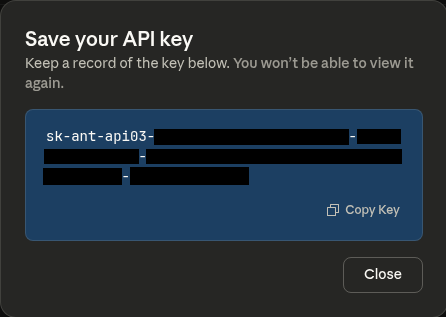
Navigate to console.anthropic.com and create an account if you don't have one. Once logged in, access the API keys section from the navigation menu on the left, and generate a new API key by clicking on + Create Key.

Claude_Code_API_Key.png

While you can generate a new key anytime from the console, you won’t be able to retrieve any existing API keys once they have been created. For this reason, you’ll want to copy your API key immediately and store it somewhere safe—you'll need it for authentication.

Always keep your API keys secure. Treat them like passwords and never commit them to version control or share them publicly.

Step 2: Install Claude Code

Claude Code installs via npm (Node Package Manager). If you don't have Node.js installed on your system, download it from nodejs.org before proceeding.

Once Node.js is installed, open your terminal and run:

npm install -g @anthropic-ai/claude-code

The -g flag installs Claude Code globally, making it available from any directory on your system.

Common installation issues:

  • "npm: command not found": You need to install Node.js first. Download it from nodejs.org and restart your terminal after installation.
  • Permission errors on Mac/Linux: Try sudo npm install -g @anthropic-ai/claude-code to install with administrator privileges.
  • PATH issues: If Claude Code installs successfully but the claude command isn't recognized, you may need to add npm's global directory to your system PATH. Run npm config get prefix to find the location, then add [that-location]/bin to your PATH environment variable.

Step 3: Configure Authentication

Set your API key as an environment variable so Claude Code can authenticate with Anthropic's servers:

export ANTHROPIC_API_KEY=your_key_here

Replace your_key_here with the actual API key you copied earlier from the Anthropic console.

To make this permanent (so you don't need to set your API key every time you open a terminal), add the export line above to your shell configuration file:

  • For bash: Add to ~/.bashrc or ~/.bash_profile
  • For zsh: Add to ~/.zshrc
  • For fish: Add to ~/.config/fish/config.fish

You can edit your shell configuration file using nano config_file_name. After adding the line, reload your configuration by running source ~/.bashrc (or whichever file you edited), or simply open a new terminal window.

Step 4: Verify Installation

Confirm that Claude Code is properly installed and authenticated:

claude --version

You should see version information displayed. If you get an error, review the installation steps above.

Try running Claude Code for the first time:

claude

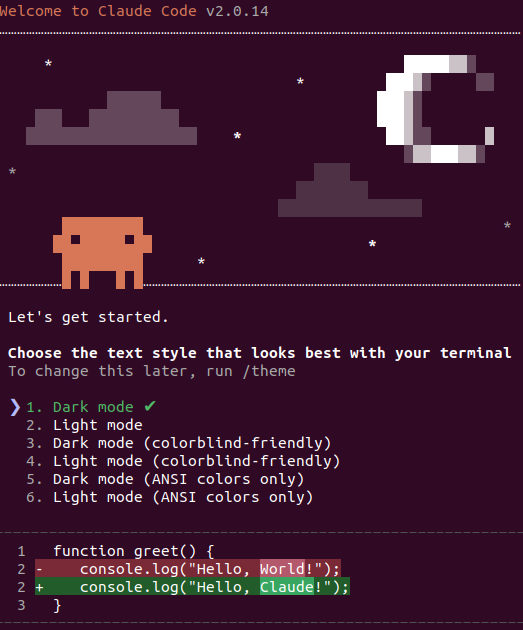
This launches the Claude Code interface. You should see a welcome message and a prompt asking you to select the text style that looks best with your terminal:

Claude_Code_Welcome_Screen.png

Use the arrow keys on your keyboard to select a text style and press Enter to continue.

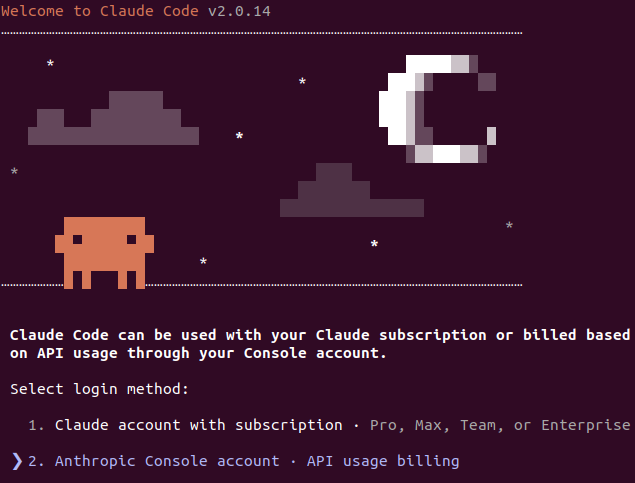
Next, you’ll be asked to select a login method:

If you have an eligible subscription, select option 1. Otherwise, select option 2. For this tutorial, we will use option 2 (API usage billing).

Claude_Code_Select_Login.png

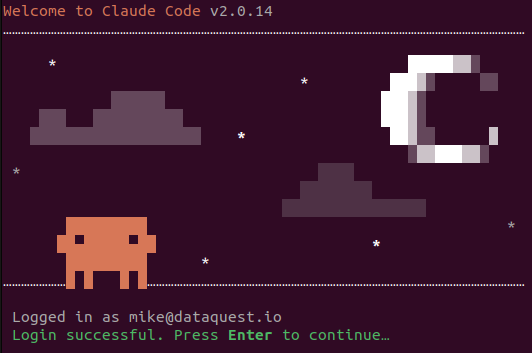
Once your account setup is complete, you’ll see a welcome message showing the email address for your account:

Claude_Code_Setup_Complete.png

To exit the setup of Claude Code at any point, press Control+C twice.

Security Note

Claude Code can read files you explicitly include and generate code that loads data from files or databases. However, it doesn't automatically access your data without your instruction. You maintain full control over what files and information Claude Code can see. When working with sensitive data, be mindful of what files you include in conversation context and review all generated code before execution, especially code that connects to databases or external systems. For more details, see Anthropic’s Security Documentation.

Understanding the Costs

Claude Code itself is free software, but using it requires an Anthropic API key that operates on usage-based pricing:

  • Free tier: Limited testing suitable for evaluation
  • Pro plan (\$20/month): Reasonable usage for individual data scientists conducting moderate development work
  • Pay-as-you-go: For heavy users working intensively on multiple projects, typically \$6-12 daily for active development

Most practitioners doing regular but not continuous development work find the \$20 Pro plan provides good balance between cost and capability. Start with the free tier to evaluate effectiveness on your actual work, then upgrade based on demonstrated value.

Your First Commands

Now that Claude Code is installed and configured, let's walk through basic usage with hands-on examples.

Starting a Claude Code Session

Navigate to a project directory in your terminal:

cd ~/projects/customer_analysis

Launch Claude Code:

claude

You'll see the Claude Code interface with a prompt where you can type natural language instructions.

Understanding Your Project

Before asking Claude Code to make changes, it needs to understand your project context. Try starting with this exploratory command:

Explain the structure of this project and identify the key files.

Claude Code will read through your directory, examine files, and provide a summary of what it found. This shows that Claude Code actively explores and comprehends codebases before acting.

Your First Refactoring Task

Let's demonstrate Claude Code's practical value with a realistic example. Create a simple file called load_data.py with some intentionally messy code:

import pandas as pd

# Load customer data
data = pd.read_csv('/Users/yourname/Desktop/customers.csv')
print(data.head())

This works but has obvious problems: hardcoded absolute path, no error handling, poor variable naming, and no documentation.

Now ask Claude Code to improve it:

Refactor load_data.py to use best practices: configurable paths, error handling, descriptive variable names, and complete docstrings.

Claude Code will analyze the file and propose improvements. Instead of the hardcoded path, you'll get configurable file paths through command-line arguments. The error handling expands to catch missing files, empty files, and CSV parsing errors. Variable names become descriptive (customer_df or customer_data instead of generic data). A complete docstring appears documenting parameters, return values, and potential exceptions. The function adds proper logging to track what's happening during execution.

Claude Code asks your permission before making these changes. Always review its proposal; if it looks good, approve it. If something seems off, ask for modifications or reject the changes entirely. This permission step ensures you stay in control while delegating the mechanical work.

What Just Happened

This demonstrates Claude Code's workflow:

  1. You describe what you want in natural language
  2. Claude Code analyzes the relevant files and context
  3. Claude Code proposes specific changes with explanations
  4. You review and approve or request modifications
  5. Claude Code applies approved changes

The entire refactoring took 90 seconds instead of 20-30 minutes of manual work. More importantly, Claude Code caught details you might have forgotten, such as adding logging, proper type hints, and handling multiple error cases. The permission-based approach ensures you maintain control while delegating implementation work.

Core Commands and Patterns

Claude Code provides several slash (/) commands that control its behavior and help you work more efficiently.

Important Slash Commands

@filename: Reference files directly in your prompts using the @ symbol. Example: @src/preprocessing.py or Explain the logic in @data_loader.py. Claude Code automatically includes the file's content in context. Use tab completion after typing @ to quickly navigate and select files.

/clear: Reset conversation context entirely, removing all history and file references. Use this when switching between different analyses, datasets, or project areas. Accumulated conversation history consumes tokens and can cause Claude Code to inappropriately reference outdated context. Think of /clear as starting a fresh conversation when you switch tasks.

/help: Display available commands and usage information. Useful when you forget command syntax or want to discover capabilities.

Context Management for Data Science Projects

Claude Code has token limits determining how much code it can consider simultaneously. For small projects with a few files, this rarely matters. For larger data science projects with dozens of notebooks and scripts, strategic context management becomes important.

Reference only files relevant to your current task using @filename syntax. If you're working on data validation, reference the validation script and related utilities (like @validation.py and @utils/data_checks.py) but exclude modeling and visualization code that won't influence the current work.

Effective Prompting Patterns

Claude Code responds best to clear, specific instructions. Compare these approaches:

  • Vague: "Make this code better"
    Specific: "Refactor this preprocessing function to handle missing values using median imputation for numerical columns and mode for categorical columns, add error handling for unexpected data types, and include detailed docstrings"
  • Vague: "Add tests"
    Specific: "Create pytest tests for the data_loader function covering successful loading, missing file errors, empty file handling, and malformed CSV detection"
  • Vague: "Fix the pandas error"
    Specific: "Debug the KeyError in line 47 of data_pipeline.py and suggest why it's failing on the 'customer_id' column"

Specific prompts produce focused, useful results. Vague prompts generate generic suggestions that may not address your actual needs.

Iteration and Refinement

Treat Claude Code's initial output as a starting point rather than expecting perfection on the first attempt. Review what it generates, identify improvements needed, and make follow-up requests:

"The validation function you created is good, but it should also check that dates are within reasonable ranges. Add validation that start_date is after 2000-01-01 and end_date is not in the future."

This iterative approach produces better results than attempting to specify every requirement in a single massive prompt.

Advanced Features

Beyond basic commands, several features improve your Claude Code experience for complex work.

  1. Activate plan mode: Press Shift+Tab before sending your prompt to enable plan mode, which creates an explicit execution plan before implementing changes. Use this for workflows with three or more distinct steps—like loading data, preprocessing, and generating outputs. The planning phase helps Claude maintain focus on the overall objective.

  2. Run commands with bash mode: Prefix prompts with an exclamation mark to execute shell commands and inject their output into Claude Code's context:

    ! python analyze_sales.py

    This runs your analysis script and adds complete output to Claude Code's context. You can then ask questions about the output or request interpretations of the results. This creates a tight feedback loop for iterative data exploration.

  3. Use extended thinking for complex problems: Include "think", "think harder", or "ultrathink" in prompts for thorough analysis:

    think harder: why does my linear regression show high R-squared but poor prediction on validation data?

    Extended thinking produces more careful analysis but takes longer (ultrathink can take several minutes). Apply this when debugging subtle statistical issues or planning sophisticated transformations.

  4. Resume previous sessions: Launch Claude Code with claude --resume to continue your most recent session with complete context preserved, including conversation history, file references, and established conventions all intact. This proves valuable for ongoing analysis where you want to continue today without re-explaining your entire analytical approach.

Optional Power User Setting

For personal projects where you trust all operations, launch with claude --dangerously-skip-permissions to bypass constant approval prompts. This carries risk if Claude Code attempts destructive operations, so use it only on projects where you maintain version control and can recover from mistakes. Never use this on production systems or shared codebases.

Configuring Claude Code for Data Science Projects

The CLAUDE.md file provides project-specific context that improves Claude Code's suggestions by explaining your conventions, requirements, and domain specifics.

Quick Setup with /init

The easiest way to create your CLAUDE.md file is using Claude Code's built-in /init command. From your project directory, launch Claude Code and run:

/init

Claude Code will analyze your project structure and ask you questions about your setup: what kind of project you're working on, your coding conventions, important files and directories, and domain-specific context. It then generates a CLAUDE.md file tailored to your project.

This interactive approach is faster than writing from scratch and ensures you don't miss important details. You can always edit the generated file later to refine it.

Understanding Your CLAUDE.md

Whether you used /init or prefer to create it manually, here's what a typical CLAUDE.md file looks like for a data science project on customer churn. In your project root directory, the file named CLAUDE.md uses markdown format and describes project information:

# Customer Churn Analysis Project

## Project Overview
Predict customer churn for a telecommunications company using historical
customer data and behavior patterns. The goal is identifying at-risk
customers for proactive retention efforts.

## Data Sources
- **Customer demographics**: data/raw/customer_info.csv
- **Usage patterns**: data/raw/usage_data.csv
- **Churn labels**: data/raw/churn_labels.csv

Expected columns documented in data/schemas/column_descriptions.md

## Directory Structure
- `data/raw/`: Original unmodified data files
- `data/processed/`: Cleaned and preprocessed data ready for modeling
- `notebooks/`: Exploratory analysis and experimentation
- `src/`: Production code for data processing and modeling
- `tests/`: Pytest tests for all src/ modules
- `outputs/`: Generated reports, visualizations, and model artifacts

## Coding Conventions
- Use pandas for data manipulation, scikit-learn for modeling
- All scripts should accept command-line arguments for file paths
- Include error handling for data quality issues
- Follow PEP 8 style guidelines
- Write pytest tests for all data processing functions

## Domain Notes
Churn is defined as customer canceling service within 30 days. We care
more about catching churners (recall) than minimizing false positives
because retention outreach is relatively low-cost.

This upfront investment takes 10-15 minutes but improves every subsequent interaction by giving Claude Code context about your project structure, conventions, and requirements.

Hierarchical Configuration for Complex Projects

CLAUDE.md files can be hierarchical. You might maintain a root-level CLAUDE.md describing overall project structure, plus subdirectory-specific files for different analysis areas.

For example, a project analyzing both customer behavior and financial performance might have:

  • Root CLAUDE.md: General project description, directory structure, and shared conventions
  • customer_analysis/CLAUDE.md: Specific details about customer data sources, relevant metrics like lifetime value and engagement scores, and analytical approaches for behavioral patterns
  • financial_analysis/CLAUDE.md: Financial data sources, accounting principles used, and approaches for revenue and cost analysis

Claude Code prioritizes the most specific configuration, so subdirectory files take precedence when working within those areas.

Custom Slash Commands

For frequently used patterns specific to your workflow, you can create custom slash commands. Create a .claude/commands directory in your project and add markdown files named for each slash command you want to define.

For example, .claude/commands/test.md:

Create pytest tests for: $ARGUMENTS

Requirements:
- Test normal operation with valid data
- Test edge cases: empty inputs, missing values, invalid types
- Test expected exceptions are raised appropriately
- Include docstrings explaining what each test validates
- Use descriptive test names that explain the scenario

Then /test my_preprocessing_function generates tests following your specified patterns.

These custom commands represent optional advanced customization. Start with basic CLAUDE.md configuration, and consider custom commands only after you've identified repetitive patterns in your prompting.

Practical Data Science Applications

Let's see Claude Code in action across some common data science tasks.

1. Data Loading and Validation

Generate robust data loading code with error handling:

Create a data loading function for customer_data.csv that:
- Accepts configurable file paths
- Validates expected columns exist with correct types
- Detects and logs missing value patterns
- Handles common errors like missing files or malformed CSV
- Returns the dataframe with a summary of loaded records

Claude Code generates a function that handles all these requirements. The code uses pathlib for cross-platform file paths, includes try-except blocks for multiple error scenarios, validates that required columns exist in the dataframe, logs detailed information about data quality issues like missing values, and provides clear exception messages when problems occur. This handles edge cases you might forget: missing files, parsing errors, column validation, and missing value detection with logging.

2. Exploratory Data Analysis Assistance

Generate EDA code:

Create an EDA script for the customer dataset that generates:
- Distribution plots for numerical features (age, income, tenure)
- Count plots for categorical features (plan_type, region)
- Correlation heatmap for numerical variables
- Summary statistics table
Save all visualizations to outputs/eda/

Claude Code produces a complete analysis script with proper plot styling, figure organization, and file saving—saving 30-45 minutes of matplotlib configuration work.

3. Data Preprocessing Pipeline

Build a preprocessing module:

Create preprocessing.py with functions to:
- Handle missing values: median for numerical, mode for categorical
- Encode categorical variables using one-hot encoding
- Scale numerical features using StandardScaler
- Include type hints, docstrings, and error handling

The generated code includes proper sklearn patterns and documentation, and it handles edge cases like unseen categories during transform.

4. Test Generation

Generate pytest tests:

Create tests for the preprocessing functions covering:
- Successful preprocessing with valid data
- Handling of various missing value patterns
- Error cases like all-missing columns
- Verification that output shapes match expectations

Claude Code generates thorough test coverage including fixtures, parametrized tests, and clear assertions—work that often gets postponed due to tedium.

5. Documentation Generation

Add docstrings and project documentation:

Add docstrings to all functions in data_pipeline.py following NumPy style
Create a README.md explaining:
- Project purpose and business context
- Setup instructions for the development environment
- How to run the preprocessing and modeling pipeline
- Description of output artifacts and their interpretation

Generated documentation captures technical details while remaining readable for collaborators.

6. Maintaining Analysis Documentation

For complex analyses, use Claude Code to maintain living documentation:

Create analysis_log.md and document our approach to handling missing income data, including:
- The statistical justification for using median imputation rather than deletion
- Why we chose median over mean given the right-skewed distribution we observed
- Validation checks we performed to ensure imputation didn't bias results

This documentation serves dual purposes. First, it provides context for Claude Code in future sessions when you resume work on this analysis, as it explains the preprocessing you applied and why those specific choices were methodologically appropriate. Second, it creates stakeholder-ready explanations communicating both technical implementation and analytical reasoning.

As your analysis progresses, continue documenting key decisions:

Add to analysis_log.md: Explain why we chose random forest over logistic regression after observing significant feature interactions in the correlation analysis, and document the cross-validation approach we used given temporal dependencies in our customer data.

This living documentation approach transforms implicit analytical reasoning into explicit written rationale, increasing both reproducibility and transparency of your data science work.

Common Pitfalls and How to Avoid Them

  • Insufficient context leads to generic suggestions that miss project-specific requirements. Claude Code doesn't automatically know your data schema, project conventions, or domain constraints. Maintain a detailed CLAUDE.md file and reference relevant files using @filename syntax in your prompts.
  • Accepting generated code without review risks introducing bugs or inappropriate patterns. Claude Code produces good starting points but isn't perfect. Treat all output as first drafts requiring validation through testing and inspection, especially for statistical computations or data transformations.
  • Attempting overly complex requests in single prompts produces confused or incomplete results. When you ask Claude Code to "build the entire analysis pipeline from scratch," it gets overwhelmed. Break large tasks into focused steps—first create data loading, then validation, then preprocessing—building incrementally toward the desired outcome.
  • Ignoring error messages when Claude Code encounters problems prevents identifying root causes. Read errors carefully and ask Claude Code for specific debugging assistance: "The preprocessing function failed with KeyError on 'customer_id'. What might cause this and how should I fix it?"

Understanding Claude Code's Limitations

Setting realistic expectations about what Claude Code cannot do well builds trust through transparency.

Domain-specific understanding requires your input. Claude Code generates code based on patterns and best practices but cannot validate whether analytical approaches are appropriate for your research questions or business problems. You must provide domain expertise and methodological judgment.

Subtle bugs can slip through. Generated code for advanced statistical methods, custom loss functions, or intricate data transformations requires careful validation. Always test generated code thoroughly against known-good examples.

Large project understanding is limited. Claude Code works best on focused tasks within individual files rather than system-wide refactoring across complex architectures with dozens of interconnected files.

Edge cases may not be handled. Preprocessing code might handle clean training data perfectly but break on production data with unexpected null patterns or outlier distributions that weren't present during development.

Expertise is not replaceable. Claude Code accelerates implementation but does not replace fundamental understanding of data science principles, statistical methods, or domain knowledge.

Security Considerations

When Claude Code accesses external data sources, malicious actors could potentially embed instructions in data that Claude Code interprets as commands. This concern is known as prompt injection.

Maintain skepticism about Claude Code suggestions when working with untrusted external sources. Never grant Claude Code access to production databases, sensitive customer information, or critical systems without careful review of proposed operations.

For most data scientists working with internal datasets and trusted sources, this risk remains theoretical, but awareness becomes important as you expand usage into more automated workflows.

Frequently Asked Questions

How much does Claude Code cost for typical data science usage?

Claude Code itself is free to install, but it requires an Anthropic API key with usage-based pricing. The free tier allows limited testing suitable for evaluation. The Pro plan at \$20/month handles moderate daily development—generating preprocessing code, debugging errors, refactoring functions. Heavy users working intensively on multiple projects may prefer pay-as-you-go pricing, typically \$6-12 daily for active development. Start with the free tier to evaluate effectiveness, then upgrade based on value.

Does Claude Code work with Jupyter notebooks?

Claude Code operates as a command-line tool and works best with Python scripts and modules. For Jupyter notebooks, use Claude Code to build utility modules that your notebooks import, creating cleaner separation between exploratory analysis and reusable logic. You can also copy code cells into Python files, improve them with Claude Code, then bring the enhanced code back to the notebook.

Can Claude Code access my data files or databases?

Claude Code reads files you explicitly include through context and generates code that loads data from files or databases. It doesn't automatically access your data without instruction. You maintain full control over what files and information Claude Code can see. When you ask Claude Code to analyze data patterns, it reads the data through code execution, not by directly accessing databases or files independently.

How does Claude Code compare to GitHub Copilot?

GitHub Copilot provides inline code suggestions as you type within an IDE, excelling at completing individual lines or functions. Claude Code offers more substantial assistance with entire file transformations, debugging sessions, and refactoring through conversational interaction. Many practitioners use both—Copilot for writing code interactively, Claude Code for larger refactoring and debugging work. They complement each other rather than compete.

Next Steps

You now have Claude Code installed, understand its capabilities and limitations, and have seen concrete examples of how it handles data science tasks.

Start by using Claude Code for low-risk tasks where mistakes are easily corrected: generating documentation for existing functions, creating test cases for well-understood code, or refactoring non-critical utility scripts. This builds confidence without risking important work. Gradually increase complexity as you become comfortable.

Maintain a personal collection of effective prompts for data science tasks you perform regularly. When you discover a prompt pattern that produces excellent results, save it for reuse. This accelerates work on similar future tasks.

For technical details and advanced features, explore Anthropic's Claude Code documentation. The official docs cover advanced topics like Model Context Protocol servers, custom hooks, and integration patterns.

To systematically learn generative AI across your entire practice, check out our Generative AI Fundamentals in Python skill path. For deeper understanding of effective prompt design, our Prompting Large Language Models in Python course teaches frameworks for crafting prompts that consistently produce useful results.

Getting Started

AI-assisted development requires practice and iteration. You'll experience some awkwardness as you learn to communicate effectively with Claude Code, but this learning curve is brief. Most practitioners feel productive within their first week of regular use.

Install Claude Code, work through the examples in this tutorial with your own projects, and discover how AI assistance fits into your workflow.


Have questions or want to share your Claude Code experience? Join the discussion in the Dataquest Community where thousands of data scientists are exploring AI-assisted development together.

  •  
❌