Reading view

Dolphin Emulator 2512 fixed SD & added Logitech Microphone Emulation

Dolphin, the GameCube and Wii emulator, released new 2512 version yesterday! Ubuntu PPA updated for all current Ubuntu 22.04, 24.04, 25.04 and 25.10 releases.

The new release of this free open-source Nintendo video game console emulator added two new options Rush Frame Presentation and Smooth Frame Presentation.

Rush Frame Presentation is a new throttling mode to reduce latency which however generally make frame pacing worse. And, Smooth Frame Presentation can improve frame pacing with Immediately Present XFB and/or Rush Frame Presentation, while still maintaining most of the input latency benefits.
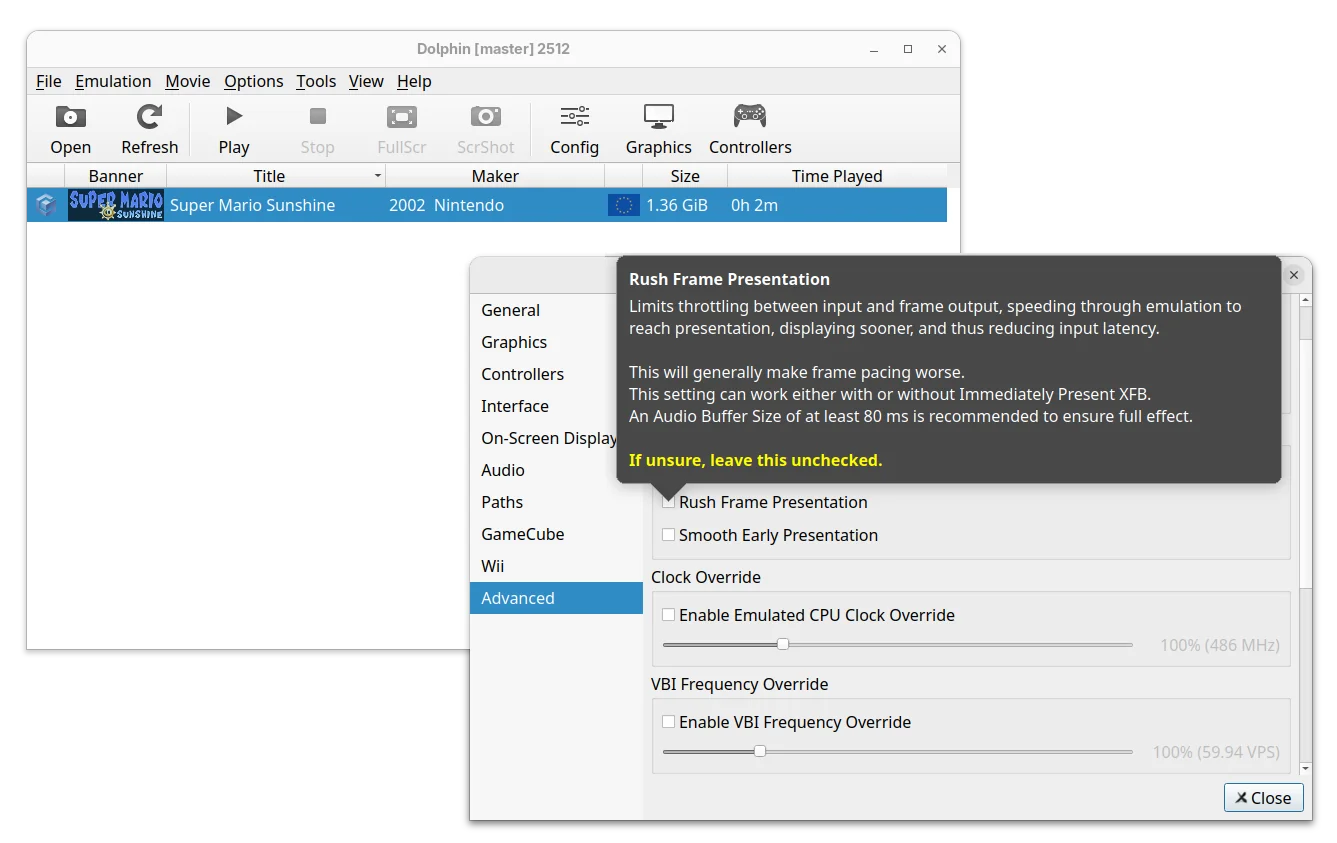
Both options are available in the Advanced settings page, where, a new “Reset All Settings” button is added to restore everything to default, without manually deleting the Dolphin settings files.

For Linux and Windows, the new version added new Broadband Adapter (BBA) IPC mode for the GameCube by using the cpp-ipc library. It allows running multiple Dolphin instances on the same machine to share memory and communicate directly without the need for a host network.

The emulator now uses Vera Sans Mono as default font for On-Screen Display, which looks clear regardless of DPI scaling. While, user can override it by adding any TrueType font to the “Load” folder of the User directory and name it “OSD_Font.ttf”.

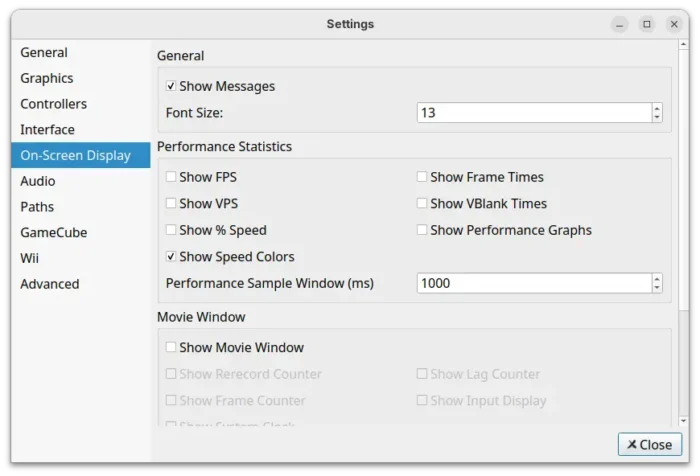
And, On-Screen Display settings page added more options to configure what to be displayed, font size, or if to disable them all together.
The 2512 version added a patch to detect and skip complex idle loops in Need for Speed: Nitro and Rayman Raving Rabbids, results in massive performance boosts, especially in lighter areas.

It also added small patches for Hulk (2003), Conduit 2, Driver: San Francisco, Monsters Inc. Scream Arena, Tetris Worlds, The Simpsons Hit & Run, etc games that either increased emulation performance or fixed specific issues.

For Android, the RetroAchievements support is finally added. User can log in and unlock achievements in supported GameCube games. However, some menus are incomplete, it may be best to have the RetroAchievements website open in the background for achievement lists and other things.

Other changes in Dolphin 2512 include:

  • Emulate Logitech Microphone with any standard PC microphone.
  • Add SDL Gamepad (Stock) profile to speed up GameCube controller mapping.
  • Make InetAToN function async to prevent stutter for online gaming.
  • Fix CSD/CID emulation. It now properly works with virtual SD cards up to 32GB in size.
  • Fix broken audio in NFL Blitz Pro.

For more about the release, see the official announcement.

Install Dolphin 2512

Dolphin provides official installer packages which are available to download via the link below:

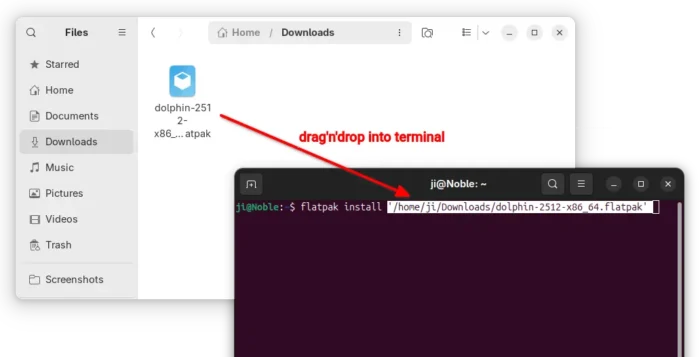
For Linux, it’s Flatpak package that runs in sandbox environment. Just download it, then run the command below in terminal to install it:

flatpak install /path/to/flatpak

Besides typing path to the flatpak manually, you may simply drag’n’drop it into terminal to auto insert the path.
For Ubuntu users who prefer the classic .deb package, I’ve built the package into this unofficial PPA for Ubuntu 22.04, Ubuntu 24.04, Ubuntu 25.04 and 25.10.

You may open terminal (Ctrl+Alt+T) and run the commands below one by one to add the PPA and install the emulator:

sudo add-apt-repository ppa:ubuntuhandbook1/dolphin-emu
sudo apt update
sudo apt install dolphin-emu

NOTE for Ubuntu 22.04 & Ubuntu 24.04, the PPA contains updated version of Vulkan loader library which is needed for building (and MAYBE properly running) Dolphin 2512, though they are NOT tested. Use it at your own risk!

  •  

MPV 0.41.0 Released with Improved Wayland Support (PPA Updated)

MPV, the popular command line media player, released new version 0.41.0 yesterday.

The new release of this free open-source media player greatly improved the Wayland support for Linux users. It added support for the color-management-v1 and wp-color-representation-v1 protocols helping ensure accurate color display for High Dynamic Range (HDR) content.

As well, it added tablet input and clipboard writing support for users on GNOME, KDE, etc desktop environments with wayland session.

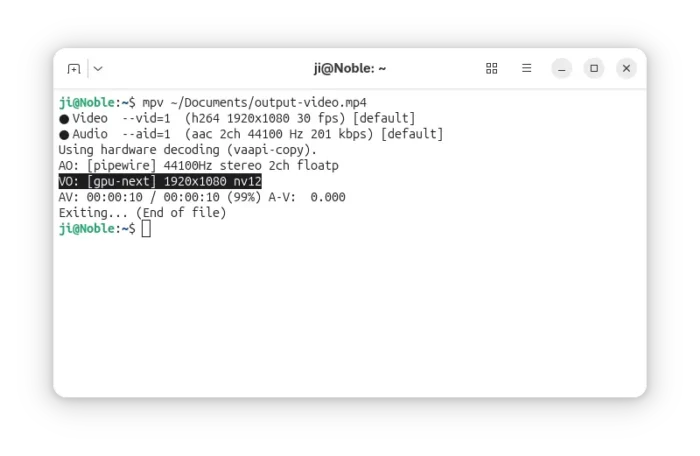
The 0.41.0 version now uses the libplacebo based gpu-next as default video output renderer instead of the previous gpu, which features overall performance improvements and better HDR and Wayland support.

It improved gpu-next with blend-subtitles=video option to force blend subtitles at the video’s native resolution, rather than the window or screen resolution.

And, it added options for the new default renderer to define the diffuse white and control subtitle peak for HDR output, and fill empty border areas with a blurred version of the video itself. It can as well respect ICC profile color space over any metadata, limit min_luma to 1000:1 contrast ratio in SDR mode, and control output colorspace metadata more precisely.

MPV 0.41.0 uses gpu-next by default

There are also new --sub-glyph-limit and --sub-bitmap-max-size libass caching options for the subtitle track, --hwdec-threads to set number of threads used for hardware decoding, and --bluray-angle to tell mpv which angle to use for Blu-ray discs contain scenes that can be viewed from multiple angles.

Other changes include:

  • Prefer vulkan hardware decoding over other APIs.
  • New context_menu.lua script for right-click context menus.
  • Ambient light support on Linux.
  • Add x11 clipboard backend.
  • Add d3d11 composition mode support for Windows.
  • Add built-in helpers to register mpv as a media app on Windows.
  • --sub-fix-timing to remove minor gaps or overlaps between subtitles.
  • Add default and forced flags to the track add commands.
  • Add options to control background tile appearance.

MPV 0.41.0 also includes many other improvements and numerous bug-fixes. See the Github releases page for details.

How to Install MPV 0.41.0 in Ubuntu

MPV does not provide official installer packages, but has a list of third-party builds for Windows, Linux, and macOS in its website.

For Linux, besides building from the source, you may keep an eye on the community maintained Flatpak package and Snap package, though they are not updated at the moment of writing.

For Ubuntu and Linux Mint users who prefer native .deb package, I’ve built mpv 0.41.0 into this unofficial PPA for Ubuntu 22.04, Ubuntu 24.04, Ubuntu 25.04 and 25.10.

To add the PPA and install MPV, run commands below in terminal (Ctrl+Alt+T) one by one:

sudo add-apt-repository ppa:ubuntuhandbook1/mpv
sudo apt update
sudo apt install mpv

NOTE for Ubuntu 22.04, the system wayland version is outdated that does not match the minimum requirement. The mpv 0.41.0 package in PPA for 22.04 was built with Wayland feature disabled.

  •  

Darktable 5.4.0 Released with Multi-Workspaces & Better Wayland Support

Darktable, the free open-source photography app and raw developer, released new major 5.4.0 version yesterday.

The new release of this GTK software introduced multiple workspace support. Like “user profile” feature for Firefox, user can now add custom workspaces at app start for Darktable. And, each workspace has it’s own database and configuration file.

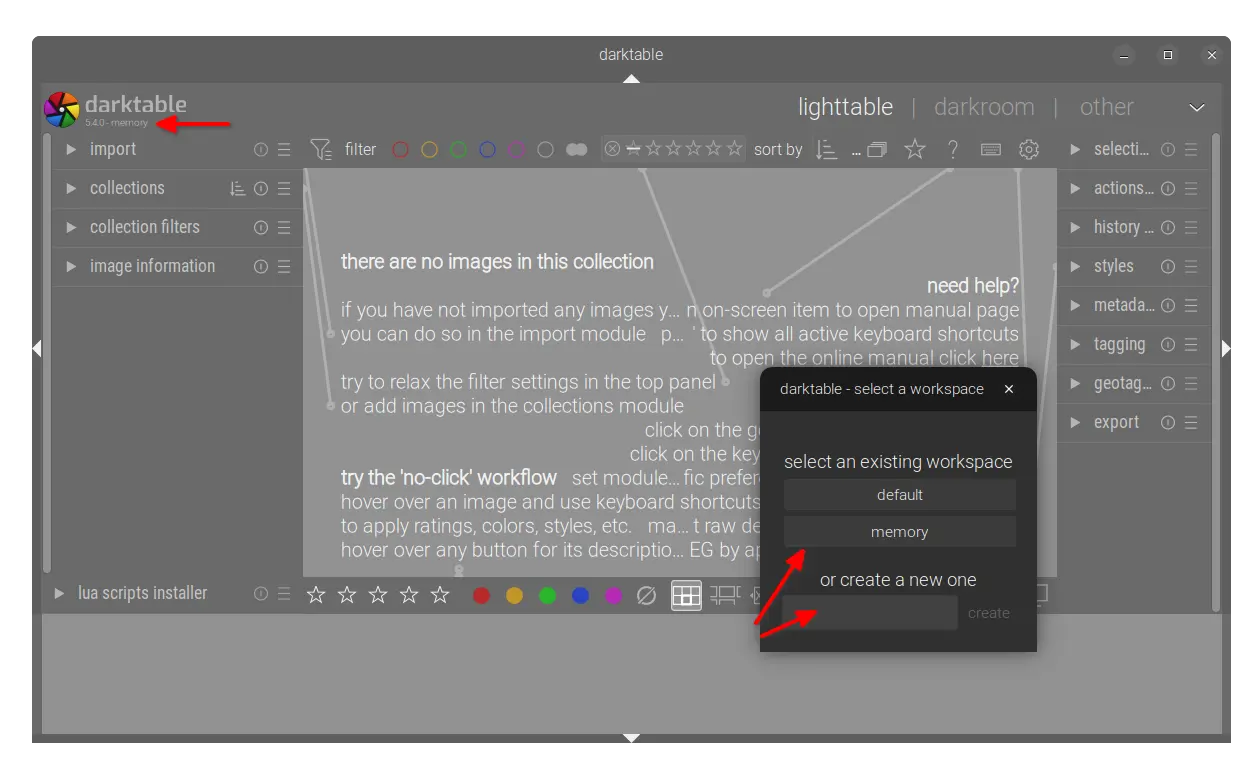
Simply go to Preferences -> storage -> database and enable “allow for multiple workspaces” option. Then, on every start of Darktable, it shows a small window for choosing or adding a new workspace.

As you see in the screenshot below, it includes “default” workspace which is the one created on first launch, “memory” workspace that keeps database in memory and discards once you close the app window. And, you can create (or delete at next launch) as many workspaces as you want.

For a non-default workspace, the app window will display the workspace name in top-left alongside the version number.

The release added new Capture Sharpening in the demosaic module, which tries to recover details lost due to in-camera or lens blurring. See the user-manual page for more about it.

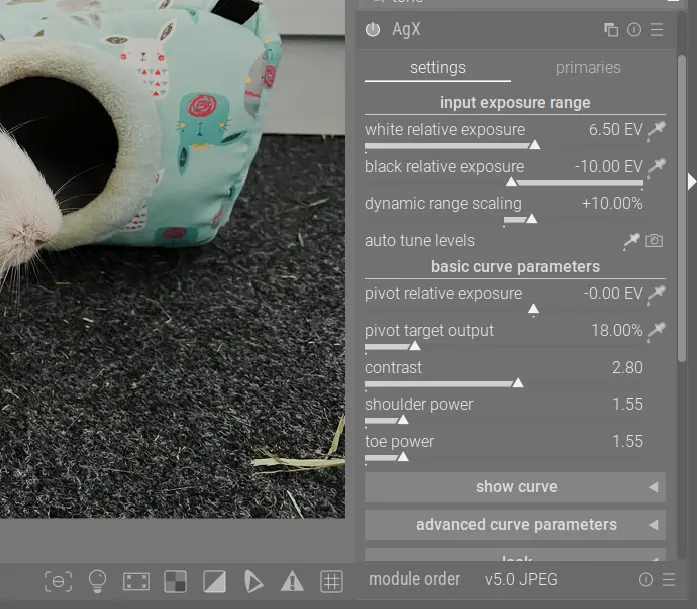
It also added the new AgX module to apply a tone mapping curve, which is inspired by Blender’s AgX tone mapper. The new module provides more extensive color output controls than Sigmoid, and it allows to set exposure white and black points explicitly similar to Filmic RGB. And, it includes user adjustable pivot point, contrast around this pivot, and contrast in highlights/shadows.

For Linux with GNOME, KDE, or other desktops with Wayland, Darktable received many fixes and improvements. It now should work on Wayland as good as it was on X11.

As well, there are many new cameras support. They include the base support for Canon EOS R1 / R5 Mark II (needs LibRaw >= 0.22-PreRC1), Canon PowerShot D10 (DNG) / S100V / S2 IS (DNG), Fujifilm FinePix HS33EXR, Fujifilm X-E5 (compressed), Kodak DCS Pro SLR/c, Kodak P712, Leica D-Lux 8, Leica M EV1 (DNG), Leica Q3 Monochrom (DNG), Leica X-E (Typ 102) (DNG), Nikon Z fc, OM System OM-5 Mark II, Olympus SP550UZ/SP565UZ, Panasonic DC-S1M2/DC-S1M2ES (3:2), Ricoh GR IV (DNG), Ricoh GX200 (DNG), Sony DSC-RX1RM3, and Sony ZV-1M2.

Other changes include:

  • Add the standard “Window” menu to the application menu bar on macOS.
  • Add new keyboard shortcuts:
    • c to toggle crop box.
    • e to set exposure compensation.
    • alt - r to set image rotation.
    • alt - [ and alt - ] to fine rotation adjustment.
  • 5% to 20% speed up for the Lut3D module.
  • Support hierarchical presets for utility modules and processing modules.
  • Dual demosaicing now works also in tiling mode.
  • Add RGB percent display in the color picker module.
  • Remove the “overwrite” option from the lighttable history stack module.
  • Add manual chroma subsampling control for AVIF export.
  • Update LUA API to v9.6.0.
  • UX/UI and performance improvements, as well as numerous bug-fixes.

How to Install Darktable 5.4.0

The official release note as well as the installer packages for Linux, Windows, and macOS are available in the Github releases via the link below:

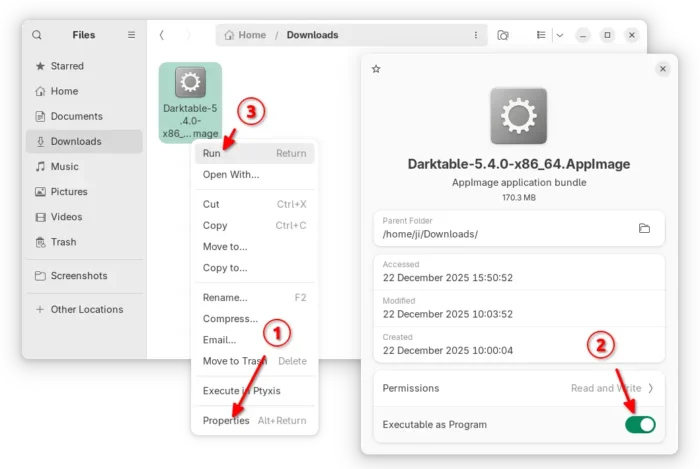
For Linux on AMD/Intel platform, select download the AppImage. Then, add executable permission from file properties. Finally, click Run to launch the software.

Tips: Ubuntu 22.04 and higher need to install libfuse2 package via the command below (Ctrl+Alt+T) for appimage support.

sudo apt install libfuse2

There’s also community maintained Flatpak package for Linux on both amd64 (AMD/Intel) and arm64 (e.g., RasPi and Snapdragon X), though it runs in sandbox environment.

For Debian, Ubuntu, Fedora, etc Linux Distributions who prefer the native .deb and .rpm packages, there’s an official OBS repository (server’s done at the moment of writing) available for choice.

And, I’ve built the new release package into this unofficial PPA for Ubuntu 22.04, Ubuntu 24.04, Ubuntu 25.04 and 25.10 users on amd64 and arm64.

To add the PPA and install darktable 5.4.0, run commands in terminal (Ctrl+Alt+T) one by one:

sudo add-apt-repository ppa:ubuntuhandbook1/darktable
sudo apt update
sudo apt install darktable

Note for Ubuntu 22.04, there’s neither HEIF nor JXL support because the system dependency libraries are old. Please leave comment below if you do need the feature.

  •  
❌