โŒ

Normal view

Firefox Adding Google Lens, Stock Data, AI โ€œPage Buddyโ€ Features

12 September 2025 at 01:33

Firefox logo with a white outline centred on a colourful gradient background.A rundown of new features in development for Firefox, including visual image search, more sponsored results in the URL bar, and (of course) more AI integration.

You're reading Firefox Adding Google Lens, Stock Data, AI โ€œPage Buddyโ€ Features, a blog post from OMG! Ubuntu. Do not reproduce elsewhere without permission.

Stop Wallpaper Moving when Switching Workspace in Ubuntu 24.04

By:Ji m
12 September 2025 at 00:00

For GNOME users who donโ€™t like the default workspace switch animation, hereโ€™s an extension that can help!

When switching workspace (virtual desktop), the transition acts like sliding the desktop wallpaper along with the apps. This is โ€œSliding Panelโ€ effect thatโ€™s also (seems to be) default in Windows and macOS.

If you like, itโ€™s easy to use Android/iOS style swipe left or right switching home screen pages animation. In the case, the wallpaper is static during transitions, it works like only switching the app windows on your desktop.

ย 

This can be implemented by an extension called Static Workspace Background. And, hereโ€™s how to install it in Ubuntu 24.04, 25.04 and 25.10.

NOTE: This extension only works in Ubuntu and other Linux with GNOME Desktop!

Option 1: Install the Extension in Ubuntu 25.04 / 25.10

The extension so far supports GNOME 48 and 49, though itโ€™s working good in my case in GNOME 46.

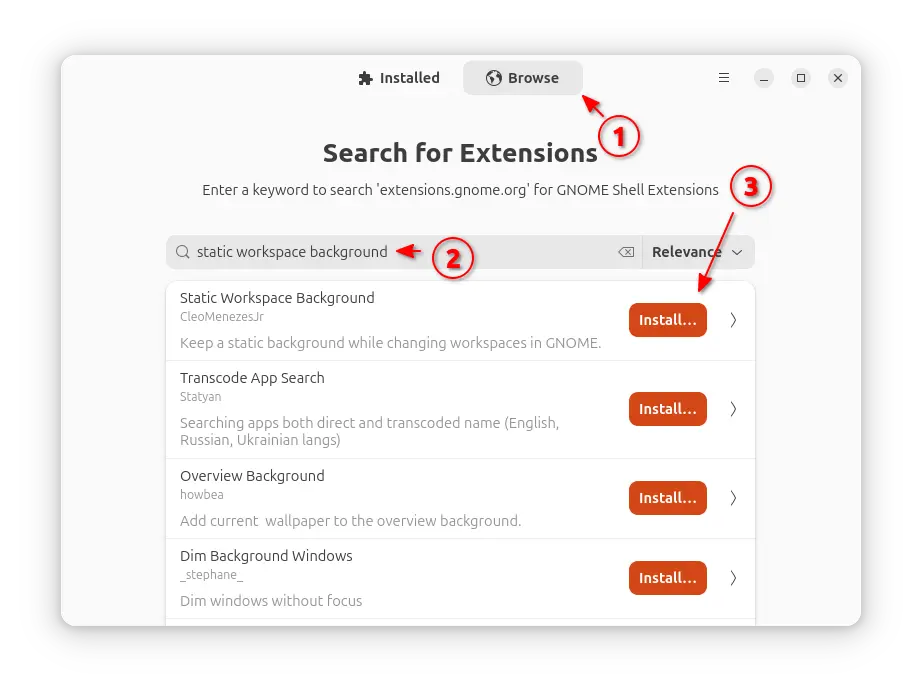
For Ubuntu 25.04 and 25.10, first launch App Center then search & install Extension Manager (filter by Debian package).

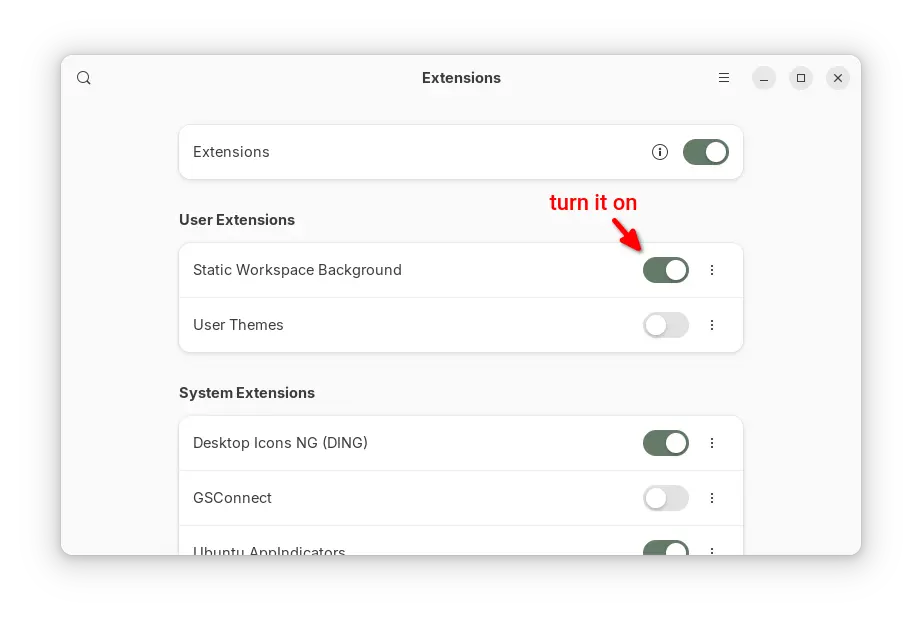
Next, use Extension Manager to search & install the โ€œStatic Workspace Backgroundโ€ extension under Browse tab and done!

Install via Extension Manager

Option 2: Install it in Ubuntu 24.04

The extension (version 49.0) so far works good in my case in Ubuntu 24.04 with GNOME 46, though itโ€™s not officially supported.

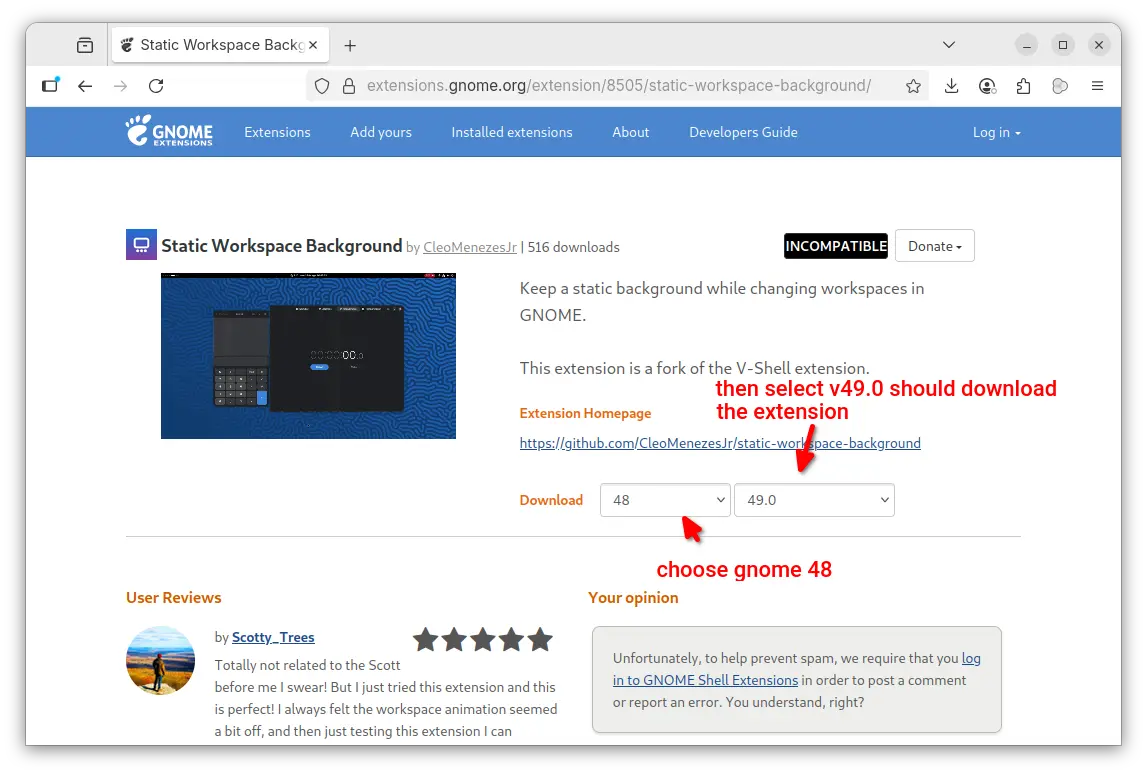
1. First, go to the extension page in extensions.gnome.org (EGO):

In the โ€œDownloadโ€ section of the page, choose a Gnome version (e.g., v48) and select extension version 49.0 to download it.

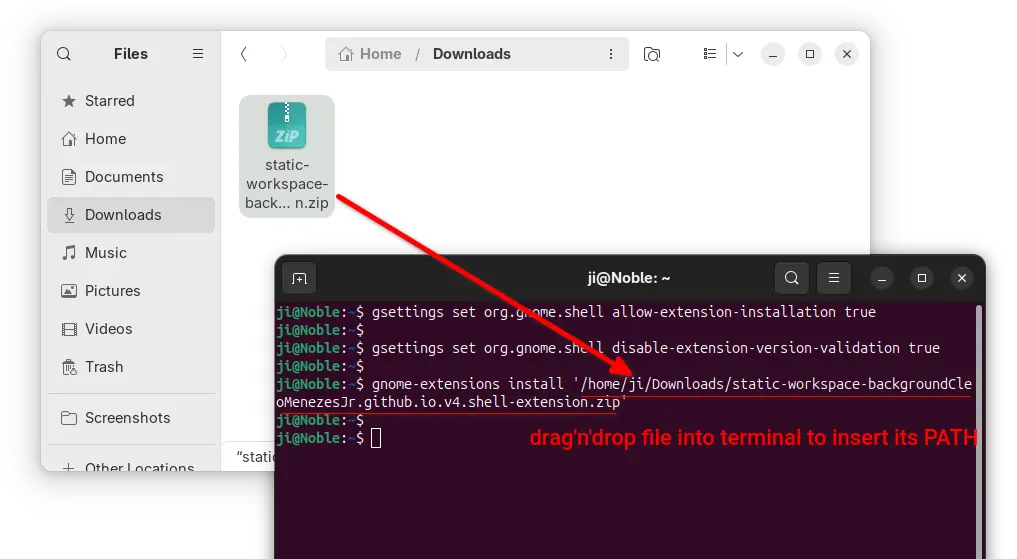
2. Once you downloaded the extension package (usually .zip archive), press Ctrl+Alt+T to open terminal and run commands below one by one to install.

  • First, run command to make sure your GNOME is configured to allow users to install extensions in their home folder, though itโ€™s usually enabled by default.
    gsettings set org.gnome.shell allow-extension-installation true
  • Next, disable the validation of extension version compatibility by running command:
    gsettings set org.gnome.shell disable-extension-version-validation true
  • Finally, install the extension (.zip archive you just downloaded) via command:
    gnome-extensions install /path/to/zip-archive

    Here replace /path/to/zip-archive by dragโ€™nโ€™dropping it from file manager into terminal!

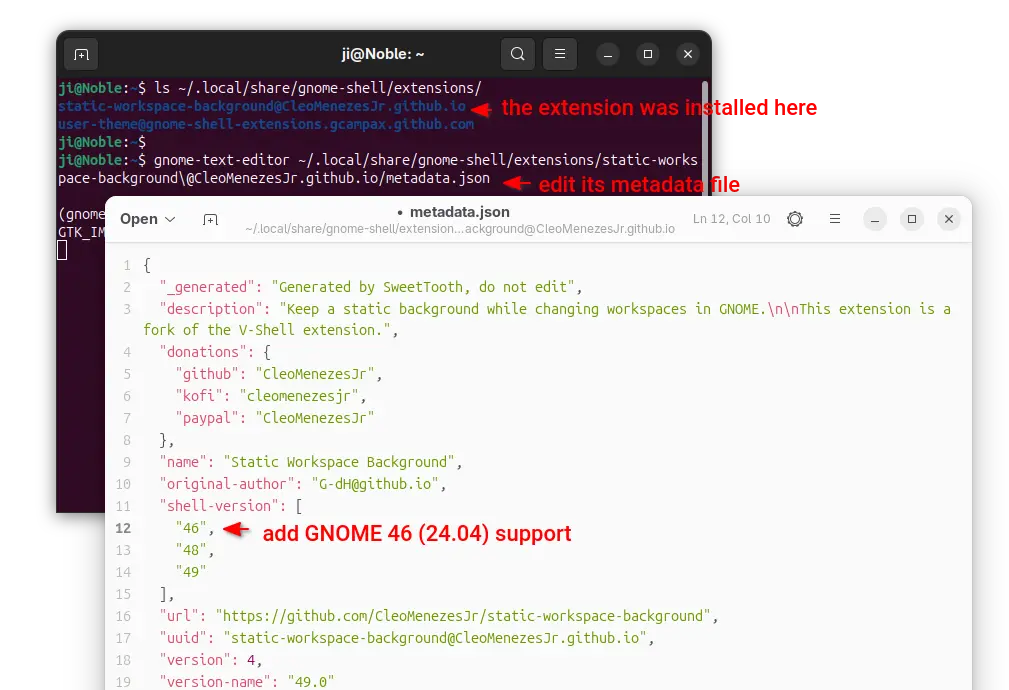
3. (Optional) After that, you have the extension installed to ./local/share/gnome-shell/extensions directory.

In case you want to re-enable the validation of extension version afterwards, run the command below to edit the metadata of that extension:

gnome-text-editor ~/.local/share/gnome-shell/extensions/static-workspace-background\@CleoMenezesJr.github.io/metadata.json

When file opens, either add โ€œ46โ€ in โ€œshell-versionโ€ section or simply replace any GNOME version (e.g., 49) to 46.

Then save the file, and re-enable the extension version compatibility validation if you want:

gsettings reset org.gnome.shell disable-extension-version-validation

4. Finally, log out and back in. Launch either โ€œExtension Managerโ€ or โ€œGnome Extensionsโ€ app (both available in App Center) to enable the extension.

Warzone 2100 Released 4.6.0 with Spectator Host Mode

By:Ji m
11 September 2025 at 19:50

Warzone 2100, the free open-source 3D real-time strategy game, released new major 4.6.0 version few days ago.

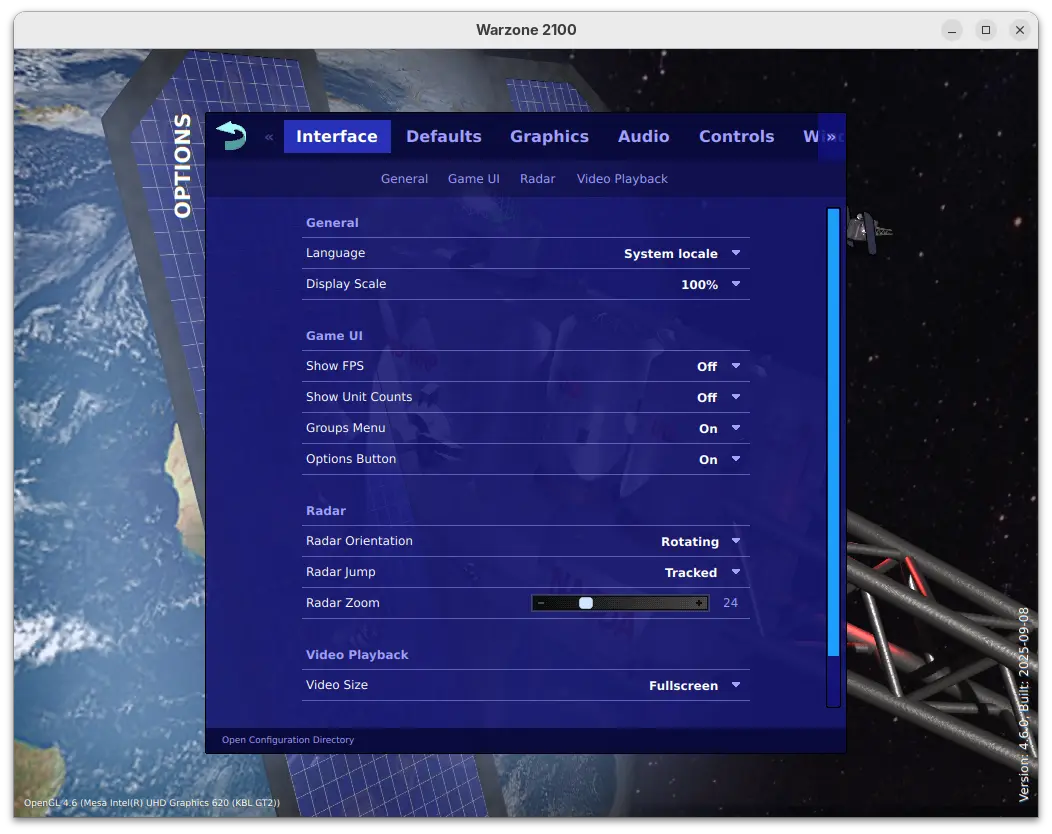
This is a big release that features revamped options menu. The options menu now has a clean design with reorganized options, which as well introduced many new toggle options, such as show FPS / Unit Counts, Group Reporting, Radar Zoom, default AI and more.

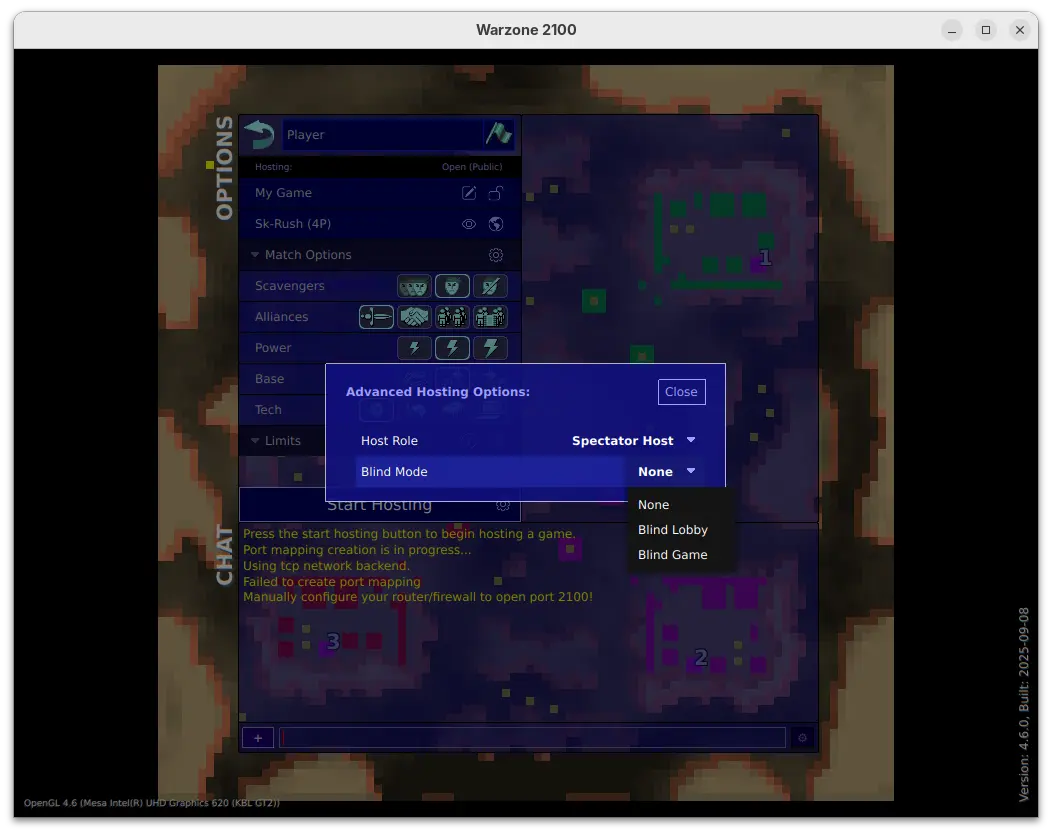
For multi-player mode, the release added option to start hosting in Spectator Host mode, in which case the host is a spectator in the game.

When start hosting in this mode, it also allows to set blind lobby mode to hide playersโ€™ true identities until the game starts, or blind game to hide playersโ€™ true identities until the game ends, while the host (as a spectator) can see them in both modes.

The 4.6.0 release also massively improved high-quality water effects, improved the performance for loading, path-finding, target selection, networking, and high-object-count situations.

It revamped Lobby game browser with new design, more filtering options, more room information, and increased responsiveness. And, it now automatically attempts multiple graphics backends on first-run, and defaults to Vulkan in more cases, when possible.

For Windows, it now provides single .exe installer (instead of three) to install the game on all the X86, X86_64, and ARM64 computers, along with option to choose install for either all users or current user only.

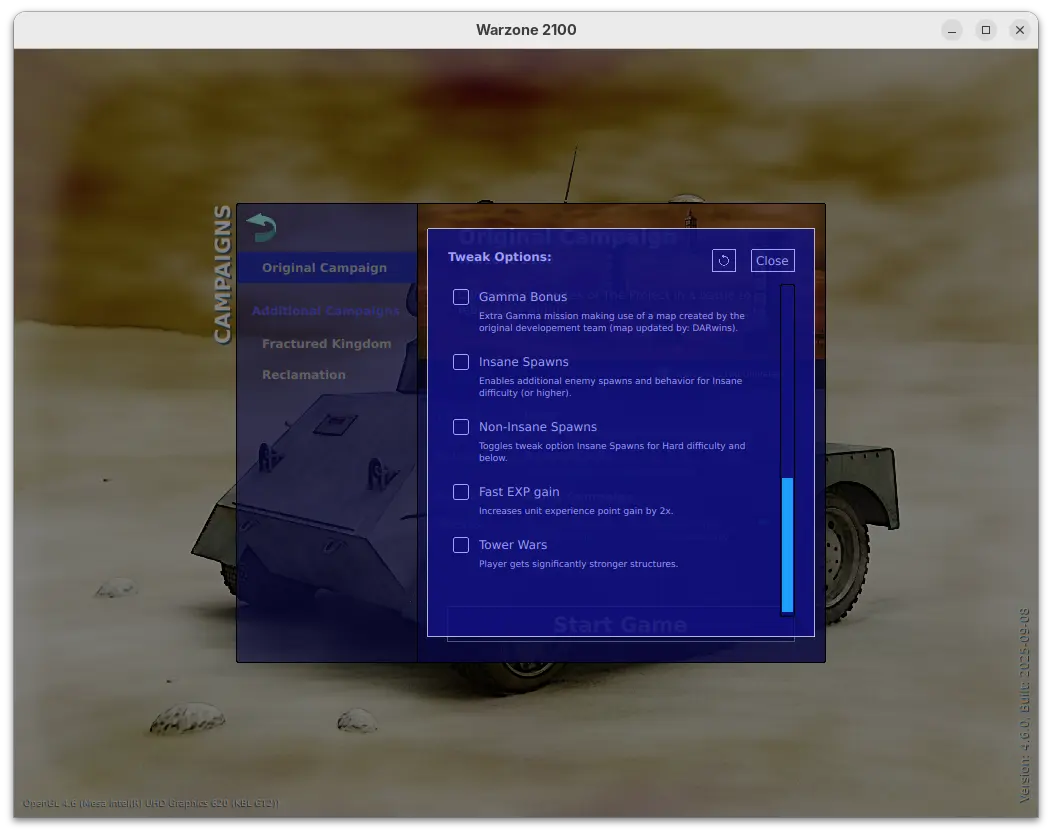
Warzone 2100 also introduced many additional tweak options for the Original Campaign. They include:

  • Infinite Time โ€“ missions have no timer when possible.
  • Victory Hints โ€“ displays a console message every few minutes showing victory related information.
  • Finale Fun โ€“ activate Final Gamma mission bonus content.
  • Insane Spawns โ€“ enable additional enemy spawns and behavior for Insane difficulty.
  • Non-Insane Spawns โ€“ toggle Insane Spawns for Hard difficulty and below.
  • Fast EXP gain โ€“ 2x unit experience point gain.
  • TowerWars โ€“ player gets significantly stronger structures.

There are as well many in game changes, including:

  • Bump repair spread area from 6 to 10 tiles.
  • Update Fractured Kingdom to v1.4.
  • Give ACs some basic splash damage.
  • Specify missing research names so research appears in the Stats objects.
  • Add โ€œDefending Your Baseโ€ guide topic.
  • Add Particle Gun Laser weapon.
  • Adjust Emplacement-PlasmaCannon cost 200 -> 350, buildPoints 400 -> 500.
  • Increase spinAngle for Tracks in MP 45->65 to allow better unit packing.

For more, see the official release note.

Download & Install Warzone 2100 4.6.0

The official installers for Linux, macOS, ans Windows are available to download at the link below (under Assets section):

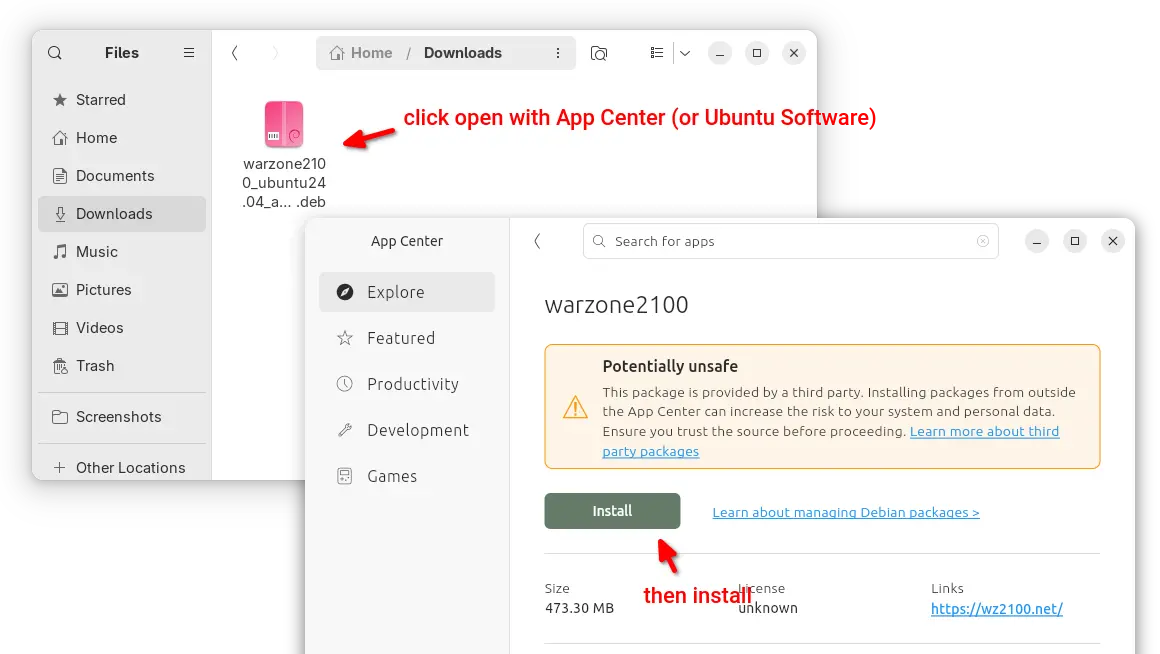
For Ubuntu 22.04 and Ubuntu 24.04 on modern Intel/AMD platform, select download the .deb package then click open & install via either Ubuntu Software or App Center.

Warzone 2100 DEB package

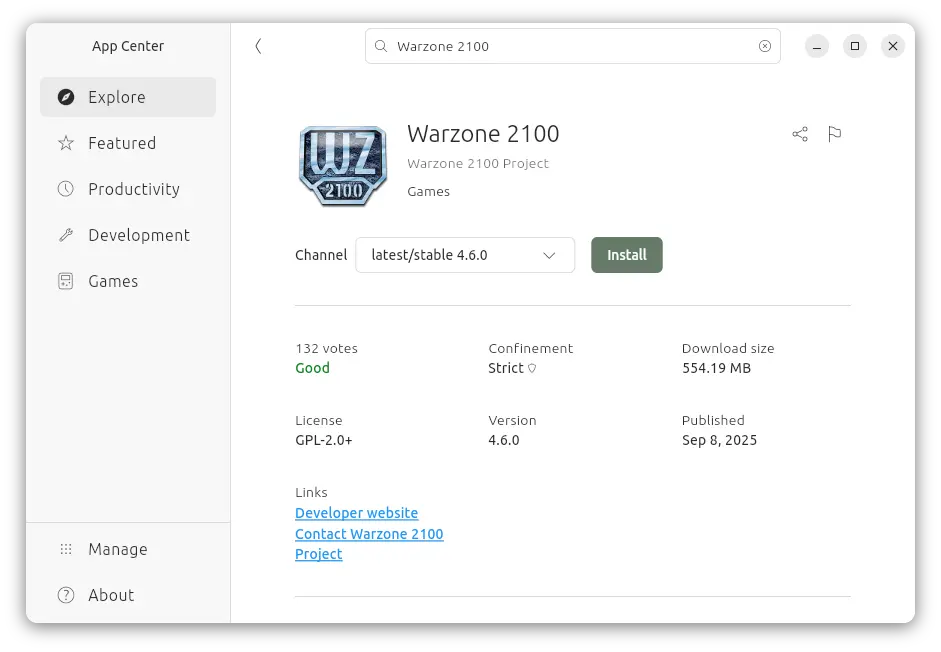
For all Ubuntu editions on Intel/AMD and ARM64, user may also choose install the Snap package (runs in sandbox) from App Center or Ubuntu Software.

warzone 2100 Snap package

While, thereโ€™s also Flatpak package (also runs in sandbox) available to install in most Linux desktops.

Distribution Release: Voyager Live 13

11 September 2025 at 17:23
The DistroWatch news feed is brought to you by TUXEDO COMPUTERS. Rodolphe Bachelart has announced the release of Voyager Live 13, the latest version of the project's Debian-based desktop Linux distribution featuring a customised GNOME desktop: "I present to you Voyager 13 'Debian', based on Debian 13 'Trixie'. It features all the updates and almost all the new features....

How to Extend Root Partition in Linux

The post How to Extend Root Partition in Linux first appeared on Tecmint: Linux Howtos, Tutorials & Guides .

As a Linux user, you may eventually run into a situation where your root partition (/) runs out of space,

The post How to Extend Root Partition in Linux first appeared on Tecmint: Linux Howtos, Tutorials & Guides.

Distribution Release: GLF OS 25.05

11 September 2025 at 05:47
The DistroWatch news feed is brought to you by TUXEDO COMPUTERS. Gaming Linux France has announced the first stable release of GLF OS, a NixOS-based Linux distribution for gamers. Called "Omnislash", the new release attempts to facilitate the switch from Windows to Linux with guided installation, pre-installed graphics drivers, integrated gaming applications and latency-reduction optimisations. "What does GLFโ€ฏOSโ€ฏ'Omnislash' bring....

Distribution Release: Univention Corporate Server 5.2-3

10 September 2025 at 21:04
The DistroWatch news feed is brought to you by TUXEDO COMPUTERS. The Univention team have announced the release of Univention Corporate Server (UCS) 5.2-3, the third update in the 5.2 series. The new release allows for improved organization of users and computers in the organization's directory structure. "The Active Directory Connector was extended several months ago with advanced filter....

Distribution Release: Luberri Linux 25.1

10 September 2025 at 19:03
The DistroWatch news feed is brought to you by TUXEDO COMPUTERS. Alex Gabilondo has announced the release of Luberri Linux 25.1, the latest version of the project's educational distribution based on Linux Mint and localised into the Basque language. It is intended primarily for Basque-speaking users, although a distribution supports Spanish as well. The release announcement (in Basque) provides....

Spotify Finally Adds Lossless Audio Streaming Option

11 September 2025 at 06:48

Spotify logo on a blue background.Spotify Premium users can now stream music in lossless audio quality at no extra cost. The desktop Spotify Linux app is likely to add support for it too.

You're reading Spotify Finally Adds Lossless Audio Streaming Option, a blog post from OMG! Ubuntu. Do not reproduce elsewhere without permission.

Ubuntu 25.10 Switches to Dracut by Default

11 September 2025 at 01:57

Ubuntu 25.10 daily builds switch to Dracut by default, after Feature Freeze Exception granted to replace initramfs-tools for a more modern boot process.

You're reading Ubuntu 25.10 Switches to Dracut by Default, a blog post from OMG! Ubuntu. Do not reproduce elsewhere without permission.

Stop Wallpaper Moving When You Switch Workspace in GNOME

10 September 2025 at 20:47

Stop distracting wallpaper movement in GNOME Shell workspace transitions with Static Workspace Background extension, keepings the background fixed.

You're reading Stop Wallpaper Moving When You Switch Workspace in GNOME, a blog post from OMG! Ubuntu. Do not reproduce elsewhere without permission.

Distribution Release: Clear NDR 1.0

10 September 2025 at 09:12
The DistroWatch news feed is brought to you by TUXEDO COMPUTERS. Stamus Networks has announced the release of the inaugural version of Clear NDR (formerly SELKS), the company's, Debian-based Linux distribution with focus on security and threat detection with the open-source Suricata threat-detection engine: "Stamus Networks, a global provider of high-performance network-based threat detection and response systems, today announced....

Linux 6.17 Kernel Arrives in Ubuntu 25.10 Daily Builds

10 September 2025 at 04:46

Linux kernel 6.17 is now baked-in to the latest Ubuntu 25.10 daily builds, which means this will be the kernel version the next Ubuntu releases ships with.

You're reading Linux 6.17 Kernel Arrives in Ubuntu 25.10 Daily Builds, a blog post from OMG! Ubuntu. Do not reproduce elsewhere without permission.

SuperTuxKart 1.5 RC2 added GUI option to Choose Vulkan or DirectX 9

By:Ji m
9 September 2025 at 23:12

SuperTuxKart, the 3D kart racing game, announced the second release candidate for the next 1.5 release few days ago.

Due to inner team disagreement, the release of version 1.5 was delayed. And, it explained the reason by announcing SuperTuxKart Evolution (the name of the next major release) few days ago.

Now the problem has been fixed. And, SuperTuxKart 1.5-rc2 is available as the first update afterwards.

The new release candidate introduced a graphical option in โ€œGraphicsโ€ settings page, allowing to easily switch rendering driver to Vulkan or DirectX9 (Windows only), without having to edit the configuration file. While the default is still OpenGL.

In addition, the release migrated the online services to a new, more powerful server, which fixed occasional server disconnect issue due to sporadic overloads and improved server list loading performance.

As well, a new forum is introduced for sharing your tips, artistic creations, and discussing about the gameโ€™s development. For more, see the official announcement.

Download SuperTuxKart 1.5 RC2

The official packages for Windows, Linux, macOS, Switch, and Android, are available to download via the link below:

For Linux, select download the .tar.gz tarball depends on your CPU. They include x86_64 for modern Intel/AMD, x86 for old 32-bit CPU, arm64 for 64-bit ARM (e.g., Snapdragon processors), 32-bit armv7, and RISC-V processors.

If you donโ€™t even know your CPU processor architecture type, open terminal and run uname -m command to tell.

After downloaded the tarball, decompress, then run the run_game.sh file to launch the game and enjoy!

Distribution Release: MocaccinoOS 25.09

9 September 2025 at 02:30
The DistroWatch news feed is brought to you by TUXEDO COMPUTERS. MocaccinoOS 25.09, an updated build of the project's minimalist, Gentoo-based Linux distribution with a custom package manager called "Luet", has been released. The new build continues to be available as a set of live images featuring GNOME, KDE Plasma, MATE and Xfce desktops: "We are excited to announce....
โŒ