❌

Normal view

Kernel 6.15.4 Performance Tuned, Networking Polished, Stability Reinforced

Kernel 6.15.4 Performance Tuned, Networking Polished, Stability Reinforced

Introduction

In the life cycle of any kernel branch, patch releases, those minor β€œ.x” updates, play a vital role in refining performance, patching regressions, and ironing out rough edges. Kernel 6.15.4 is one such release: it doesn’t bring headline features, but focuses squarely on stabilizing and optimizing the 6.15 series with targeted fixes in performance and networking.

While version 6.15 already introduced several ambitious changes (filesystem improvements, networking enhancements, Rust driver infrastructure, etc.), the 6.15.4 update doubles down on making those changes more robust and efficient. In this article, we'll walk through the most significant improvements, what they mean for systems running 6.15.*, and how to approach updating.

Release Highlights

The official announcement of Kernel 6.15.4 surfaced around late June 2025.Β The release includes:

  • A full source tarball (linux-6.15.4.tar.xz) and patches.

  • Signature verification via PGP for integrity.

  • A changelog/diff summary comparing 6.15.3 β†’ 6.15.4.

This update is not a major feature expansion; it’s a refinement release targeting performance regressions, network subsystem reliability, and bug fixes that emerged in prior 6.15.* builds.

Performance Enhancements

Because 6.15 already brought several ambitious changes to memory, I/O, scheduler, and mount semantics, many of the improvements in 6.15.4 are about smoothing interactions, avoiding regressions, and reclaiming performance in corner cases. While not all patches are publicly detailed in summaries, we can infer patterns based on what 6.15 introduced and what β€œperformance patches” generally target.

Memory & TLB Optimizations

One often-painful cost in high-performance workloads is flushing translation lookaside buffers (TLBs) too aggressively. Kernel 6.15 had already begun to optimize broadcast TLB invalidation using AMD’s INVLPGB (for remote CPUs) to reduce overhead in multi-CPU environments. In 6.15.4, fixes likely target edge cases or regressions in those mechanisms, ensuring TLB invalidation is more efficient and consistent.

Additionally, various memory management cleanups, object reuse, and page handling improvements tend to appear in patch releases. While not explicitly documented in the public summaries, such fixes help reduce fragmentation, locking contention, and latency in memory allocation.

Python 3.13.5 Patch Release Packed with Fixes & Stability Boosts

Python 3.13.5 Patch Release Packed with Fixes & Stability Boosts

Introduction

On June 11, 2025, the Python core team released Python 3.13.5, the fifth maintenance update to the 3.13 line. This release is not about flashy new language features, instead, it addresses some pressing regressions and bugs introduced in 3.13.4. The β€œ.5” in the version number signals that this is a corrective, expedited update rather than a feature-driven milestone.

In this article, we’ll explore what motivated 3.13.5, catalog the key fixes, review changes inherited in the 3.13 stream, and discuss whether and how you should upgrade. We’ll also peek at implications for future Python releases.

What Led to 3.13.5 (Release Context)

Python 3.13 β€” released on October 7, 2024 β€” introduced several significant enhancements over 3.12, including a revamped interactive shell, experimental support for running without a Global Interpreter Lock (GIL), and preliminary JIT infrastructure.

However, after releasing 3.13.4, the maintainers discovered several serious regressions. Thus, 3.13.5 was accelerated (rather than waiting for the next regular maintenance release) to correct these before they impacted a broader user base. In discussions preceding the release, it was noted the Windows extension module build broke under certain configurations, prompting urgent action.

Because of this, 3.13.5 is a β€œrepair” release β€” its focus is bug fixes and stability, not new capabilities. Nonetheless, it also inherits and stabilizes many of the improvements introduced earlier in 3.13.

Key Fixes & Corrections

While numerous smaller bugs are resolved in 3.13.5, three corrections stand out as primary drivers for the expedited update:

GH-135151 β€” Windows extension build failure

Under certain build configurations on Windows (for the non-free-threaded build), compiling extension modules failed.Β This was traced to the pyconfig.h header inadvertently enabling free-threaded builds.Β The patch restores proper alignment of configuration macros, ensuring extension builds succeed as before.

GH-135171 β€” Generator expression TypeError delay

In 3.13.4, generator expressions stopped raising a TypeError early when given a non-iterable. Instead, the error was deferred to the time of first iteration. 3.13.5 restores the earlier behavior of raising the TypeError at creation time when the supplied input is not iterable. This change avoids subtler runtime surprises for developers.

Ubuntu 25.10 No Longer Includes Startup Applications Tool

27 September 2025 at 00:40

A hand is about to drop a blue application icon into a trash can, symbolizing the action of deleting an app. The background shows various app icons.The way to autostart applications in Ubuntu has changed, as the standalone 'Startup Applications' tool not included in 25.10 β€” don't panic; it's still possible.

You're reading Ubuntu 25.10 No Longer Includes Startup Applications Tool, a blog post from OMG! Ubuntu. Do not reproduce elsewhere without permission.

Pop!_OS 24.04 (with COSMIC Desktop) Just Hit Beta

26 September 2025 at 21:06

System76's new COSMIC desktop environment has hit beta, and available for testing in the new Pop!_OS 24.04 beta. Both are available to download right now.

You're reading Pop!_OS 24.04 (with COSMIC Desktop) Just Hit Beta, a blog post from OMG! Ubuntu. Do not reproduce elsewhere without permission.

πŸ’Ύ

Distribution Release: ZimaOS 1.5.0

26 September 2025 at 18:53
The DistroWatch news feed is brought to you by TUXEDO COMPUTERS. IceWhale Technology has published ZimaOS 1.5.0, an updated release of the company's independently-developed, Linux-based operating system for personal servers and network-attached storage (NAS) devices. Apart from improvements and bug fixes, this release marks the launch of the project's commercial edition called "ZimaOS Plus": "Good News. ZimaOS hits 1,000,000+....

Meet the Coolest (and Most Expensive) Raspberry Pi Yet

25 September 2025 at 21:13

Raspberry Pi 500 plus keyboard with backlit keys and $200 price tag.Raspberry Pi today unveiled the new Raspberry Pi 500+ β€” a β€˜premium’ version of its compact keyboard PC that uses mechanical switches, RGB backlighting and is pre-fitted with an SSD. β€œRaspberryΒ PiΒ 500+ puts the power of RaspberryΒ PiΒ 5’s quad-core 64-bit Arm processor and RP1 I/O controller into an ergonomic and tactile mechanical keyboard, combining uncompromising performance with 16GB RAM and 256GB NVMe storage,” they say. Those who dig the idea of the your keyboard being the PC β€” as someone old enough to have owned an Amstrad CPC 464, I do β€” but are too discerning to the quality of key clacking […]

You're reading Meet the Coolest (and Most Expensive) Raspberry Pi Yet, a blog post from OMG! Ubuntu. Do not reproduce elsewhere without permission.

Distribution Release: Neptune 9.0

26 September 2025 at 00:49
The DistroWatch news feed is brought to you by TUXEDO COMPUTERS. The Neptune project have announced a new release of its Debian-based distribution. The new version, Neptune 9.0, carries the codename "Maja" and ships with KDE Plasma 6.3. The distribution has also introduced a refreshed system installer and runs on version 6.12 of the Linux kernel. The release announcement....

Block Certain App Packages in Ubuntu 25.10 [New Apt Method]

By:Ji m
25 September 2025 at 21:53

This is a step by step guide shows how to block certain app packages from Ubuntu local repositories, PPAs, or other apt repositories in Ubuntu 25.10 and higher.

Previously, we can set package pin-priority to prevent from or prior to installing certain app packages. Now, in Debian/Ubuntu with apt 3.1+, a new method is available to include/exclude packages for specified apt sources (repositories).

Say you have a Ubuntu PPA or apt repository installed in Ubuntu. It contains many app packages, but you only need one or few of them. In the case, you may use the new method below to completely exclude all other packages from that repository, so they are not installable with any apt option or other graphical tool.

NOTE 1: This tutorial only works for classic .deb packages. Though, you may use the method to block snap and flatpak entirely.

NOTE 2: This tutorial needs apt 3.1+, meaning Debian Unstable/Testing or Ubuntu 25.10+.

Step 1: Find out what packages available in the repository

Before getting started, it might be helpful to first find out all the package names available in the target PPA or apt repository.

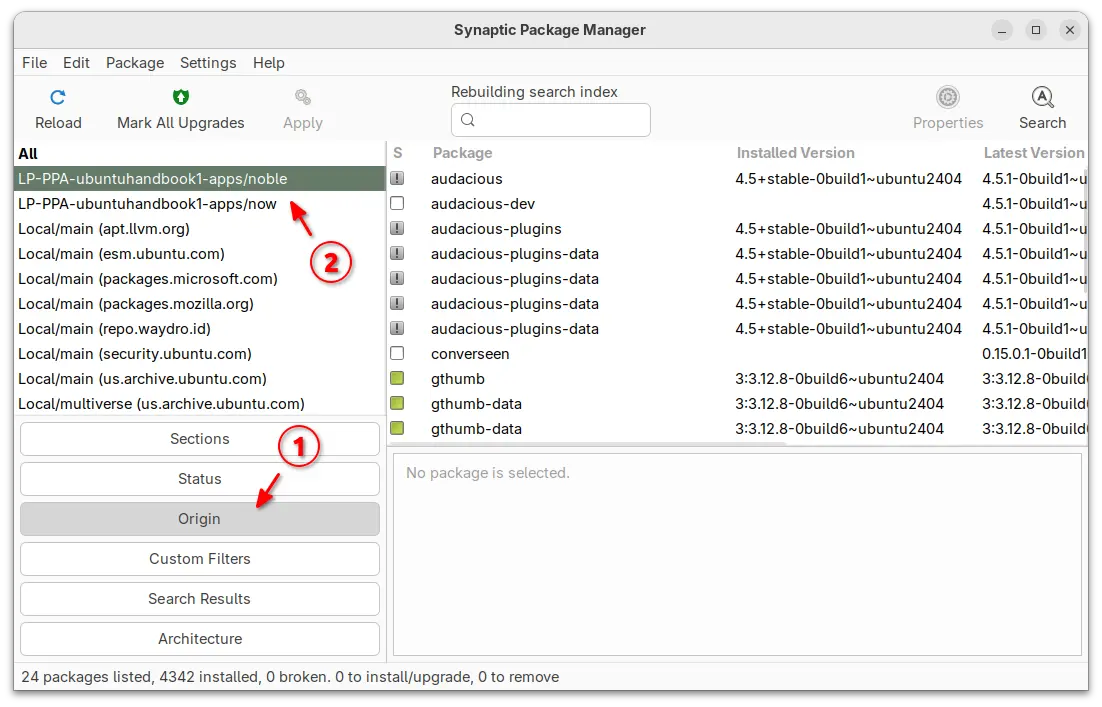
For Ubuntu desktop, you can simply install and launch Synaptic package manager. Then, choose β€œOrigin” in left and select the target repository to show all the packages.

For server without GUI, you may view the package index files instead.

  • First, run the command below to update package index:
    sudo apt update
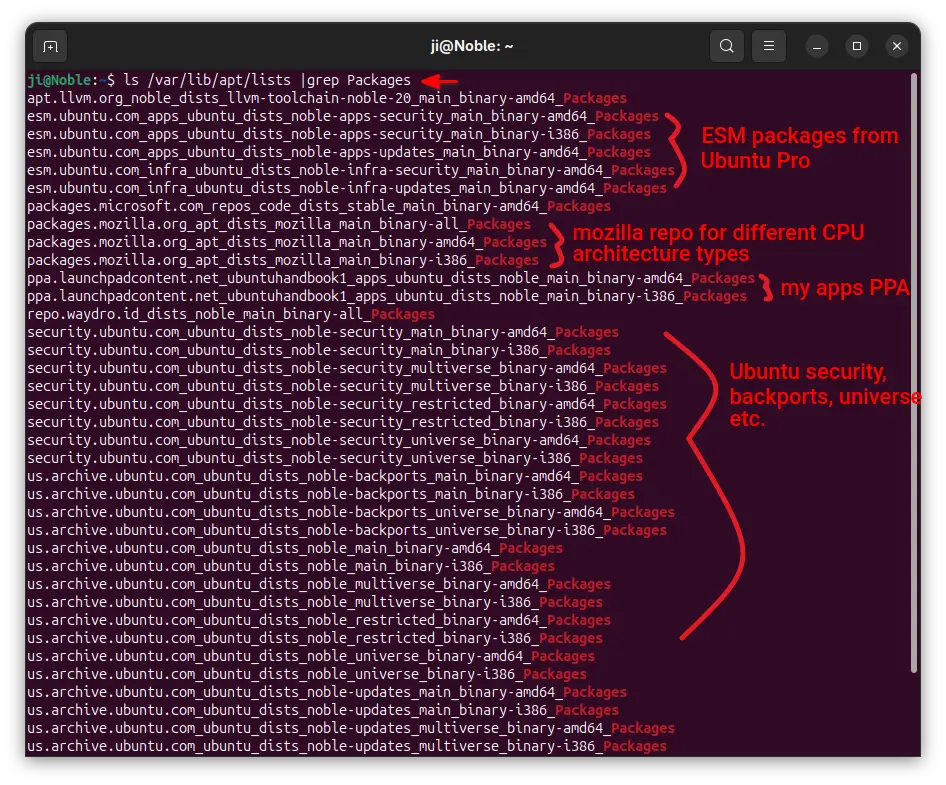
  • Next, print all the package index files under /var/lib/apt/lists directory:
    ls /var/lib/apt/lists/ |grep Packages

    The files contain the package names, their versions, origin, maintainers, sizes, and hash-code, etc information.

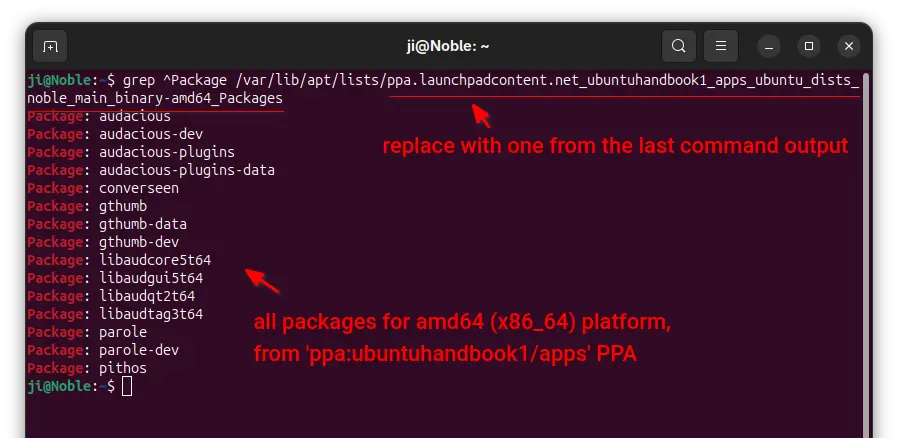
  • In last command output, find out the target file-name for your repository, then use the command below to filter and show only package names in it:
    grep ^Package /var/lib/apt/lists/ppa.launchpadcontent.net_ubuntuhandbook1_apps_ubuntu_dists_noble_main_binary-amd64_Packages

    Here you need to replace the long file-name with yours.

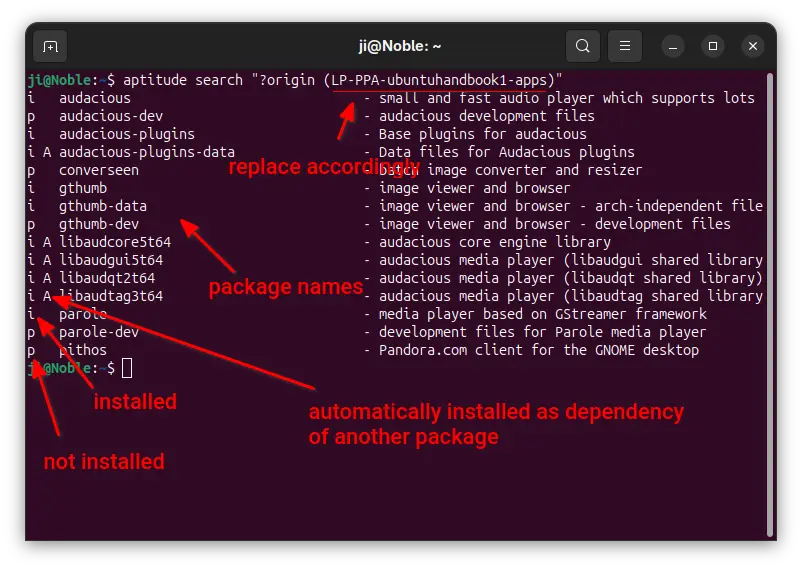
For choice, you may install aptitude, then use the command below instead to list all packages from target repository:

aptitude search "?origin (LP-PPA-ubuntuhandbook1-apps)"

Here replace LP-PPA-ubuntuhandbook1-apps accordingly, while ubuntuhandbook1 is PPA maintainer name, and apps is PPA name. For other repositories, run apt-cache policy |grep "o=" to list and get the target value of β€œo=”.

Step 2: Edit source files to block packages

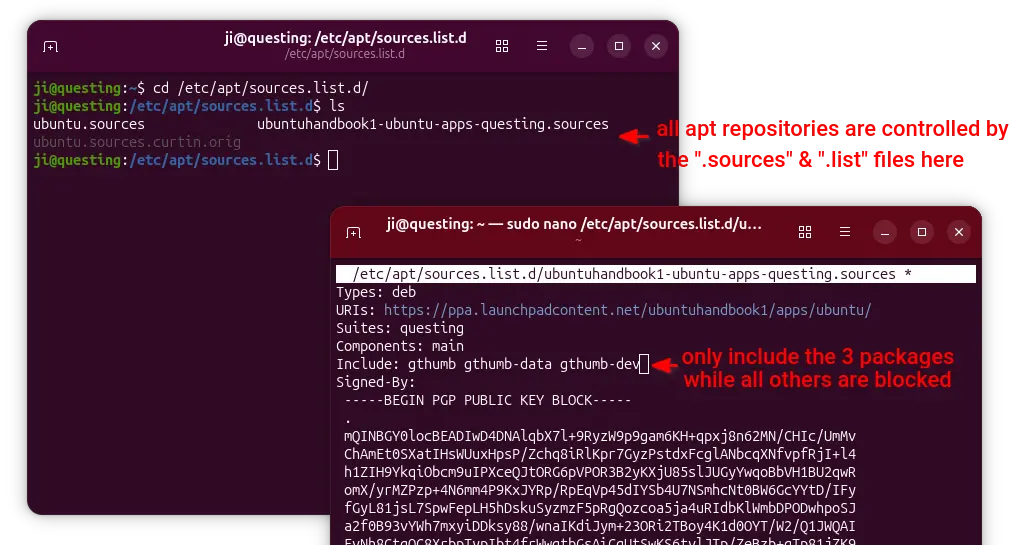
For Ubuntu, all the apt sources are handled by .sources and .list files under /etc/apt/sources.list.d directory.

To block specific packages from Ubuntu official repositories, open terminal (Ctrl+Alt+T) and run command to edit the file below:

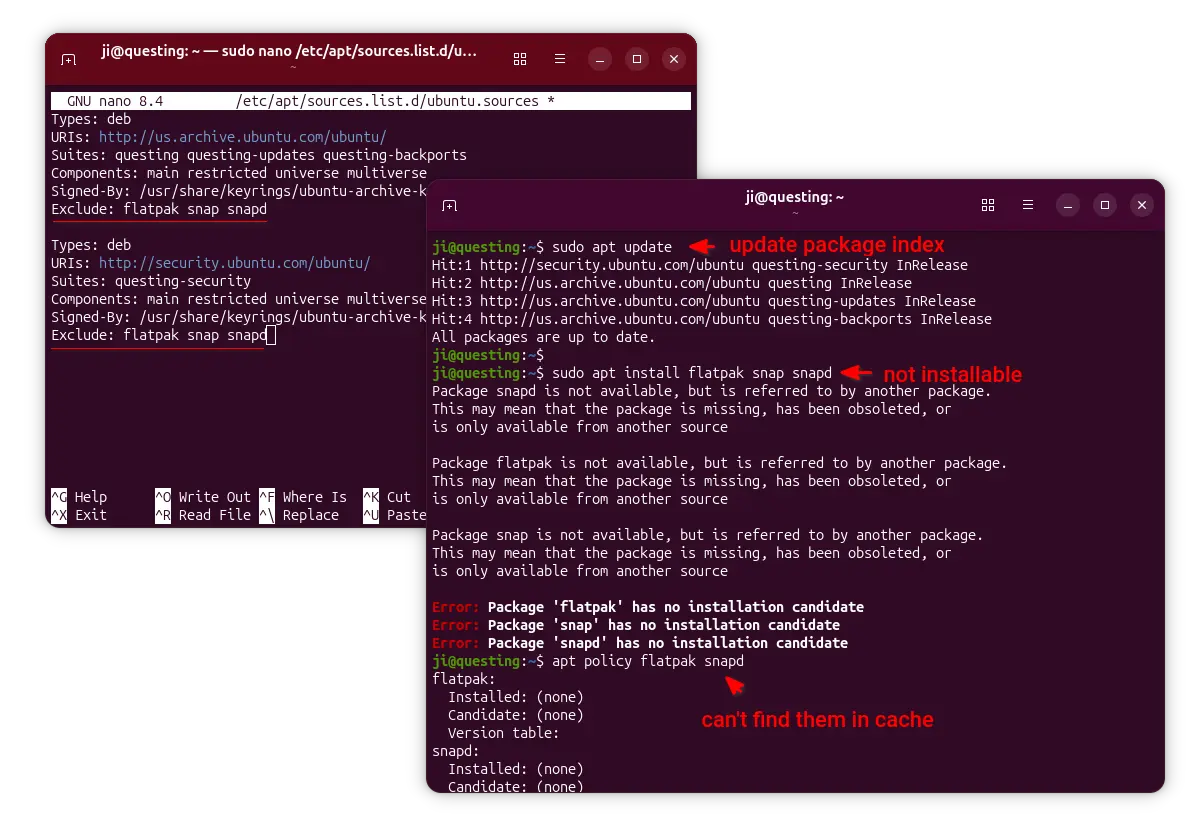
sudo nano /etc/apt/sources.list.d/ubuntu.sources

For next Ubuntu 26.04, there’ll be ubuntu-esm-apps.sources and ubuntu-esm-infra.sources in that directory for ESM packages if Ubuntu Pro is enabled.

When file opens, simply add Exclude: package1 package2 package3 ... in the end of the 2 sections.

In the screenshot above, it tells to block flatpak, snap, and snapd packages. After saved file (Ctrl+S, then Ctrl+X), run sudo apt update to apply changes.

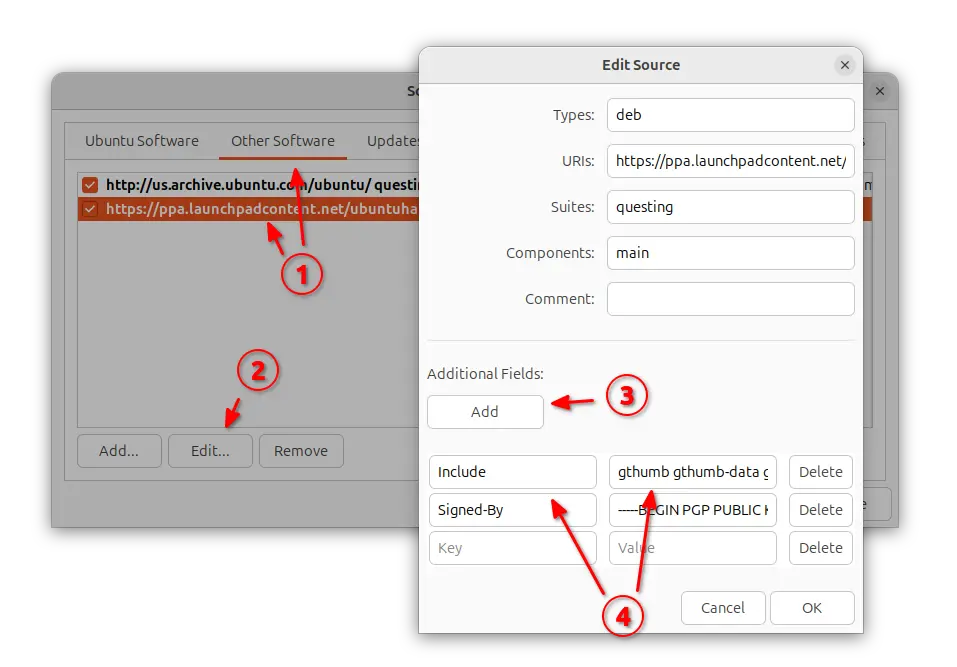
To block certain PPA packages, simply launch β€œSoftware & Updates” utility and navigate to β€œOther Software tab”.

Then, highlight the PPA source and edit it. Finally, click Add an additional fields, and:

  • either set key Include and value package1 package2 package3, so to block all others.
  • or set key Exclude and value package1 package2 ... to block certain packages.

Also refresh cache via either sudo apt update or Software Updater after saving the changes.

NOTE: When using β€œInclude” (leaving others blocked), don’t forget to also include the dependency packages (if any) in that repository!

For server without GUI, run commands below and finally refresh cache.

  • First, list and find out the target source file:
    ls /etc/apt/sources.list.d
  • Then, edit the file (replace file-name with yours):
    sudo nano /etc/apt/sources.list.d/ubuntuhandbook1-ubuntu-apps-questing.sources

    Finally, add new line with either Include: package1 package2 or Exclude: package accordingly

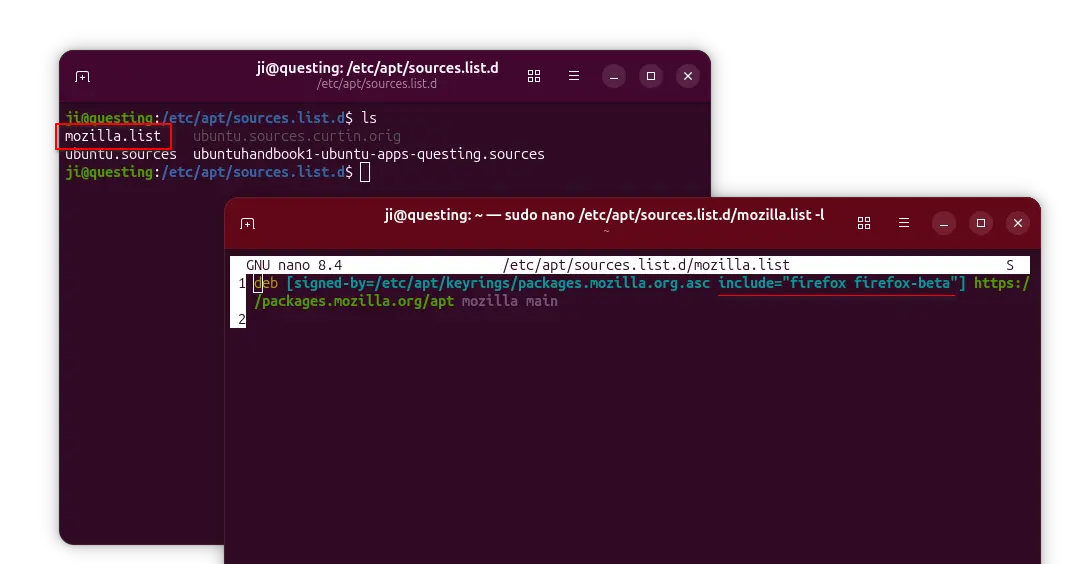
For apt repository installed in the classic .list file, edit it and add the include="package" or exclude="package" section between the brackets after β€˜signed-by’ section.

And, finally run sudo apt update to apply changes.

This GNOME Weather Widget Puts Forecasts Directly on Your Desktop

25 September 2025 at 06:54

If you want weather information displayed directly on your Ubuntu desktop, the Desktop Widgets GNOME Shell extension is worth checking out. See why inside.

You're reading This GNOME Weather Widget Puts Forecasts Directly on Your Desktop, a blog post from OMG! Ubuntu. Do not reproduce elsewhere without permission.

❌