 Login
Login
GNOME Flatpak Runtime Drops 32-Bit Compatibility Extension
14 October 2025 at 06:56


Ubuntu 25.10 was released on October 9, but if you're on Ubuntu 25.04 and have not gotten an upgrade notification yet, there is a reason for it – all explained inside.
You're reading Waiting to Upgrade to Ubuntu 25.10? Here’s When You Can, a blog post from OMG! Ubuntu. Do not reproduce elsewhere without permission.
In Linux and other Unix-like operating systems, the init (initialization) process is the first process executed by the kernel at
The post 6 Best Modern Linux ‘init’ Systems (1992-2025) first appeared on Tecmint: Linux Howtos, Tutorials & Guides.
Blender 5.0 free and open source 3D creation suite is now available for public beta testing with major new features and improvements. Here's what to expect!
The post Blender 5.0 Beta Officially Released with HDR and Wide Gamut Display Support appeared first on 9to5Linux - do not reproduce this article without permission. This RSS feed is intended for readers, not scrapers.
Firefox 144 open-source web browser is now available for download with various new features and improvements. Here's what's new!
The post Firefox 144 Is Now Available for Download, This Is What’s New appeared first on 9to5Linux - do not reproduce this article without permission. This RSS feed is intended for readers, not scrapers.
A quick and painless tutorial on how to upgrade your Linux Mint Debian Edition (LMDE) 6 installations to Linux Mint Debian Edition (LMDE) 7.
The post How to Upgrade LMDE 6 to LMDE 7 appeared first on 9to5Linux - do not reproduce this article without permission. This RSS feed is intended for readers, not scrapers.
The GNOME project has removed the 32-bit compatibility extension from its Flatpak Runtime with the release of GNOME 49, ending a long-running path for legacy 32-bit support. The org.gnome.Platform.i386.Compat extension is no longer published, leaving the runtime available only for x86_64 and AArch64. The dropped component provided a 32-bit environment used mainly by Wine and […]
The post GNOME 49 Officially Drops 32-bit Support from Flatpak Runtime appeared first on UbuntuPIT.
The latest Box64 0.3.8 release focuses squarely on performance and compatibility. The headline feature, DynaCache, introduces a disk-based cache for native code generation that dramatically cuts program load times and reduces runtime hiccups—especially noticeable in titles like Factorio on Linux. Version 0.3.8 marks a notable technical step for Box64’s dynamic recompilation engine. The newly added […]
The post Box64 0.3.8 Brings DynaCache and Faster Game Loading on Linux appeared first on UbuntuPIT.
Linus Torvalds has tagged and released Linux 6.18-rc1, the first test build of the upcoming kernel. After two weeks of merges, Torvalds described this cycle as an ordinary, smooth window with no serious issues. In his release note, Torvalds called the 6.18 merge window “one of the good merge windows,” saying he did not need […]
The post Linus Torvalds Announces Linux 6.18-rc1, Calls It “One of the Good Merge windows” appeared first on UbuntuPIT.
Qt applications (e.g, qBittorrent, KeePassXC) look weird as they don’t have window border or shadow in Ubuntu since 24.04. Here’s how to configure to make them look native.
Applications in Ubuntu and other popular Linux distributions mostly use GTK or Qt tool-kits for rendering their user interfaces. Gnome is based on GTK. It uses “xcb” QPA plugin for Qt apps running on classic Xorg session.
Due to switch to Wayland, the “xcb” plugin is not in use by default, and Qt apps look weird as you see in the screenshot below in Ubuntu 24.04, Ubuntu 25.04 & 25.10.
Qt apps look border-less in Ubuntu since 24.04
To “fix” the issue, I found few choices:
While there are also Qt5/6 configuration tool and Kvantum available for configuring Qt theme, icon, font, color, and more.
Most Qt applications (both Qt5 and Qt6) are still working good with “xcb” QPA plugin even in Wayland session.
1. First, press Ctrl+Alt+T on keyboard to open window. When it opens, run command to install the required libraries:
sudo apt install libxcb-cursor0 libxcb-composite0
Run sudo apt update to refresh cache in case it’s unable to locate the packages.
2. After that, run the command below in terminal to set the environment variable:
export QT_QPA_PLATFORM=xcb
Then, all Qt apps start from that terminal window will try using “xcb” plugin. For example, run keepassxc to start the Qt-based password manager.
enable ‘xcb’ for apps start from this terminal only
3. If it works for you, then open Files (aka Nautilus), and press Ctrl+H to show all hidden files. Find out .profile file in home directory and click edit it.
Finally, add export QT_QPA_PLATFORM=”xcb;wayland” in the end of file to make it work for all Qt applications permanently! And, log out and back in to apply.
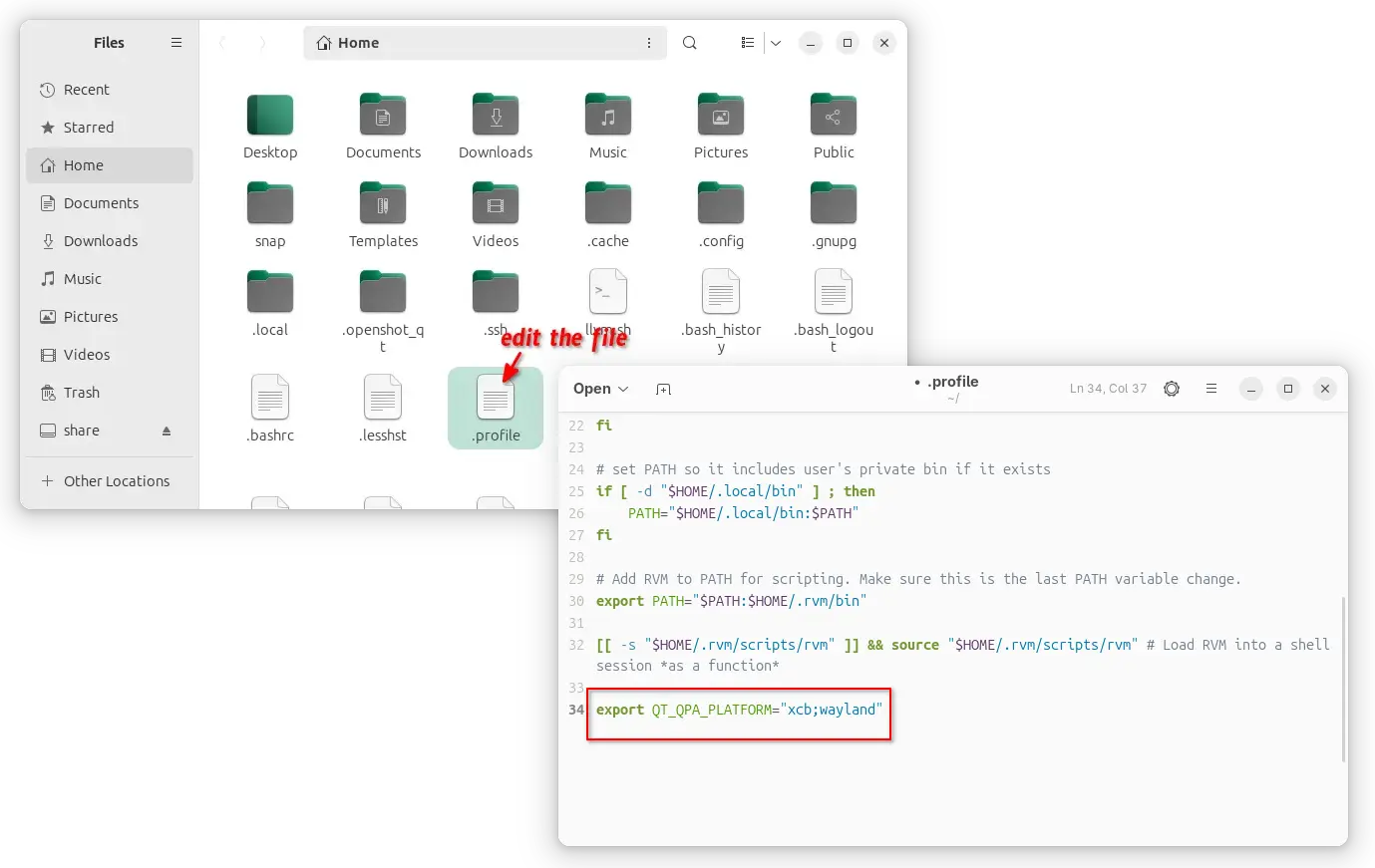
enable xcb for all Qt apps, though current user only
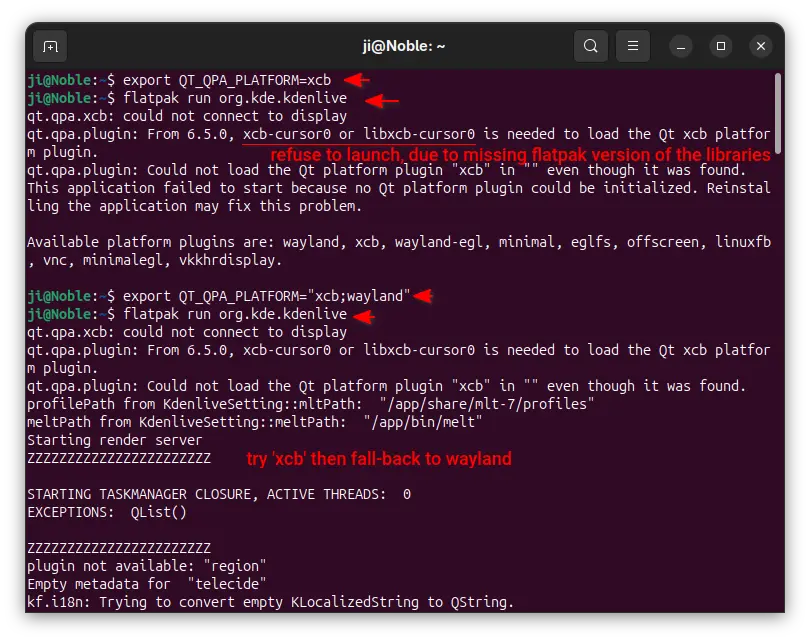
NOTE: It must be set to “xcb;wayland“, to allow fall-back to default wayland, when ‘xcb’ does not work. For example, Qt apps installed as Flatpak may not work with ‘xcb’ plugin and output the error below:
qt.qpa.xcb: could not connect to display
qt.qpa.plugin: From 6.5.0, xcb-cursor0 or libxcb-cursor0 is needed to load the Qt xcb platform plugin.
qt.qpa.plugin: Could not load the Qt platform plugin “xcb” in “” even though it was found.
While xcb is designed for Xorg, FedoraQt team has developed few Qt plugins for better integration in GNOME. They are “QGnomePlatform” theme, “adwaita-qt” style, and “QAdwaitaDecorations”.
Downsides: The Qt window title-bar made by QGnomePlatform looks NOT so good. FedoraQt has discontinued the project. And, Ubuntu 24.04 only includes Qt5 version of the package.
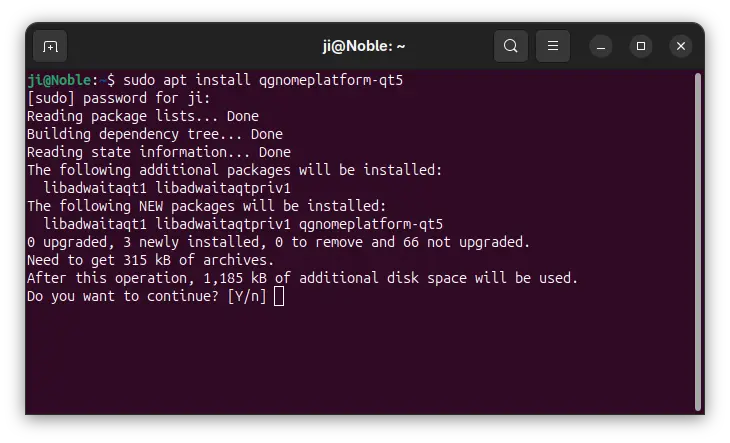
1. To install the Qt platform theme, open terminal (Ctrl+Alt+T) and run command:
sudo apt install qgnomeplatform-qt5
Ubuntu 25.04, 25.10 may also install qgnomeplatform-qt6 for Qt6 support.
2. Next, either run the command below to set environment:
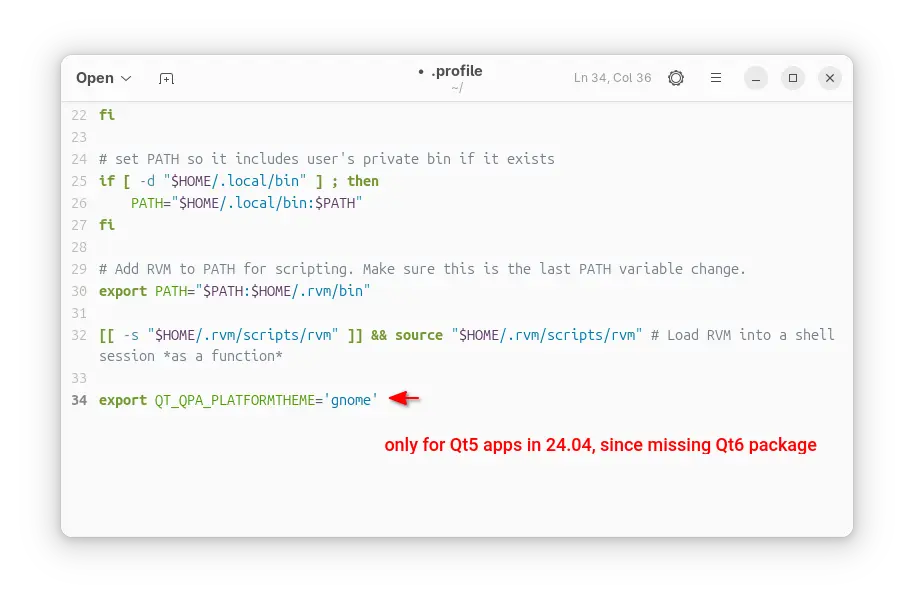
export QT_QPA_PLATFORMTHEME='gnome'
Then, start Qt apps from the same terminal window to use the Qt platform theme.
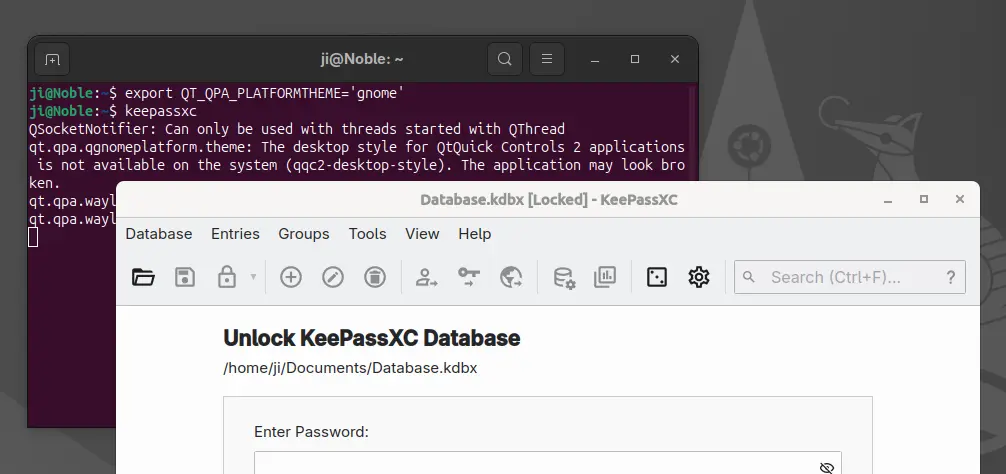
Or, edit .profile file in home directory and add export QT_QPA_PLATFORMTHEME='gnome' to make it work permanently for all Qt apps (Qt5 only for 24.04) at next login.
QGnomePlatform and adwaita-qt have been discontinued (though they still work). QAdwaitaDecorations, the project that implements Adwaita-like client-side decorations, is so far the only upstream project that’s still in development.
However, it’s NOT made into Debian/Ubuntu repositories so far. Meaning you need to build it by yourself. And, it does not support Qt6 app for Ubuntu 24.04, as it requires Qt6 >= 6.5.0 (24.04 has 6.4.2).
This option is good choice for Ubuntu 25.10, to enable Qt5 window decorations, while Qt6 decorations work out-of-the-box.
1. First, open terminal (Ctrl+Alt+T) and run command to install dependency libraries:
sudo apt install git cmake build-essential qtbase5-dev libqt5svg5-dev libqt5waylandclient5-dev qtbase5-private-dev qtwayland5-private-dev libwayland-dev
2. Then, run command to grab the source code:
git clone https://github.com/FedoraQt/QAdwaitaDecorations.git
After that, navigate to the source folder, create ‘build’ sub-folder and navigate into it:
cd QAdwaitaDecorations
mkdir build && cd build
Next, configure the source for Qt5:
cmake -DUSE_QT6=OFF ../
Ubuntu 24.04 does NOT meet Qt6 requirement, and Qt6 window decoration in 25.10 looks good out-of-the-box, so here I only build it for Qt5.
3. Finally, build & install the plugin by running the 2 commands below one by one:
make -j3
sudo make install
Here -j3 tells to start 3 threads in parallel. Depends on how many CPU cores you have, you may replace it with -j4, -j8, or j$(nproc) to use all CPU cores.
4. After successfully built the plugin, clean up by deleting the source folder. Then, either run the command below to set environment variable:
export QT_WAYLAND_DECORATION=adwaita
So it works for all Qt5 apps start from this terminal window.
Or, edit .profile file in user home and add the line to make it work permanently for all Qt5 apps at next login.
Gnome/Adwaita style decorations is NOT enough? You may also configure the Qt apps themes, fonts, icons, and color scheme.
If you use “xcb” plugin for the decorations, then you may also use Kvantum (SVG-based theme engine) to change the Qt app themes.
1. First, open terminal (Ctrl+Alt+T) and run command to install the package:
sudo apt install qt5-style-kvantum
Ubuntu 25.04, 25.10 users may also install qt6-style-kvantum for Qt6 apps support, however it’s NOT available in Ubuntu 24.04.
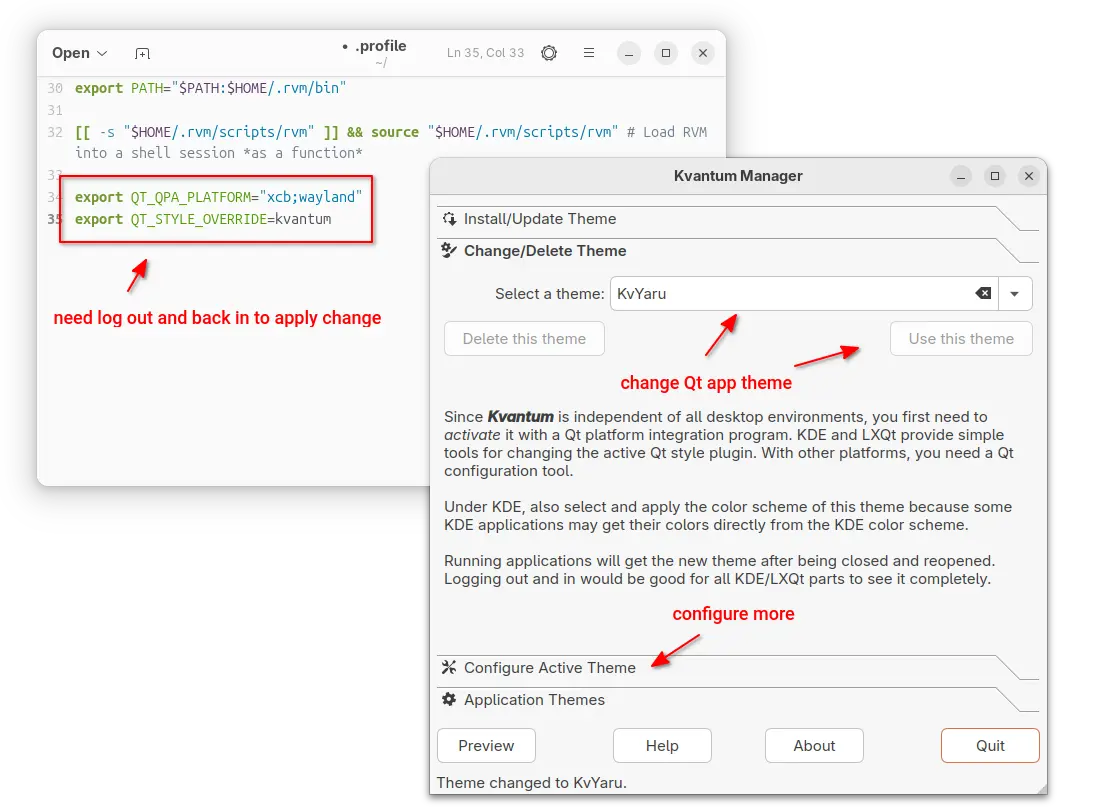
2. Next, set the following environment variables:
export QT_QPA_PLATFORM="xcb;wayland"
export QT_STYLE_OVERRIDE=kvantum
either in terminal for apps start from that terminal, or in .profile for all Qt apps (Qt5 only for 24.04).
3. Finally, launch “Kvantum Manager” to change Qt theme and configure active theme.
For choice, you may use Qt5 / Qt6 settings tools to configure the app window buttons, fonts, icons, and color scheme.
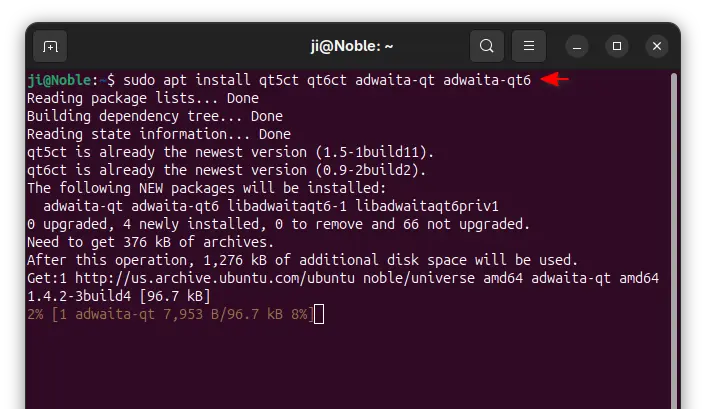
1. First, open terminal and install the settings tools, as well as adwaita-qt themes:
sudo apt install qt5ct qt6ct adwaita-qt adwaita-qt6
2. Next, set environment variable:
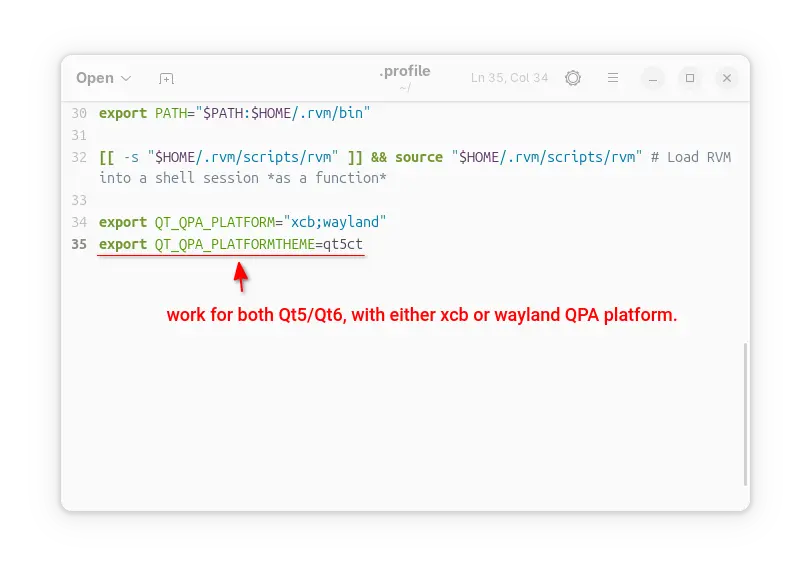
export QT_QPA_PLATFORMTHEME=qt5ct
It works for both Qt5 and Qt6 with either “xcb” or “wayland” QPA platform.
3. After set the environment (log out and back in if added to .profile), launch Qt5 Settings or Qt6 settings to configure the Qt appearances.
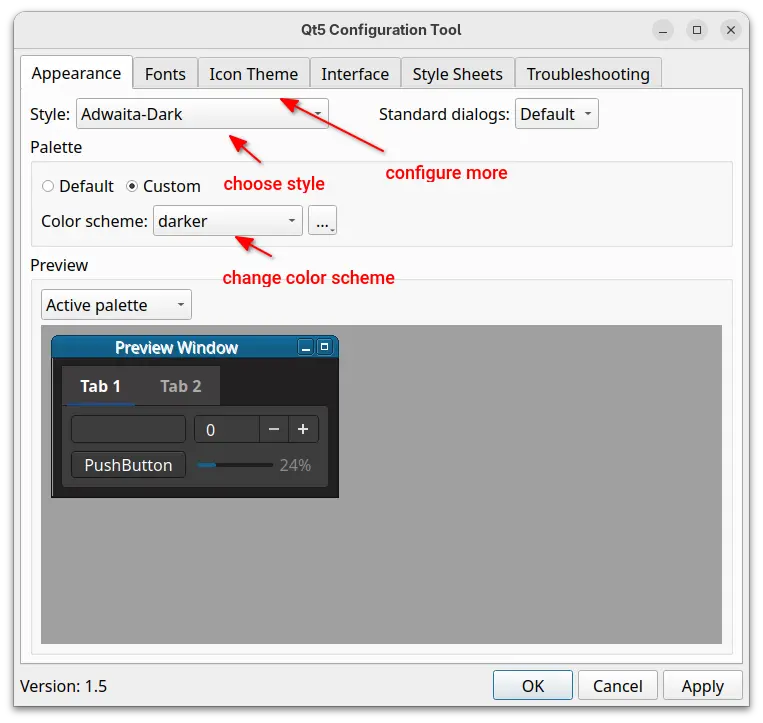
This tutorial shows how to “fix” border-less issue for Qt apps in Ubuntu 24.04 and higher with default GNOME, as well as change the theme, fonts, icons, and color scheme.
The “xcb” QPA platform plugin is still a good choice for 24.04 with both Qt5 and Q6 support. While, QAdwaitaDecorations is better (in my own opinion) for Qt5 in 25.10, as Qt6 decorations look good out-of-the-box.
9to5Linux Weekly Roundup for October 12th, 2025, brings news about Ubuntu 25.10, LMDE (Linux Mint Debian Edition) 7, Linux 6.16 EOL, Wireshark 4.6, GIMP 3.0.6, ClamAV 1.5, LibreOffice 25.8.2, KDE Gear 25.08.2, KDE Frameworks 6.19, Linux 6.18 RC, and more.
The post 9to5Linux Weekly Roundup: October 12th, 2025 appeared first on 9to5Linux - do not reproduce this article without permission. This RSS feed is intended for readers, not scrapers.
Linus Torvalds announced the general availability of the first Release Candidate version of the upcoming Linux 6.18 kernel series for public testing. Here’s what to expect!
The post Linus Torvalds Announces First Linux Kernel 6.18 Release Candidate appeared first on 9to5Linux - do not reproduce this article without permission. This RSS feed is intended for readers, not scrapers.
Linux kernel 6.16 reached end of life and all users are now recommended to upgrade their systems to the latest Linux 6.17 kernel series as soon as possible.
The post Linux Kernel 6.16 Reaches End of Life, It’s Time to Upgrade to Linux Kernel 6.17 appeared first on 9to5Linux - do not reproduce this article without permission. This RSS feed is intended for readers, not scrapers.
Linux Mint Debian Edition (LMDE) 7 distribution is now available for download based on the Debian GNU/Linux 13 "Trixie" operating system. Here's what's new!
The post LMDE (Linux Mint Debian Edition) 7 Is Now Available for Download appeared first on 9to5Linux - do not reproduce this article without permission. This RSS feed is intended for readers, not scrapers.
KDE Frameworks 6.19 open-source software suite is out now with various improvements and bug fixes for KDE apps and the Plasma desktop. Here’s what’s new!
The post KDE Frameworks 6.19 Released with Various Improvements and Bug Fixes appeared first on 9to5Linux - do not reproduce this article without permission. This RSS feed is intended for readers, not scrapers.
Red Hat and Rusticl developer Karol Herbst has opened a new Mesa merge request introducing “CLUDA,” a compute-only Gallium3D driver that runs on top of NVIDIA’s CUDA driver API. The proposal introduces a Gallium3D driver implemented over CUDA’s libcuda.so, enabling Mesa’s compute framework to operate on proprietary NVIDIA hardware. Herbst describes CLUDA as a driver […]
The post Mesa’s New “CLUDA” Driver Bridges Gallium3D and NVIDIA CUDA for OpenCL Compute appeared first on UbuntuPIT.
Greg Kroah-Hartman has announced the release of Linux kernel version 6.17.2, marking another steady round of maintenance updates for the platform. The release focuses on tightening up code reliability with dozens of fixes across filesystems, virtualization, crypto modules, and device drivers. The update refines core areas of the kernel with an emphasis on correctness and […]
The post Linux Kernel 6.17.2 Released: Key Fixes for f2fs, KVM, and amdgpu appeared first on UbuntuPIT.
A new monthly version of Microsoft’s code editor, Visual Studio Code 1.105, was released few days ago.
The release added 2 new AI chat models, GPT-5-Codex and Claude Sonnet 4.5. In addition to Google and Github account, it now allows to sign in or sign up GitHub Copilot with an Apple account, along with
The AI chat now supports fully qualified tool names for prompt files and chat modes, which can help to avoid naming conflicts between built-in tools and tools provided by MCP servers or extensions.
Support for AGENTS.md at the root of workspace is now generally available and enabled by default. There’s as well experimental support for nested AGENTS.md files in sub-folders of your workspace.
The release also improved the OS notifications for chat sessions. It now shows a notification with preview when a chat response is received, and selecting it brings focus to the chat input.
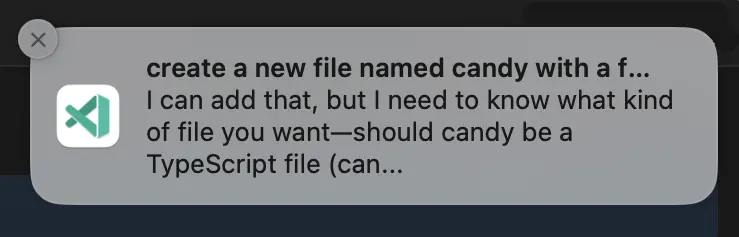
Other AI chat changes include:
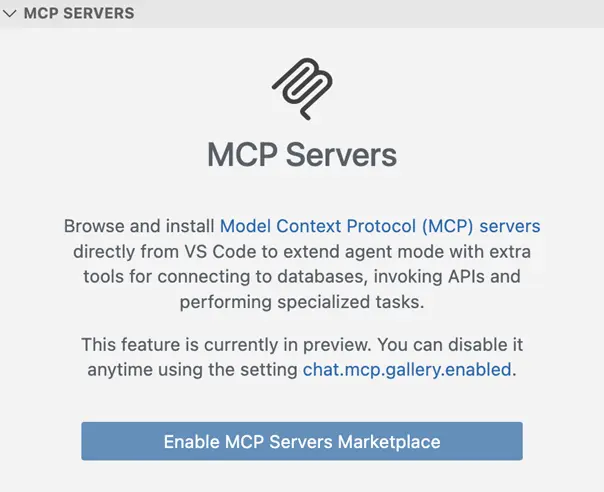
Ctrl+Alt+Up/Down shortcut keys to navigate through your chat messages.Besides that, VS Code 1.105 introduced built-in MCP marketplace, which enables users to browse and install MCP servers directly from the Extensions view, though disabled by default.
The new or outdated MCP servers are now started automatically when you send a chat message. There are as well 2 new MCP specification updates SEP-973 and SEP-1034.
The new vs code release also improved the editor experience, by adding ability to override the default keyboard shortcuts for the Quick Input controls, and possibility to disallow next edit suggestions (NES) to propose whitespace-only changes such as code formatting.
The runTests tool in Chat now also reports test code coverage to the agent, and it now shows notification when long-running task completes while the VS Code window is not focused.
Other changes in the release include:
For more about the release, as well as download links for Windows, MacOS, and Linux, go to its website via the link below:
For Ubuntu, besides download & install the deb package from the link above, there’s also Snap package available to install in App Center (or Ubuntu Software).
While, a community maintained flatpak package is also available for choice. See this guide for how to install them.
