Normal view

Received — 17 October 2025 Linux News & Update

Samba 4.22.6 Brings Fixes for Finder, Ceph, and Active Directory

17 October 2025 at 15:20

The Samba team has announced version 4.22.6, the latest stable release in the 4.22 series, bringing key fixes for macOS compatibility, Active Directory integration, Ceph stability, and clustered Samba environments. Samba 4.22.6, released on October 16, 2025, focuses on improving system reliability and cross-platform performance. This update resolves multiple issues affecting macOS users, including DFS […]

The post Samba 4.22.6 Brings Fixes for Finder, Ceph, and Active Directory appeared first on UbuntuPIT.

OnlyOffice Desktop Editors 9.1 Released with New PDF Editing Tools

By:Ji m
16 October 2025 at 23:59

OnlyOffice Desktop Editor, the free open-source offline use office suite, release new 9.1 version yesterday.

The new release updated the PDF editing support with new tools, and improved formulas in sheets. It now automatically recover unsaved documents due to app crashes.

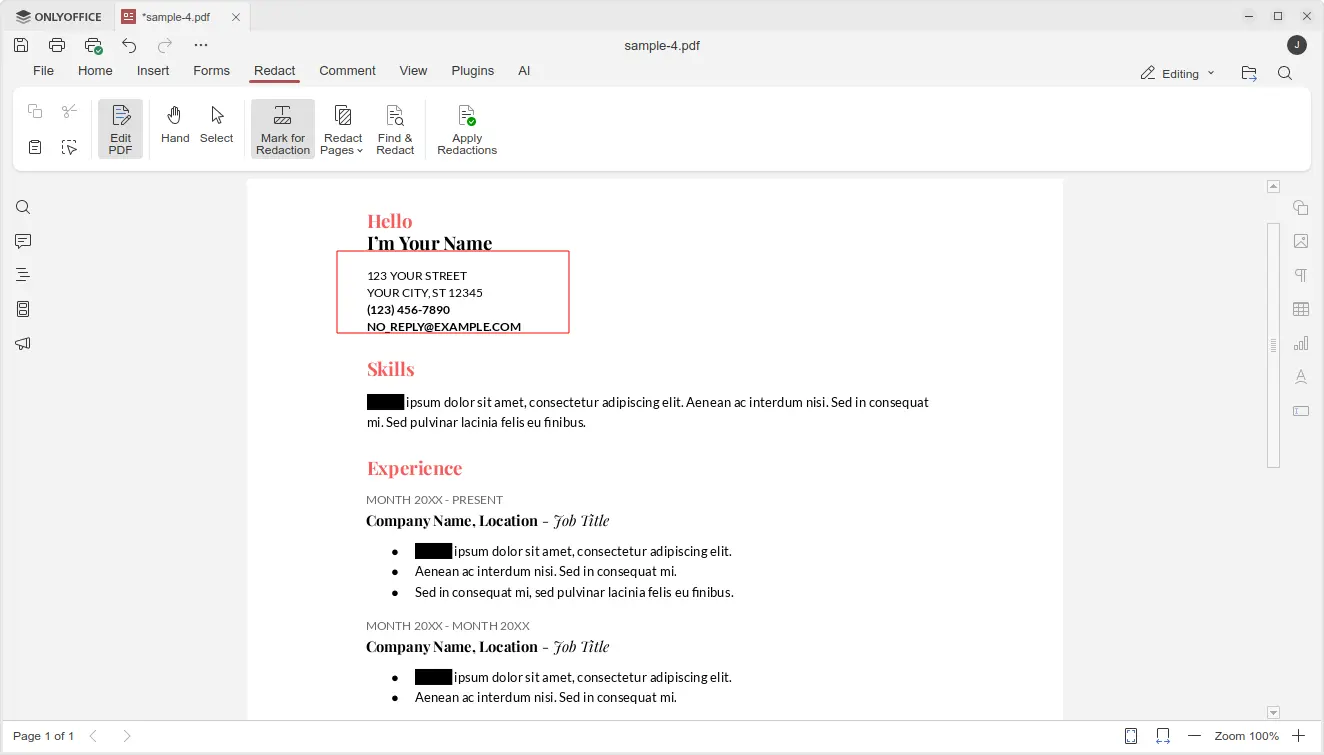
First, in PDF editing mode, it introduced new Redact feature, allowing to hide sensitive or confidential information.

The Redact tab includes “Mark for Redaction”, “Redact Pages”, and “Find & Redact” options, allowing user to select rectangle area in PDF content, choose PDF pages, or find all matched keywords, then use “Apply Redactions” option to hide them.

In “Comment” tab, there are new annotation tools added, allowing to draw rectangle, circle, arrow, and connected lines on your PDF, with custom color and size.

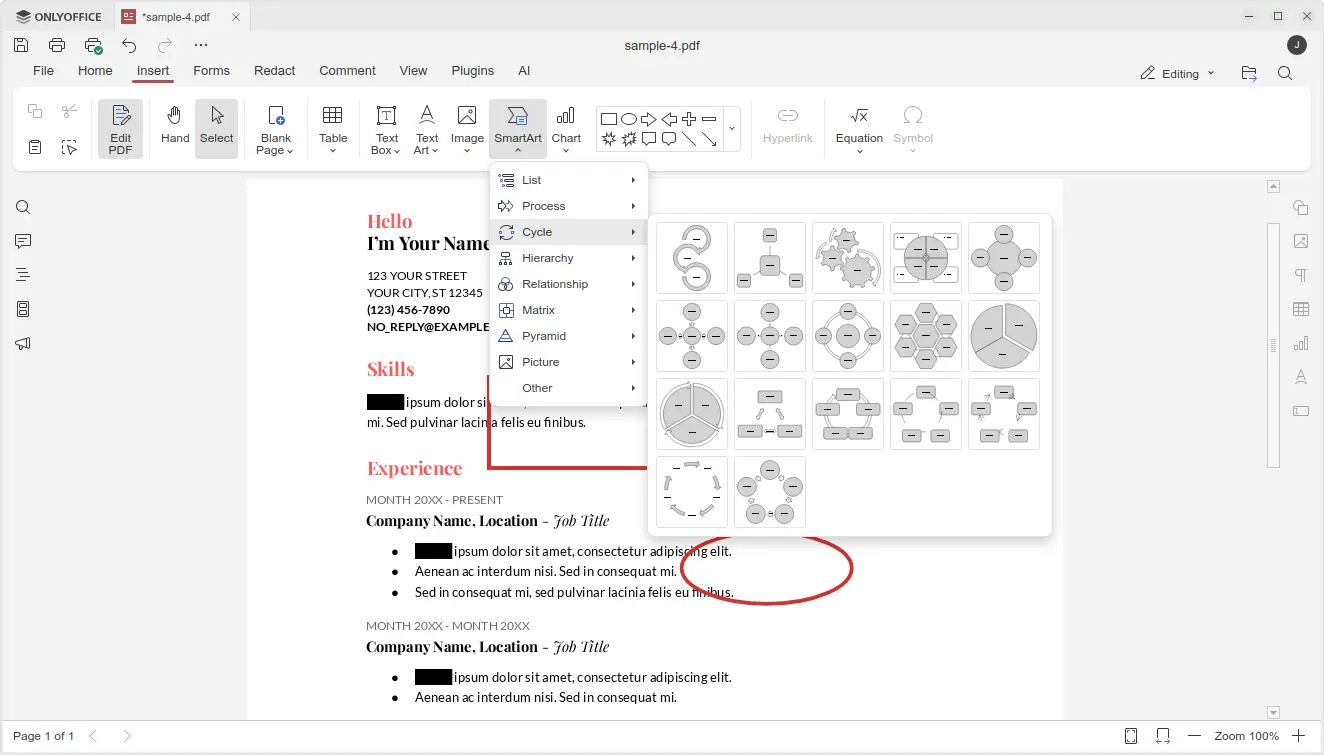
And in “Insert” tab, it added new SmartArt and Chart option, allowing to insert many new objects into your PDF.

The Spreadsheet editor now provides updated LOOKUP, VLOOKUP, HLOOKUP and XLOOKUP formulas that now deliver up to 4x faster exact and linear searches.

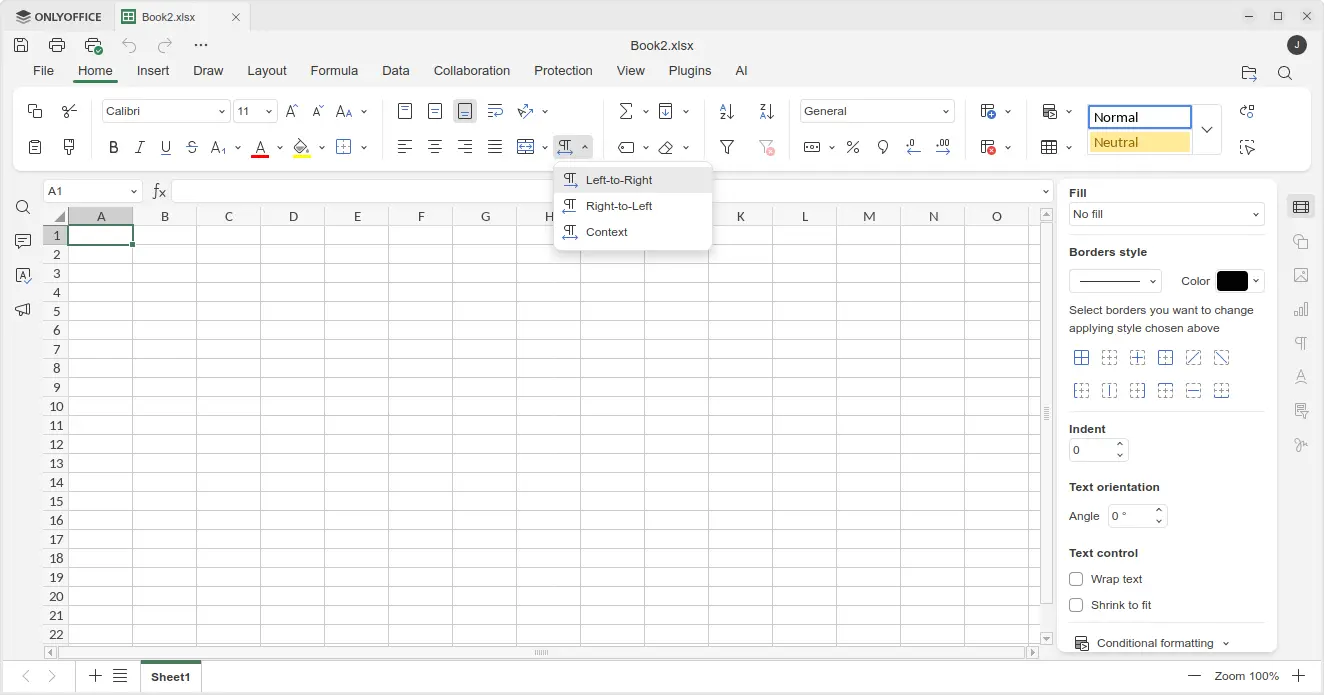
It also added support for date filters in pivot tables, dedicated “Table Design” tab with formatted table settings, and added Left-to-Right and Right-to-Left options in Home tab to easily switch text direction in cells.

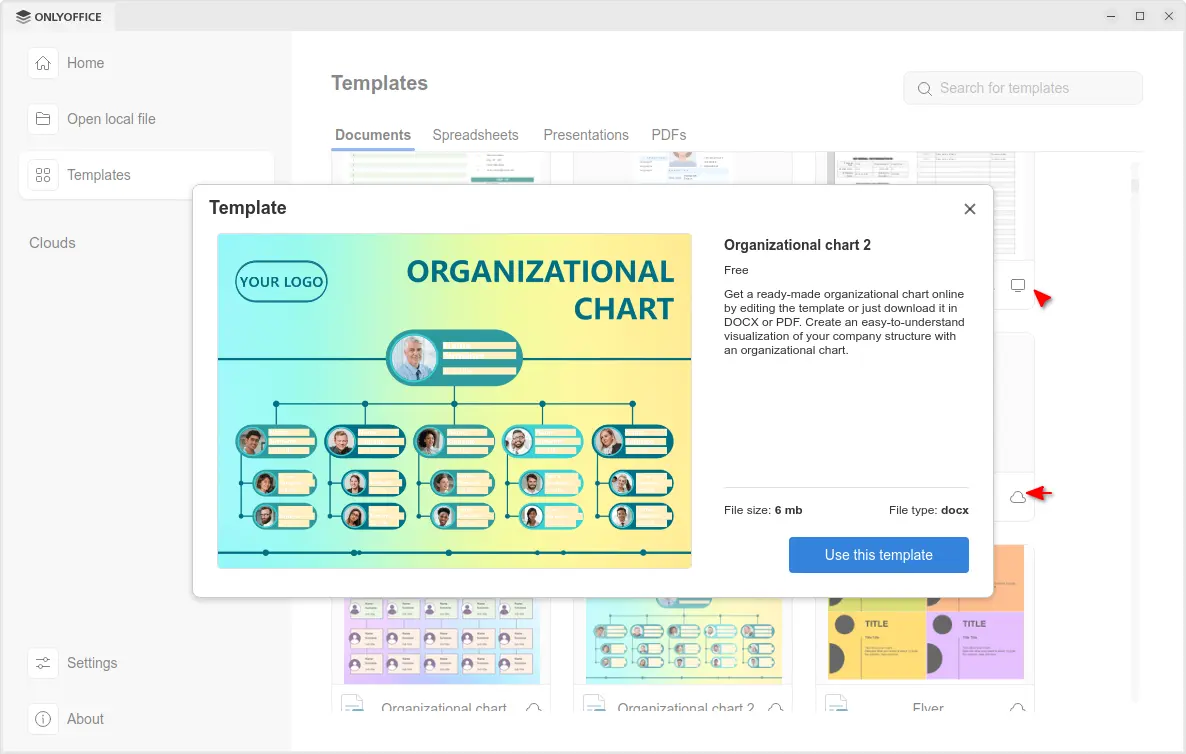
The release also improved the Templates support. It now includes many templates in local computer as well as tons of templates in cloud.

Clicking on a cloud template no longer open it directly in editor, instead it shows a popup with bigger preview with description as well as file type and size, making clearer whether it’s what you want before downloading it.

For Windows 10 and higher, it now displays the notifications about file associations and updates via system toast notifications instead of modal windows.

For macOS, it finally added the new options to insert audio and video files in Presentation, as well as built-in media player to play videos in your slides.

Other changes in the release include:

  • Add HEIF images and HWPML documents support.
  • Support direct PDF to TXT and PPTX to TXT conversion.
  • Full-featured chart editor in documents and presentations.
  • Add Spelling language detection toggle for macOS.
  • Add explosion support for 2D pie and doughnut charts;

For more about OnlyOffice Desktop Editors 9.1, see the official announcement.

Get OnlyOffice Desktop Editors 9.1

For Ubuntu user, the office suite is easy to install by using App Center (or Snap Store). It’s Snap package that runs in sandbox environment. And, at the moment of writing, it’s still at version 9.0.x.

OnlyOffice in App Center

For choice you may download the app package for Windows, Linux, and macOS from its website. Where Ubuntu user may choose Download DEB, then click open with App Center to install.

GNOME 49.1 Released with Fixes across Shell, Mutter, and Core Apps

17 October 2025 at 01:35

GNOME 49.1 refines the desktop experience with major stability fixes in Shell and Mutter, improved session reliability, and updated core apps and toolkits marking a solid maintenance release for Linux users. GNOME 49.1, the latest point release in the 49 series, focuses on refinement and regression fixes across the stack. It prioritizes smoother performance, improved […]

The post GNOME 49.1 Released with Fixes across Shell, Mutter, and Core Apps appeared first on UbuntuPIT.

Ubuntu Security Roundup: Fixes for MuPDF, Redis, Samba, and More

17 October 2025 at 00:16

Canonical has released a series of Ubuntu Security Notices (USNs) addressing critical vulnerabilities across key open-source packages, including MuPDF, Redis, Samba, and Apache Subversion. The updates mitigate risks ranging from denial-of-service attacks to potential remote code execution. The latest batch of Ubuntu security advisories highlights several vulnerabilities fixed across multiple long-term support (LTS) releases, reinforcing […]

The post Ubuntu Security Roundup: Fixes for MuPDF, Redis, Samba, and More appeared first on UbuntuPIT.

Bcachefs Ousted from Mainline Kernel: The Move to DKMS and What It Means

Bcachefs Ousted from Mainline Kernel: The Move to DKMS and What It Means

Introduction

After years of debate and development, bcachefs—a modern copy-on-write filesystem once merged into the Linux kernel—is being removed from mainline. As of kernel 6.17, the in-kernel implementation has been excised, and future use is expected via an out-of-tree DKMS module. This marks a turning point for the bcachefs project, raising questions about its stability, adoption, and relationship with the kernel development community.

In this article, we’ll explore the background of bcachefs, the sequence of events leading to its removal, the technical and community dynamics involved, and implications for users, distributions, and the filesystem’s future.

What Is Bcachefs?

Before diving into the removal, let’s recap what bcachefs is and why it attracted attention.

  • Origin & goals: Developed by Kent Overstreet, bcachefs emerged from ideas in the earlier bcache project (a block-device caching layer). It aimed to build a full-featured, general-purpose filesystem combining performance, reliability, and modern features (snapshots, compression, encryption) in a coherent design.

  • Mainline inclusion: Bcachefs was merged into the mainline kernel in version 6.7 (released January 2024) after a lengthy review and incubation period.

  • “Experimental” classification: Even after being part of the kernel, bcachefs always carried disclaimers about its maturity and stability—they were not necessarily recommends for production use by all users.

Its presence in mainline gave distributions a path to ship it more casually, and users had easier access without building external modules—an important convenience for adoption.

What Led to the Removal

The excision of bcachefs from the kernel was not sudden but the culmination of tension over development practices, patch acceptance timing, and upstream policy norms.

“Externally Maintained” status in 6.17

In kernel 6.17’s preparation, maintainers marked bcachefs as “externally maintained.” Though the code remained present, the change signified that upstream would no longer accept new patches or updates within the kernel tree.

This move allowed a transitional period. The code was “frozen” inside the tree to avoid breaking existing systems immediately, while preparation was made for future removal.

Linux Mint 22.2 ‘Zara’ Released: Polished, Modern, and Built for Longevity

Linux Mint 22.2 ‘Zara’ Released: Polished, Modern, and Built for Longevity

Introduction

The Linux Mint team has officially unveiled Linux Mint 22.2, codenamed “Zara”, on September 4, 2025. As a Long-Term Support (LTS) release, Zara will receive updates through 2029, promising users stability, incremental improvements, and a comfortable desktop experience.

This version is not about flashy overhauls; rather, it’s about refinement — applying polish to existing features, smoothing rough edges, weaving in new conveniences (like fingerprint login), and improving compatibility with modern hardware. Below, we’ll delve into what’s new in Zara, what users should know before upgrading, and how it continues Mint’s philosophy of combining usability, reliability, and elegance.

What’s New in Linux Mint 22.2 “Zara”

Here’s a breakdown of key changes, refinements, and enhancements in Zara.

Base, Support & Kernel Stack
  • Ubuntu 24.04 (Noble) base: Zara continues to use Ubuntu 24.04 as its upstream base, ensuring broad package compatibility and long-term security support.

  • Kernel 6.14 (HWE): The default kernel for new installations is 6.14, bringing support for newer hardware.

  • However — for existing systems upgraded from Mint 22 or 22.1 — the older kernel (6.8 LTS) remains the default, because 6.14’s support window is shorter.

  • Zara is an LTS edition, with security updates and maintenance promised through 2029.

Major Features & Enhancements

Fingerprint Authentication via Fingwit

Zara introduces a first-party tool called Fingwit to manage fingerprint-based authentication. With compatible hardware and support via the libfprint framework, users can:

  • Enroll fingerprints

  • Use fingerprint login for the screensaver

  • Authenticate sudo commands

  • Launch administrative tools via pkexec using the fingerprint

  • In some cases, bypass password entry at login (unless home directory encryption or keyring constraints force password fallback)

It is important to note that fingerprint login on the actual login screen may be disabled or limited depending on encryption or keyring usage; in those cases, the system falls back to password entry.

UI & Theming Refinements

  • Sticky Notes app now sports rounded corners, improved Wayland compatibility, and a companion Android app named StyncyNotes (available via F-Droid) to sync notes across devices.

Ubuntu Update Backlog: How a Brief Canonical Outage Cascaded into Multi-Day Delays

Ubuntu Update Backlog: How a Brief Canonical Outage Cascaded into Multi-Day Delays

Introduction

In early September 2025, Ubuntu users globally experienced disruptive delays in installing updates and new packages. What seemed like a fleeting outage—only about 36 minutes of server downtime—triggered a cascade of effects: mirrors lagging, queued requests overflowing, and installations hanging for days. The incident exposed how fragile parts of Ubuntu’s update infrastructure can be under sudden load.

In this article, we’ll walk through what happened, why the fallout was so severe, how Canonical responded, and lessons for users and infrastructure architects alike.

What Happened: Outage & Immediate Impact

On September 5, 2025, Canonical’s archive servers—specifically archive.ubuntu.com and security.ubuntu.com—suffered an unplanned outage. The status page for Canonical showed the incident lasting roughly 36 minutes, after which operations were declared “resolved.”

However, that brief disruption set off a domino effect. Because the archives and security servers serve as the central hubs for Ubuntu’s package ecosystem, any downtime causes massive backlog among mirror servers and client requests. Mirrors found themselves out of sync, processing queues piled up, and users attempting updates or new installs encountered failed downloads, hung operations, or “404 / package not found” errors.

On Ubuntu’s community forums, Canonical acknowledged that while the server outage was short, the upload / processing queue for security and repository updates had become “obscenely” backlogged. Users were urged to be patient, as there was no immediate workaround.

Throughout September 5–7, users continued reporting incomplete or failed updates, slow mirror responses, and installations freezing mid-process. Even newly provisioning systems faced broken repos due to inconsistent mirror states.

By September 8, the situation largely stabilized: mirrors caught up, package availability resumed, and normal update flows returned. But the extended period of degraded service had already left many users frustrated.

Why a Short Outage Turned into Days of Disruption

At first blush, 36 minutes seems trivial. Why did it have such prolonged consequences? Several factors contributed:

  1. Centralized repository backplane Ubuntu’s infrastructure is architected around central canonical repositories (archive, security) which then propagate to mirrors worldwide. When the central system is unavailable, mirrors stop receiving updates and become stale.

Received — 16 October 2025 Linux News & Update

GNOME 49.1 Desktop Released with Various Improvements and Bug Fixes

16 October 2025 at 22:00

GNOME 49.1

GNOME 49.1 is now available as the first point release to the latest GNOME 49 desktop environment series with various bug fixes and improvements.

The post GNOME 49.1 Desktop Released with Various Improvements and Bug Fixes appeared first on 9to5Linux - do not reproduce this article without permission. This RSS feed is intended for readers, not scrapers.

PipeWire 1.6 Promises Bluetooth Audio Streaming for Hearing Aid Support

16 October 2025 at 18:56

PipeWire 1.2 Release Candidate

PipeWire 1.6 open-source server for handling audio/video streams and hardware on Linux is now available for public beta testing. Here's what to expect!

The post PipeWire 1.6 Promises Bluetooth Audio Streaming for Hearing Aid Support appeared first on 9to5Linux - do not reproduce this article without permission. This RSS feed is intended for readers, not scrapers.

Mesa 25.2.5 Released: Critical Vulkan, Intel, and Zink Fixes Across the Graphics Stack

16 October 2025 at 11:45

The Mesa team has announced the release of Mesa 25.2.5, a focused bugfix update that enhances driver stability and resolves a broad set of regressions in Vulkan, OpenGL, and Gallium components. Maintainer Eric Engestrom confirmed the rollout, encouraging users to report any issues through Mesa’s GitLab tracker. In an official message to the Mesa developer […]

The post Mesa 25.2.5 Released: Critical Vulkan, Intel, and Zink Fixes Across the Graphics Stack appeared first on UbuntuPIT.

ONLYOFFICE 9.1 Released with PDF Redact Tools + More

16 October 2025 at 06:59

ONLYOFFICE logoThe free ONLYOFFICE productivity suite has been updated with a host of new features, including an improved PDF Editor. Details on what's new inside.

You're reading ONLYOFFICE 9.1 Released with PDF Redact Tools + More, a blog post from OMG! Ubuntu. Do not reproduce elsewhere without permission.

Fastmail’s New Desktop App is Available on Linux

16 October 2025 at 00:06

Users of the Fastmail email service can now download and an install a desktop app to access their mail. The standalone client is available for Windows, Mac and Linux.

You're reading Fastmail’s New Desktop App is Available on Linux, a blog post from OMG! Ubuntu. Do not reproduce elsewhere without permission.

VMware Workstation Pro 25H2 Released with New Features

15 October 2025 at 11:30

VMware Workstation Pro 25H2 has been released with support for Virtual Hardware Version 22, better host OS compatibility, and a new command-line tool.

You're reading VMware Workstation Pro 25H2 Released with New Features, a blog post from OMG! Ubuntu. Do not reproduce elsewhere without permission.

Distribution Release: Mobian 13.0

15 October 2025 at 18:47
The DistroWatch news feed is brought to you by TUXEDO COMPUTERS. The Mobian team has announced the release of Mobian 13.0, a major update of the project's port of the Debian distribution, running the mainline Linux kernel, to smartphones and tablets. It comes in two user interface variants (Phosh and Plasma Mobile) and is available for various popular devices....
❌