❌

Normal view

Received today β€” 20 December 2025

LibreOffice 25.8.4 Is Now Available for Download with More Than 70 Bug Fixes

18 December 2025 at 21:05

LibreOffice 25.8

LibreOffice 25.8.4 is now available for download as the fourth maintenance update to the latest LibreOffice 25.8 office suite series with more than 70 bug fixes.

The post LibreOffice 25.8.4 Is Now Available for Download with More Than 70 Bug Fixes appeared first on 9to5Linux - do not reproduce this article without permission. This RSS feed is intended for readers, not scrapers.

Received before yesterday

OnlyOffice Desktop Editors 9.2 added AI Agent & Macro Recording

By:Ji m
3 December 2025 at 16:02

OnlyOffice desktop editors, the free open-source office suite for Linux, Windows, and macOS, released new 9.2 version yesterday.

The new release added AI agent support, customizable keyboard shortcut, macro recording for repetitive actions, and Windows on ARM support.

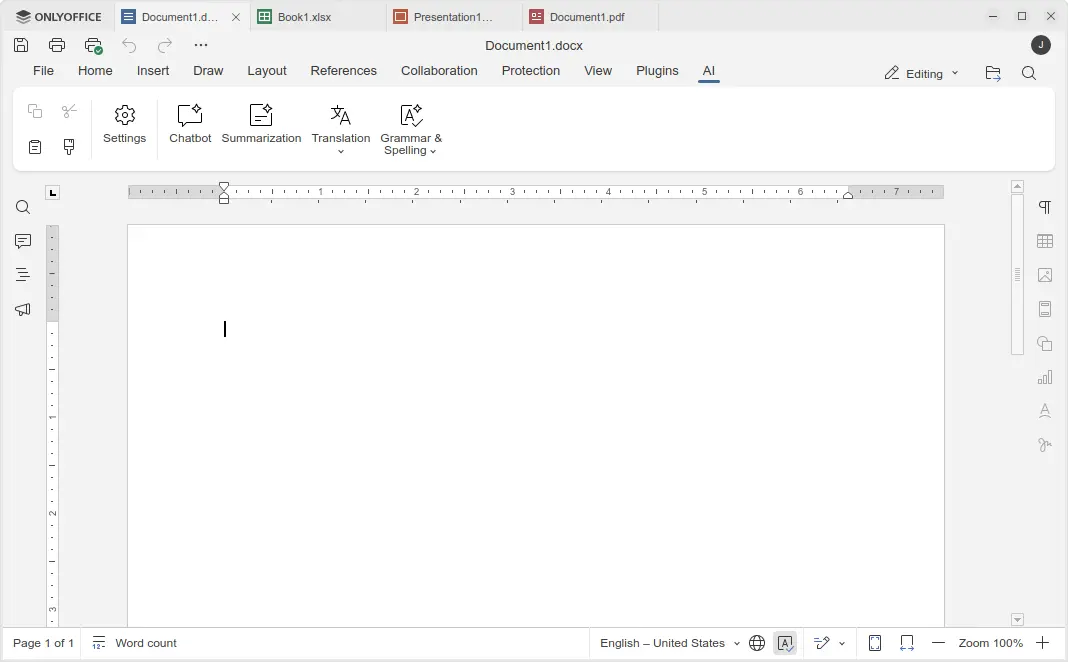
In the bottom left of the app window, an β€œAI agent” option is added, allowing to connect to either Anthropic, OpenAI, TogetherAI, or OpenRouter AI models through API key, or Ollama local hosted AI model.

After that, you may chat with AI to ask questions, find and open files on your computer, create new documents, presentations, or PDFs, generate text or HTML from files without open them, fill forms, and do more actions.

Besides that, the Document, Spreadsheet, Presentation, and PDF editors have AI toolbar options, allowing to do AI-powered translations, summarization, grammar correction and spell-checking. Though, they all need an AI model connected as mentioned above.

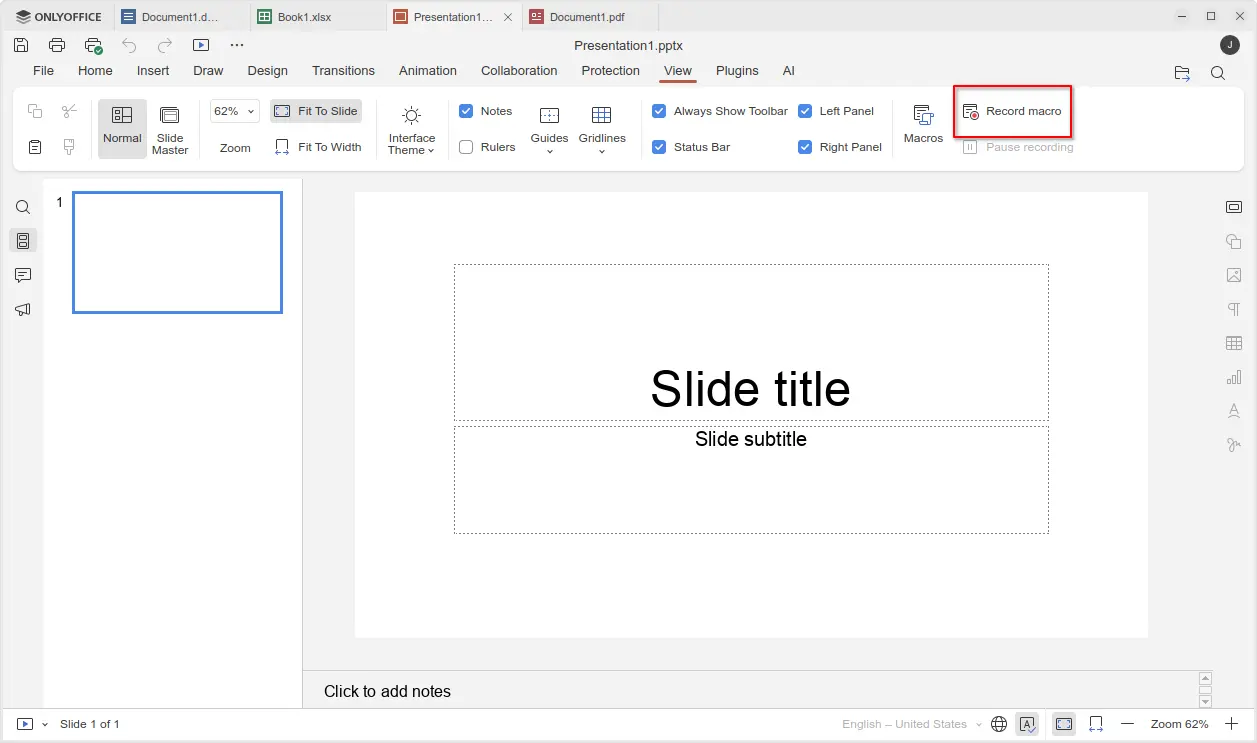
For those who often perform repetitive actions with OnlyOffice, the new version added View -> Record macro menu option, allowing to automate your actions by recording them as macros.

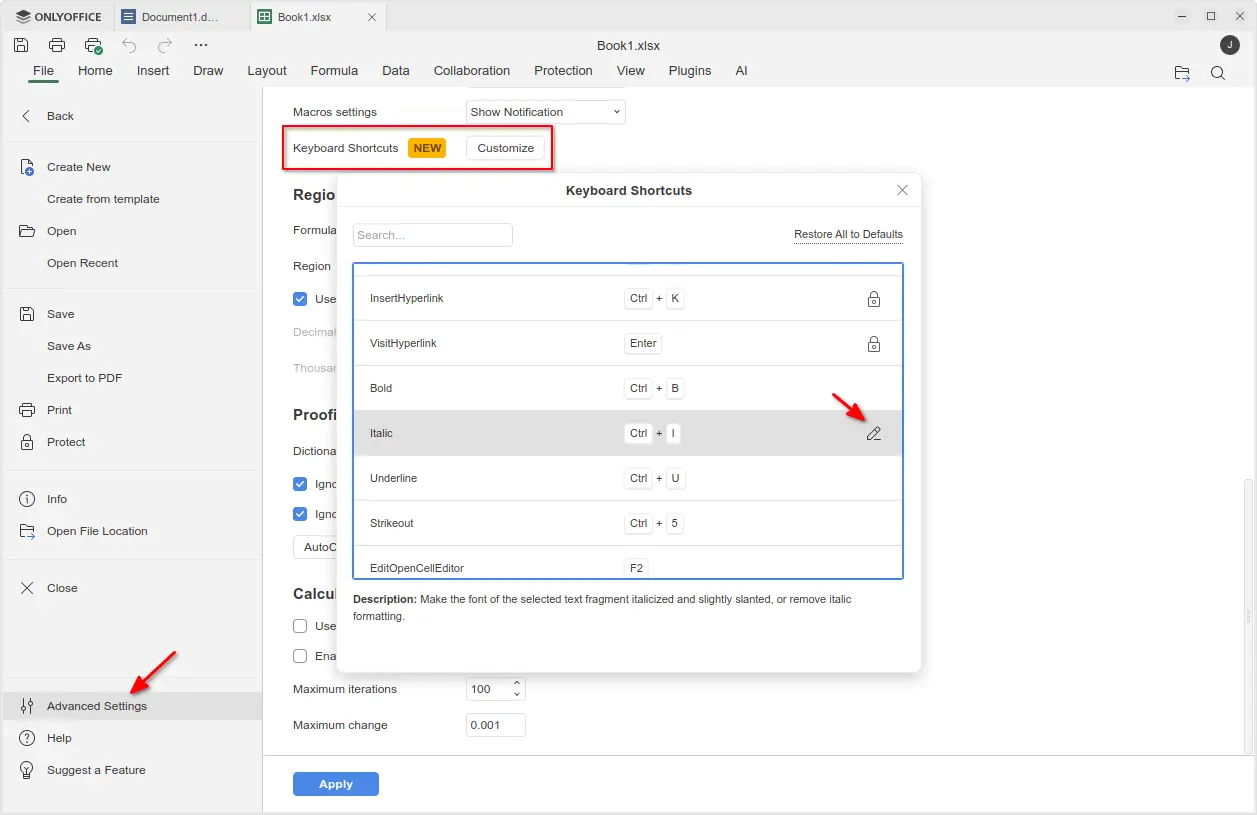
The new version also added support changing the keyboard shortcuts. Simply go to File -> Advanced Settings -> Keyboard Shortcuts, then click on β€œCustomize” button. In pop-up dialog, find out your desired shortcut and either double-click or click β€˜edit’ icon to change it.

Though, many shortcuts are locked as unchangeable, and a β€œRestore All to Defaults” option is available to reset them all.

Moreover, the new version added official support for Windows on ARM64 computers, such as Surface Laptop 7, Galaxy Book4 Edge, etc laptops with Snapdragon X series processors. And, ARM64 support for Linux is coming in future releases.

Other changes in OnlyOffice Desktop Editor 9.2 include:

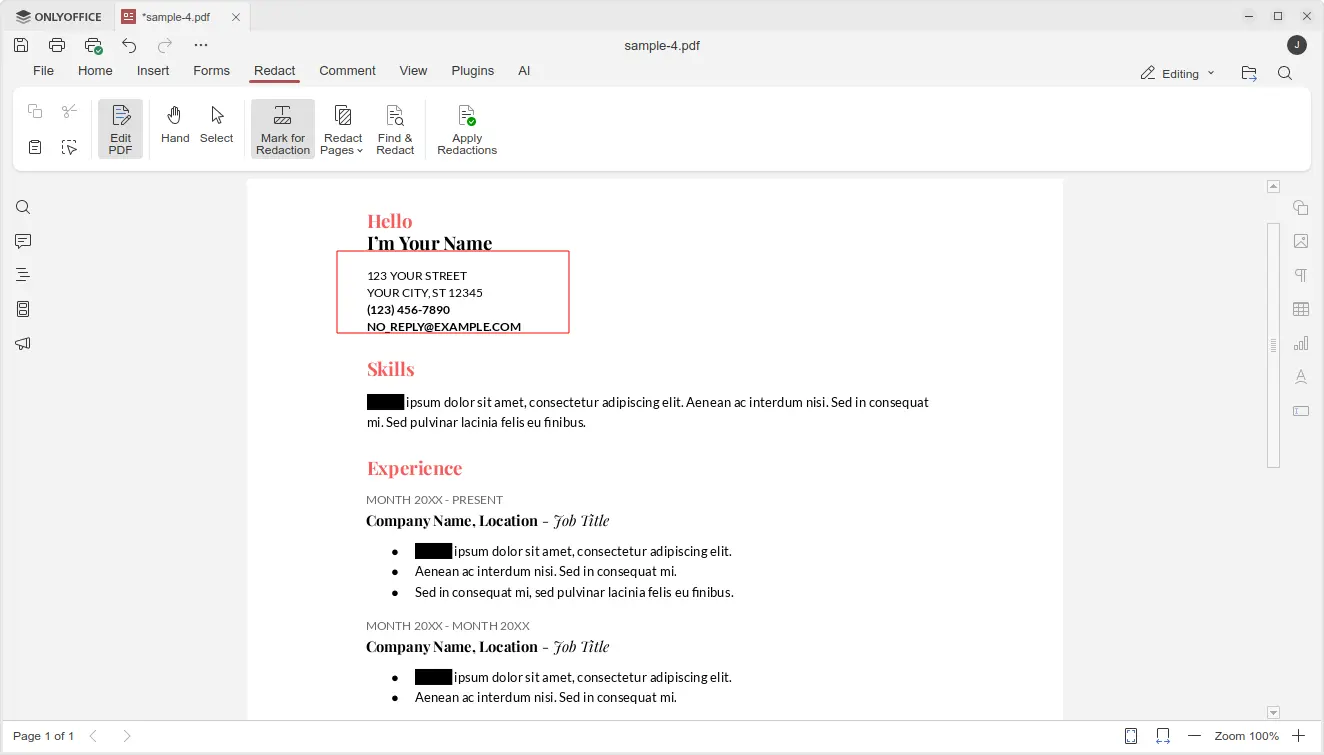
  • Custom color support for the Redact feature in PDF editor.
  • Ability to add descriptive text labels to checkboxes and radio buttons.
  • Assign specific roles to new fields when inserting them into form.
  • For more, see the official release note.

Get OnlyOffice Desktop Editor 9.2

For Ubuntu, the office suite can be installed easily through the App Center (or Ubuntu Software for 22.04). It’s the official Snap package that runs in sandbox environment. Though, at the moment of writing, it’s still at version 9.1.

For choice you may download the app package for Windows, Linux, and macOS from its website. Where, Ubuntu user may choose download:

  • native DEB package, then click open with App Center or Ubuntu Software to install.
  • non-install AppImage, that can launch the office after adding executable permission.
  • or Flatpak package which runs in sandbox environment.

LibreOffice 25.2.7 Released: Final Update Before Major 25.8 Upgrade

30 October 2025 at 23:40

The Document Foundation (TDF) has announced the release of LibreOffice 25.2.7, the final maintenance update in the LibreOffice 25.2 series, now available for download at www.libreoffice.org/download. The foundation urged users of the 25.2 branch to upgrade to LibreOffice 25.8.x, as the 25.2 line nears its end of support. Recommended: 10 Best Free Office Suites for […]

The post LibreOffice 25.2.7 Released: Final Update Before Major 25.8 Upgrade appeared first on UbuntuPIT.

ONLYOFFICE 9.2 Offers AI Agent to All, Adds Macro Recording

2 December 2025 at 07:14

ONLYOFFICE logoONLYOFFICE 9.2 is out. The free, open-source office suite now includes a built-in AI Agent for document generation, content analysis, and more. Feature details inside.

You're reading ONLYOFFICE 9.2 Offers AI Agent to All, Adds Macro Recording, a blog post from OMG! Ubuntu. Do not reproduce elsewhere without permission.

LibreOffice 25.8.3 Office Suite Is Now Available for Download with 70 Bug Fixes

13 November 2025 at 22:48

LibreOffice 25.8

LibreOffice 25.8.3 is now available for download as the third maintenance update to the latest LibreOffice 25.8 office suite series with 70 bug fixes.

The post LibreOffice 25.8.3 Office Suite Is Now Available for Download with 70 Bug Fixes appeared first on 9to5Linux - do not reproduce this article without permission. This RSS feed is intended for readers, not scrapers.

LibreOffice 25.2.7 Is Out as the Last Update in the Series, Upgrade to LibreOffice 25.8

30 October 2025 at 21:49

LibreOffice 25.2

LibreOffice 25.2.7 is now available for download as the last update in the LibreOffice 25.2 office suite series with 57 bug fixes. Users are now urged to update to LibreOffice 25.8.

The post LibreOffice 25.2.7 Is Out as the Last Update in the Series, Upgrade to LibreOffice 25.8 appeared first on 9to5Linux - do not reproduce this article without permission. This RSS feed is intended for readers, not scrapers.

LibreOffice 25.2.7 Released: Final Update Before Major 25.8 Upgrade

30 October 2025 at 23:40

The Document Foundation (TDF) has announced the release of LibreOffice 25.2.7, the final maintenance update in the LibreOffice 25.2 series, now available for download at www.libreoffice.org/download. The foundation urged users of the 25.2 branch to upgrade to LibreOffice 25.8.x, as the 25.2 line nears its end of support. Recommended: 10 Best Free Office Suites for […]

The post LibreOffice 25.2.7 Released: Final Update Before Major 25.8 Upgrade appeared first on UbuntuPIT.

OnlyOffice Desktop Editors 9.1 Released with New PDF Editing Tools

By:Ji m
16 October 2025 at 23:59

OnlyOffice Desktop Editor, the free open-source offline use office suite, release new 9.1 version yesterday.

The new release updated the PDF editing support with new tools, and improved formulas in sheets. It now automatically recover unsaved documents due to app crashes.

First, in PDF editing mode, it introduced new Redact feature, allowing to hide sensitive or confidential information.

The Redact tab includes β€œMark for Redaction”, β€œRedact Pages”, and β€œFind & Redact” options, allowing user to select rectangle area in PDF content, choose PDF pages, or find all matched keywords, then use β€œApply Redactions” option to hide them.

In β€œComment” tab, there are new annotation tools added, allowing to draw rectangle, circle, arrow, and connected lines on your PDF, with custom color and size.

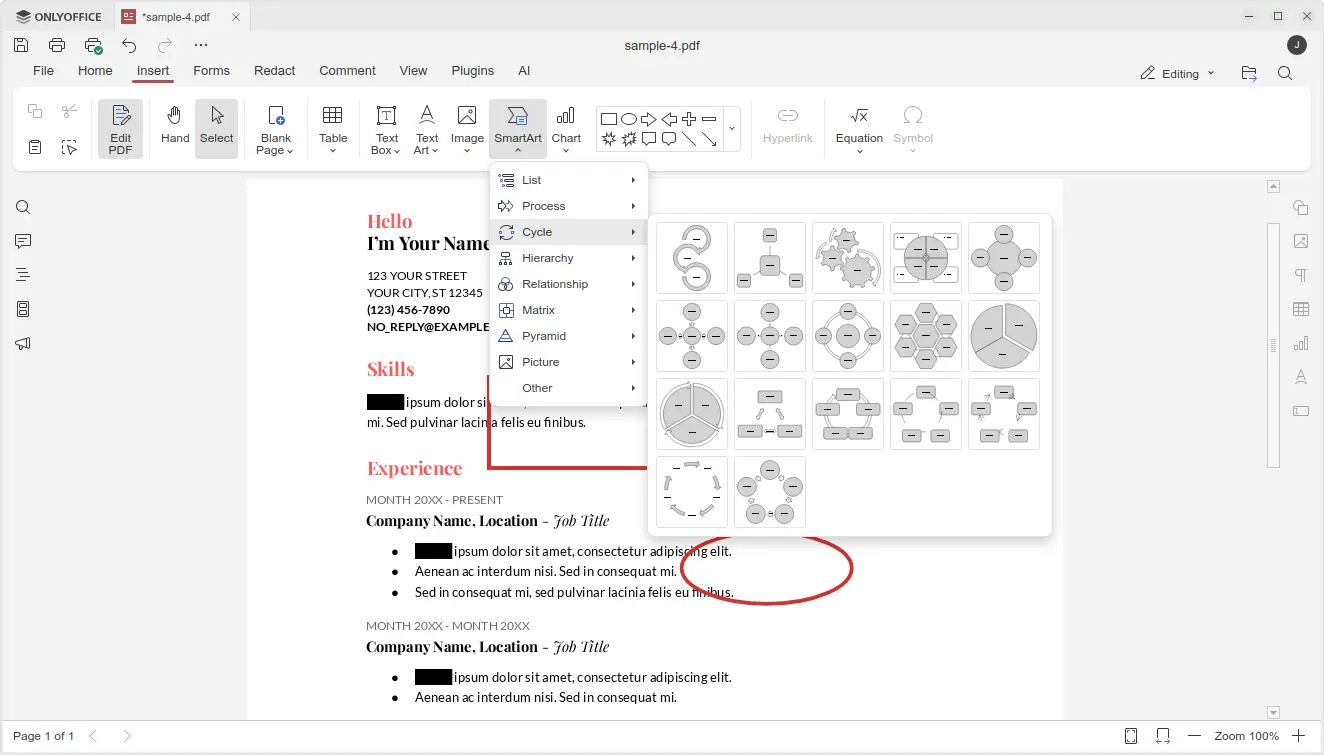
And in β€œInsert” tab, it added new SmartArt and Chart option, allowing to insert many new objects into your PDF.

The Spreadsheet editor now provides updated LOOKUP, VLOOKUP, HLOOKUP and XLOOKUP formulas that now deliver up to 4x faster exact and linear searches.

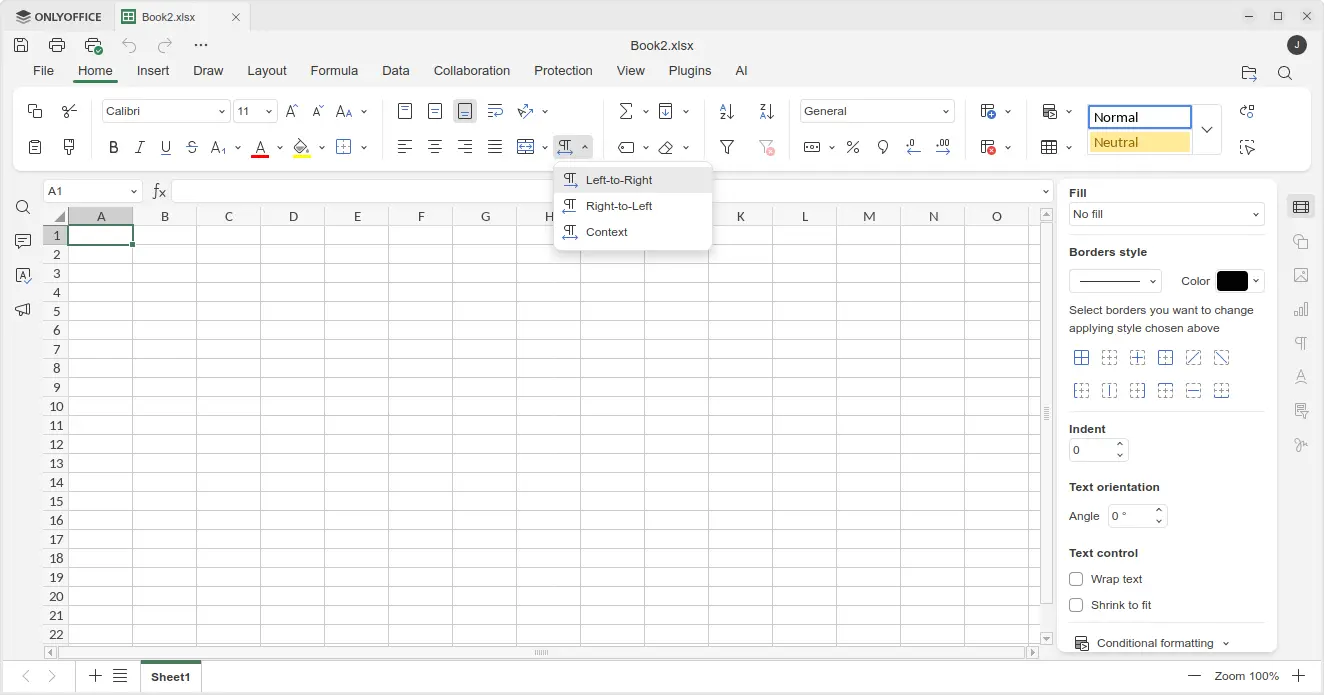
It also added support for date filters in pivot tables, dedicated β€œTable Design” tab with formatted table settings, and added Left-to-Right and Right-to-Left options in Home tab to easily switch text direction in cells.

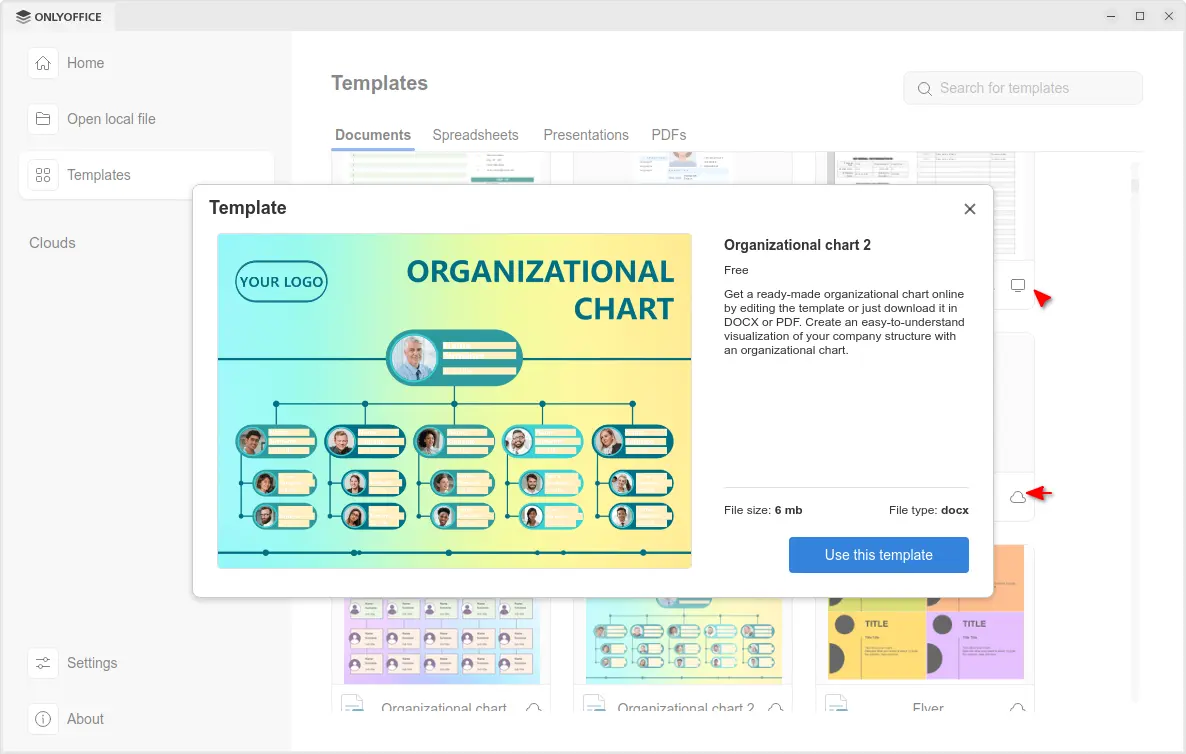
The release also improved the Templates support. It now includes many templates in local computer as well as tons of templates in cloud.

Clicking on a cloud template no longer open it directly in editor, instead it shows a popup with bigger preview with description as well as file type and size, making clearer whether it’s what you want before downloading it.

For Windows 10 and higher, it now displays the notifications about file associations and updates via system toast notifications instead of modal windows.

For macOS, it finally added the new options to insert audio and video files in Presentation, as well as built-in media player to play videos in your slides.

Other changes in the release include:

  • Add HEIF images and HWPML documents support.
  • Support direct PDF to TXT and PPTX to TXT conversion.
  • Full-featured chart editor in documents and presentations.
  • Add Spelling language detection toggle for macOS.
  • Add explosion support for 2D pie and doughnut charts;

For more about OnlyOffice Desktop Editors 9.1, see the official announcement.

Get OnlyOffice Desktop Editors 9.1

For Ubuntu user, the office suite is easy to install by using App Center (or Snap Store). It’s Snap package that runs in sandbox environment. And, at the moment of writing, it’s still at version 9.0.x.

OnlyOffice in App Center

For choice you may download the app package for Windows, Linux, and macOS from its website. Where Ubuntu user may choose Download DEB, then click open with App Center to install.

ONLYOFFICE 9.1 Released with PDF Redact Tools + More

16 October 2025 at 06:59

ONLYOFFICE logoThe free ONLYOFFICE productivity suite has been updated with a host of new features, including an improved PDF Editor. Details on what's new inside.

You're reading ONLYOFFICE 9.1 Released with PDF Redact Tools + More, a blog post from OMG! Ubuntu. Do not reproduce elsewhere without permission.

ONLYOFFICE Desktop 9.1 Brings PDF Redaction, MathML Support, and Optimized Spreadsheet Performance

15 October 2025 at 21:33

ONLYOFFICE has released version 9.1 of its Desktop Editors suite for Linux, Windows, and macOS, introducing significant upgrades across PDF editing, spreadsheet performance, and chart functionality. The update also enhances usability with smarter system integration and improved file handling. The ONLYOFFICE Desktop Editors 9.1 release delivers a focused set of productivity improvements for offline users […]

The post ONLYOFFICE Desktop 9.1 Brings PDF Redaction, MathML Support, and Optimized Spreadsheet Performance appeared first on UbuntuPIT.

LibreOffice 25.8.2 Office Suite Is Now Available for Download with 70 Bug Fixes

9 October 2025 at 20:48

LibreOffice 25.8

LibreOffice 25.8.2 is now available for download as the second maintenance update to the latest LibreOffice 25.8 office suite series with 70 bug fixes.

The post LibreOffice 25.8.2 Office Suite Is Now Available for Download with 70 Bug Fixes appeared first on 9to5Linux - do not reproduce this article without permission. This RSS feed is intended for readers, not scrapers.

LibreOffice 25.8.1 Update Delivers Almost 100 Bug Fixes

1 September 2025 at 00:46

LibreOffice 25.8.1 brings almost 100 bug, crash and other regression fixes. This is the first of several planned point updates to the latest stable release series.

You're reading LibreOffice 25.8.1 Update Delivers Almost 100 Bug Fixes, a blog post from OMG! Ubuntu. Do not reproduce elsewhere without permission.

LibreOffice 25.8 Released with PDF 2.0 Export, Faster Performance

20 August 2025 at 19:13

LibreOffice 25.8 released with PDF 2.0 export, 30% faster file opening, new Calc functions, better performance, and various user-interface tweaks.

You're reading LibreOffice 25.8 Released with PDF 2.0 Export, Faster Performance, a blog post from OMG! Ubuntu. Do not reproduce elsewhere without permission.

LibreOffice 25.8 Released! PDF 2.0 Export & Many New Calc Functions

By:Ji m
21 August 2025 at 01:00

LibreOffice, the popular free open-source office suite, release new 25.8 version today!

LibreOffice 25.8 is a new major release that features user interface improvements, many new spreadsheet functions, faster file loading, and many other new features.

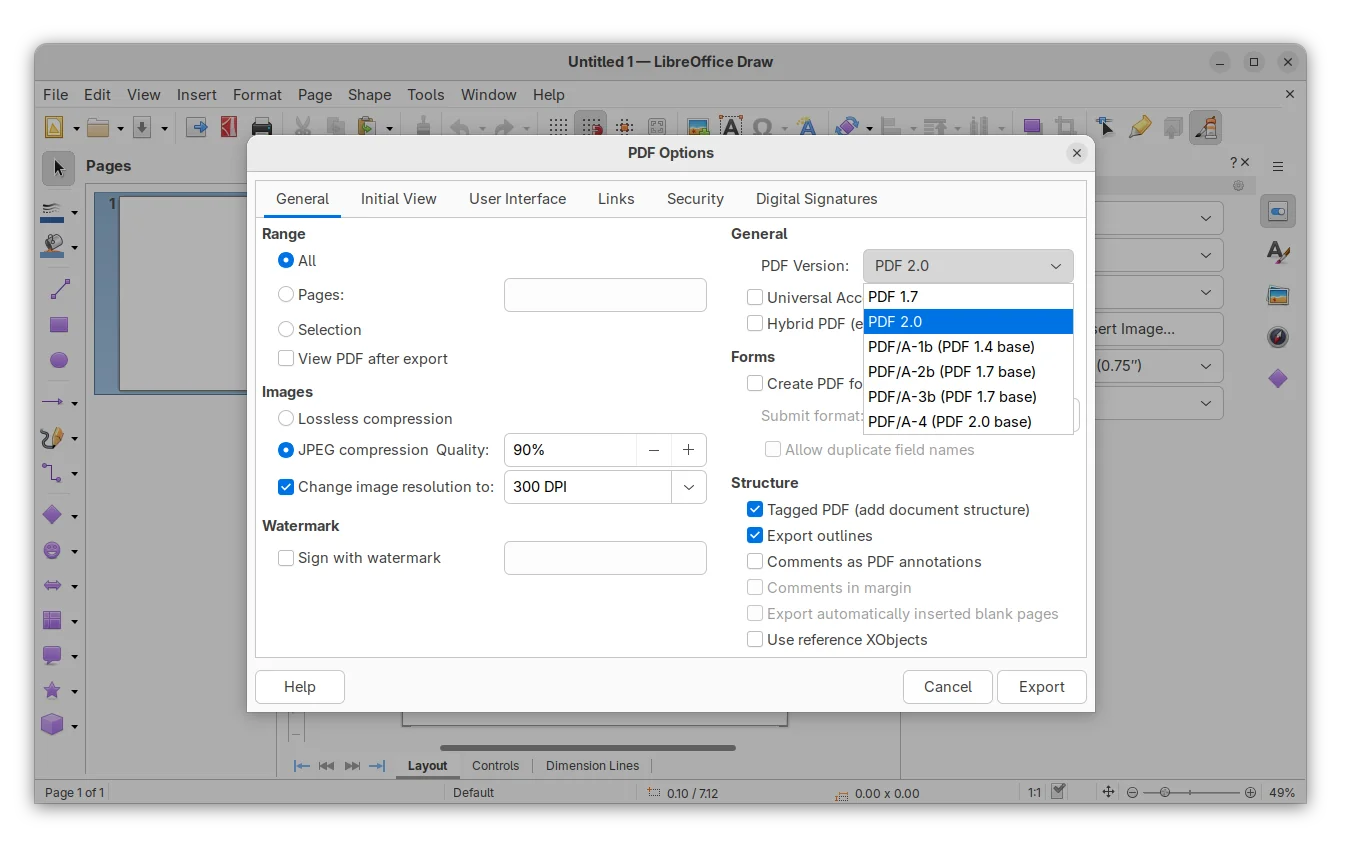
First, the new release added support for exporting PDF 2.0 (ISO 32000-2). The PDF export dialog now offers a drop-down box to choose PDF 2.0 or PDF/A-4 that’s using PDF 2.0 as the base. And, it implemented modern AES-256 encryption that is mandatory with PDF 2.0.

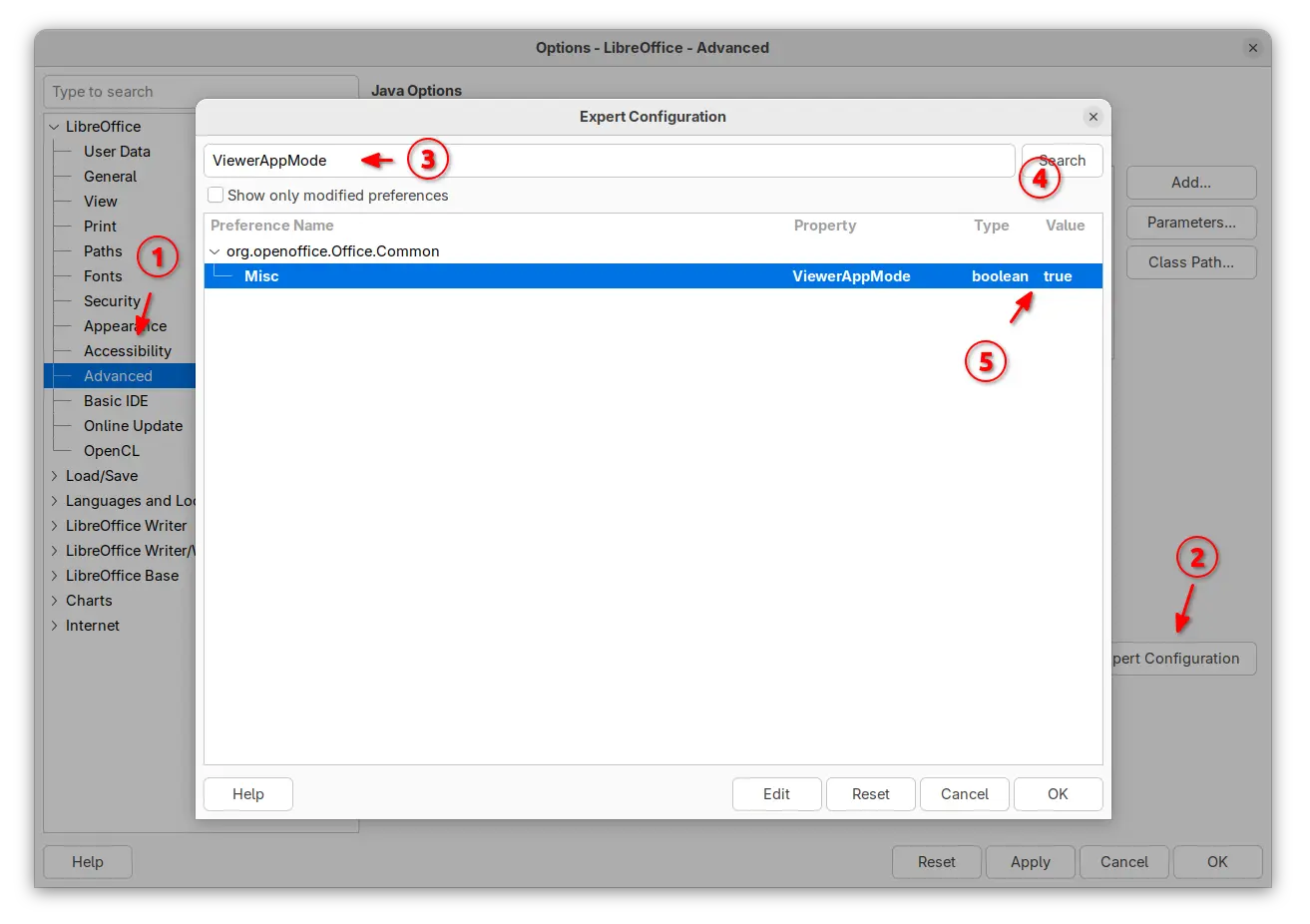
For those who would like to use LibreOffice as a document viewer, the release introduced application-wide viewer mode that all files will be open as read-only mode with all editing tools disabled.

And the option is controlled by ViewerAppMode option in the Advanced -> Expert Configuration dialog.

Enable Application Wide Viewer (read-only) Mode.

The Calc app in the release introduced many new functions. They include CHOOSECOLS, CHOOSEROWS, DROP, EXPAND, HSTACK, TAKE, TEXTAFTER, TEXTBEFORE, TEXTSPLIT, TOCOL, TOROW, VSTACK, WRAPCOLS, and WRAPROWS functions.

It as well added β€œClear AutoFilter” option to Calc cells context menu, and ability to customize conditional formatting operators in icon sets.

The Writer app introduced new Move line hyphenation rule to choose whether to hyphenate the last line words of the pages and move the whole lines to the next pages instead.

It added paragraph, column, page and spread end zones, command to insert a paragraph break before a table, command to convert fields into plain text, and dialog for copy content of a field from read-only document.

There are also per-window track changes recording, reinstate for tracked changes, option to redact images (remove sensitive data), and ability to set the language of certain punctuation characters.

Redact Images

LibreOffice 25.8 also has significantly performance improvements. Writer and Calc open files up to 30% faster in benchmark tests.

For Writer, it’s now much faster for deleting very large tables, faster loading tables with bookmarks, and faster to open large right-to-left documents in. For Calc, it greatly improved loading XLSX files with lots of conditional formatting, graphical objects, customFormat attributes, or formulas.

Other changes in the release include:

  • Accessibility check for links and references in writer header/footer.
  • Support Embedded fonts in PPTX files.
  • Master Slides in Impress and Master Pages in Draw can now be copied.
  • Show boundaries for page margins in Draw.
  • Signed PDF output now compatible with Adobe Reader.
  • Background image in document now visible as a bitmap thumbnail.
  • BASIC IDE code completion and auxiliary resources (experimental).
  • New Macro Manager dialog (experimental)
  • ODF Wholesome Encryption (experimental)

LibreOffice 25.8 also removed Windows 7 and 8/8.1 support, deprecated 32-bit Windows build. And, it’s the last version that runs on macOS 10.15. For more, see the official release note.

Get LibreOffice 25.8

LibreOffice 25.8 is available to download for Linux, Windows, and macOS via the link below:

For Ubuntu users, there are 5 choices, though some of them are not updated at the moment of writing.

  • AppImage package – run to launch the office suite without installation required. Ubuntu since 22.04 needs to install libfuse2 package first.

    LibreOffice AppImage

  • Flatpak package – runs in sandbox environment. Ubuntu users may run the 2 commands below one by one to install:
    sudo apt install flatpak
    flatpak install https://dl.flathub.org/repo/appstream/org.libreoffice.LibreOffice.flatpakref
  • Snap package – available in App Center (Ubuntu Software), which also runs in sandbox environment.
  • Ubuntu PPA – recommend for users who prefer native .deb package. Though the LibreOffice Fresh PPA usually has a few weeks (even months) delay for the new major releases.To add PPA and upgrade pre-installed libreoffice to the latest, run commands below one by one:
    sudo add-apt-repository ppa:libreoffice/ppa
    sudo apt update
    sudo apt install libreoffice
  • Official Deb packages – the download page also provide native .deb packages for Ubuntu and Debian users.After downloaded the tarball, extract, and navigate to the sub-folder that contains all the .deb packages. Right blank area and select β€œOpen in Terminal”, finally run command to install them all:
    sudo apt install ./*.deb

Uninstall LibreOffice

As there are so many ways to install the office suite, it’s easy to get it installed multiple times, resulting duplicated app icons.

Make backup of your important data before uninstalling the application.

To uninstall the Snap package, either use App Center (or Ubuntu Software) or run command:

snap remove --purge libreoffice

For Flatpak package, use the command below to uninstall:

flatpak uninstall --delete-data org.libreoffice.LibreOffice

To uninstall the Deb packages downloaded from LibreOffice website, use command:

sudo apt remove libobasis25.8* libreoffice25.8*

Or, remove the Ubuntu PPA package by running command:

sudo apt remove --autoremove libreoffice-common

NOTE: Remove the PPA package will also get rid of the pre-installed LibreOffice (if Ubuntu was installed in β€œExtended selection” mode). You may choose to purge PPA which will downgrade LibreOffice to the stock version:

sudo apt install ppa-purge
sudo ppa-purge ppa:libreoffice/ppa

❌