โŒ

Normal view

Ubuntu 26.04 LTS โ€œResolute Raccoonโ€ Daily Builds Are Now Available for Download

23 October 2025 at 08:23

Ubuntu 26.04 LTS Daily

Ubuntu 26.04 LTS (Resolute Raccoon) daily build ISO images are now available for download for early adopters and application developers who want to test drive their apps against the new toolchain.

The post Ubuntu 26.04 LTS โ€œResolute Raccoonโ€ Daily Builds Are Now Available for Download appeared first on 9to5Linux - do not reproduce this article without permission. This RSS feed is intended for readers, not scrapers.

OpenBSD 7.8 Released with Raspberry Pi 5 support, Parallel TCP stack, SEV-ES VMs, and OpenSSH 10.2

22 October 2025 at 22:43

OpenBSD 7.8 ships broad hardware enablement, major SMP networking gains, and security-focused updates across VMM, OpenSSH, and LibreSSL. The OpenBSD project has released version 7.8, introducing a wide array of system-level refinements, expanded device support, and substantial security and networking improvements. Broader Hardware and Platform Support OpenBSD 7.8 brings full Raspberry Pi 5 support on [โ€ฆ]

The post OpenBSD 7.8 Released with Raspberry Pi 5 support, Parallel TCP stack, SEV-ES VMs, and OpenSSH 10.2 appeared first on UbuntuPIT.

KDE Plasma 6.5 Released! How to Install it in KUbuntu 25.10

By:Ji m
23 October 2025 at 00:06

KDE announced the Plasma desktop 6.5 yesterday. See whatโ€™s new and how to install guide for (K)Ubuntu 25.10.

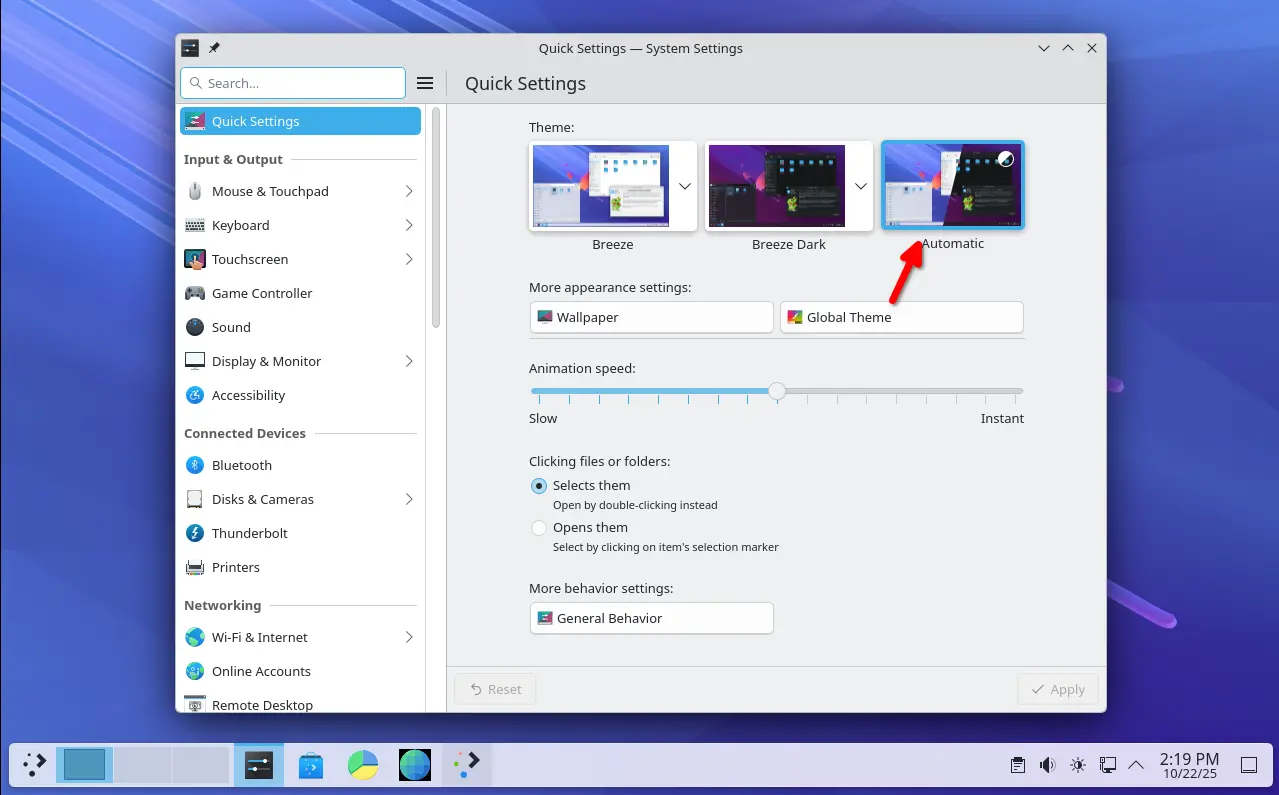
Plasma 6.5 introduced an Automatic theme selection in settings, allowing to automatically switch between light and dark themes according to the time of day.

In the Automatic mode, it uses the light theme for panels, menus, app windows, and wallpaper during the day, and automatically switch them to dark at night. While, user has the choice to set which light or dark theme, and which wallpapers to use.

The new desktop release updated its software app (aka Discover) with support for flatpak+https:// URLs. Meaning that, it allows to click โ€œInstallโ€ button in Flathub.org page to automatically open Discover. And, it now can show you hardware drivers available for installation on operating systems supporting this feature.

KRunner, the app launcher, unit converter, calculator, that can be triggered by Alt+F2 or Alt+Space, now supports Fuzzy Search. Meaning even when you misspell an appโ€™s name, it will probably still find it for you.

KRunner Fuzzy Search

The built-in Remote Desktop Protocol (RDP) server in the release now has the ability to share the clipboard. And, it no longer requires to manually create separate remote desktop accounts, as systemโ€™s existing user accounts now work as expected.

Zoom & Magnifier effect now has new โ€œEnable text caret trackingโ€ option. With it enabled, it will automatically jump to the position of the text insertion point, when you moving around the screen.

Other changes in Plasma 6.5 include:

  • Rounded window corners (include bottom corners) for default Breeze themes.
  • Add โ€œPinned clipboard itemsโ€ feature.
  • Hibernate system from the login screen.
  • Inform when printerโ€™s ink or toner running low or empty.
  • Ability to see missed notifications while you were in Do Not Disturb mode.
  • โ€œMute Microphoneโ€ key or Meta+Mute shortcut mutes all microphones rather than just the active one.
  • Configure rotary dials and touch rings on your drawing tablet in System Settings -> Drawing Tablet
  • Add general Application Permissions page to manage app (include Flatpak apps) permissions.
  • Add more info about game controllers in System Settingsโ€™ Game Controller page.
  • Orca screen reader now reads out changes to the Caps Lock state.
  • Show a system notification when plug in a device.
  • Ability to re-order virtual desktops from the Pager widget (Wayland only).
  • Experimental support for Wayland picture-in-picture protocol.
  • Add โ€œoverlay planesโ€ support for compatible GPU.

For more about it, see the official release note in this page.

Install Plasma 6.5 in (K)Ubuntu 25.10

Arch Linux has made the Plasma 6.5 into its Extra-Testing repository.

For KUbuntu 25.10, the official Kubuntu Backports PPA has been updated with Plasma Desktop 6.5 along with most recent KDE Gear 25.08.2.

To get them, simply launch terminal (Konsole) and run the commands below one by one:

  • First, run command to add the Backports PPA:
    sudo add-apt-repository ppa:kubuntu-ppa/backports

    It should automatically update caches after adding PPA. Just in case, you may run sudo apt update to manually refresh cache.

  • Then, install all available updates to upgrade your desktop to Plasma 6.5:
    sudo apt full-upgrade

Ubuntu 25.10 and other flavors without KDE Plasma may also install the desktop environment by running the command below after added the PPA:

sudo apt install kubuntu-desktop

Though this is not a good idea as it might mess your current desktop appearance.

Finally, restart your computer to apply changes.

Uninstall KDE Plasma 6.5:

If you installed the 6.5 version of this desktop environment in KUbuntu 25.10 from PPA, simply open terminal (Konsole) and run command below to uninstall:

sudo apt install ppa-purge && sudo ppa-purge ppa:kubuntu-ppa/backports

This command will install ppa-purge command line tool, and use it to purge the PPA, which also downgrade all the packages installed from it. Also, you need to restart computer to apply changes.

VirtualBox 7.2.4 Released with Initial 6.18 Kernel Support

By:Ji m
22 October 2025 at 19:38

VirtualBox, the free open-source hypervisor software by Oracle, released new 7.2.4 version yesterday.

This is the second maintenance update for the latest 7.2 release series, features only include some bug-fixes, translation updates and minor new features.

First, the new release added initial support for Linux Kernel 6.18, which is still in RC development stage. Meaning it now works for Linux with this mainline kernel, either running as host OS or guest in virtual machine.

The release fixed Linux Guest Additions compile issue for RHEL 9.6 / 9.7 and their derivatives, such as Alma Linux 9. It also fixed Guest Additions installation issue on Windows XP SP2.

It as well fixed the VirtualBox VM Manager crash issue when the Windows host OS was resuming from sleep, and, fixed NAT networking breaks when adding additional port forwarding rule.

Other changes include translation updates with support for Traditional Chinese, Greek, Swedish, Hungarian and Indonesian. For more, see the official ChangeLog page.

Get VirtualBox 7.2.4

The official packages for Linux, Windows, macOS, and Solaris hosts are available to download in its website via the link below:

NOTE: the new release so far does NOT support Ubuntu 25.10 host OS, even the package for 25.04 does not install on it due to dependency issue.

BSD Release: OpenBSD 7.8

22 October 2025 at 13:05
The DistroWatch news feed is brought to you by TUXEDO COMPUTERS. Theo de Raadt has announced the release of OpenBSD 7.8, the latest of the regular biannual updates of the project's free, multi-platform 4.4BSD-based UNIX-like operating system. This version adds support for Raspberry Pi 5, among many other changes: "We are pleased to announce the official release of OpenBSD....

SuperTuxKart 1.5 Released with Improved Graphics + More

22 October 2025 at 10:35

SuperTuxKart 1.5 released with graphics overhaul, new benchmark mode and egg hunt tracks. It's also the final 1.x release before SuperTuxKart Evolution arrives.

You're reading SuperTuxKart 1.5 Released with Improved Graphics + More, a blog post from OMG! Ubuntu. Do not reproduce elsewhere without permission.

KDE Plasma 6.5: Rounded Corners, Clipboard Pinning + More

21 October 2025 at 23:22

KDE Plasma 6.5 graphic.KDE Plasma 6.5 released on 21 October 2025. The new version offers better RDP, HDR and Wayland support, expanded settings and other improvements.

You're reading KDE Plasma 6.5: Rounded Corners, Clipboard Pinning + More, a blog post from OMG! Ubuntu. Do not reproduce elsewhere without permission.

Clonezilla Live 3.3.0-33 Adds Support for Cloning MTD Block and eMMC Boot Devices

22 October 2025 at 00:30

Clonezilla Live 3.3.0-33

Clonezilla Live 3.3.0-33 open-source and free disk cloning/imaging tool is now available for download with various changes and updated components. Hereโ€™s whatโ€™s new!

The post Clonezilla Live 3.3.0-33 Adds Support for Cloning MTD Block and eMMC Boot Devices appeared first on 9to5Linux - do not reproduce this article without permission. This RSS feed is intended for readers, not scrapers.

VirtualBox 7.2.4 Released with Initial Support for Linux Kernel 6.18

22 October 2025 at 00:02

VirtualBox 7.2.4

VirtualBox 7.2.4 open-source virtualization software is now available for download with initial support for Linux kernel 6.18 and other changes. Here's what's new!

The post VirtualBox 7.2.4 Released with Initial Support for Linux Kernel 6.18 appeared first on 9to5Linux - do not reproduce this article without permission. This RSS feed is intended for readers, not scrapers.

KDE Plasma 6.5 Desktop Environment Officially Released, This Is Whatโ€™s New

21 October 2025 at 17:48

KDE Plasma 6.5

KDE Plasma 6.5 desktop environment is now available with rounded bottom corners, day/night wallpapers, and other improvements. Here's everything that's new!

The post KDE Plasma 6.5 Desktop Environment Officially Released, This Is Whatโ€™s New appeared first on 9to5Linux - do not reproduce this article without permission. This RSS feed is intended for readers, not scrapers.

RustDesk Released 1.4.3 with Multi-Monitor for Wayland & Virtual Mouse

By:Ji m
22 October 2025 at 01:20

RustDesk, the popular free open-source remote desktop software, released version 1.4.3 few days ago.

RustDesk is yet another remote desktop solution written in Rust, which works in Linux, Windows, macOS, Android, iOS, and web browser. It features peer-to-peer encrypted connection and self-hosting server support.

RustDesk client in Ubuntu

Like TeamViewer or AnyDesk, simply install the app in both sides of your devices, then you may input the ID to connect to each other. By default, it uses the public server to initialize the connection, but data is typically sent peer-to-peer after the connection is established. While, user may set its own server for faster and more reliable connections.

RustDesk supports VP8, VP9, AV1, and hardware accelerated (if your GPU support it) H264/H265 video codecs, as well as IPv6 p2p connection, UDP hole punching, and more.

The latest 1.4.3 version added virtual mouse along with virtual joystick support when accessing remote desktop from mobile devices. It allows user to control mouse movement by touching and dragging a virtual joystick on screen, and scroll up or down through virtual scroll-buttons.

RustDesk on iPhone, accessing remote Ubuntu desktop with virtual mouse

For Linux Wayland (e.g., Ubuntu 24.04 & higher with default session), it now supports sharing multiple monitor screens (if any). When accessing with remote machine, thereโ€™ll be a toggle to switch between the monitors, view all monitor screens in single view, or have multiple RustDesk windows (one monitor screen per window).

In addition to show remote desktop with the original screen size, adaptive to fit app window size, the release added scale custom option with a slider bar, allowing to scale the remote desktop screen by percentage value. Itโ€™s useful to scale remote screen to fit app window, while keeping the ratio to prevent distortion.

Other changes in the release include:

  • IPv6 prefix-based rate limiting on login failures.
  • Move touch mode option from peer option to local option.
  • More assign from cli and devices.py.
  • Address book api res/ab.py, and audit api res/audits.py.
  • Fix high CPU usage on Arch with Wayland.

How to Install RustDesk 1.4.3

The software offers official packages for Windows, Linux, macOS, iOS, and Android, available to download at its Github releases:

Go to โ€œAssetsโ€ sections for more packages, and select download X86_64 for Intel/AMD, AArch64 (ARM64) for RasPi, Snapdragon, or Apple Silicon.

For Linux, run uname -m command to tell if you donโ€™t even know your CPU architecture type. And, see the official docs for setting up self-hosting server.

digiKam 8.8.0 Released with UI Translation for 61 Languages

By:Ji m
21 October 2025 at 19:40

digiKam, the popular Qt-based photo management software, released new 8.8.0 version after 4 months of development.

This is probably the last release in 2025, as the developer team plans to add Qt 6.10 bundle and AI-power tools for image enhancement and management in next version for 2026.

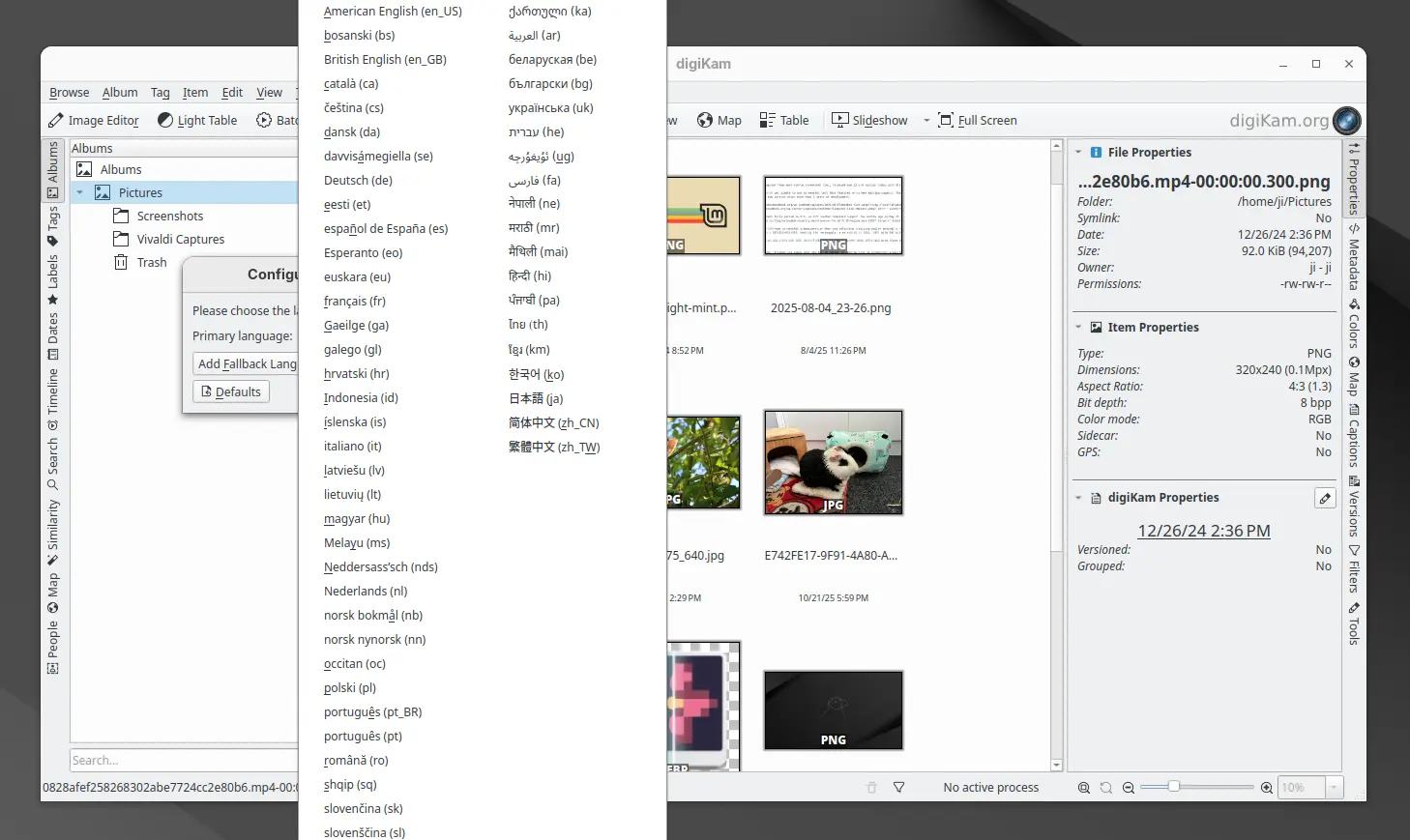
The new release finally updated its UI with translations support. By going to Settings -> Configure Language, user can now switch the application graphical interface between 61 different languages. And, the online documentation has been updated with Brazilian Portuguese translations support.

digiKam 8.8.0 has been fully ported with Qt 6.10.0 support, though the official installers for Linux, Windows, and macOS are still have Qt 6.9.1 in bundle.

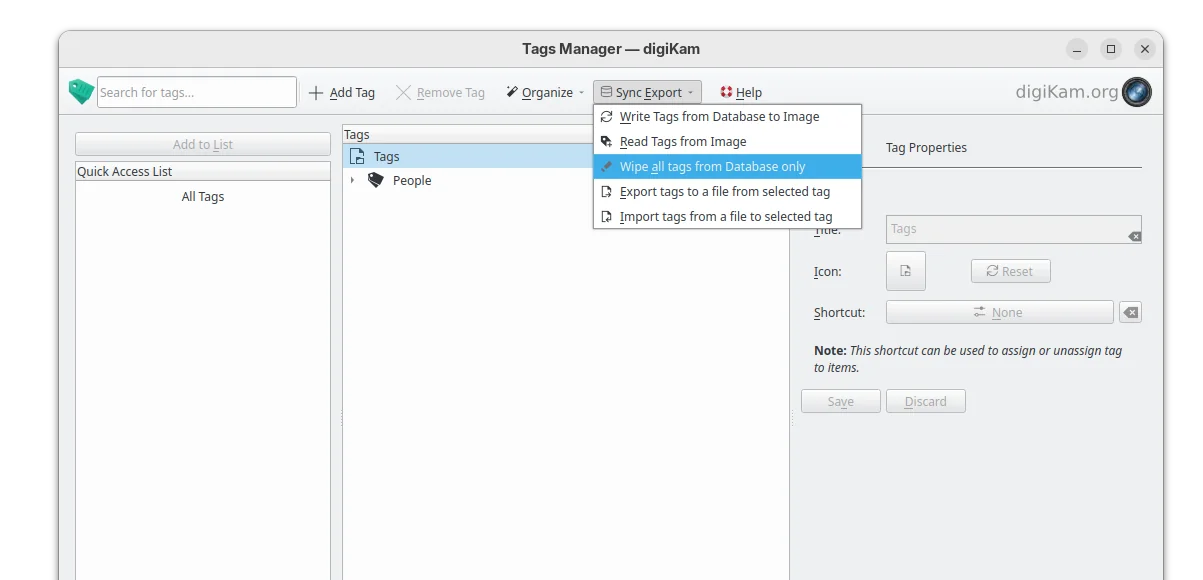
The tag manager in the release now include 2 new options, allowing to import or export tag hierarchies to and from text files, supporting the Controlled Vocabulary Keyword Catalogue (CVKC) format.

The Preview module has been updated with focus point visualization support for FujiFilm and Olympus/OM Systems cameras, providing photographers with precise information about focus accuracy and composition.

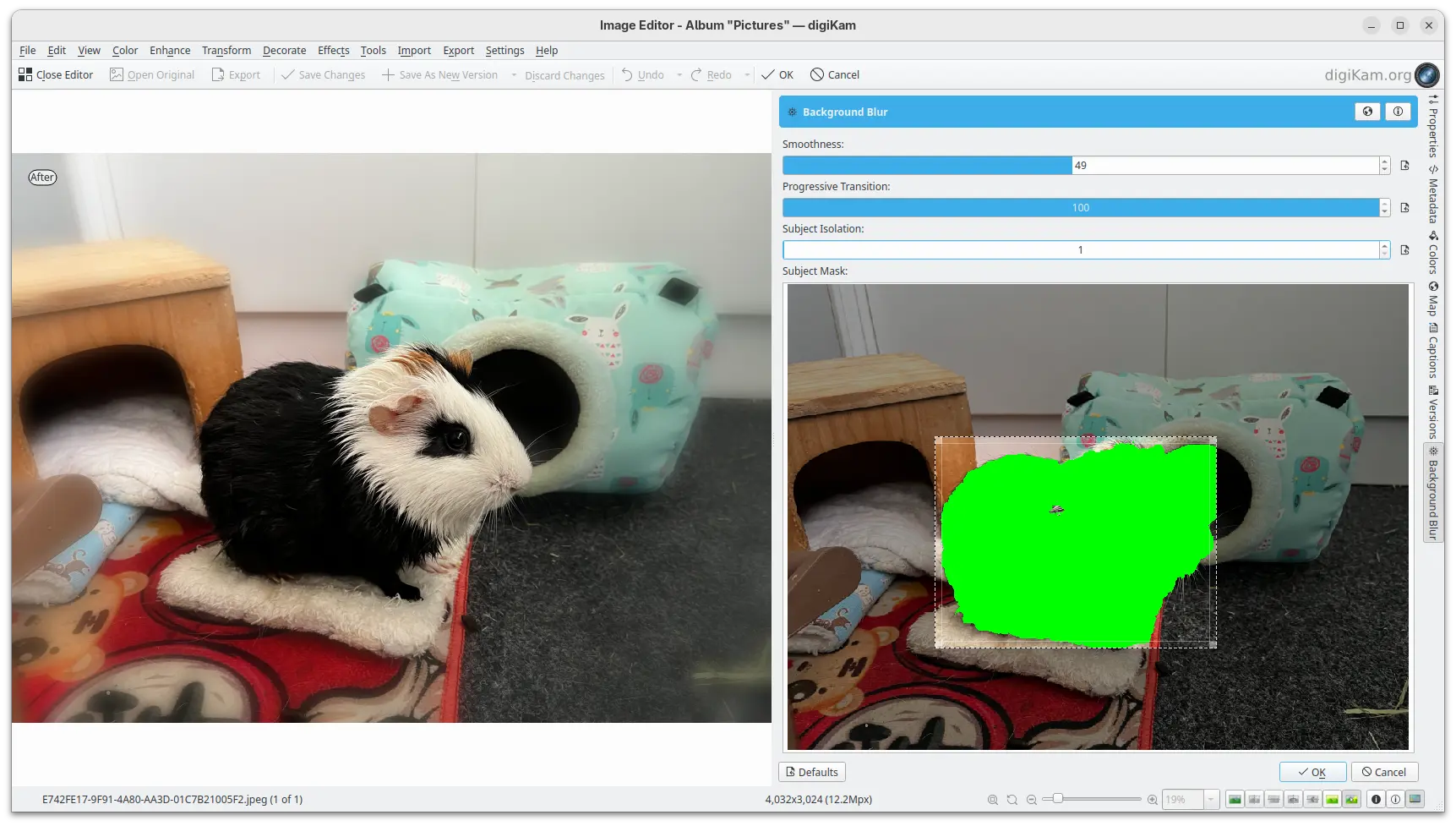
And, the Image Editor new includes a new enhancement tool, Background Blur, allowing to progressively blur the background of a subject in a photo, enabling creative depth-of-field effects.

New background blur enhance tool

Other changes include Gโ€™MIC-Qt plugin 3.6.0, long file paths (when enabled) support in Windows, as well as:

  • Use the monitor color profile set under Windows, macOS, and Linux Wayland.
  • Use native desktop notifications in Progress Manage.
  • Update QtAVPlayer video module to 20250913.
  • Update Libraw RAW decoder to 20250727.
  • Improved stability for Linux Wayland.
  • And over 100 bug-fixes.

For more about digiKam 8.8.0, see the official release note.

Install digiKam 8.8.0

The software offers official packages for Linux, Windows, and macOS, which are available to download at the link below:

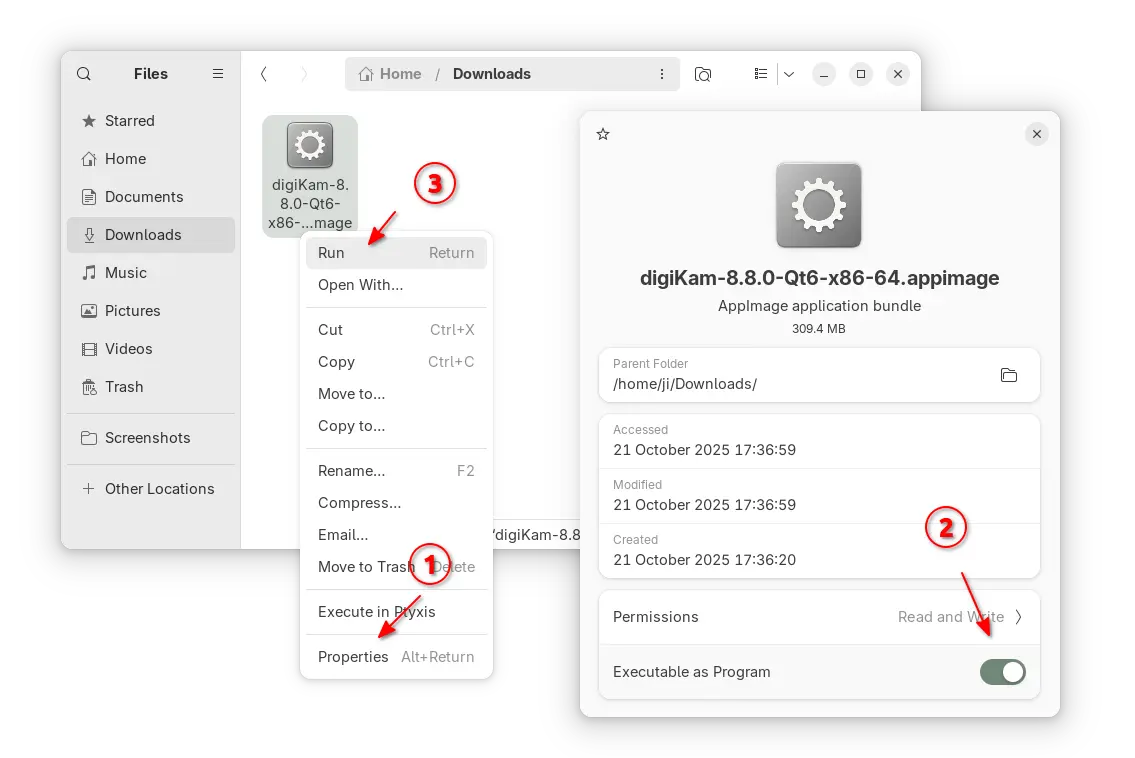
For Linux, itโ€™s an AppImage for modern Intel/AMD platforms. Just grab the package, add executable permission from its Properties dialog, finally run to launch the software.

NOTE: Ubuntu since 22.04 does NOT support AppImage out-of-the-box, you need to open terminal (Ctrl+Alt+T) and run command to install libfuse2 package first:

sudo apt install libfuse2

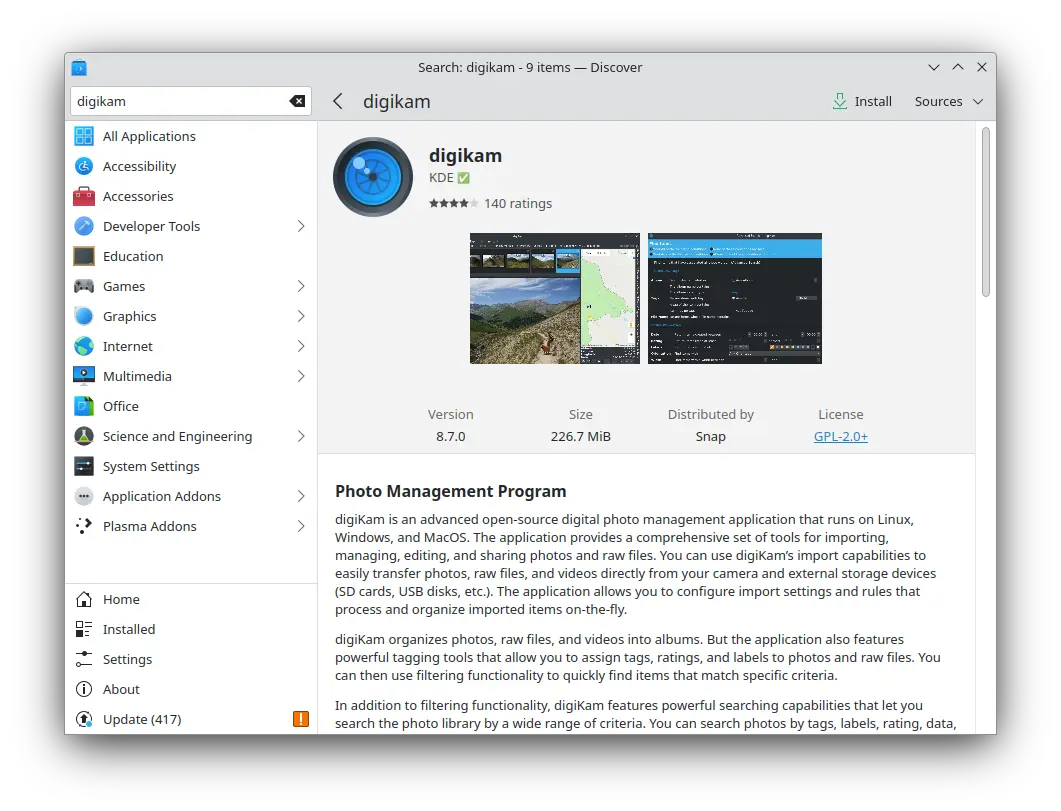
For choice, Ubuntu user (and its official flavors) may search & install digiKam from either App Center (Ubuntu Software) or desktop specific software app. Itโ€™s official Snap package that runs in sandbox, though not updated at the moment of writing.

digiKam snap package in KUbuntu software app

For Linux Mint, Fedora, etc Linux Distributions that prefer Flatpak, or Linux users on ARM64 platform, itโ€™s also available to install as Flatpak package.

While Debian & Ubuntu users may run 2 commands below one by one to get it:

  • Install Flatpak daemon:
    sudo apt install flatpak
  • Install digiKam flatpak package:
    flatpak install https://dl.flathub.org/repo/appstream/org.kde.digikam.flatpakref

NOTE: If this is the first Flatpak app you installed on your system, then you may need a log out and back in to make app icon visible. Or, you may start it from terminal by running terminal:

flatpak run org.kde.digikam

And, you may replace run in last command with update to check updates, or with uninstall to remove the package.

Distribution Release: Ultramarine Linux 42

22 October 2025 at 04:55
The DistroWatch news feed is brought to you by TUXEDO COMPUTERS. The developers of Ultramarine Linux, a set Fedora-based distributions with a choice of Budgie, GNOME, KDE Plasma and Xfce desktops, have announced the release of Ultramarine Linux 42. The new version, based on Fedora 42, brings improvements to the Taidan input method editor and hardware acceleration for Windows....

Distribution Release: Clonezilla Live 3.3.0-33

21 October 2025 at 21:12
The DistroWatch news feed is brought to you by TUXEDO COMPUTERS. Clonezilla Live is a Debian-based distribution for duplicating and restoring disk images and partitions. The distribution has published an update to its Stable branch which includes a new kernel with new hardware support and updates to its key utilities. "The underlying GNU/Linux operating system was upgraded. This release....
โŒ