 Login
LoginMozilla to Require Data-Collection Disclosure in All New Firefox Extensions
24 October 2025 at 19:11



In the world of modern CPUs, speculative execution, where a processor guesses ahead on branches and executes instructions before the actual code path is confirmed, has long been recognized as a performance booster. However, it has also given rise to a class of vulnerabilities collectively known as “Spectre” attacks, where microarchitectural side states (such as the branch target buffer, caches, or predictor state) are mis-exploited to leak sensitive data.
Now, a new attack variant, dubbed VMScape, exposes a previously under-appreciated weakness: the isolation between a guest virtual machine and its host (or hypervisor) in the branch predictor domain. In simpler terms: a malicious VM can influence the CPU’s branch predictor in such a way that when control returns to the host, secrets in the host or hypervisor can be exposed. This has major implications for cloud security, virtualization environments, and kernel/hypervisor protections.
In this article we’ll walk through how VMScape works, the CPUs and environments it affects, how the Linux kernel and hypervisors are mitigating it, and what users, cloud operators and admins should know (and do).
Speculative execution vulnerabilities like Spectre exploit the gap between architectural state (what the software sees as completed instructions) and microarchitectural state (what the CPU has done internally, such as cache loads, branch predictor updates, etc). Even when speculative paths are rolled back architecturally, side-effects in the microarchitecture can remain and be probed by attackers.
One of the original variants, Spectre-BTI (Branch Target Injection, also called Spectre v2) leveraged the Branch Target Buffer (BTB) / predictor to redirect speculative execution along attacker-controlled paths. Over time, hardware and software mitigations (IBRS, eIBRS, IBPB, STIBP) have been introduced. But VMScape shows that when virtualization enters the picture, the isolation assumptions break down.
VMScape: Guest to Host via Branch PredictorVMScape (tracked as CVE‑2025‑40300) is described by researchers from ETH Zürich as “the first Spectre-based end-to-end exploit in which a malicious guest VM can leak arbitrary sensitive information from the host domain/hypervisor, without requiring host code modifications and in default configuration.”
Here are the key elements making VMScape significant:
The attack is cross-virtualization: a guest VM influences the host’s branch predictor state (not just within the guest).
Modern computing systems rely heavily on operating-system schedulers to allocate CPU time fairly and efficiently. Yet many of these schedulers operate blindly with respect to the meaning of workloads: they cannot distinguish, for example, whether a task is latency-sensitive or batch-oriented. This mismatch, between application semantics and scheduler heuristics, is often referred to as the semantic gap.
A recent research framework called SchedCP aims to close that gap. By using autonomous LLM‐based agents, the system analyzes workload characteristics, selects or synthesizes custom scheduling policies, and safely deploys them into the kernel, without human intervention. This represents a meaningful step toward self-optimizing, application-aware kernels.
In this article we will explore what SchedCP is, how it works under the hood, the evidence of its effectiveness, real-world implications, and what caveats remain.
At the heart of the issue is that general-purpose schedulers (for example the Linux kernel’s default policy) assume broad fairness, rather than tailoring scheduling to what your application cares about. For instance:
A video-streaming service may care most about minimal tail latency.
A CI/CD build system may care most about throughput and job completion time.
A cloud analytics job may prefer maximum utilisation of cores with less concern for interactive responsiveness.
Traditional schedulers treat all tasks mostly the same, tuning knobs generically. As a result, systems often sacrifice optimisation opportunities. Some prior efforts have used reinforcement-learning techniques to tune scheduler parameters, but these approaches have limitations: slow convergence, limited generalisation, and weak reasoning about why a workload behaves as it does.
SchedCP starts from the observation that large language models can reason semantically about workloads (expressed in plain language or structured summaries), propose new scheduling strategies, and generate code via eBPF that is loaded into the kernel via the sched_ext interface. Thus, a custom scheduler (or modified policy) can be developed specifically for a given workload scenario, and in a self-service, automated way.
SchedCP comprises two primary subsystems: a control-plane framework and an agent loop that interacts with it. The framework decouples “what to optimise” (reasoning) from “how to act” (execution) in order to preserve kernel stability while enabling powerful optimisations.
Here are the major components:
After almost three years of development, SuperTuxKart kart racing game finally released new major 1.5 version few days ago.
The new release of this game introduced Supersampling Anti-Aliasing (SSAA) support. Meaning that it can render game resolution higher than current screen size (even over maximum display resolution). It greatly improved the graphics quality, which is however extremely heavy that may lower frame rate.
You may enable this feature by going to “Graphics” setting page and set render resolution higher than 100%.
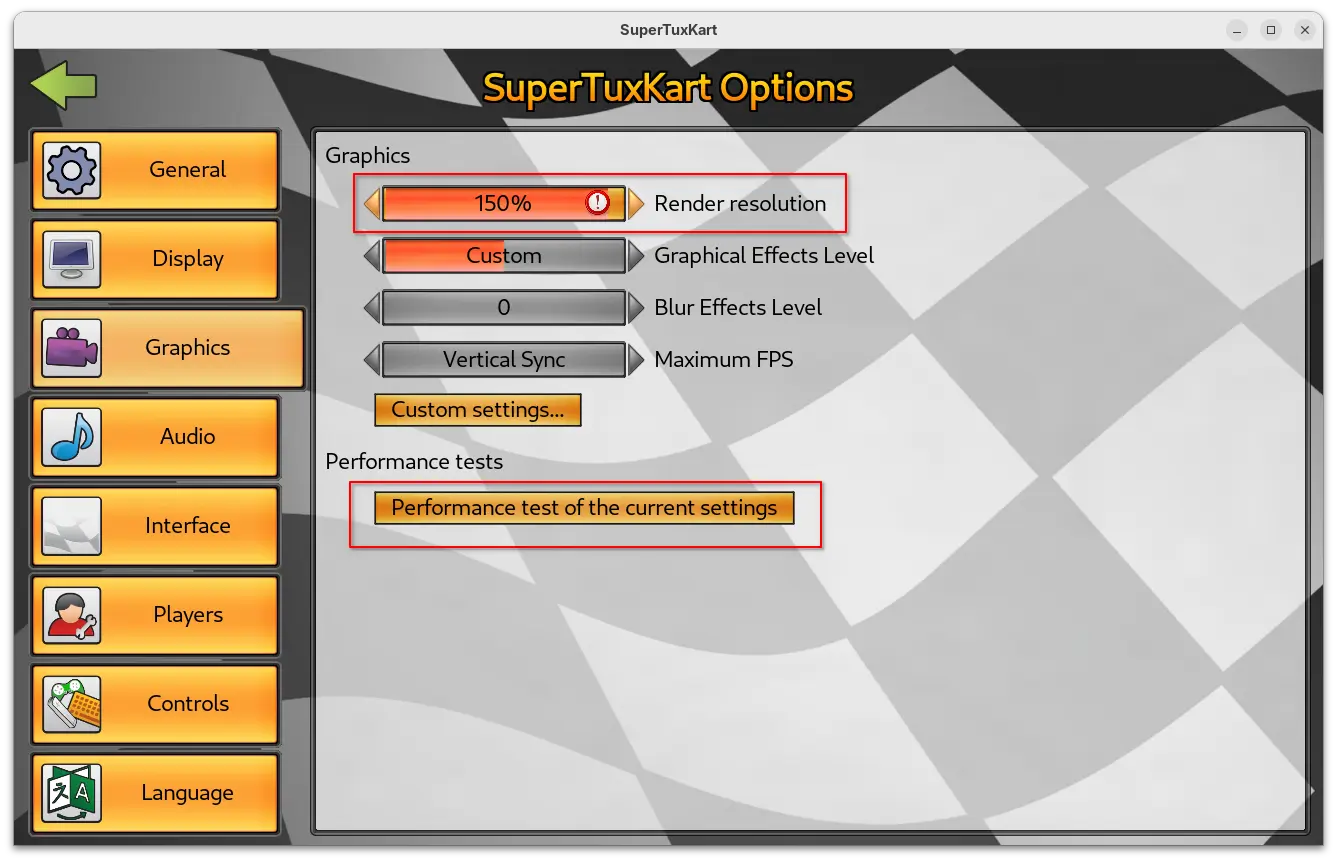
As you can see in the screenshot above, the setting page also added new “Performance test of the current settings” benchmark button. By clicking on the option, it starts a self-driving game with single loop track, and prints the performance test results, such as FPS, duration, and your current settings when it ends.
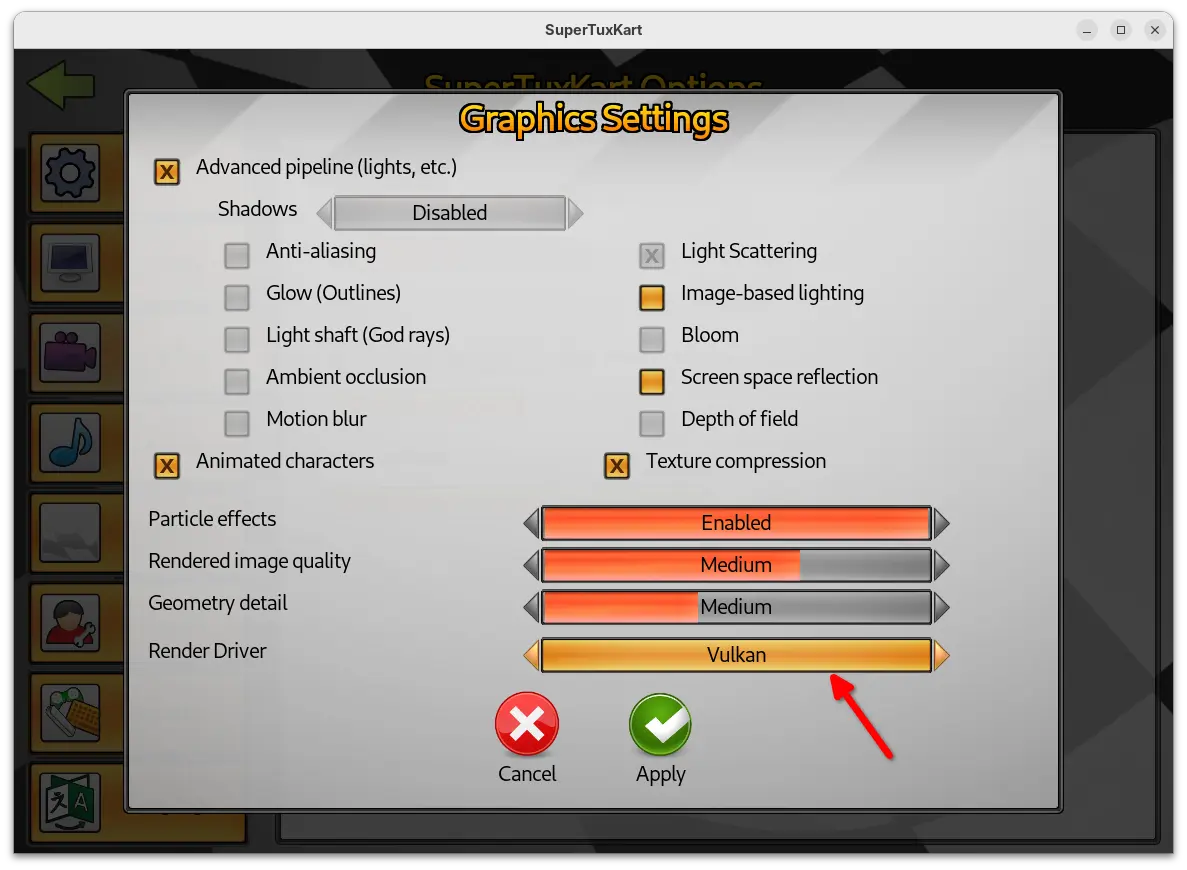
Besides that, the Vulkan support now goes stable. It added spotlight support and significant updates to the Vulkan renderer. And, user can now go to “Custom settings…” under Graphics to easily switch the render driver to Vulkan.
SuperTuxKart 1.5 as well improved level of details (LoD) and shadow mapping logic, which significantly reduce the occurrence of the sudden or abrupt appearance of game elements. And, it improved sound scale allowing headphone users to easily pick the ideal sound level.
For the UI, the release added 6 new skins. The previous skins are now grouped as Classic with 5 variants, while a new Desert variant is added in this release. Cartoon theme now has five new variants, and each of them come with a background picture showing a scene from one of STK’s tracks.
Other changes in the release include three new egg hunts in Black Forest, Gran Paradisio Island and The Old Mine, and three new official fields in soccer mode. They are Oasis and XR-4R3N4 by CrystalDaEevee, and Hole Drop by CrystalDaEevee & Sven Andreas Belting.
There are as well following changes in the release:
For more about the release, see the official announcement.
The new release packages as well as the source code are available to download via the link below:
For Linux, it’s a portable tarball. Download and decompress it, then run the “run_game.sh” script to start the game.
If you want to launch the game from app launcher (e.g., Gnome App Grid, overview search), then open Text Editor, create an empty document, then paste the following lines:
[Desktop Entry]
Name=SuperTuxKart 1.5
Icon=supertuxkart
GenericName=A 3D open-source kart racing game
Exec=/home/ji/MyApps/SuperTuxKart-1.5-linux-x86_64/run_game.sh
Terminal=false
StartupNotify=false
Type=Application
Categories=Game;ArcadeGame;
Keywords=tux;game;race;
PrefersNonDefaultGPU=true
Here you need to replace the game PATH that’s in bold, according to where you saved the folder to.
In my case, I created “MyApps” folder in user home, and put all portable apps/games folders into there.
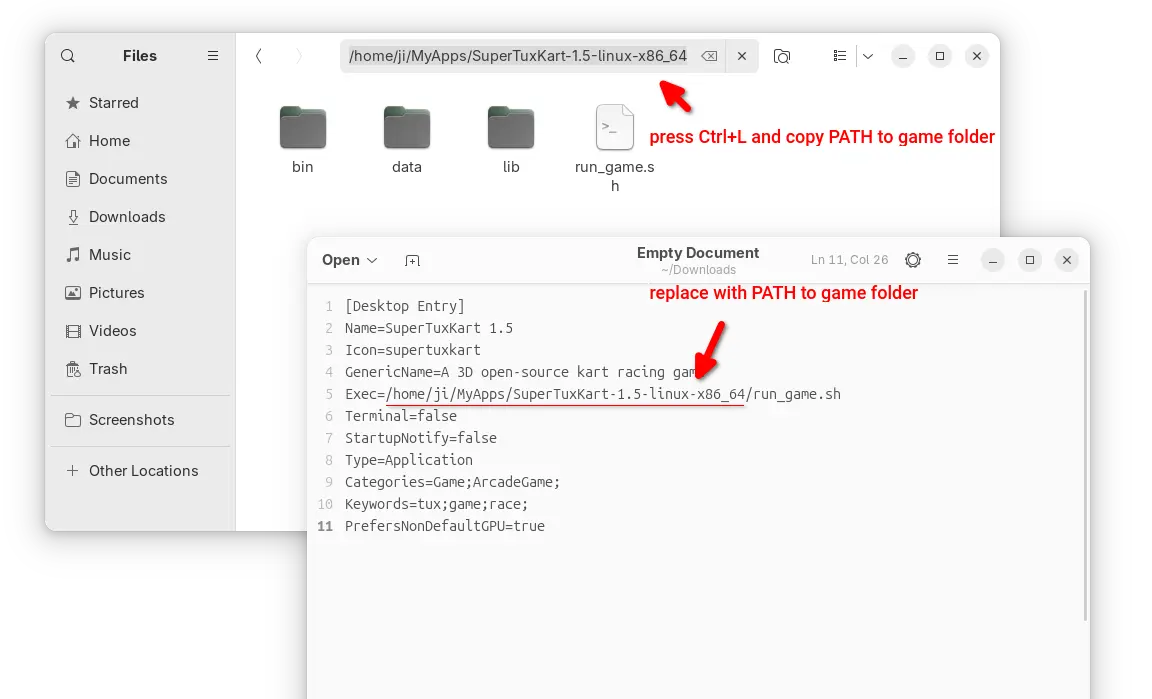
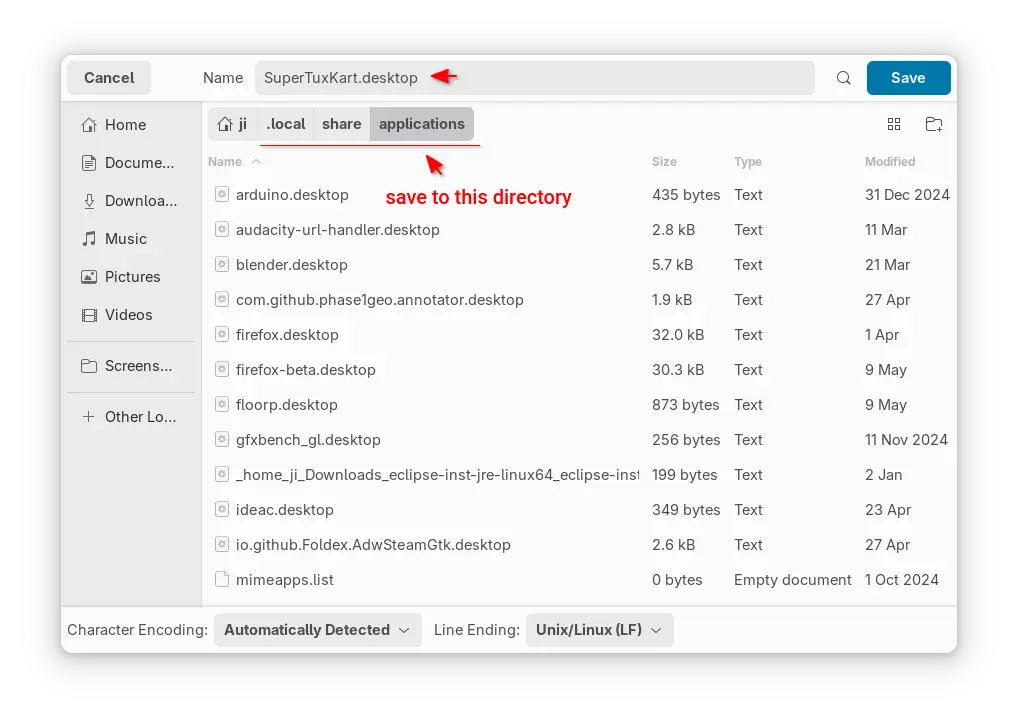
After that, save the file as “supertuxkart.desktop” into .local/share/applications directory. NOTE: .local is hidden by default, press Ctrl+H in file chooser dialog to view/hide it.
If everything goes well, you’ll be able to launch the game from start menu (or Gnome overview) few moments later.
Note for missing app icon, just grab one from the web, name it as supertuxkart (.PNG or .SVG), finally put it into .local/share/icons directory.
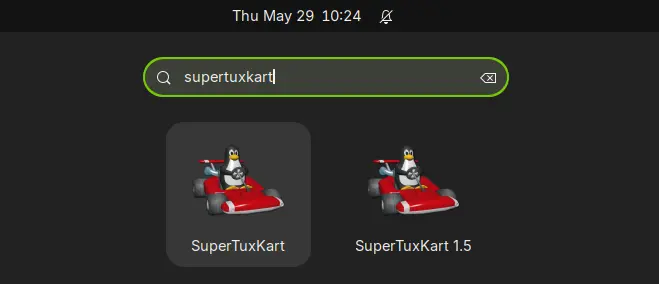
In my case, I have both SuperTuxKart 1.4 installed from system repository, and v1.5 via the Linux tarball. So, I have 2 game icons in launcher, but with different names.
To uninstall the kart racing game installed via the steps above, simply delete the game folder using file manager.
Then, also delete the supertuxkart.desktop file from .local/share/applications, and delete the icons (if any) from .local/share/icons directory.
Canonical announce beta DeepSeek and Qwen AI inference snaps for Ubuntu, both optimised to deliver better performance on Intel and ARM Ampere systems.
You're reading DeepSeek and Qwen AI Models Now Available as Ubuntu Snaps, a blog post from OMG! Ubuntu. Do not reproduce elsewhere without permission.
VirtualBox 7.2.4 is the second maintenance update in the new 7.2.x series, but users say installation fails on Ubuntu 25.10 due to a libxml2 dependency issue.
You're reading VirtualBox 7.2.4 Released (But Won’t Install on Ubuntu 25.10), a blog post from OMG! Ubuntu. Do not reproduce elsewhere without permission.
Ubuntu 26.04 LTS (Resolute Raccoon) daily build ISO images are now available for download for early adopters and application developers who want to test drive their apps against the new toolchain.
The post Ubuntu 26.04 LTS “Resolute Raccoon” Daily Builds Are Now Available for Download appeared first on 9to5Linux - do not reproduce this article without permission. This RSS feed is intended for readers, not scrapers.
OpenBSD 7.8 ships broad hardware enablement, major SMP networking gains, and security-focused updates across VMM, OpenSSH, and LibreSSL. The OpenBSD project has released version 7.8, introducing a wide array of system-level refinements, expanded device support, and substantial security and networking improvements. Broader Hardware and Platform Support OpenBSD 7.8 brings full Raspberry Pi 5 support on […]
The post OpenBSD 7.8 Released with Raspberry Pi 5 support, Parallel TCP stack, SEV-ES VMs, and OpenSSH 10.2 appeared first on UbuntuPIT.
KDE announced the Plasma desktop 6.5 yesterday. See what’s new and how to install guide for (K)Ubuntu 25.10.
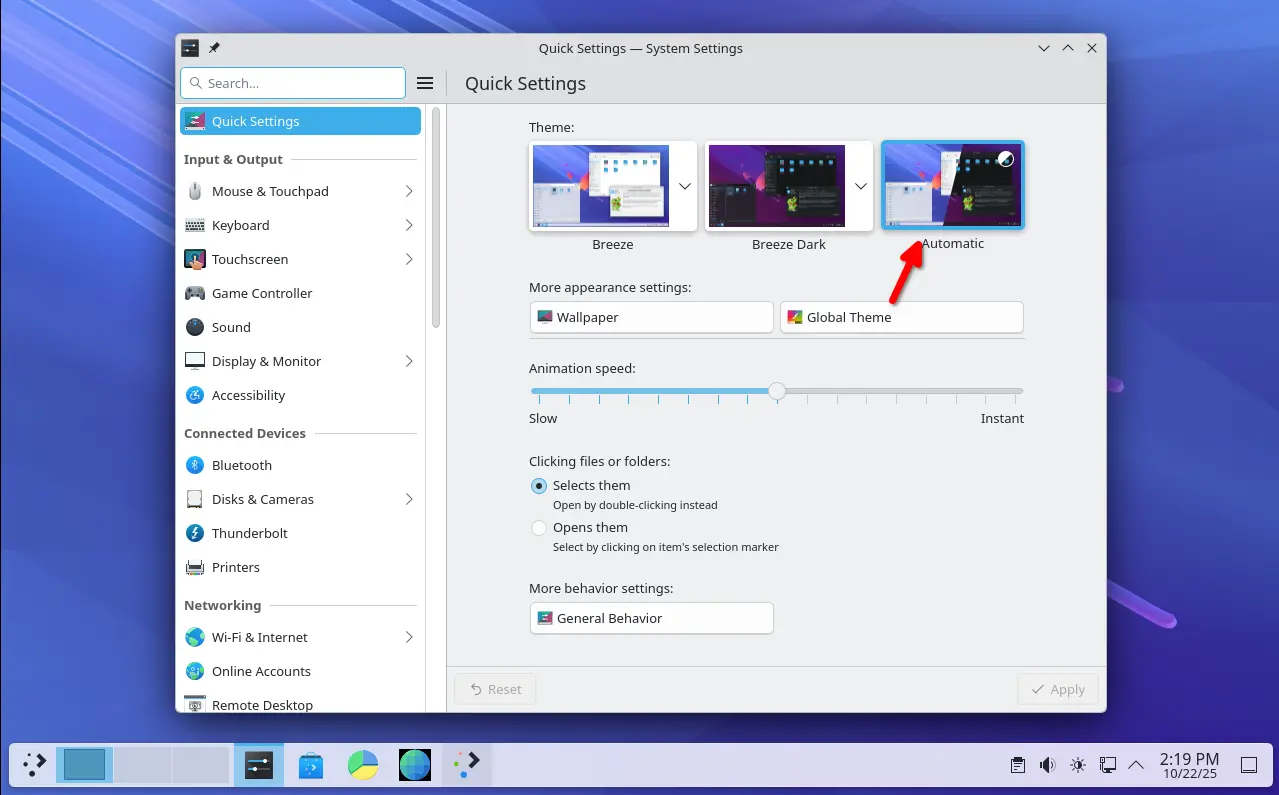
Plasma 6.5 introduced an Automatic theme selection in settings, allowing to automatically switch between light and dark themes according to the time of day.
In the Automatic mode, it uses the light theme for panels, menus, app windows, and wallpaper during the day, and automatically switch them to dark at night. While, user has the choice to set which light or dark theme, and which wallpapers to use.
The new desktop release updated its software app (aka Discover) with support for flatpak+https:// URLs. Meaning that, it allows to click “Install” button in Flathub.org page to automatically open Discover. And, it now can show you hardware drivers available for installation on operating systems supporting this feature.
KRunner, the app launcher, unit converter, calculator, that can be triggered by Alt+F2 or Alt+Space, now supports Fuzzy Search. Meaning even when you misspell an app’s name, it will probably still find it for you.
KRunner Fuzzy Search
The built-in Remote Desktop Protocol (RDP) server in the release now has the ability to share the clipboard. And, it no longer requires to manually create separate remote desktop accounts, as system’s existing user accounts now work as expected.
Zoom & Magnifier effect now has new “Enable text caret tracking” option. With it enabled, it will automatically jump to the position of the text insertion point, when you moving around the screen.
Other changes in Plasma 6.5 include:
Meta+Mute shortcut mutes all microphones rather than just the active one.For more about it, see the official release note in this page.
Arch Linux has made the Plasma 6.5 into its Extra-Testing repository.
For KUbuntu 25.10, the official Kubuntu Backports PPA has been updated with Plasma Desktop 6.5 along with most recent KDE Gear 25.08.2.
To get them, simply launch terminal (Konsole) and run the commands below one by one:
sudo add-apt-repository ppa:kubuntu-ppa/backports
It should automatically update caches after adding PPA. Just in case, you may run sudo apt update to manually refresh cache.
sudo apt full-upgrade
Ubuntu 25.10 and other flavors without KDE Plasma may also install the desktop environment by running the command below after added the PPA:
sudo apt install kubuntu-desktop
Though this is not a good idea as it might mess your current desktop appearance.
Finally, restart your computer to apply changes.
If you installed the 6.5 version of this desktop environment in KUbuntu 25.10 from PPA, simply open terminal (Konsole) and run command below to uninstall:
sudo apt install ppa-purge && sudo ppa-purge ppa:kubuntu-ppa/backports
This command will install ppa-purge command line tool, and use it to purge the PPA, which also downgrade all the packages installed from it. Also, you need to restart computer to apply changes.
VirtualBox, the free open-source hypervisor software by Oracle, released new 7.2.4 version yesterday.
This is the second maintenance update for the latest 7.2 release series, features only include some bug-fixes, translation updates and minor new features.
First, the new release added initial support for Linux Kernel 6.18, which is still in RC development stage. Meaning it now works for Linux with this mainline kernel, either running as host OS or guest in virtual machine.
The release fixed Linux Guest Additions compile issue for RHEL 9.6 / 9.7 and their derivatives, such as Alma Linux 9. It also fixed Guest Additions installation issue on Windows XP SP2.
It as well fixed the VirtualBox VM Manager crash issue when the Windows host OS was resuming from sleep, and, fixed NAT networking breaks when adding additional port forwarding rule.
Other changes include translation updates with support for Traditional Chinese, Greek, Swedish, Hungarian and Indonesian. For more, see the official ChangeLog page.
The official packages for Linux, Windows, macOS, and Solaris hosts are available to download in its website via the link below:
NOTE: the new release so far does NOT support Ubuntu 25.10 host OS, even the package for 25.04 does not install on it due to dependency issue.
SuperTuxKart 1.5 released with graphics overhaul, new benchmark mode and egg hunt tracks. It's also the final 1.x release before SuperTuxKart Evolution arrives.
You're reading SuperTuxKart 1.5 Released with Improved Graphics + More, a blog post from OMG! Ubuntu. Do not reproduce elsewhere without permission.
