❌

Normal view

Fwupd 2.0.17 Released with Support for Lexar and Maxio NVMe SSDs

6 November 2025 at 00:26

fwupd

Fwupd 2.0.17 Linux firmware updater is now available for download with support for ASUS CX9406 touch controller, Framework Copilot keyboard, and other devices.

The post Fwupd 2.0.17 Released with Support for Lexar and Maxio NVMe SSDs appeared first on 9to5Linux - do not reproduce this article without permission. This RSS feed is intended for readers, not scrapers.

LXQt 2.3 Desktop Environment Released with New Features and Enhancements

5 November 2025 at 21:00

LXQt 2.3

LXQt 2.3 desktop environment is now available with support for adjusting the screen backlight with the mouse wheel on the LXQt panel and many other changes. Here's what's new!

The post LXQt 2.3 Desktop Environment Released with New Features and Enhancements appeared first on 9to5Linux - do not reproduce this article without permission. This RSS feed is intended for readers, not scrapers.

NVIDIA 580.105.08 added New Env to Disable GPU Boost for CUDA apps

By:Ji m
5 November 2025 at 23:14

NVIDIA 580.105.08, a new point release for the latest production branch driver for Linux, was released yesterday.

This is the 5th release in the NVIDIA 580 series. It introduced a new environment variable and fixed various bugs.

In the passt 4 NVIDIA 580 releases, it added fifo-v1 protocol support for Vulkan apps running on Wayland session, reducing visual inconsistencies and potential stuttering.

It as well enabled RMIntrLockingMode feature by default, which can help reduce stutter especially when using virtual reality (VR), and, added Smooth Motion frame generation support for GeForce RTX 40 Series GPUs.

NVIDIA 580 supports Smooth Motion for RTX 40 Series GPUs

In the new 580.105.08 driver, it added new CUDA_DISABLE_PERF_BOOST environment variable, allowing to disable boosting the GPU to a higher power state when running CUDA applications.

This is useful for saving power and prevent overheating, when your GPU is powerful enough handling the job when running at base clock speed.

To enable this feature, you may set it per app basis:

  • run command export CUDA_DISABLE_PERF_BOOST=1 in terminal, and start apps from that terminal window.
  • set env CUDA_DISABLE_PERF_BOOST=1 /path/to/executable EXEC value in your app’s desktop entry (.desktop file).

Or, write export CUDA_DISABLE_PERF_BOOST=1 to .profiles or .bashrc file so it works for all CUDA applications.

Besides that, the new driver also fixed various bugs. They include crashes for Metro Exodus EE and Rage2 video games, as well as:

  • HDMI display blank issue and HDMI FRL not working issue after unplug and re-plug in.
  • vfio-pci module soft lockup after powering off a VM with passed-through NVIDIA GPUs.
  • VRR blank screen issue.
  • large resolution or high refresh rate modes (e.g., 7680x2160p@240hz) not available when using HDMI FRL or DisplayPort.

And, here are more features in NVIDIA 580 driver series:

  • add support YCbCr 4:2:2 display modes, which is designed for brandwidth reduction and efficient video and image compression.
  • Update nvidia-settings, NVML, and nvidia-smi to show clocks before thermal and idle slowdowns.
  • Bigscreen Beyond Head Mounted Displays compatibility.
  • new β€œOutputBitsPerComponent” MetaMode attribute to control the number of bits per color component transmitted via a display connector.

For more details, see the releases for NVIDIA 580.65.06, 580.76.05, 580.82.07, 580.95.05, and 580.105.08.

Install NVIDIA 580.105.08 in Ubuntu:

Ubuntu has made NVIDIA 580 driver packages into system repository (restricted) for current Ubuntu 22.04, 24.04, 25.04 and 25.10.

So far, it’s NVIDIA 580.95.05. While, the latest 580.105.08 as usual will be available in next few weeks if everything goes well.

If you can’t wait, then try adding the popular β€œGraphics Drivers” team PPA which usually updates the driver packages timely.

After that, use either ubuntu-drivers install nvidia:580 command, or β€œAdditional Drivers” utility to install the driver package.

Mobile OS Release: iodΓ©OS 6.9

6 November 2025 at 02:17
The DistroWatch news feed is brought to you by TUXEDO COMPUTERS. The iodΓ©OS team have announced the availability of iodΓ©OS 6.9. The new version focuses on security and user accounts, enabling automatic reboot after a period of inactivity, full signing out of user accounts, and better protection of device settings. "Full logout for secondary users - secondary users can....

Development Release: antiX 25 Beta 1

6 November 2025 at 00:26
The DistroWatch news feed is brought to you by TUXEDO COMPUTERS. The developers of antiX, a lightweight, systemd-free desktop Linux distribution featuring the IceWM window manager, have announced the availability of the initial beta build of a major new version, 25, based on Debian 13. This release adds s6-rc and s6-66 as alternatives to runit and Dinit init systems:....

Distribution Release: umbrelOS 1.5.0

5 November 2025 at 20:11
The DistroWatch news feed is brought to you by TUXEDO COMPUTERS. Umbrel, Inc. has announced the release of umbrelOS 1.5.0, the latest version of the company's Debian-based Linux distribution for home servers, available for standard 64-bit and Raspberry Pi computers. The distribution features a web-based user interface and an online app store with a large range of applications -....

NVIDIA 580.105.08 Linux Graphics Driver Released with a New Environment Variable

5 November 2025 at 03:17

NVIDIA 535.54.03

NVIDIA 580.105.08 graphics driver for Linux systems is now available for download with a new environment variable, CUDA_DISABLE_PERF_BOOST, to allow for disabling the default behavior of boosting the GPU to a higher power state when running CUDA applications.

The post NVIDIA 580.105.08 Linux Graphics Driver Released with a New Environment Variable appeared first on 9to5Linux - do not reproduce this article without permission. This RSS feed is intended for readers, not scrapers.

KDE Plasma 6.5.2 Improves KRunner’s Search Result Ordering and Fixes Regressions

5 November 2025 at 01:26

KDE Plasma 6.5.2

KDE Plasma 6.5.2 is now available as the second maintenance update to the latest KDE Plasma 6.5 desktop environment series with various improvements and bug fixes.

The post KDE Plasma 6.5.2 Improves KRunner’s Search Result Ordering and Fixes Regressions appeared first on 9to5Linux - do not reproduce this article without permission. This RSS feed is intended for readers, not scrapers.

The Most Critical Linux Kernel Breaches of 2025 So Far

The Most Critical Linux Kernel Breaches of 2025 So Far

The Linux kernel, foundational for servers, desktops, embedded systems, and cloud infrastructure, has been under heightened scrutiny. Several vulnerabilities have been exploited in real-world attacks, targeting critical subsystems and isolation layers. In this article, we’ll walk through major examples, explain their significance, and offer actionable guidance for defenders.

CVE-2025-21756 – Use-After-Free in the vsock Subsystem

One of the most alarming flaws this year involves a use-after-free vulnerability in the Linux kernel’s vsock implementation (Virtual Socket), which enables communication between virtual machines and their hosts.

How the exploit works: A malicious actor inside a VM (or other privileged context) manipulates reference counters when a vsock transport is reassigned. The code ends up freeing a socket object while it’s still in use, enabling memory corruption and potentially root-level access.

Why it matters: Since vsock is used for VM-to-host and inter-VM communication, this flaw breaks a key isolation barrier. In multi-tenant cloud environments or container hosts that expose vsock endpoints, the impact can be severe.

Mitigation: Kernel maintainers have released patches. If your systems run hosts, hypervisors, or other environments where vsock is present, make sure the kernel is updated and virtualization subsystems are patched.

CVE-2025-38236 – Out-of-Bounds / Sandbox Escape via UNIX Domain Sockets

Another high-impact vulnerability involves the UNIX domain socket interface and the MSG_OOB flag. The bug was publicly detailed in August 2025 and is already in active discussion.

Attack scenario: A process running inside a sandbox (for example a browser renderer) can exploit MSG_OOB operations on a UNIX domain socket to trigger a use-after-free or out-of-bounds read/write. That allows leaking kernel pointers or memory and then chaining to full kernel privilege escalation.

Why it matters: This vulnerability is especially dangerous because it bridges from a low-privilege sandboxed process to kernel-level compromise. Many systems assume sandboxed code is safe; this attack undermines that assumption.

Mitigation: Distributions and vendors (like browser teams) have disabled or restricted MSG_OOB usage for sandboxed contexts. Kernel patches are available. Systems that run browser sandboxes or other sandboxed processes need to apply these updates immediately.

CVE-2025-38352 – TOCTOU Race Condition in POSIX CPU Timers

In September 2025, the U.S. Cybersecurity & Infrastructure Security Agency (CISA) added this vulnerability to its Known Exploited Vulnerabilities (KEV) catalog.

How to Install Camelot in Python: Guide for Windows, macOS, and Linux

4 November 2025 at 13:57

Extracting tables from PDF files in Python is not always a straightforward process unless you have a specific library to do that. For PDF data extraction, using Camelot is one of the go-to tools. The best part is that it is not very difficult to install, especially if you already have Python, as its package […]

The post How to Install Camelot in Python: Guide for Windows, macOS, and Linux appeared first on LinuxShout.

KeePass 2.60 Released with Firefox CSV Import Support (Ubuntu PPA)

By:Ji m
5 November 2025 at 00:24

KeePass Password Safe released new 2.60 version few days ago. Here are the new features and PPA update for Ubuntu users.

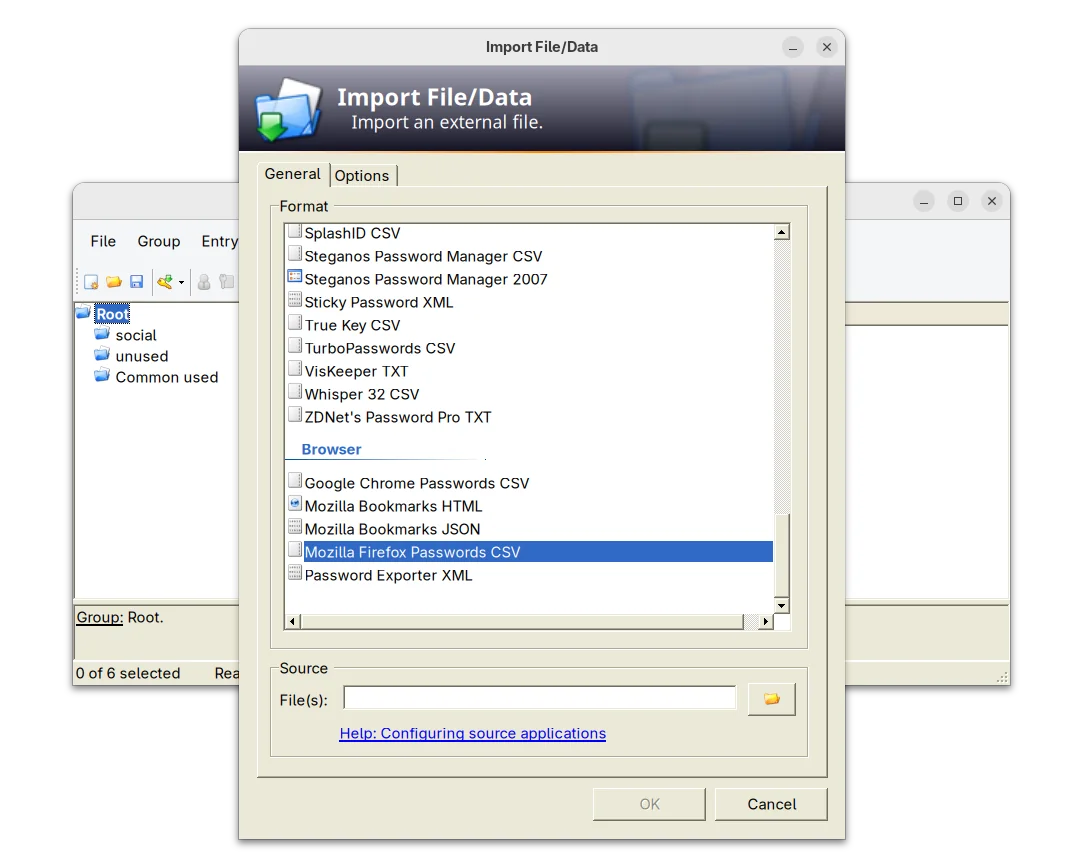
The new release of this free open-source password manager application added support importing .csv passwords exported from Mozilla Firefox web browser.

KeePass 2.60 support importing Firefox Password CSV

It as well improved Bitwarden JSON support. Now, if the value of a totp field consists only of Base32 characters, it is now treated as a shared secret for time-based one-time password generation.

The release also improved the app user interface. The quick search box now search for group paths, while a toggle option is available in Tools -> Options -> Interface (1) to turn on/off the feature.

The drop-down box for quick search box, which can be opened by Alt + Down now supports keyboard navigation and selection. However, due to bug, the auto-completion of the quick search box is disabled.

For users who have many groups, the release now supports displaying β€˜Group Path’ and β€˜Group Name’ list columns in the main entry. Though, the feature is not enabled by default. User may enable them by going to β€˜View’ β†’ β€˜Configure Columns’.

KeePass 2.60 also improved the app user experience for keyboard users. It now supports pressing Ctrl+A to select all items in the list views, and Delete to delete selected items in list views that have a corresponding β€˜Delete’ button.

And, for those who use Ctrl+Alt+A for the global auto-type hot key, while French Standard AZERTY keyboard layout is active, it shows a warning dialog telling the conflict along with a β€˜More information’ link.

Other changes in the release include:

  • Add empty state messages for list views.
  • Support generating native ARM64 images (NGen) on ARM64 systems for ShInstUtil.
  • Save configuration immediately when shutting down the system.
  • The value of a β€˜File/URL’ or β€˜Key file’ field of a trigger event/condition/action may now optionally be enclosed in double quotation marks.
  • Various other improvements. See the release note for details.

Install KeePass 2.60

The official installer and portable zip archive for Windows are available to download in its website along with KeePass 1.x and source tarball.

For choice, you may go directly to this sourceforge page download page.

For Ubuntu user, there’s no official package for the new release so far. Besides building from source, I’ve uploaded the package into this unofficial PPA for Ubuntu 20.04, Ubuntu 22.04, Ubuntu 24.04, 25.04 and 25.10.

You may press Ctrl+Alt+T on keyboard to open terminal, then run the commands below one by one to add PPA & install the password manager:

sudo add-apt-repository ppa:ubuntuhandbook1/keepass2
sudo apt update
sudo apt install keepass2

Uninstall:

To uninstall the PPA package, run command:

sudo apt remove keepass2

And, remove the PPA either by running the command below in terminal:

sudo add-apt-repository --remove ppa:ubuntuhandbook1/keepass2

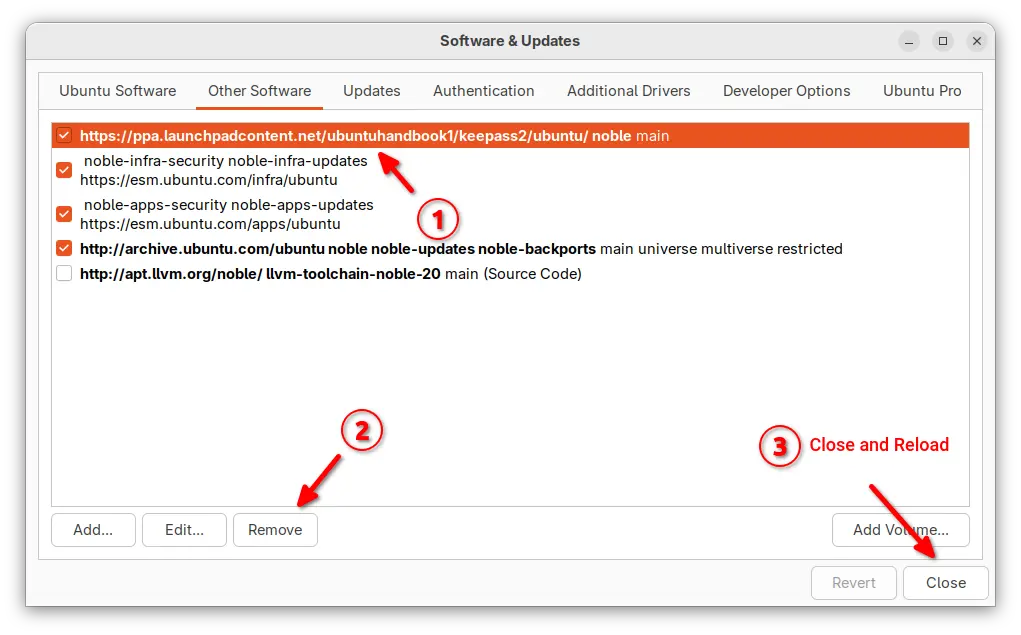
Or, launch β€œSoftware & Updates” and remove the source line under Other Software tab.

❌