 Login
Login
NVIDIA Releases Linux Driver 590.48 With Wayland and Vulkan Fixes
18 December 2025 at 22:53


NVIDIA 580.119.02 graphics driver is now available for download for Linux, FreeBSD, and Solaris systems with various bug fixes.
The post NVIDIA 580.119.02 Linux Graphics Driver Released with Various Bug Fixes appeared first on 9to5Linux - do not reproduce this article without permission. This RSS feed is intended for readers, not scrapers.
NVIDIA 590, the next new feature branch driver for Linux, is available for beta testing.
This beta driver is NVIDIA 590.44.01, which however does not introduce any new features, but raised the minimum system library requirements and fixed some bugs.
The new driver now requires wayland >= 1.20 for the modern Wayland session, xserver 1.17 or higher for classic Xorg session, and glibc library >= 2.27. For Ubuntu, 22.04 and higher match the Wayland requirement, while 18.04 and 20.04 with Xorg are still supported.
Besides the minimum requirements update, the release also removed support for GeForce 700, GeForce 800M, GeForce 900/900M, GeForce 10 series, as well as GeForce MX100, MX200, MX300 series notebooks.
And, it improved the performance of recreating Vulkan swap chains. The swap chain is essentially a queue of images waiting to be presented to the screen. By improving the performance of swap chains recreation, it can help prevent stuttering when resizing Vulkan application windows.
Others are mostly bug-fixes. They include:
For more about NVIDIA 590.44.01 as well as the official .run installers for x86_64 processors, see this nvidia webpage. Or, go to this page for aarch64 processor, FreeBSD, and Solaris.
If nothing goes wrong, Ubuntu will add the official NVIDIA 590 driver package for next Ubuntu 26.04, and perhaps backport it for current Ubuntu 25.10 and 24.04/22.04 LTS releases. Though, the process can take few months. Keep an eye on this page for the official NVIDIA 590 package by Ubuntu.
For choice, you may add the long standing Graphics Driver Team PPA, which usually adds the new driver package earlier that the official package mentioned above.
For those who can’t wait, the Ubuntu developer Jacob Martin has made NVIDIA 590.44.01 into this personal PPA for Ubuntu 22.04, Ubuntu 24.04, and Ubuntu 25.10 for testing purpose!
NOTE: the PPA package is for testing only purpose. Don’t try it on production machine!!! It breaks my wi-fi in my case when trying to restore NVIDIA 580.
To add the PPA, open terminal (Ctrl+Alt+T) and run command:
sudo add-apt-repository ppa:jacobmartin/nv-graphics-2
Then, try launching “Additional Drivers” utility to install the driver. Or run the command below instead in terminal:
sudo ubuntu-drivers install nvidia:590
When done, reboot computer.
If the driver does not work properly for you, then try running the command below to uninstall:
sudo apt --purge remove '*nvidia*590*'
NVIDIA 590 graphics driver series is now available for public beta testing with improved Wayland support and other changes. Here’s what to expect!
The post NVIDIA 590 Linux Graphics Driver Enters Public Beta with Better Wayland Support appeared first on 9to5Linux - do not reproduce this article without permission. This RSS feed is intended for readers, not scrapers.
NVIDIA 580.105.08, a new point release for the latest production branch driver for Linux, was released yesterday.
This is the 5th release in the NVIDIA 580 series. It introduced a new environment variable and fixed various bugs.
In the passt 4 NVIDIA 580 releases, it added fifo-v1 protocol support for Vulkan apps running on Wayland session, reducing visual inconsistencies and potential stuttering.
It as well enabled RMIntrLockingMode feature by default, which can help reduce stutter especially when using virtual reality (VR), and, added Smooth Motion frame generation support for GeForce RTX 40 Series GPUs.
NVIDIA 580 supports Smooth Motion for RTX 40 Series GPUs
In the new 580.105.08 driver, it added new CUDA_DISABLE_PERF_BOOST environment variable, allowing to disable boosting the GPU to a higher power state when running CUDA applications.
This is useful for saving power and prevent overheating, when your GPU is powerful enough handling the job when running at base clock speed.
To enable this feature, you may set it per app basis:
export CUDA_DISABLE_PERF_BOOST=1 in terminal, and start apps from that terminal window.env CUDA_DISABLE_PERF_BOOST=1 /path/to/executable EXEC value in your app’s desktop entry (.desktop file).Or, write export CUDA_DISABLE_PERF_BOOST=1 to .profiles or .bashrc file so it works for all CUDA applications.
Besides that, the new driver also fixed various bugs. They include crashes for Metro Exodus EE and Rage2 video games, as well as:
And, here are more features in NVIDIA 580 driver series:
OutputBitsPerComponent” MetaMode attribute to control the number of bits per color component transmitted via a display connector.For more details, see the releases for NVIDIA 580.65.06, 580.76.05, 580.82.07, 580.95.05, and 580.105.08.
Ubuntu has made NVIDIA 580 driver packages into system repository (restricted) for current Ubuntu 22.04, 24.04, 25.04 and 25.10.
So far, it’s NVIDIA 580.95.05. While, the latest 580.105.08 as usual will be available in next few weeks if everything goes well.
If you can’t wait, then try adding the popular “Graphics Drivers” team PPA which usually updates the driver packages timely.
After that, use either ubuntu-drivers install nvidia:580 command, or “Additional Drivers” utility to install the driver package.
NVIDIA 580.105.08 graphics driver for Linux systems is now available for download with a new environment variable, CUDA_DISABLE_PERF_BOOST, to allow for disabling the default behavior of boosting the GPU to a higher power state when running CUDA applications.
The post NVIDIA 580.105.08 Linux Graphics Driver Released with a New Environment Variable appeared first on 9to5Linux - do not reproduce this article without permission. This RSS feed is intended for readers, not scrapers.
NVIDIA has moved its open-source strategy forward by submitting a second version of its “request for comments” (RFC) patch series to the Linux kernel mailing list, aiming to establish stable GPU virtualization (vGPU) support. Authored by NVIDIA developer Zhi Wang, this initiative signals a continued and serious effort to improve the company’s driver framework within […]
The post NVIDIA Pushes Open-Source vGPU Support for Linux Kernel with Second RFC Patch Series appeared first on UbuntuPIT.
For Linux users with NVIDIA graphics card, the new 580 production branch driver got a new update few days ago!
It’s NVIDIA 580.95.05, the third stable release in this driver series. Like the last one, it introduced only one but important new feature, and fixed few bugs.
The new driver version added YCbCr 4:2:2 display modes support. Like RGB and CMYK, it’s a family of color spaces designed for brandwidth reduction and efficient video and image compression.
YCbCr 4:2:2 uses chroma subsampling technique to save file size by capturing less color data. It’s useful to meet the bandwidth demands of high resolution (e.g, 4K) games or videos at high-frame-rate (e.g., 120Hz), though it causes image quality reduction, such as blurry or fuzzy text.
The feature requires Fixed Rate Link (FRL) signaling technology (meaning display connected with HDMI 2.1), and Blackwell or later GPU, such as RTX 50 series, B100, B200, B300 …
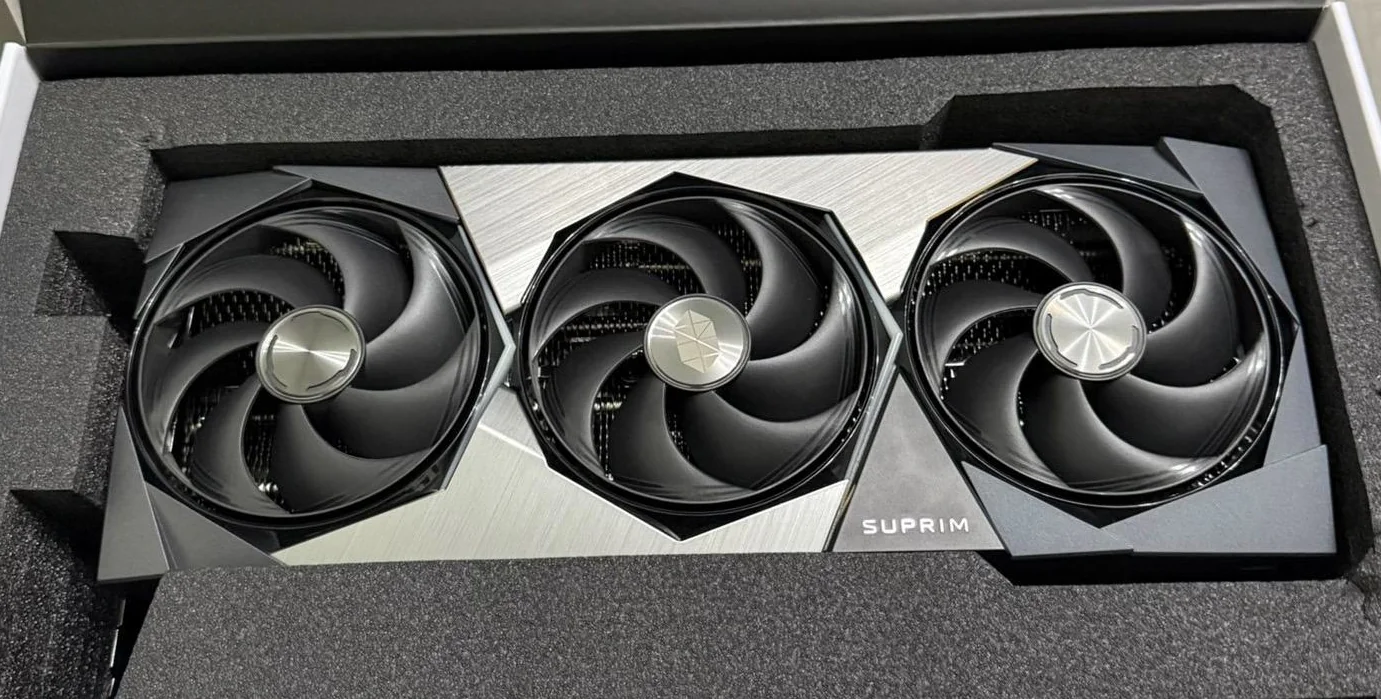
MSI SUPRIM, NVIDIA RTX 5090
Besides that, the new driver fixed interactive object outline rendering issue in Indiana Jones and the Great Circle game, and few other issues.
Compare to the previous NVIDIA 575 driver, there’re also Smooth Motion frame generation support for RTX 40 series GPU introduced by 580.82.07 for better gaming performance, and RMIntrLockingMode enabed by default that can help reduce stutter especially when using virtual reality (VR).
Other changes in NVIDIA 580 series driver include:
fifo-v1 protocol support when using Vulkan backend in Wayland, reducing visual inconsistencies and potential stuttering.And, more. See HERE, HERE, and HERE for details.
Ubuntu has already made the NVIDIA 580 driver into system repositories, which is however NVIDIA 580.65.06 so far for current two 22.04 and 24.04 LTS (check this page).
If you can wait for the official package from Ubuntu, then try adding either the “Canonical Kernel Team” team PPA or “Graphics Drivers” team PPA (long-standing PPA), then use Additional Drivers utility to install, both of which are maintained by Ubuntu members.
The new OBS Studio 32.0 release is out, with support for higher-quality recordings out-of-the-box, new filters and effects, a plugin manager and plenty of bug fixes.
You're reading OBS Studio 32.0 Brings New Plugin Manager, NVIDIA RTX Effects, a blog post from OMG! Ubuntu. Do not reproduce elsewhere without permission.
Canonical will package and distribute NVIDIA CUDA in the Ubuntu repositories, making it easier for developers to install with a single, simple APT command.
You're reading Canonical Make It Easier to Install NVIDIA CUDA on Ubuntu, a blog post from OMG! Ubuntu. Do not reproduce elsewhere without permission.
For user with NVIDIA graphics card, Ubuntu finally added official NVIDIA 580 driver packages for all current Ubuntu releases.
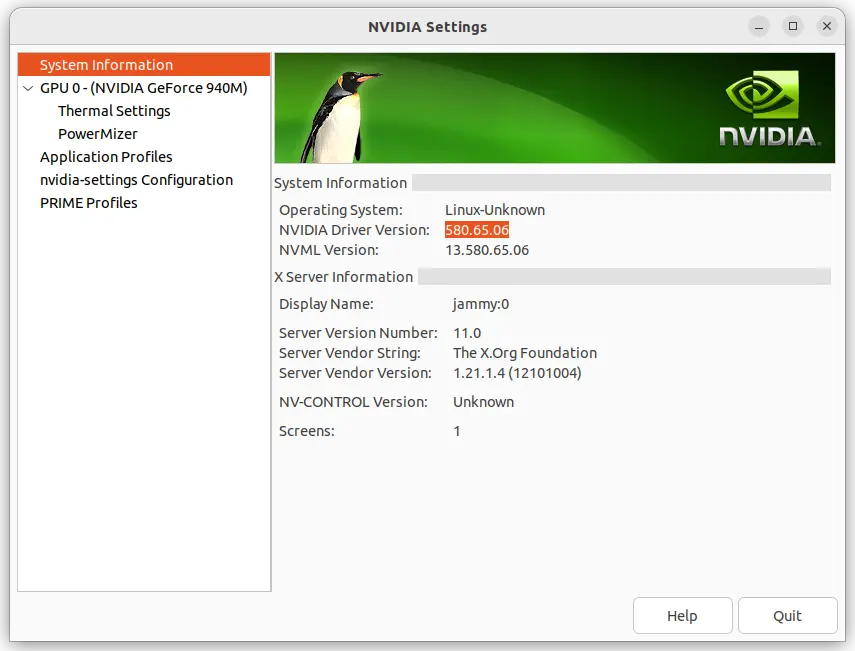
As you may know, NVIDIA 580 is so far the latest driver series for Linux, that was initially released one month ago. It’s a production branch driver qualified for enterprise and data center GPU use.
The 580 driver features Wayland fifo-v1 protocol support for apps/games running via Vulkan API, reducing visual inconsistencies and potential stuttering.
It enabled RMIntrLockingMode feature by default, which can help reduce stutter especially when using virtual reality (VR). As well, it implemented a feature to reduce time spent in the interrupt top half for low latency display interrupts by deferring the work until later. See HERE for more.
With NVIDIA 580.82.07, it also supports NVIDIA Smooth Motion on GeForce RTX 40 Series GPUs!
Ubuntu made NVIDIA 580 driver (so far 580.65.06) package into the proposed repository for testing few weeks ago. Now, it finally goes official. And, you may install it by following steps.
1. Enable Restricted and Multi-verse repository
The proprietary driver is available through the restricted and multiverse repositories. They are usually enabled by default in Ubuntu desktop.
Just in case, you may launch “Software & Updates” utility to ensure:
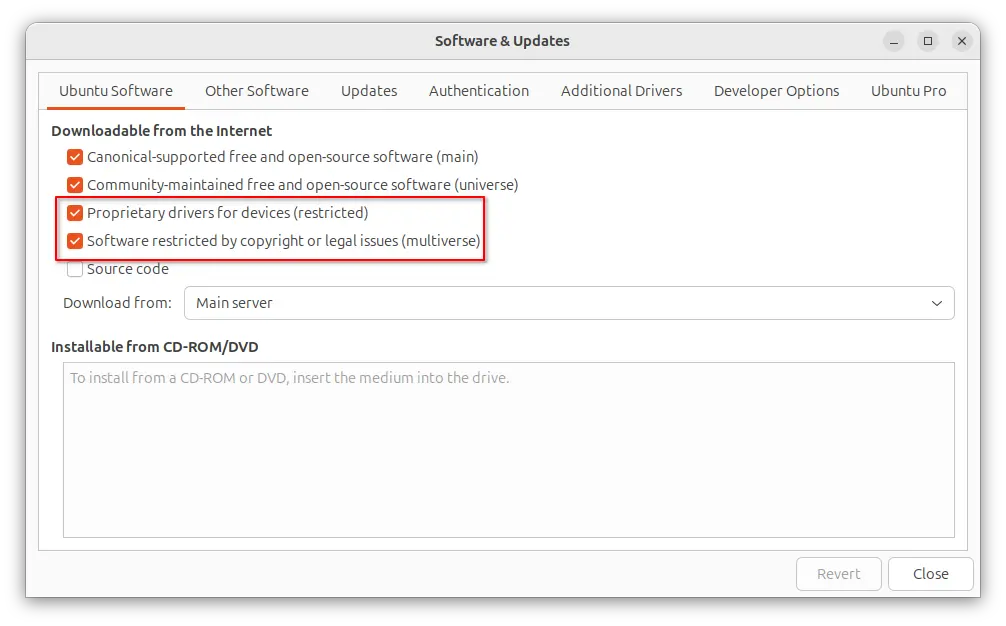
Or, run the command below for Ubuntu Server to enable them:
sudo add-apt-repository restricted multiverse
You need to install software-properties-common package if the command does not work.
2. Update your system.
Before installing the driver, it’s better to install all available system updates, especially kernel updates (usually minor version updates), to prevent potential failure.
To do so, either use Software Updater or run the commands below in terminal (Ctrl+Alt+T):
sudo apt update

sudo apt upgrade
If there’s a kernel updates, restart computer to boot the new kernel.
3. Install NVIDIA 580 driver
NOTE: The driver version so far is nvidia 580.65.06. If you can’t wait to get 580.82.07 for NVIDIA Smooth Motion support on RTX 40 series GPUs, or you’re on old Ubuntu 20.04|18.04, then run command below to add the popular “Graphics Drivers” team PPA, which however is not officially supported.
sudo add-apt-repository ppa:graphics-drivers/ppa
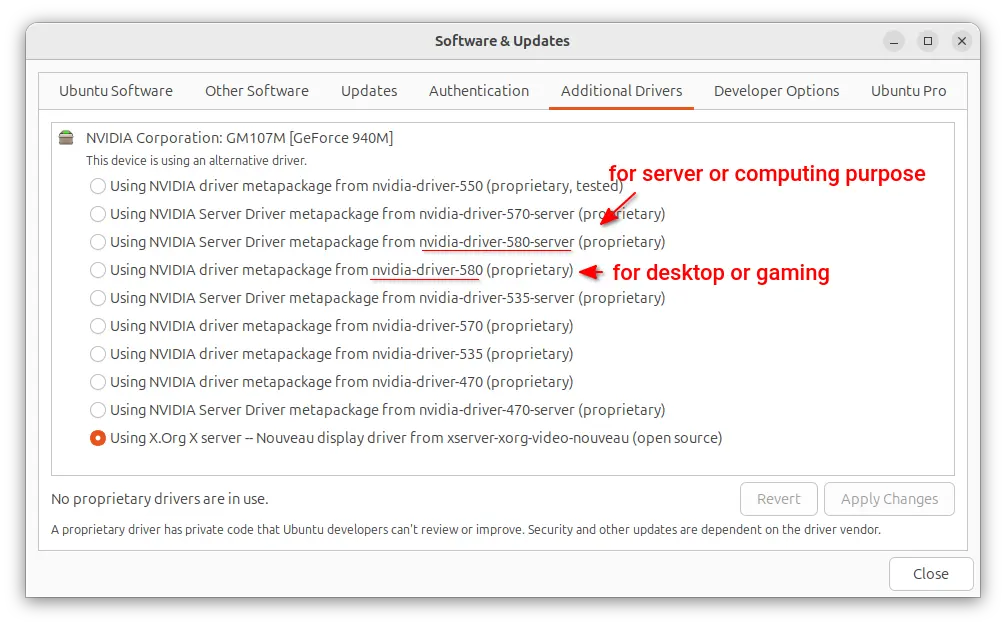
For Ubuntu Desktop, you may now launch “Additional Drivers” utility, then select either driver below:
nvidia-driver-580 for general desktop and gaming purpose.nvidia-driver-580-server for Ubuntu Server or computing purpose.Then, click “Apply Changes” and restart computer when installation done!
For server without GUI, simply run the commands below one by one to install the driver.
sudo ubuntu-drivers list
Skip the “udevadm hwdb is deprecated. Use systemd-hwdb instead.” output. It’s a warning that does not matter.
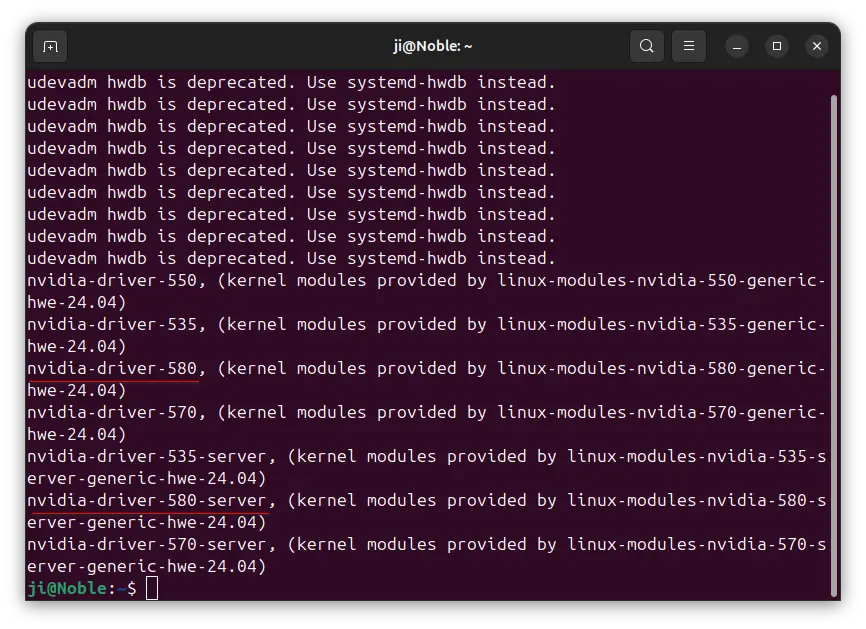
sudo ubuntu-drivers install nvidia:580
Or, install the server or computing purpose driver:
sudo ubuntu-drivers install --gpgpu nvidia:580-server
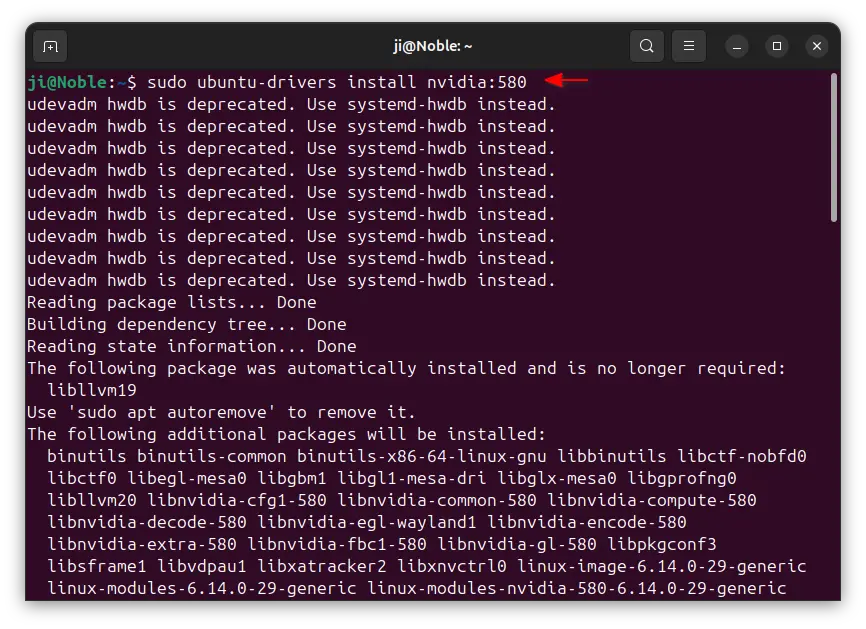
Finally, restart computer and enjoy!
In addition, for Ubuntu with default GNOME Desktop, it by default fall back to Xorg session, you need to manually switch back Wayland session (if need) from login screen.
For NVIDIA Optimus laptop, it by default runs in hybrid mode. You can right-click on an application or game icon and choose “Launching using Discrete Graphics Card” to start it via NVIDIA GPU while leaving all others handled by integrated GPU.
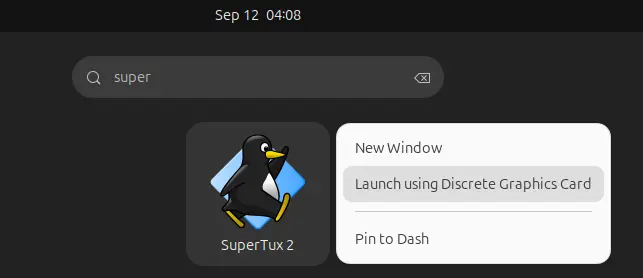
Or, run command below in terminal to set environment variable, so all apps start from that terminal will be rendering via NVIDIA GPU:
export __NV_PRIME_RENDER_OFFLOAD=1 __GLX_VENDOR_LIBRARY_NAME=nvidia
If you want to run Ubuntu desktop with NVIDIA only mode, then launch “NVIDIA Settings” and navigate to PRIME Profiles page to make a switch.
For NVIDIA users with GeForce RTX 40 Series GPUs (e.g., 4060, 4090), it finally supports Smooth Motion frame generation for better gaming performance in Linux.
NVIDIA Smooth Motion is a feature designed for games without native DLSS support. It uses AI to generate additional frames between two rendered frames for overall smoothness of game-play.
The feature was initially added for Linux via NVIDIA 575 driver series, but only for RTX 50 series GPUs. Now with NVIDIA 580.82.07, the feature also works for RTX 40 GPUs. While, Windows users will probably get it in 590 driver series.
As the latest production branch driver, NVIDIA 580 also added fifo-v1 protocol support to reduce visual inconsistencies and potential stuttering for apps/games running in Wayland with Vulkan backend.
It as well enabled RMIntrLockingMode feature by default, which can help reduce stutter especially when using virtual reality (VR).
There are as well new “OutputBitsPerComponent” MetaMode attribute, allowing to control the number of bits per color component transmitted via a display connector in Xorg with multiple displays.
Other changes in NVIDIA 580 so far include:
The official package and release note for NVIDIA 580.82.07 is available at the link below:
For Ubuntu, it’s HIGHLY recommended to wait the Ubuntu’s official package, though it’s still in proposed testing stage at the moment.
Or, use either the popular “Graphics Drivers” team PPA which now contains NVIDIA 580.82.07 for Ubuntu from 18.04 to 25.04, or “Canonical Kernel Team” team PPA for 22.04 and higher.
To add the Canonical Kernel Team PPA, open terminal (Ctrl+Alt+T) and run command:
sudo add-apt-repository ppa:canonical-kernel-team/nvidia-graphics2
Then, you may either use “Additional Drivers” (graphical tool) to install nvidia-580 for desktop, or nvidia-580-server for server computing use.
Or run one of the commands below instead in terminal to install the driver:
sudo ubuntu-drivers install nvidia:580
sudo ubuntu-drivers install --gpgpu nvidia:580-server
NVIDIA 580.82.07 graphics driver for Linux is now available for download with NVIDIA Smooth Motion support on GeForce RTX 40 Series GPUs and bug fixes.
The post NVIDIA 580.82.07 Supports NVIDIA Smooth Motion on GeForce RTX 40 Series GPUs appeared first on 9to5Linux - do not reproduce this article without permission. This RSS feed is intended for readers, not scrapers.
