Normal view

Received — 10 November 2025 Linux News & Update

DistroWatch Weekly, Issue 1147

10 November 2025 at 09:30
The DistroWatch news feed is brought to you by TUXEDO COMPUTERS. This week in DistroWatch Weekly:
Review: Fedora 43
News: Debian introduces Rust dependency into APT, Redox ports process monitors and web engine, Kubuntu website goes off-line, Mint introduces new troubleshooting tools, FreeBSD improves reproducible builds, Flatpak resumes development
Questions and answers: Size and stability of the Linux kernel
Released last week:....

Distribution Release: PorteuX 2.4

10 November 2025 at 06:16
The DistroWatch news feed is brought to you by TUXEDO COMPUTERS. The PorteuX development team has release PorteuX 2.4, the latest version of the project's set of lightweight and stripped-down Linux distribution featuring a number of popular desktop environments. This release presents a new desktop option, the COSMIC desktop developed by System 76: "This release brings the COSMIC desktop....

Swift Programming Language Now Available for FreeBSD: Official Preview Release Supports x86_64 Architecture

8 November 2025 at 15:32

The Swift team announced on the official forum that it has launched a preview version of the Swift toolchain for FreeBSD, supporting the x86_64 architecture of FreeBSD 14.3 and above. This release includes a development compiler and execution environment that allows developers to compile and run Swift programs natively on FreeBSD systems. This announcement marks […]

The post Swift Programming Language Now Available for FreeBSD: Official Preview Release Supports x86_64 Architecture appeared first on LinuxShout.

Slackware-Based PorteuX 2.4 Is Out with Linux 6.17, COSMIC and LXQt 2.3 Desktops

10 November 2025 at 04:30

PorteuX 2.4

PorteuX 2.4 Linux distribution is now available for download with Linux kernel 6.17, GNOME 49.1, KDE Plasma 6.5.2, LXQt 2.3, and more. Here’s what else is new!

The post Slackware-Based PorteuX 2.4 Is Out with Linux 6.17, COSMIC and LXQt 2.3 Desktops appeared first on 9to5Linux - do not reproduce this article without permission. This RSS feed is intended for readers, not scrapers.

MX Linux 25 “Infinity” Is Now Available for Download, Based on Debian 13 “Trixie”

10 November 2025 at 03:43

MX Linux 25

MX Linux 25 distribution is now available for download based on the Debian 13 “Trixie” operating system series. Here’s what’s new!

The post MX Linux 25 “Infinity” Is Now Available for Download, Based on Debian 13 “Trixie” appeared first on 9to5Linux - do not reproduce this article without permission. This RSS feed is intended for readers, not scrapers.

Trinity Desktop Environment R14.1.5 Released with Support for Debian Trixie

9 November 2025 at 23:52

Trinity Desktop R14.1.5

Trinity Desktop Environment (TDE) R14.1.5 desktop environment is out with various new features and enhancements for nostalgic KDE 3.5 fans. Here’s what’s new!

The post Trinity Desktop Environment R14.1.5 Released with Support for Debian Trixie appeared first on 9to5Linux - do not reproduce this article without permission. This RSS feed is intended for readers, not scrapers.

MKVToolNix 96.0 Released with New CLI Parameter and Improved AV1/IVF Support

8 November 2025 at 23:17

MKVToolNix 96.0

MKVToolNix 96.0 open-source MKV manipulation tool is now available for download with a new command-line parameter and bug fixes. Here’s what’s changed!

The post MKVToolNix 96.0 Released with New CLI Parameter and Improved AV1/IVF Support appeared first on 9to5Linux - do not reproduce this article without permission. This RSS feed is intended for readers, not scrapers.

Run Custom Actions Automatically When Switch to Light or Dark

By:Ji m
8 November 2025 at 23:58

Want to do some actions automatically when you switch desktop theme to light or dark style? Here’s a new application can do the job for GNOME Desktop.

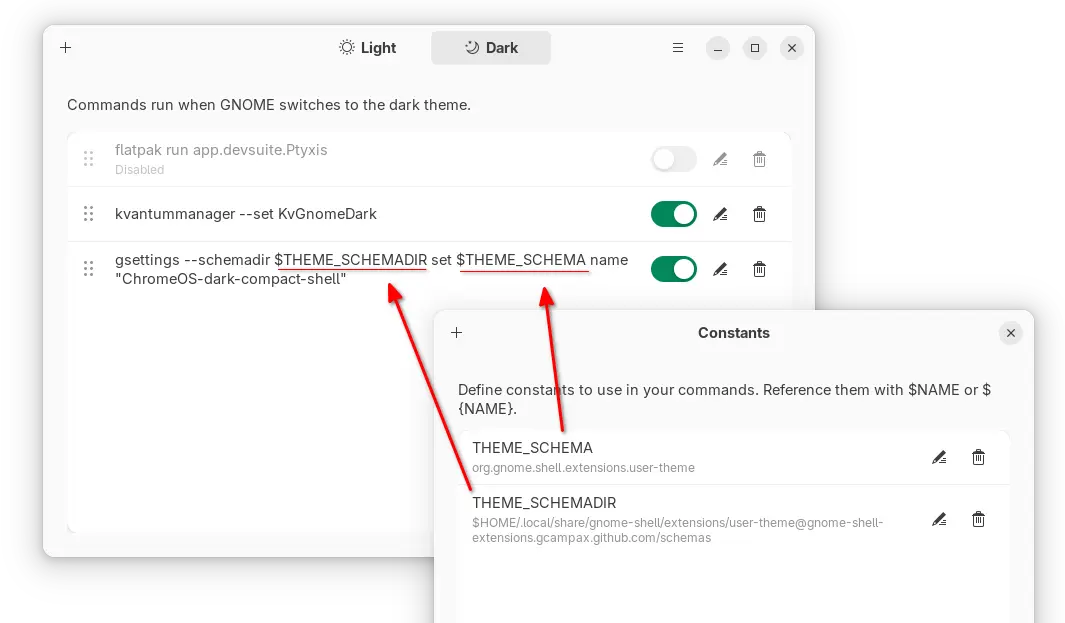
It’s switchcraft, a free open-source Vala written application that provides a modern simple interface, allowing to add custom commands to run automatically when the theme changes.

The app monitors the org.gnome.desktop.interface color-scheme key value and executes commands instantly when it’s changed to “prefer-dark” or “prefer-light”.

It can be useful for doing the following things automatically when switching desktop between light and dark style:

  • Change the legacy GTK3 theme, though Ubuntu already does it automatically.
  • Change Qt app theme.
  • Enable/Disable extensions, or configure extensions’ preferences.
  • Change Gnome Shell theme.
  • Or do whatever that you want.

Simply add your desired commands in the “Light” and “Dark” tabs, and turn on “Enable Monitor” option in Preferences.

Then, it will auto-run the switchcraft-monitor.sh script under .local/bin folder in next login, monitoring your desktop color scheme and running the commands automatically.

Besides that, it supports adding reusable constants for common variables in commands. And, it support exporting all the commands and importing to other systems.

Install switchcraft

Switchcraft provides official installer packages which are available to download in the link below:

They include .rpm package for Fedora/RHEL and .deb package for Debian/Ubuntu, which can be installed by system software app (e.g., Gnome Software and App Center).

For other Linux, it also provides non-install AppImage package that can be run directly to launch to the app, though you need to add executable permission from file properties dialog.

NOTE: switchcraft requires GNOME 40+, GLib >= 2.66, and jq command-line JSON processor.

Example Commands:

For those who are new to Linux, here are some example commands that may help.

1. change legacy GTK3/Icon theme

NOTE: The commands are written for Debian, Fedora, etc Linux Distributions, as Ubuntu automatically set Yaru and its variants as legacy GTK3 theme.

gsettings set org.gnome.desktop.interface gtk-theme 'adw-gtk3-dark'

This command changes the GTK3 theme to adw-gtk3 dark mode. You need to replace adw-gtk3-dark depends on which theme you want to set.

gsettings set org.gnome.desktop.interface icon-theme 'MacTahoe-light'

This will change the icon theme to MacTahoe-light. Also you need to change the theme name accordingly.

Go to gnome-look.org for more themes, and use “Gnome Tweaks -> Appearance” to see all available choices.

2. Enable/Disable Extensions

First, run command to list all the installed extensions.

gnome-extensions list

Then, disable an extension by command:

gnome-extensions disable [email protected]

Here replace disable with enable if you want to enable an extension. And, replace extension ID [email protected] accordingly.

3. Configure Extension

For system default extensions, use similar command below to configure:

gsettings set org.gnome.shell.extensions.dash-to-dock background-color "#ffffff"

You may install and use the graphical “Dconf Editor” tool to get available extension names, keys, and key values.

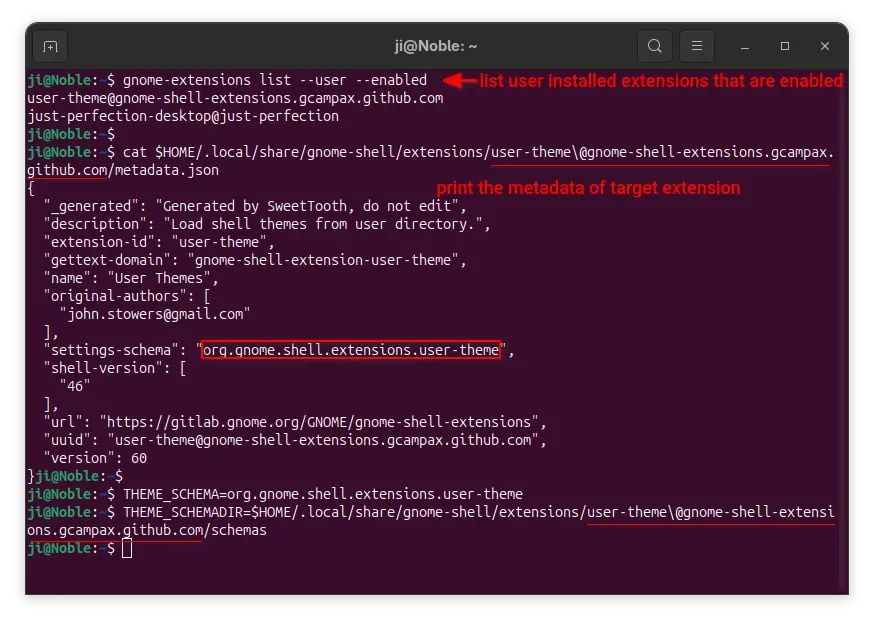
For user installed extensions, you may first run command to list them:

gnome-extensions list --user --enabled

Then, print metadata of an extension (User Themes for example), to get the setting schema:

cat $HOME/.local/share/gnome-shell/extensions/user-theme\@gnome-shell-extensions.gcampax.github.com/metadata.json

Next, set constants:

THEME_SCHAMA=org.gnome.shell.extensions.user-theme
THEME_SCHAMADIR=$HOME/.local/share/gnome-shell/extensions/user-theme\@gnome-shell-extensions.gcampax.github.com/metadata.json/schemas

Finally, run command to configure the “name” (get the key from ‘gschema.xml’ file in extension folder) for the extension.

gsettings --schemadir $THEME_SCHEMADIR set $THEME_SCHEMA name "ChromeOS-dark-compact-shell"

Feel free to leave command below if you want more commands.

Received — 8 November 2025 Linux News & Update

TUXEDO InfinityBook Max 15 Gen10 Linux Laptop Announced with AMD Ryzen AI 300

7 November 2025 at 23:27

InfinityBook Max 15 Gen10

TUXEDO InfinityBook Max 15 Gen10 Linux laptop announced with AMD Ryzen AI 300 CPUs, up to 128GB RAM, up to 8TB SDD, and NVIDIAGeForce RTX 5000 Series GPUs.

The post TUXEDO InfinityBook Max 15 Gen10 Linux Laptop Announced with AMD Ryzen AI 300 appeared first on 9to5Linux - do not reproduce this article without permission. This RSS feed is intended for readers, not scrapers.

Calibre 8.14 Open-Source E-Book Manager Updates the Tolino Driver and Fixes Bugs

7 November 2025 at 18:54

Calibre 8.14

Calibre 8.14 open-source e-book manager software is now available for download with various new features and bug fixes. Here's what's new!

The post Calibre 8.14 Open-Source E-Book Manager Updates the Tolino Driver and Fixes Bugs appeared first on 9to5Linux - do not reproduce this article without permission. This RSS feed is intended for readers, not scrapers.

Linux Mint Devs Introduce New System Administration & System Information Tools

6 November 2025 at 23:41

Linux Mint System Administration

Linux Mint devs introduce new System Information and System Administration tools to make it easier to troubleshoot hardware-related issues.

The post Linux Mint Devs Introduce New System Administration & System Information Tools appeared first on 9to5Linux - do not reproduce this article without permission. This RSS feed is intended for readers, not scrapers.

❌