❌

Normal view

Calibre 8.15 Open-Source E-Book Manager Improves the Comments Editor

21 November 2025 at 13:00

Calibre 8.15

Calibre 8.15 open-source e-book management software is now available for download with various new features and bug fixes. Here's what's new!

The post Calibre 8.15 Open-Source E-Book Manager Improves the Comments Editor appeared first on 9to5Linux - do not reproduce this article without permission. This RSS feed is intended for readers, not scrapers.

Raspberry Pi 500+ Works as Standalone Keyboard (Well, Kinda)

22 November 2025 at 07:12

Can the Raspberry Pi 500+ work as a standalone Bluetooth keyboard? Yes, using the open-source btferret project – but not without limitations, as I report.

You're reading Raspberry Pi 500+ Works as Standalone Keyboard (Well, Kinda), a blog post from OMG! Ubuntu. Do not reproduce elsewhere without permission.

RustDesk 1.4.4 Released with Edge Scrolling Support

By:Ji m
21 November 2025 at 21:03

RustDesk, the free open-source remote desktop application, release new 1.4.4 version few days ago.

The new release of this Teamviewer or AnyDesk alternative app introduced edge scrolling support, when your app window is smaller than the remote screen size.

Previously, it scrolls automatically when you move cursor around the screen. While, the β€œScrollbar” mode is available for choice when you want to manually move the bottom or right scrollbar to move around.

In the new release, a new β€œScrollEdge” mode is added. With it enabled, you may move cursor to the window edge to move the screen. And, a scroll-bar is available to adjust the edge thickness.

For Linux with Wayland (e.g., Ubuntu 22.04+ and Fedora Workstation), it added support sharing multiple monitor screens since last 1.4.3. In the new release, it improved this feature by supporting multiple scaled monitors with Gnome or KDE Wayland.

RustDesk 1.4.4 also introduced new β€œAsk for note at the end of connection” option in the General settings page.

With it enabled, it will display a popup dialog where user can enter a note, when disconnects either actively or passively. See this page for more about the feature.

The new version also improve Apple devices support. It now shows proxy settings on iOS, and allows to manage transferred files through Files or iTunes app. And, it updated hwcodec that fixed H265 encoding support on Intel chip Mac computers.

Other changes in the 1.4.4 release include:

  • Allow flipping sort order in mobile app’s file transfer
  • File transfer auto start on reconnect
  • Load custom installed CA root on mobile
  • UI costomization for Sciter version
  • Insecure TLS option
  • Fix cursor icon capture for the Linux Flatpak package.
  • Better TLS compatibility on all platforms

Get RustDesk 1.4.4

The official release note, as well as the installer packages for Windows, Linux, macOS, iOS, and Android, are available in its Github releases via the link below:

For Linux, the β€œAssets” section provides more packages, e.g., pkg.tar.zst for Arch, .rpm for Fedora/SUSE/RHEL, non-install .appimage, and .flatpak for most Linux that runs in sandbox environment.

If you don’t know which OS type (X86_64, aarch64, or archv7) to choose, open terminal and run uname -m or dpkg --print-architecture command to tell.

And for those who are new to this application, simply install it in both remote and local machines, then type the remote ID to connect, though remember to start the service first in hamburger menu.

It by default uses the public server to initialize the connection, then send data peer-to-peer after connection is established. While, you may see the official docs for setting up self-hosting server.

HPLIP 3.25.8 Released with Few Dozen More Printers Support

By:Ji m
21 November 2025 at 18:49

HPLIP, the free open-source Linux driver for HP inkjet and laser based printers, released new 3.25.8 version few days ago.

This is the third release in 2025, which features a few dozen new printer devices support but NO installer update for the most recent Linux Distributions support.

According to the official release note, HPLIP 3.25.8 added following printers support:

  • HP LaserJet Enterprise Flow MFP 8601z
  • HP LaserJet Enterprise 5501
  • HP LaserJet Enterprise MFP 5601dn
  • HP LaserJet Enterprise 6500dn
  • HP LaserJet Enterprise 5501n
  • HP LaserJet Enterprise MFP 5601
  • HP LaserJet Enterprise 6500
  • HP LaserJet Enterprise 5502dn
  • HP LaserJet Enterprise MFP 5602dn
  • HP LaserJet Enterprise 6500n
  • HP LaserJet Enterprise 5502
  • HP LaserJet Enterprise MFP 5602f
  • HP LaserJet Enterprise 6501dn
  • HP LaserJet Enterprise X50452dn
  • HP LaserJet Enterprise Flow MFP 5602zfw
  • HP LaserJet Enterprise 6501
  • HP LaserJet Enterprise X50452
  • HP LaserJet Enterprise MFP 5602
  • HP LaserJet Enterprise X60257dn
  • HP LaserJet Enterprise MFP X53052dn
  • HP LaserJet Enterprise Flow MFP X530
  • HP LaserJet Enterprise X60257
  • HP LaserJet Enterprise MFP X53052
  • HP LaserJet Enterprise X60357dn
  • HP LaserJet Enterprise X60357
  • HP LaserJet Enterprise MFP 6600dn
  • HP LaserJet Enterprise Flow MFP 6600zfw
  • HP LaserJet Enterprise MFP 6600
  • HP LaserJet Enterprise Flow MFP 6600zfsw
  • HP LaserJet Enterprise MFP X62757dn
  • HP LaserJet Enterprise Flow MFP X62757zs
  • HP LaserJet Enterprise MFP X62757
  • DEX D50452dn
  • DEX MFP D53052dn

Sadly, the official installer so far supports Distros up to following versions:

  • Ubuntu24.04
  • Fedora 40
  • Debian 12
  • RHEL 9.1
  • Linux Mint 22
  • SUSE Linux 15.5
  • Zorin 17.1
  • and more.

Meaning for Ubuntu 25.04, 25.10, Debian 13, Fedora 43 etc, you need to manually build the driver from source.

How to Install HPLIP 3.25.8

The official installer β€œhplip-3.25.8.run” is available to download in sourceforge.net via the link below:

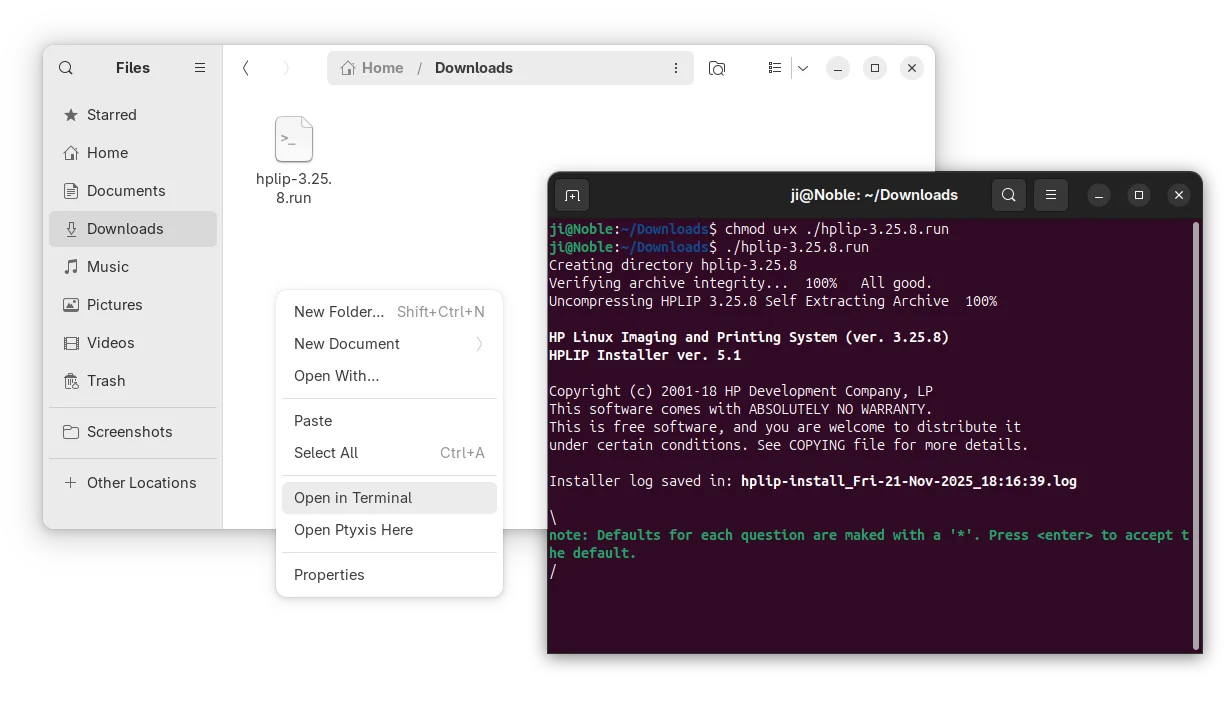
After downloaded the installer, open the Downloads folder in terminal, and finally run the 2 commands below one by one:

  • Add executable permission:
    chmod u+x ./hplip-3.25.8.run
  • Start the installer and follow terminal output to install HPLIP:
    ./hplip-3.25.8.run

For non-supported Linux Distributions, either grab the source form the link above, or, open the extracted folder (the command above automatically generate the source folder) in terminal, then compile by yourself.

Wine 10.19 Released: Game Changing Support for Windows Reparse Points on Linux

Wine 10.19 Released: Game Changing Support for Windows Reparse Points on Linux

Introduction

If you use Linux and occasionally run Windows applications, whether via native Wine or through gaming layers like Proton, you’ll appreciate what just dropped in Wine 10.19. Released November 14 2025, this version brings a major enhancement: official support for Windows reparse points,Β a filesystem feature many Windows apps rely on, and a host of other compatibility upgrades.

In simpler terms: Wine now understands more of the Windows filesystem semantics, which means fewer workarounds, better application compatibility, and smoother experiences for many games and tools previously finicky under Linux.

What Are Reparse Points & Why They Matter

Understanding Reparse Points

On Windows, a reparse point is a filesystem object (file or directory) that carries additional data, often used for symbolic links, junctions, mount points, or other redirection features. When an application opens or queries a file, the OS may check the reparse tag to determine special behavior (for example β€œredirect this file open to this other path”).

Because many Windows apps, installers, games, DRM systems, file-managers, use reparse points for features like directory redirection, path abstractions, or filesystem overlays, lacking full support for them in Wine means those apps often misbehave.

What Wine 10.19 Adds

With Wine 10.19, support for these reparse point mechanisms has been implemented in key filesystem APIs: for example NtQueryDirectoryFile, GetFileInfo, file attribute tags, and DeleteFile/RemoveDirectory for reparse objects.

This means that in Wine 10.19:

  • Windows apps that create or manage symbolic links, directory junctions or mount-point style re-parsing will now function correctly in many more cases.

  • Installers or frameworks that rely on β€œwhen opening path X, redirect to path Y” will work with less tinkering.

  • Games or utilities that check for reparse tags or use directory redirections will have fewer β€œstuck” behaviors or missing files.

In effect, this is a step toward closer to native behavior for Windows file-system semantics under Linux.

Other Key Highlights in Wine 10.19

Beyond reparse points, the release brings several notable improvements:

  • Expanded support for WinRT exceptions (Windows Runtime error handling) meaning better compatibility for Universal Windows Platform (UWP) apps and newer Windows-based frameworks.

  • Refactoring of β€œCommon Controls” (COMCTL32) following the version 5 vs version 6 split, which helps GUI applications that rely on older controls or expect mixed versions.

Use AirPods Pro Features on Linux with LibrePods

21 November 2025 at 07:58

Linux mascot holds AirPods Pro against a bright purple and yellow backdropLibrePods brings AirPods Pro features to Linux desktops, including active noise cancellation, transparency mode, ear detection and accurate battery levels.

You're reading Use AirPods Pro Features on Linux with LibrePods, a blog post from OMG! Ubuntu. Do not reproduce elsewhere without permission.

How to Open and Edit Apple iWork Files on Linux

The post How to Open and Edit Apple iWork Files on Linux first appeared on Tecmint: Linux Howtos, Tutorials & Guides .

Apple iWork is Apple’s suite of office applications, similar to Microsoft Office or Google Docs, consisting of three main applications

The post How to Open and Edit Apple iWork Files on Linux first appeared on Tecmint: Linux Howtos, Tutorials & Guides.

PHP 8.5 Released with Pipe Operator, URI Extension, and Clone With Functionality

21 November 2025 at 02:48

PHP 8.5

PHP 8.5 open-source scripting language is out now with URI extension, Pipe operator, and support for modifying properties while cloning. Here's what's new!

The post PHP 8.5 Released with Pipe Operator, URI Extension, and Clone With Functionality appeared first on 9to5Linux - do not reproduce this article without permission. This RSS feed is intended for readers, not scrapers.

Wireshark 4.6.1 Released with Updated Protocol Support and Various Bug Fixes

20 November 2025 at 19:55

Wireshark 4.6.1

Wireshark 4.6.1 open-source network protocol analyzer is now available to download with various bug fixes and updated protocols. Here’s what’s changed!

The post Wireshark 4.6.1 Released with Updated Protocol Support and Various Bug Fixes appeared first on 9to5Linux - do not reproduce this article without permission. This RSS feed is intended for readers, not scrapers.

GDM Settings adding Toggles for Light Mode & Fingerprint Authentication

By:Ji m
20 November 2025 at 21:14

GDM Settings, the graphical configuration tool for GNOME Login Screen, updated recently with new toggle options!

As you know, GDM Settings is a free open-source Python written settings app for GNOME’s Login/Display Manager.

With it, you may change the login screen background image, set the fonts and themes, tweak top-bar colors, disable user list, show welcome message, and configure more about the login screen.

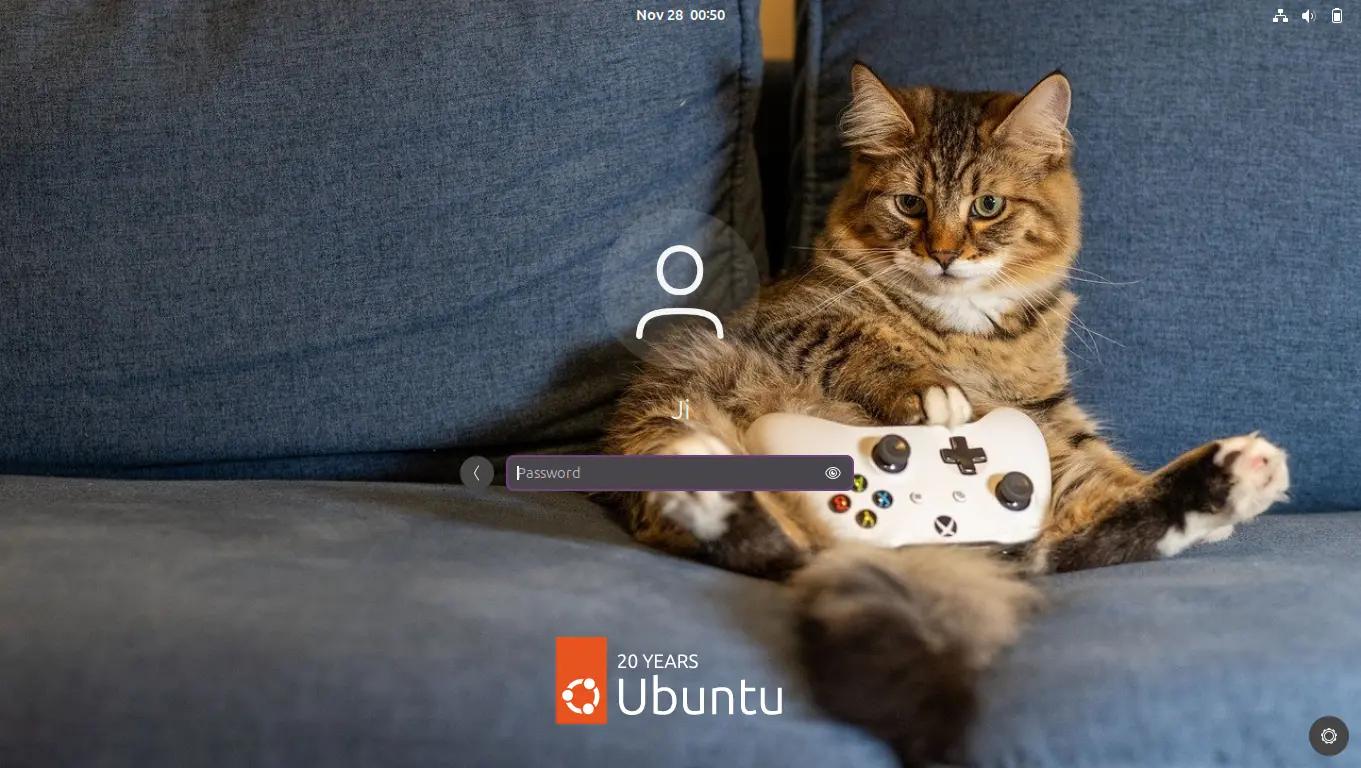
GNOME Login Screen with custom background

The latest of the app is so far at version 5.0 which was release one year ago. The development slows down however after that release.

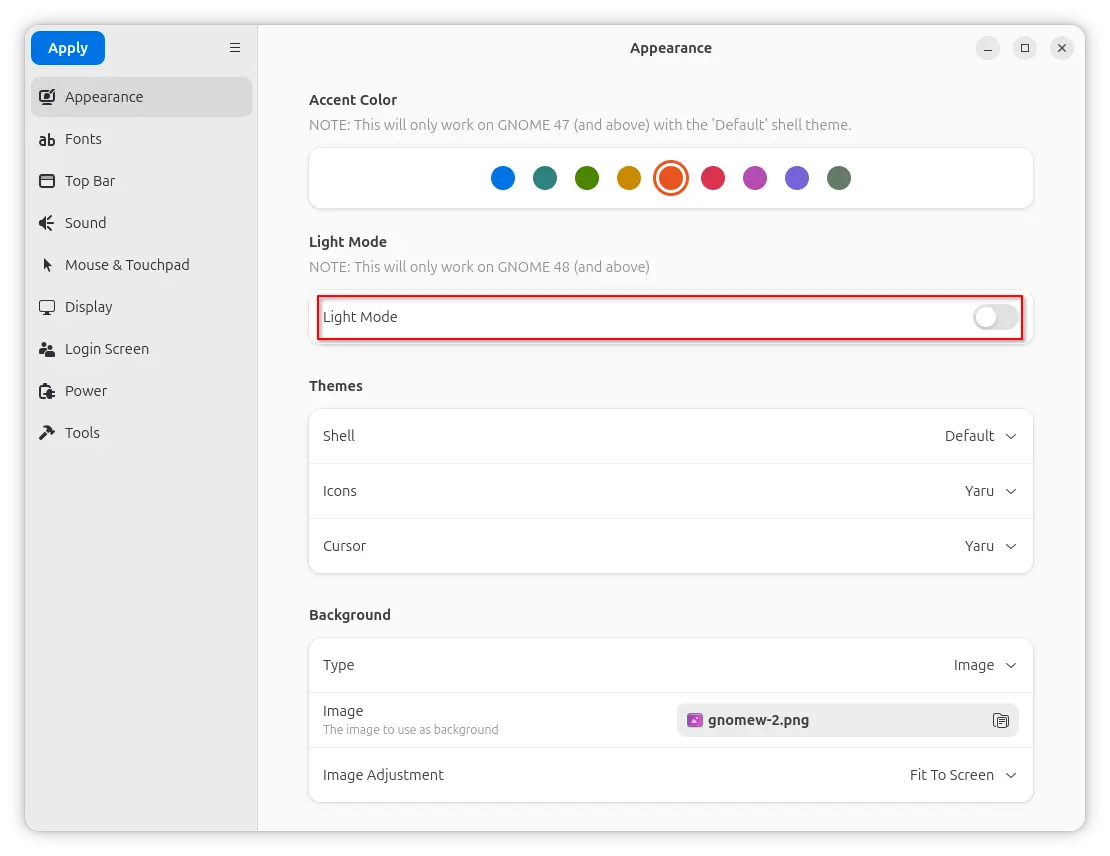
In the past 12 months, only few features were added. One is the β€œLight Mode” toggle option under Appearance tab, which works for GNOME 48 and above.

It works by setting the org/gnome/desktop/interface/color-scheme key to β€˜prefer-lightβ€˜ for GDM. Though, in vanilla Gnome both top-bar and menus are dark in either mode. And, I didn’t see anything goes light after enabled the option in my test in Ubuntu 25.10.

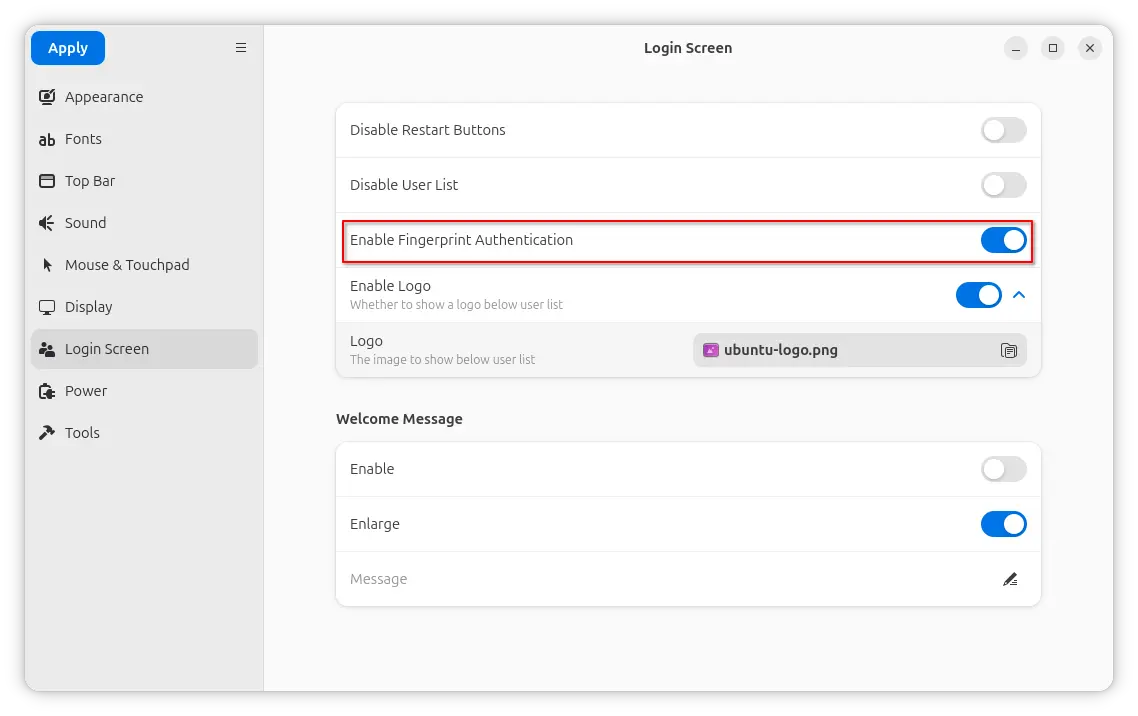
Another is a new Enable Fingerprint Authentication toggle option added to β€˜Login Screen’ page. It can be useful when you want to use fingerprint authentication for your GNOME desktop environment except the login screen, as you know log-in without password will cause unlock keyring pop-up when launching Chrome etc application though it can be skipped.

And, the function is done by setting org/gnome/login-screen/enable-fingerprint-authentication key for GDM silently in the background.

Besides that, it also updated to GNOME 49 platform for the Flatpak package. For more about the development of GDM Settings, see the commits page.

Install GDM Settings

The changes mentioned above are still in development stage. MeaningΒ you need to manually build it from source code.

NOTE: GDM Settings has the potential to break your login screen. Don’t use it on production machine!

For the 5.0 version, it’s available to install in most Linux Distributions through Flatpak package.

Just enable Flatpak support, then run the command below to install it:

flatpak install flathub io.github.realmazharhussain.GdmSettings

While, Fedora Workstation may simply search for and install it from GNOME Software, if you have 3rd party repository enabled.

GDM Settings flatpak package in Fedora GNOME Software

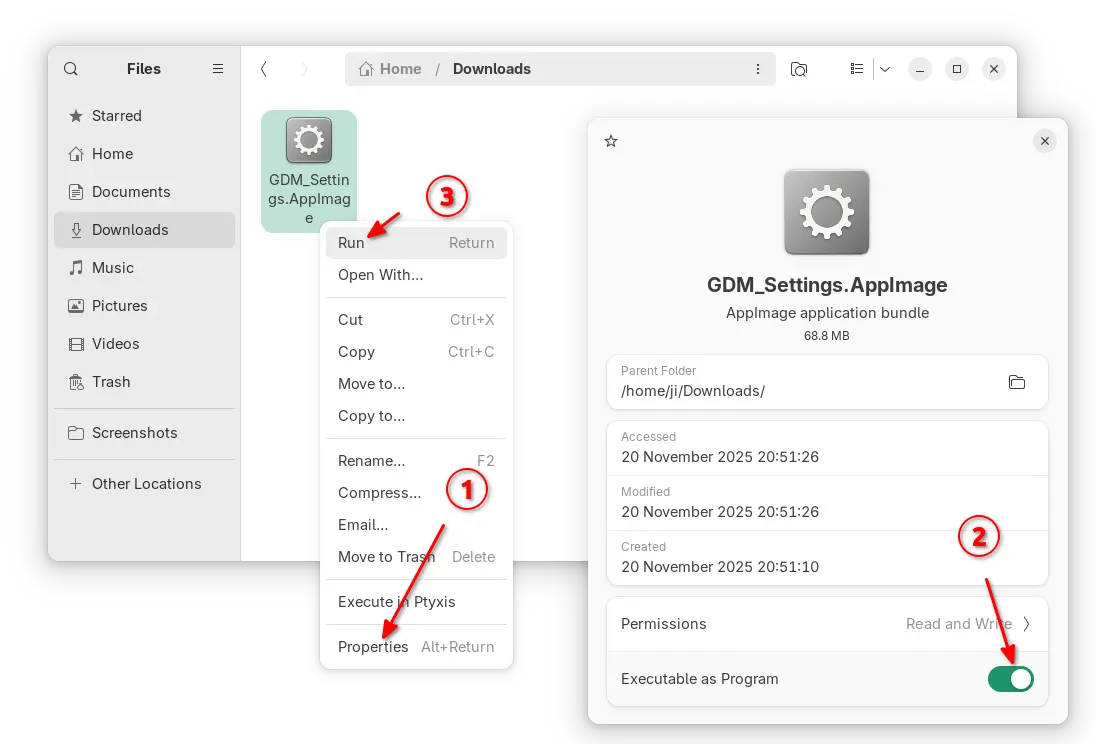
For choice, there’s also non-install AppImage available to download in the Github releases page under Assets section.

As both AppImage and Flatpak were built with most recent GNOME runtime, they may be NOT working good in old GNOME Desktops.

So, I built the app package into this unofficial PPA for Ubuntu 22.04, Ubuntu 24.04, 25.04 and 25.10.

To add the PPA and install GDM Settings, open terminal (Ctrl+Alt+T) and run commands below one by one:

sudo add-apt-repository ppa:ubuntuhandbook1/gdm-settings
sudo apt update
sudo apt install gdm-settings

Optionally, you may remove the PPA package and remove the PPA at any time by running commands:

sudo apt remove gdm-settings
sudo add-apt-repository --remove ppa:ubuntuhandbook1/gdm-settings

Slimbook and KDE Celebrate 8th Anniversary with KDE Slimbook VII Linux Laptop

20 November 2025 at 00:51

KDE Slimbook VII

KDE Slimbook VII Linux laptop launches with an AMD Ryzen AIβ€―9β€―365 CPU, integrated AMD Radeon 880M graphics, and up to 128β€―GB RAM.

The post Slimbook and KDE Celebrate 8th Anniversary with KDE Slimbook VII Linux Laptop appeared first on 9to5Linux - do not reproduce this article without permission. This RSS feed is intended for readers, not scrapers.

Blender 5.0 Open-Source 3D Graphics App Is Now Available for Download

19 November 2025 at 00:11

Blender 5.0

Blender 5.0 free and open-source 3D computer graphics software tool set is now available for download as a major update with many new features and improvements. Here's what's new!

The post Blender 5.0 Open-Source 3D Graphics App Is Now Available for Download appeared first on 9to5Linux - do not reproduce this article without permission. This RSS feed is intended for readers, not scrapers.

Debian Libre Live Images Released for Software Freedom Lovers

18 November 2025 at 23:27

Debian Libre Live Images

The Debian Libre Live Images project allows you to run and install the Debian GNU/Linux operating system without non-free software.

The post Debian Libre Live Images Released for Software Freedom Lovers appeared first on 9to5Linux - do not reproduce this article without permission. This RSS feed is intended for readers, not scrapers.

❌