This is a step by step guide shows how to block certain app packages from Ubuntu local repositories, PPAs, or other apt repositories in Ubuntu 25.10 and higher.
Previously, we can set package pin-priority to prevent from or prior to installing certain app packages. Now, in Debian/Ubuntu with apt 3.1+, a new method is available to include/exclude packages for specified apt sources (repositories).
Say you have a Ubuntu PPA or apt repository installed in Ubuntu. It contains many app packages, but you only need one or few of them. In the case, you may use the new method below to completely exclude all other packages from that repository, so they are not installable with any apt option or other graphical tool.
NOTE 1: This tutorial only works for classic .deb packages. Though, you may use the method to block snap and flatpak entirely.
NOTE 2: This tutorial needs apt 3.1+, meaning Debian Unstable/Testing or Ubuntu 25.10+.
Step 1: Find out what packages available in the repository
Before getting started, it might be helpful to first find out all the package names available in the target PPA or apt repository.
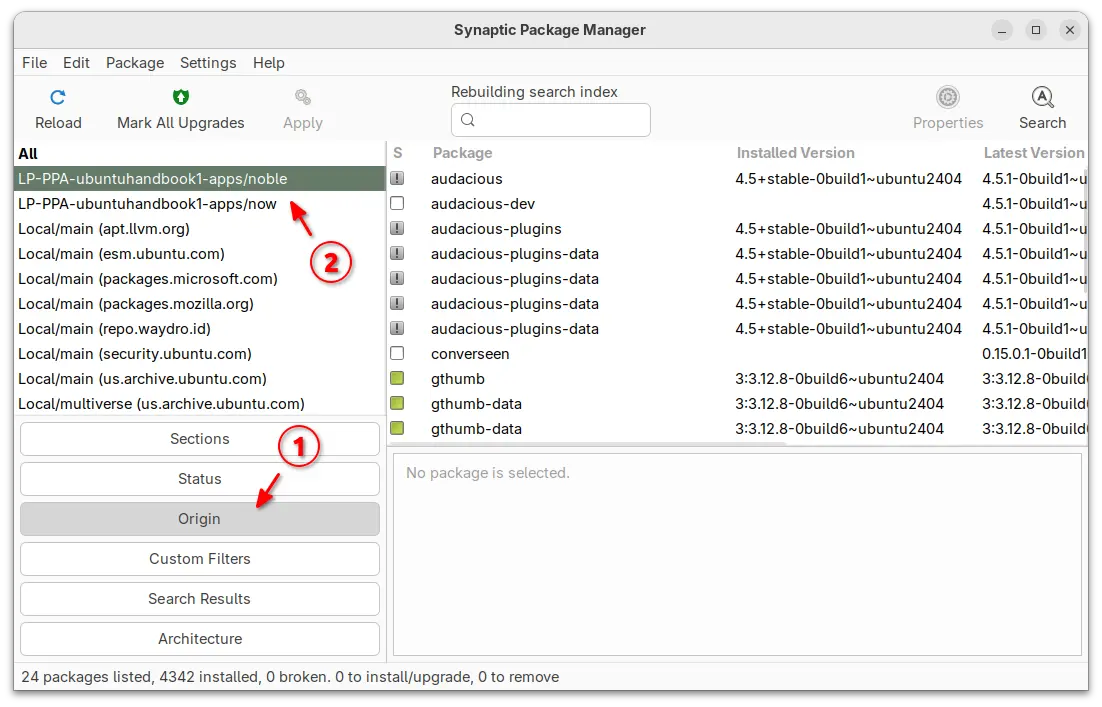
For Ubuntu desktop, you can simply install and launch Synaptic package manager. Then, choose “Origin” in left and select the target repository to show all the packages.
For server without GUI, you may view the package index files instead.
- First, run the command below to update package index:
sudo apt update
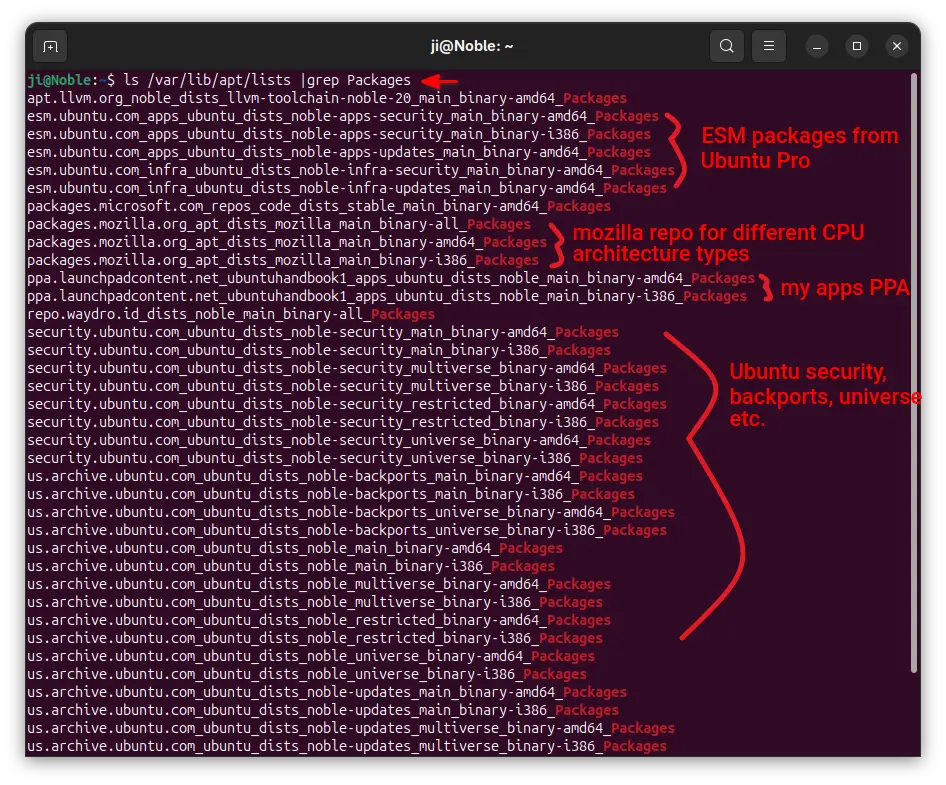
- Next, print all the package index files under
/var/lib/apt/lists directory:
ls /var/lib/apt/lists/ |grep Packages
The files contain the package names, their versions, origin, maintainers, sizes, and hash-code, etc information.
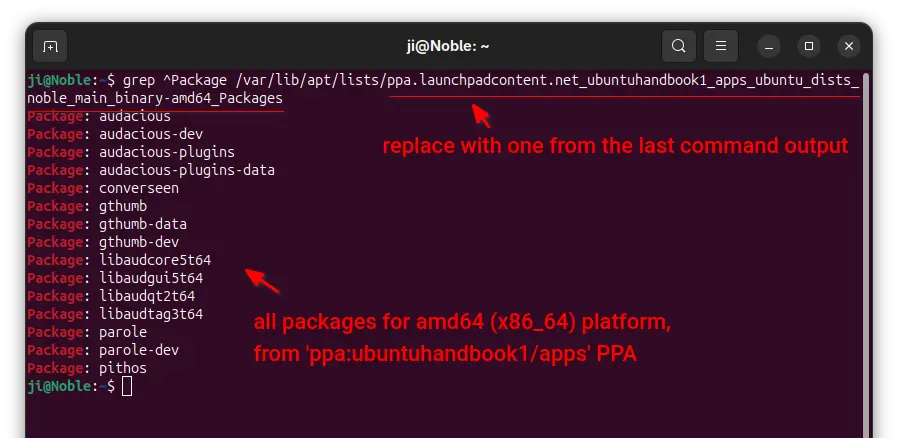
- In last command output, find out the target file-name for your repository, then use the command below to filter and show only package names in it:
grep ^Package /var/lib/apt/lists/ppa.launchpadcontent.net_ubuntuhandbook1_apps_ubuntu_dists_noble_main_binary-amd64_Packages
Here you need to replace the long file-name with yours.
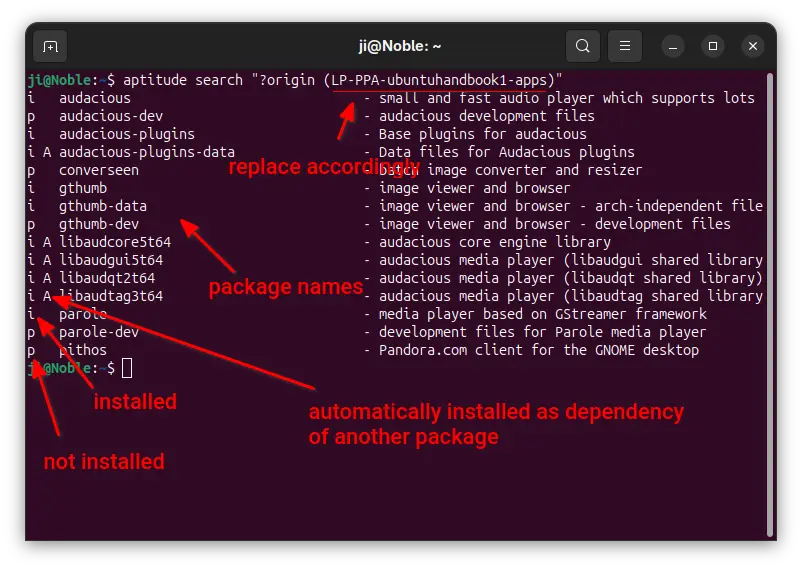
For choice, you may install aptitude, then use the command below instead to list all packages from target repository:
aptitude search "?origin (LP-PPA-ubuntuhandbook1-apps)"
Here replace LP-PPA-ubuntuhandbook1-apps accordingly, while ubuntuhandbook1 is PPA maintainer name, and apps is PPA name. For other repositories, run apt-cache policy |grep "o=" to list and get the target value of “o=”.
Step 2: Edit source files to block packages
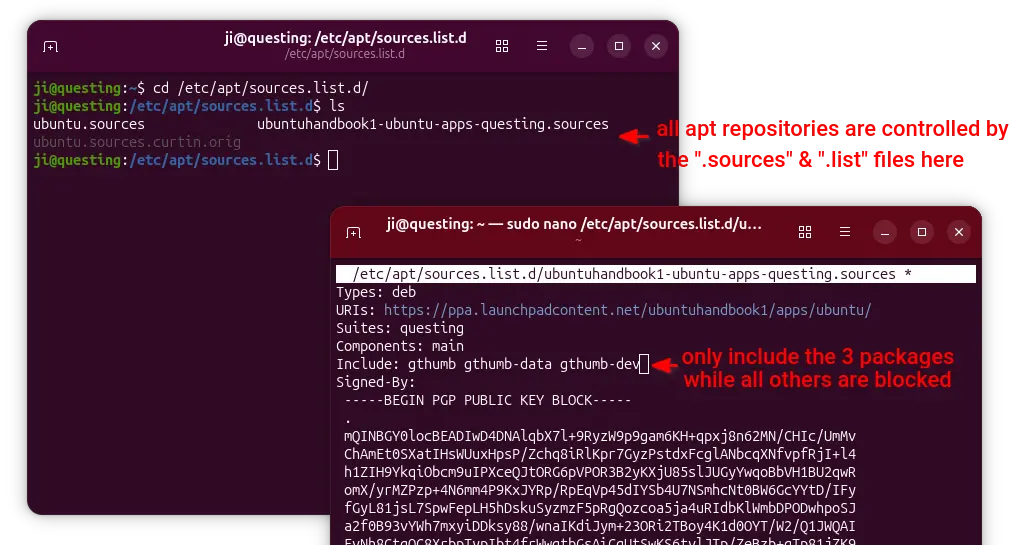
For Ubuntu, all the apt sources are handled by .sources and .list files under /etc/apt/sources.list.d directory.
To block specific packages from Ubuntu official repositories, open terminal (Ctrl+Alt+T) and run command to edit the file below:
sudo nano /etc/apt/sources.list.d/ubuntu.sources
For next Ubuntu 26.04, there’ll be ubuntu-esm-apps.sources and ubuntu-esm-infra.sources in that directory for ESM packages if Ubuntu Pro is enabled.
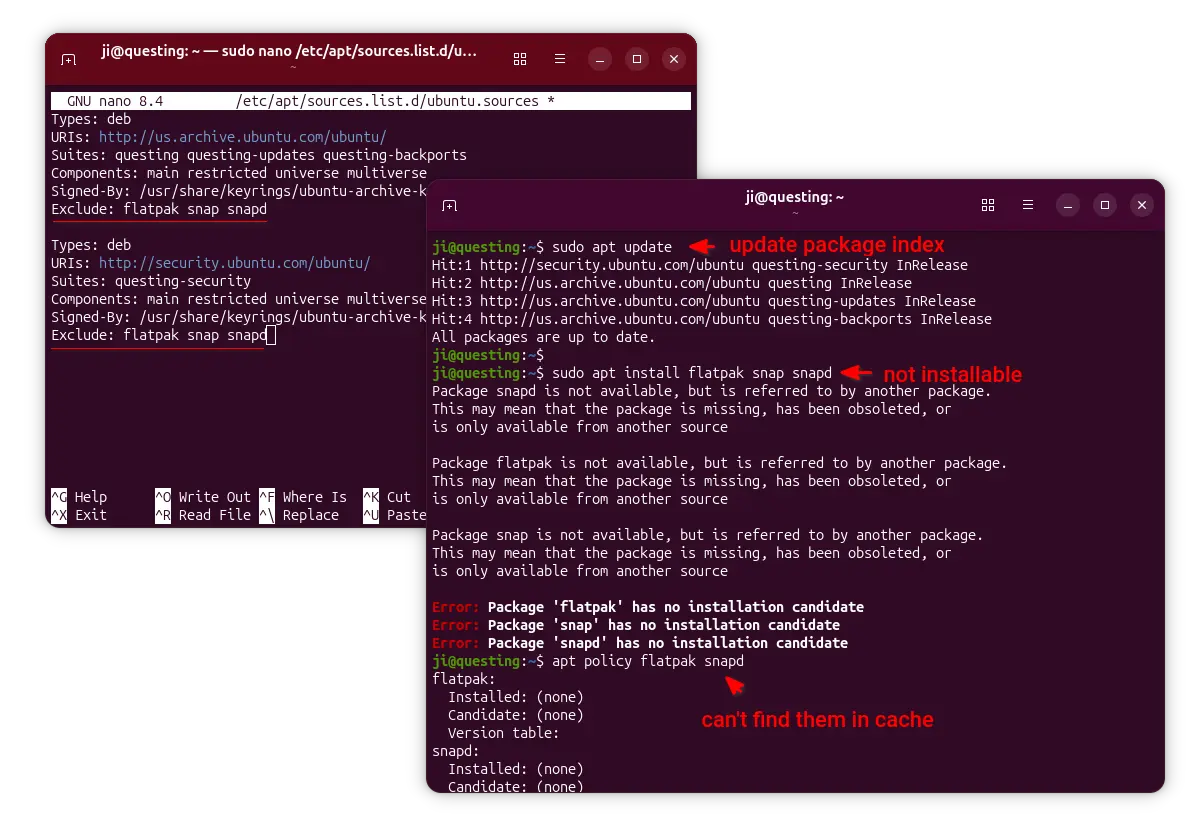
When file opens, simply add Exclude: package1 package2 package3 ... in the end of the 2 sections.
In the screenshot above, it tells to block flatpak, snap, and snapd packages. After saved file (Ctrl+S, then Ctrl+X), run sudo apt update to apply changes.
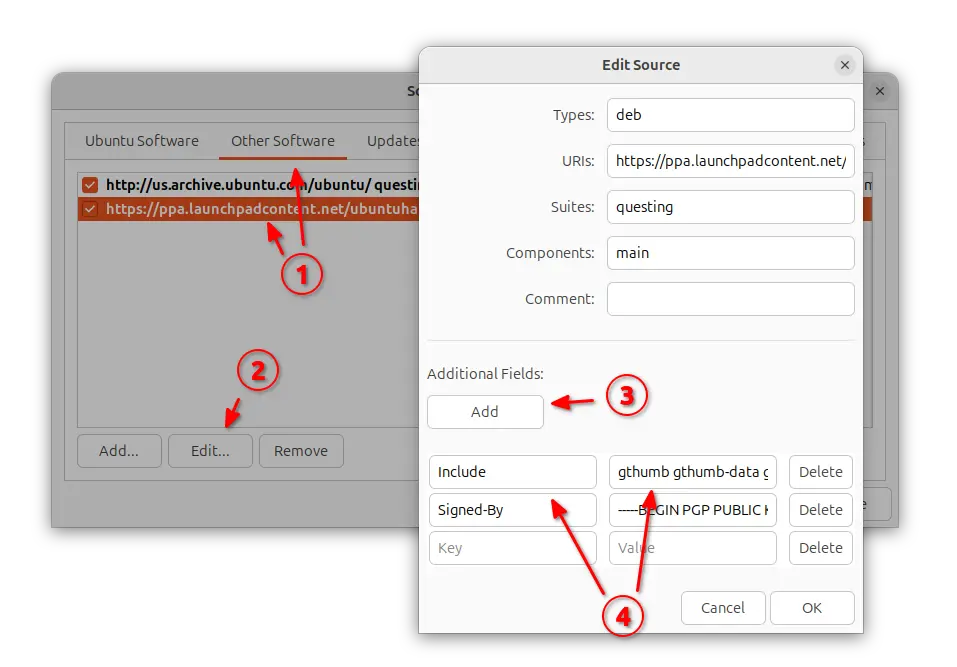
To block certain PPA packages, simply launch “Software & Updates” utility and navigate to “Other Software tab”.
Then, highlight the PPA source and edit it. Finally, click Add an additional fields, and:
- either set key
Include and value package1 package2 package3, so to block all others.
- or set key
Exclude and value package1 package2 ... to block certain packages.
Also refresh cache via either sudo apt update or Software Updater after saving the changes.
NOTE: When using “Include” (leaving others blocked), don’t forget to also include the dependency packages (if any) in that repository!
For server without GUI, run commands below and finally refresh cache.
- First, list and find out the target source file:
ls /etc/apt/sources.list.d
- Then, edit the file (replace file-name with yours):
sudo nano /etc/apt/sources.list.d/ubuntuhandbook1-ubuntu-apps-questing.sources
Finally, add new line with either Include: package1 package2 or Exclude: package accordingly
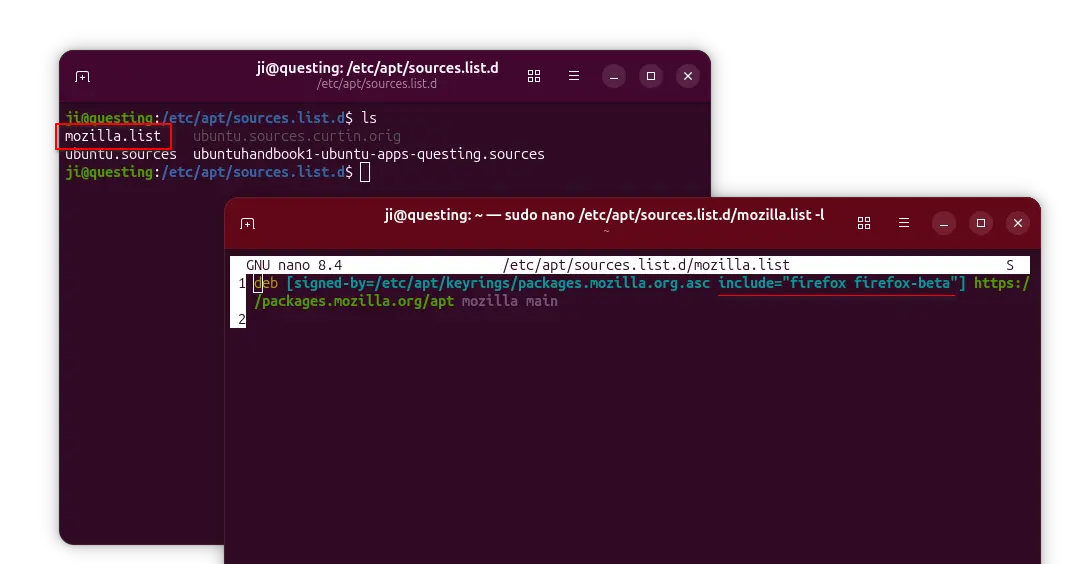
For apt repository installed in the classic .list file, edit it and add the include="package" or exclude="package" section between the brackets after ‘signed-by’ section.
And, finally run sudo apt update to apply changes.

 Login
Login