❌

Normal view

System76 Launches First Stable Release of COSMIC Desktop and Pop!_OS 24.04 LTS

12 December 2025 at 02:24

Pop!_OS 24.04 COSMIC

Pop!_OS 24.04 Linux distribution from System76 is now available for download with the first stable release of the COSMIC desktop environment. Here's what's new!

The post System76 Launches First Stable Release of COSMIC Desktop and Pop!_OS 24.04 LTS appeared first on 9to5Linux - do not reproduce this article without permission. This RSS feed is intended for readers, not scrapers.

NVIDIA 580.119.02 Linux Graphics Driver Released with Various Bug Fixes

12 December 2025 at 02:08

NVIDIA 535.54.03

NVIDIA 580.119.02 graphics driver is now available for download for Linux, FreeBSD, and Solaris systems with various bug fixes.

The post NVIDIA 580.119.02 Linux Graphics Driver Released with Various Bug Fixes appeared first on 9to5Linux - do not reproduce this article without permission. This RSS feed is intended for readers, not scrapers.

KDE Gear 25.12 Software Suite Released with Many Improvements for KDE Apps

11 December 2025 at 19:56

KDE Gear 25.12

KDE Gear 25.12 open-source software suite is now available with improvements for many of your favorite KDE applications. Here’s what’s new!

The post KDE Gear 25.12 Software Suite Released with Many Improvements for KDE Apps appeared first on 9to5Linux - do not reproduce this article without permission. This RSS feed is intended for readers, not scrapers.

Tails 7.3.1 Anonymous Linux OS Released with Tor Browser 15.0.3 and Tor 0.4.8.21

11 December 2025 at 19:38

Tails 7.3.1

Tails 7.3.1 anonymous Linux OS is now available for download with Tor Browser 15.0.3, Tor 0.4.8.21, and Linux kernel 6.12.57 LTS.

The post Tails 7.3.1 Anonymous Linux OS Released with Tor Browser 15.0.3 and Tor 0.4.8.21 appeared first on 9to5Linux - do not reproduce this article without permission. This RSS feed is intended for readers, not scrapers.

Raspberry Pi Imager 2.0.2 Adds Support for Multiple SSH Keys, Direct I/O Bypass

11 December 2025 at 08:36

Raspberry Pi Imager 2.0.2

Raspberry Pi Imager 2.0.2 microSD card flashing utility is now available for download with numerous new features and improvements. Here's what's new!

The post Raspberry Pi Imager 2.0.2 Adds Support for Multiple SSH Keys, Direct I/O Bypass appeared first on 9to5Linux - do not reproduce this article without permission. This RSS feed is intended for readers, not scrapers.

Cinnamon 6.6 Desktop Environment Released with Redesigned Application Menu

11 December 2025 at 03:32

Cinnamon 6.6

Cinnamon 6.6 desktop environment is now available with a redesigned application menu, improved virtual keyboard, and other changes. Here's what's new!

The post Cinnamon 6.6 Desktop Environment Released with Redesigned Application Menu appeared first on 9to5Linux - do not reproduce this article without permission. This RSS feed is intended for readers, not scrapers.

AerynOS 2025.12 Released with GNOME 49.2, Mesa 25.3, and KDE Plasma 6.5.4

10 December 2025 at 06:23

AerynOS 2025.12

AerynOS 2025.12 Linux distribution is now available for download with the GNOME 49.2 desktop environment, Linux kernel 6.17, and more. Here’s what’s new!

The post AerynOS 2025.12 Released with GNOME 49.2, Mesa 25.3, and KDE Plasma 6.5.4 appeared first on 9to5Linux - do not reproduce this article without permission. This RSS feed is intended for readers, not scrapers.

Thunderbird 146 Introduces Configuration UI for Setting Up OpenPGP Keyservers

10 December 2025 at 04:50

Thunderbird 146

Thunderbird 146 open-source email client is now available for download with support for configuring preferred OpenPGP keyservers via the UI and other changes. Here's what's new!

The post Thunderbird 146 Introduces Configuration UI for Setting Up OpenPGP Keyservers appeared first on 9to5Linux - do not reproduce this article without permission. This RSS feed is intended for readers, not scrapers.

Canonical to Package and Distribute AMD ROCm within Ubuntu’s Repositories

10 December 2025 at 03:04

Canonical AMD ROCm

Ubuntu maker Canonical will package and distribute the AMD ROCm software stack within Ubuntu’s repositories to enable hardware-accelerated AI/ML and HPC workloads.

The post Canonical to Package and Distribute AMD ROCm within Ubuntu’s Repositories appeared first on 9to5Linux - do not reproduce this article without permission. This RSS feed is intended for readers, not scrapers.

Parrot 7.0 Beta Ethical Hacking Distro Switches to KDE Plasma as Default Desktop

10 December 2025 at 02:27

Parrot 7.0 Beta

Parrot 7.0 ethical hacking and penetration testing distribution is now available for public beta testing with KDE Plasma as default desktop and Debian 13 base. Here's what to expect!

The post Parrot 7.0 Beta Ethical Hacking Distro Switches to KDE Plasma as Default Desktop appeared first on 9to5Linux - do not reproduce this article without permission. This RSS feed is intended for readers, not scrapers.

Linux Kernel 5.4 Reaches End-of-Life: Time to Retire a Workhorse

Linux Kernel 5.4 Reaches End-of-Life: Time to Retire a Workhorse

One of the most widely deployed Linux kernels has officially reached the end of its lifecycle. The maintainers of the Linux kernel have confirmed that Linux 5.4, once a cornerstone of countless servers, desktops, and embedded devices, is now end-of-life (EOL). After years of long-term support, the branch has been retired and will no longer receive upstream fixes or security updates.

A Kernel Release That Defined a Generation of Linux Systems

When Linux 5.4 debuted, it made headlines for bringing native exFAT support, broader hardware compatibility, and performance improvements that many distributions quickly embraced. It became the foundation for major OS releases, including Ubuntu LTS, certain ChromeOS versions, Android kernels, and numerous appliance and IoT devices.

Its long support window made it a favorite for organizations seeking stability over bleeding-edge features.

What End-of-Life Actually Means

With the EOL announcement, the upstream kernel maintainers are officially done with version 5.4. That means:

  • No more security patches

  • No more bug fixes or performance updates

  • No regressions or vulnerabilities will be addressed

Some enterprise vendors may continue backporting patches privately, but the public upstream branch is now frozen. For most users, that makes 5.4 effectively unsafe to run.

Why This Matters for Users and Organizations

Many devices, especially embedded systems, tend to run kernels for much longer than desktops or servers. If those systems continue using 5.4, they now risk exposure to unpatched vulnerabilities.

Running an unsupported kernel can also create compliance issues for companies operating under strict security guidelines or certifications. Even home users running older LTS distributions may unknowingly remain on a kernel that’s no longer protected.

Upgrading Is the Clear Next Step

With 5.4 retired, users should begin planning an upgrade to a supported kernel line. Today’s active long-term support kernels include more modern branches such as 6.1, 6.6, and 6.8, which provide:

  • Better CPU and GPU support

  • Significant security improvements

  • Enhanced performance and energy efficiency

  • Longer future support windows

Before upgrading, organizations should test workloads, custom drivers, and hardware, especially with specialized or embedded deployments.

Distribution Release: Pop!_OS 24.04

12 December 2025 at 05:00
The DistroWatch news feed is brought to you by TUXEDO COMPUTERS. Pop!_OS 24.04, a major new version of System76's desktop Linux distribution, has been released. Based on Ubuntu's latest long-term support version, Pop!_OS 24.04 is the project's first stable version that ships the COSMIC desktop environment, developed in-house: "If you're ambitious enough, or maybe just crazy enough, there eventually....

Pop!_OS 24.04 LTS Released with New COSMIC Desktop

12 December 2025 at 02:49

A new stable release of Pop!_OS is out, the first to ship with the Rust-based COSMIC desktop environment by default. I look at what's new in Pop!_OS 24.04 LTS.

You're reading Pop!_OS 24.04 LTS Released with New COSMIC Desktop, a blog post from OMG! Ubuntu. Do not reproduce elsewhere without permission.

Thunderbird 146 Update Migrates Logins to AES + More

12 December 2025 at 02:40

Thunderbird 146 has been released, making it easier to add OpenPGP keyservers, improving the security of login data with AES encryption, and fixing a ton of bugs.

You're reading Thunderbird 146 Update Migrates Logins to AES + More, a blog post from OMG! Ubuntu. Do not reproduce elsewhere without permission.

Ubuntu’s New Telemetry Tool to β€˜Phone Home’ Monthly

11 December 2025 at 23:54

Changes to Ubuntu's telemetry with the new Ubuntu Insights tool include more frequent reporting, more controls and more transparency on what's collected.

You're reading Ubuntu’s New Telemetry Tool to β€˜Phone Home’ Monthly, a blog post from OMG! Ubuntu. Do not reproduce elsewhere without permission.

Two Ubuntu Flavours Won’t Be LTS Releases Next Year

11 December 2025 at 00:18

Official Ubuntu flavour logos in a circle around the Ubuntu logo.Ubuntu 26.04 will be a long-term support release, but not all of its official flavours will be as 2 of the 10 official Ubuntu flavours have not applied for LTS status.

You're reading Two Ubuntu Flavours Won’t Be LTS Releases Next Year, a blog post from OMG! Ubuntu. Do not reproduce elsewhere without permission.

Canonical is Bringing AMD ROCm to Ubuntu 26.04 Repos

10 December 2025 at 06:10

Ubuntu and AMD ROCm logos side by side.Canonical will package AMD ROCm directly in the Ubuntu 26.04 LTS repos, making it much easier to get GPU-accelerated workloads running on the distro.

You're reading Canonical is Bringing AMD ROCm to Ubuntu 26.04 Repos, a blog post from OMG! Ubuntu. Do not reproduce elsewhere without permission.

VS Code 1.107 Released! Isolated Background Agents, Org Level Custom Agents

By:Ji m
11 December 2025 at 21:42

Microsoft Visual Studio Code announced the November release, version 1.107, yesterday for Windows, Linux, and macOS users.

The new release of this free open-source code editor integrated the agent sessions into the Chat view. When working in a workspace, it only shows sessions related to the current workspace, while all sessions across workspaces are shown when you are in an empty window.

The agent sessions can be displayed either in β€œcompact view” that lists 3 most recent sessions along with β€œShow All Sessions” button, or in β€œside-by-side view” when Chat View is wide enough. While, there’s an orientation setting to set to always stacked (compact view), always side-by-side, or switch automatically according to Chat View width.

The local agent now continues running in the background when you close the local chat session. And, it’s able to see the status of the running agent in the sessions list and switch back to the session at any time.

When creating a new background agent, user can now choose to run in either the current workspace or a dedicated Git worktree. And, when running a background agent in a worktree, the changes is isolated in a separate folder, thus you can run multiple background agents simultaneously without conflicts.

The background agents now support multiple context attachment types. You can attach selections, problems, symbols, search results, git commits, and more to any prompt.

Other Agent HQ changes include:

  • Introduce new β€œContinue in” option to continue a local chat with a background or cloud agent seamlessly.
  • Define custom agents at the organization level for your GitHub account (experimental).
  • Bring your own custom agents into Background Agents (experimental).
  • Run agents as subagents (experimental).
  • Reuse your existing claude skills (experimental).

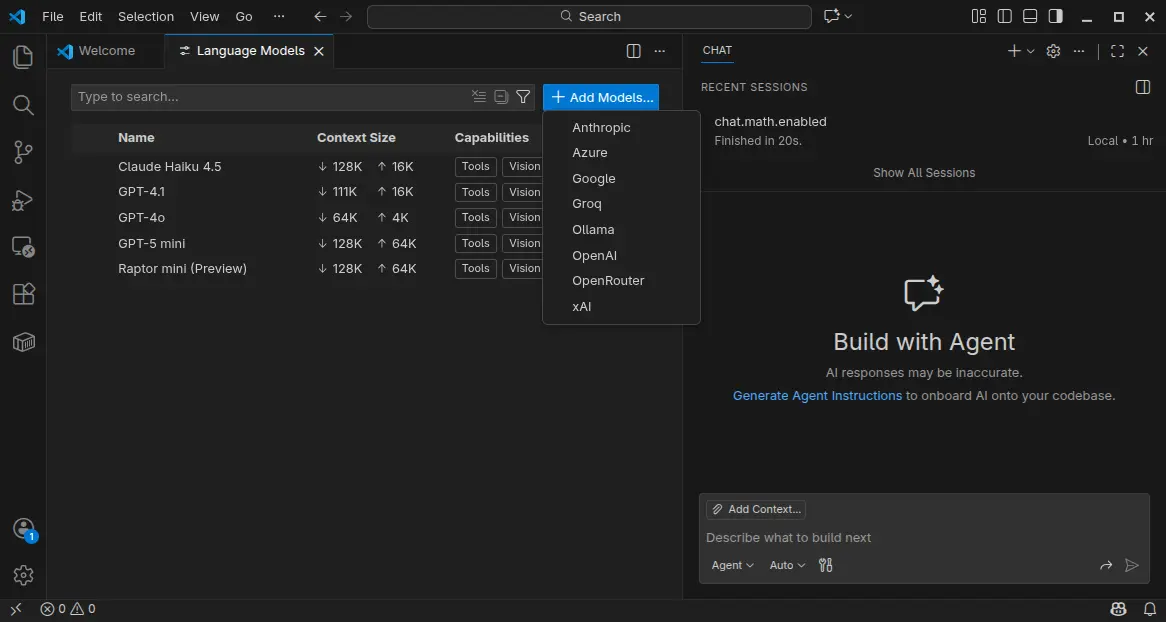
VS Code 1.107 also introduced Language Models editor which provides a centralized place to view and manage all available language models for chat in VS Code.

It can be opened either from the model picker in chat or via the Command Palette with Chat: Manage Language Models. And, it can manage model visibility and add more models.

Moreover, the textSearch tool now supports searching in ignored files/folders specified by files.exclude or search.exclude settings or .gitignore files. And, Azure model provider now uses Entra ID authentication as default.

Other AI related changes include:

  • Introduce collapsible chat sections for non-reasoning chat output.
  • Ask for confirmation when chat attempts to edit sensitive files.
  • New auto approve option to allow all future commands for the session.
  • Rich terminal output in chat.
  • Bind keyboard shortcuts to each custom agent individually.
  • And more.

Besides AI changes, VS Code 1.107 also added support the latest revision of the MCP specification, and provide GitHub remote MCP Server as a built-in MCP server (Preview).

It as well added Intel Macs and Debian-based Linux Distros support for Microsoft Authentication, enabled Terminal Suggest for stable users, introduced new model for next edit suggestions.

Other changes include:

  • 3-finger swipe on trackpad to navigate between editors in macOS.
  • Preview next edit suggestions outside the viewport.
  • Attach variables, scopes, and expressions to chat context.
  • Classic Microsoft authentication no longer available.
  • Rename suggestions for TypeScript.
  • Ability to disable automatic hover popups in the editor.
  • Add Stashes node in the Source Control Repositories view (Experimental), allows to see the complete list of stashes, view, apply, and pop each stash.

Get Visual Studio Code 1.105

For more about the new release, as well as download links for Windows, macOS, and Linux, go to VS Code website via the link below:

For Ubuntu users, besides download & install the deb package from the link above, there’s also official Snap package available to install in App Center (or Ubuntu Software for 22.04-).

NOTE: The source code for VS Code is open-source, but the packages above are proprietary freeware.

For open-source package, there’s a community maintained flatpak package is also available for choice. See this guide for how to install them in Ubuntu.

New Extension to Enable GNOME Top Bar in Multiple Displays

By:Ji m
10 December 2025 at 20:09

For Ubuntu, Fedora Workstation, and other Linux with recent GNOME Desktop, there’s now a new extension to enable the top-bar in multiple monitors.

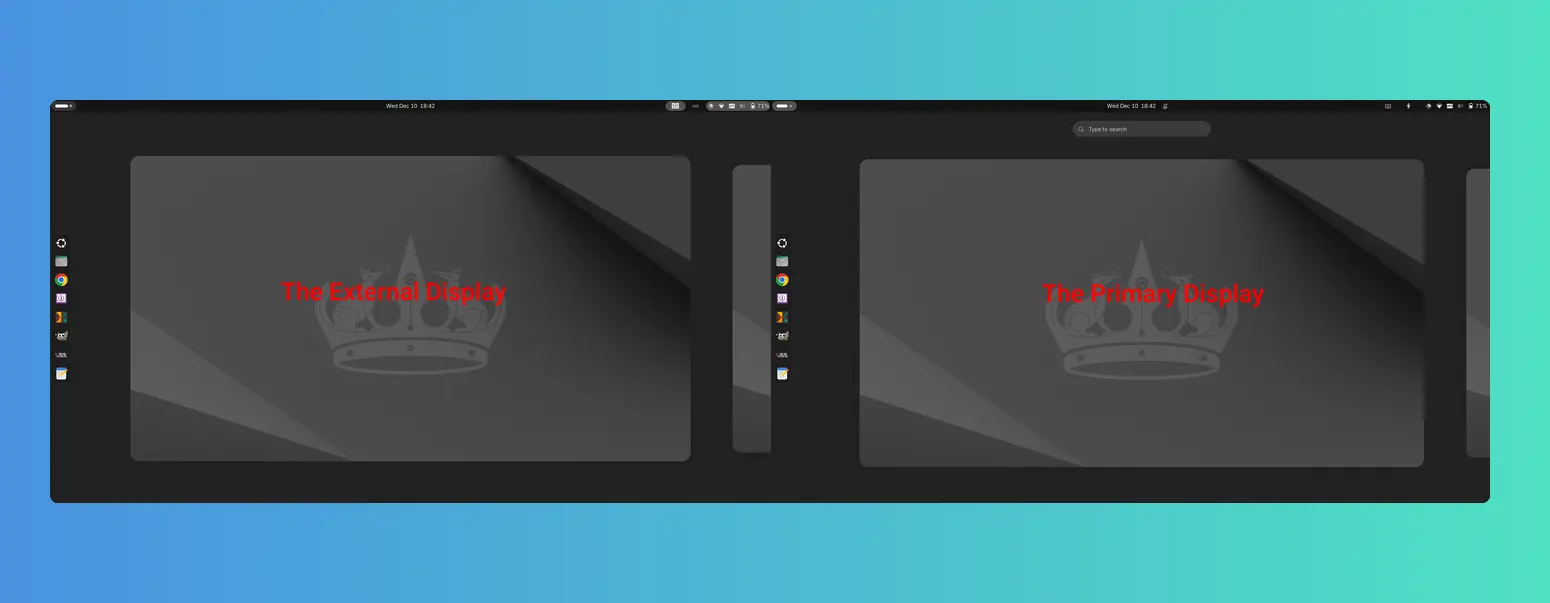
As you know, GNOME top-bar by default only shows in the primary display for multi-monitors working in the β€œJoin Mode”.

There was a multi-monitors-add-on extension which can add multiple monitors overview and panel. It’s however discontinued and support ends at Gnome 3.38.

Some forked that extension making it work in GNOME from v42 to 26, and I’ve written about how to install it in Ubuntu 22.04 & 24.04.

Now with the new Multi Monitor Bar extension, all Linux Distributions with recent GNOME v45 ~ 49 (e.g., Ubuntu 24.04, Ubuntu 25.04/25.10, Fedora 42/43, Debian 13, and Arch) can easily enable the top-bar on multiple monitors.

As you see via the screenshot above, besides the top-bar, it also shows following items in the non-primary displays:

  • Activities button (dot and pill icon).
  • date and time menu.
  • system tray icons and indicators.
  • the overview screen.

However, there are still some downsides. There’s neither overview search-box nor app grid to launch apps from the non-primary display. And, following things do NOT work properly either:

  • Scroll on dot-and-pill icon does not switch workspace.
  • Some indicator icons do not show in non-primary display.
  • The built-in screenshot UI options only available in primary display, and β€œScreen” selection only take the primary screen, though area selection works in all screens.
  • System tray icons display incorrectly when you full-screen something in primary screen. See this issue. In which case, you need to restart the extension to reset.

Install the extension to Enable Gnome Top-bar in Multi-monitors

For Ubuntu 24.04 and higher, simply launch App Center, search & install Extension Manager (filter by Debian package).

Install Extension Manager in Ubuntu Software/App Center

Next, launch Extension Manager and switch to β€œBrowse” tab, finally search & install the β€œMulti Monitor Bar” extension.

After installed the extension, Gnome top-bar should display automatically on your external monitors. And, you may switch to β€œInstalled” tab in Extension Manager to configure that extension with following options:

  • Turn on/off panel, activities-button, date and time button in additional monitors.
  • Enable/disable hot-corners function.
  • Add more indicators to additional monitors.

For other Linux, simply launch web browser and visit the extension on EGO:

Then, install the browser extension (if it asks) with the link in that page and refresh. Finally, use the ON/OFF toggle to install the extension.

Tips: besides installing the browser extension, Debian/Ubuntu need to also install the agent package by running the command below in terminal:

sudo apt install chrome-gnome-shell

Finally refresh the page to see the toggle option.

After installed the extension, install β€œGnome Extensions” in GNOME Software or your system package manager and use it to manage the extension preferences.

That’s all. Enjoy!

❌