โŒ

Normal view

Received today โ€” 20 December 2025

Linux Mint 22.3 Beta is Available to Download

By:Ji m
19 December 2025 at 21:16

For Linux Mint users, the Beta release of next version 22.3 is now available to download for testing purpose.

Linux Mint 22.3, code-name โ€œZenaโ€, features Cinnamon Desktop 6.6.2, modern new application menu, and new application to configure the boot menu.

The Linux Mint blog revealed the exciting new features for 22.3 version in the October monthly news post. The start menu (aka Applications Menu) has been redesigned to look modern in todayโ€™s desktop operating systems.

It now has a full height left-bar contains user avatar, user folders, and few core apps (e.g. Settings and Software Manager). The categories now use new XApp Symbolic Icons which look tidy and compact that no longer needs a scroll-bar.
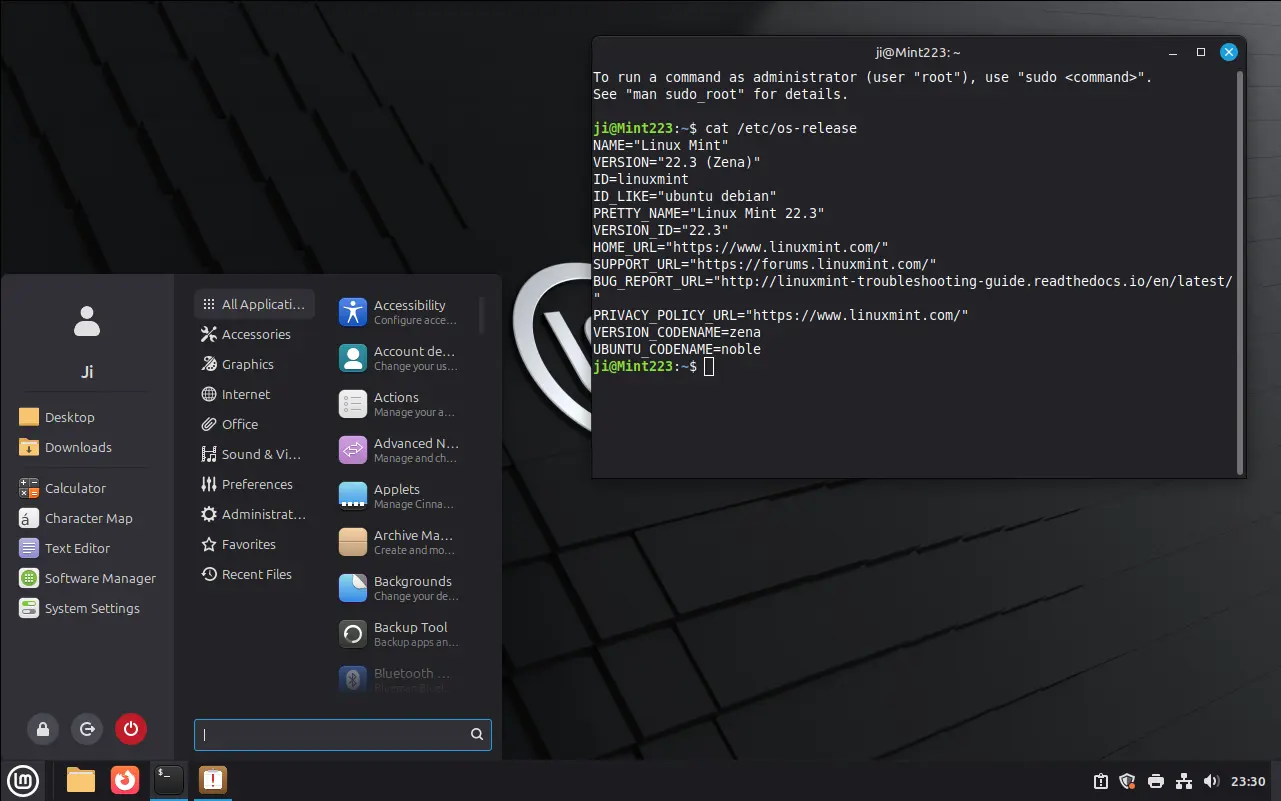
Linux Mint 22.3 Cinnamon Desktop

The search box can now be moved to the bottom of menu, and the system buttons (e.g., lock, logout, and power-off) can be placed to either in left sidebar or alongside the search box.

In addition, user can configure which kind of apps and user folders to display, and even hide the whole left-bar from the application menu.
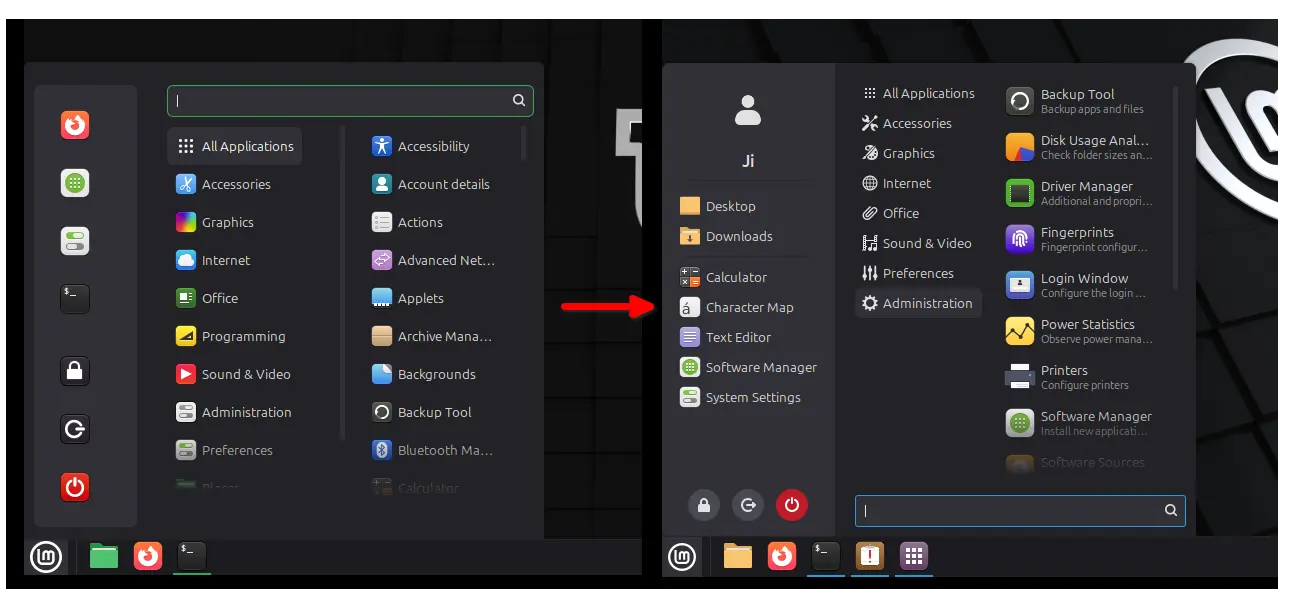
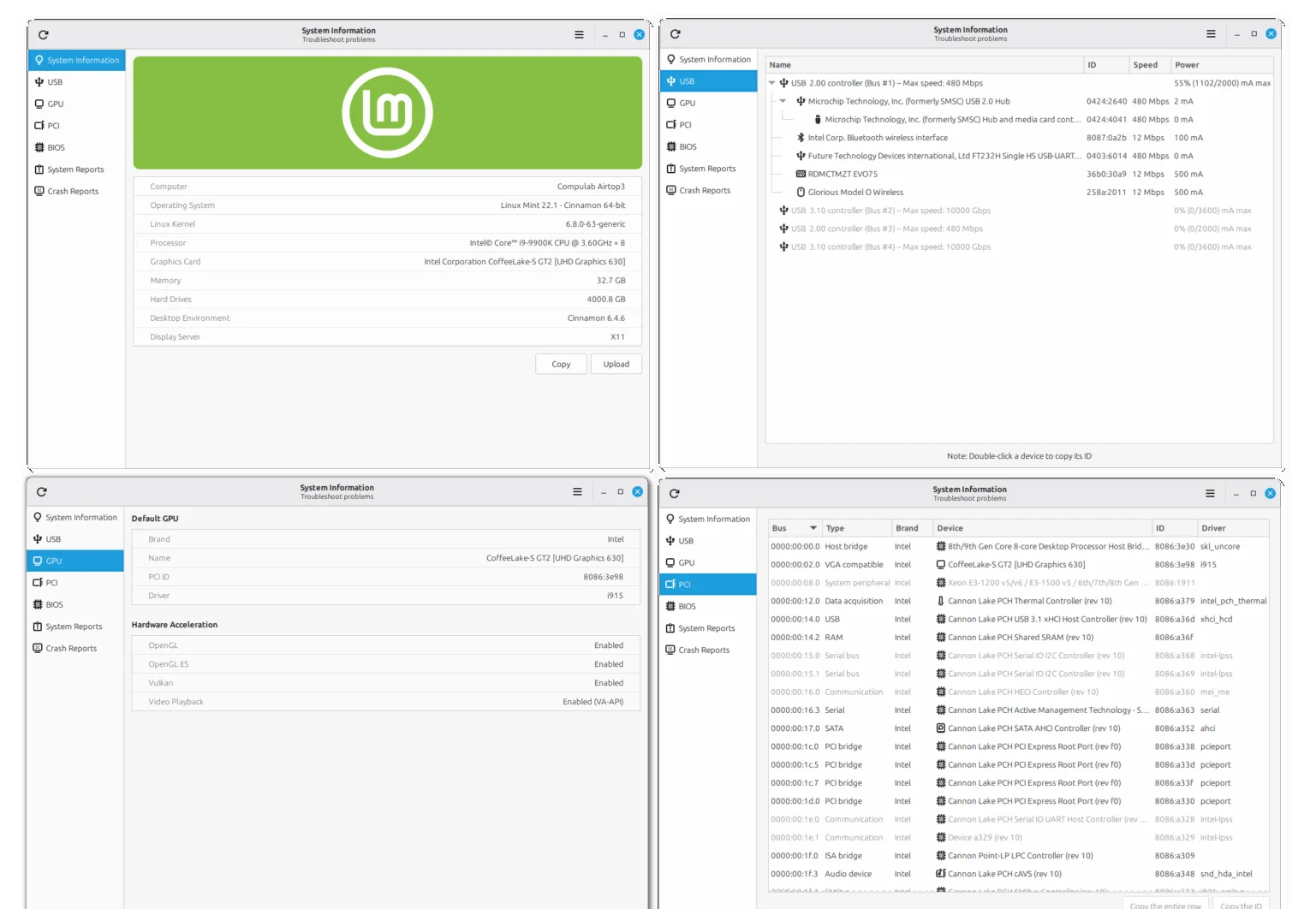
Linux Mint 22.3 also renamed System Info to System Information. Besides showing the basic system info, the app merged โ€œSystem Reportsโ€ and โ€œError Reportsโ€, as well added following new pages:

  • USB โ€“ displays all plugged-in devices, as well as their types, names, and IDs.
  • GPU โ€“ shows information about the default graphics card and the status of hardware acceleration support.
  • PCI โ€“ with detailed look of internal computer components, and their bus IDs, device names, and drivers.
  • BIOS โ€“ shows the information about the motherboard, BIOS version, boot mode (UEFI or legacy boot), and secure-boot enabled or not.
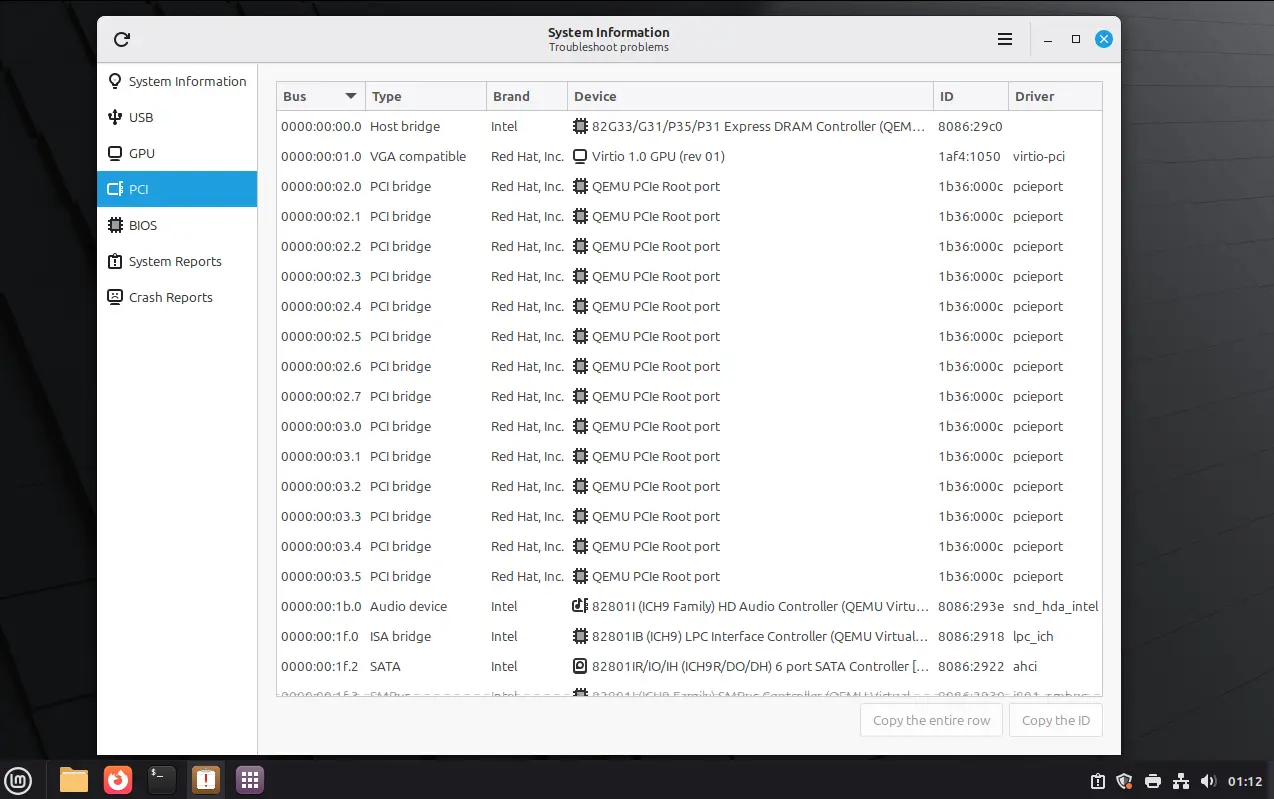
Moreover, Mint 22.3 introduced new System Administration app, allowing to configure the boot menu (aka Grub boot-loader).

With it, you may choose whether to show the boot menu or not, configure how long the menu displayed before booting the default entry, and select to remember and boot the last choice. As well, it supports adding/editing Kernel and boot parameters.
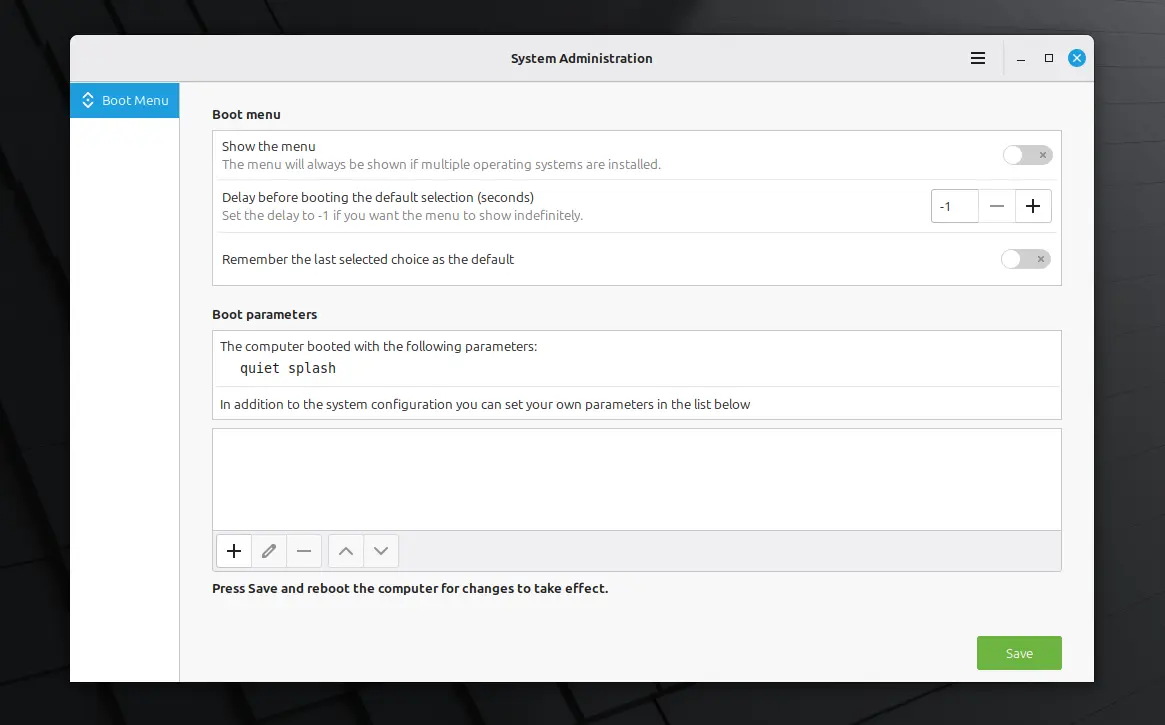
Other changes include:

  • Wayland-compatible keyboard/IM handling.
  • Improved on-screen keyboard.
  • Ability to pause file operations in Nemo file manager.
  • Add โ€˜Always onโ€™ Night Light schedule option.
  • Add ability to send text messages in Warpinator.

Get Linux Mint 22.3 Beta

The official release note is not ready at the moment of writing. You may keep an eye on Linux Mint blog for the announcement and download link.

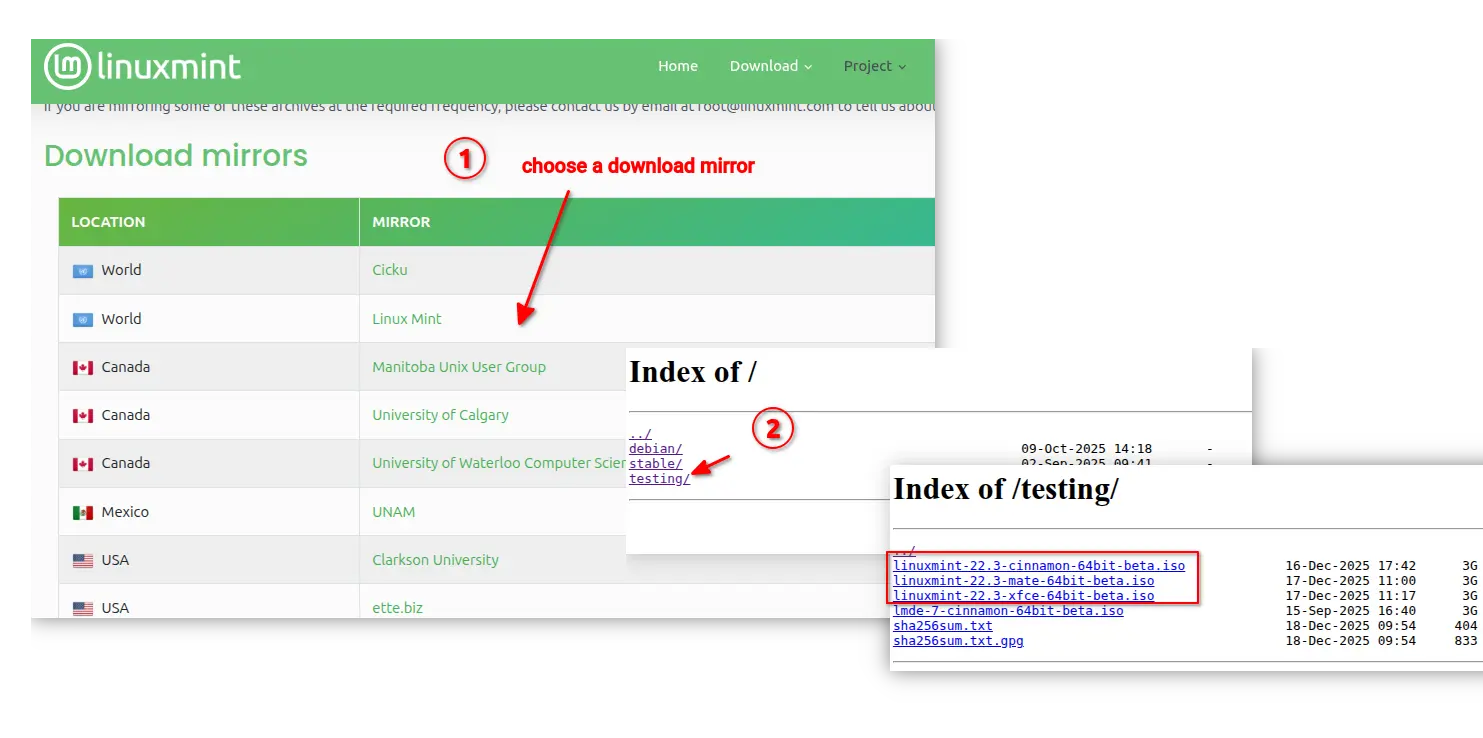
For the .iso images, choose a download mirror that near to you, then select download either Cinnamon, MATE, or XFCE edition under โ€œtestingโ€ directory.

Linux Mint 22.3 โ€œZenaโ€ Beta Is Available for Download with Cinnamon 6.6

18 December 2025 at 22:54

Linux Mint 22.3 Beta

Linux Mint 22.3 beta is now available for download with the Cinnamon 6.6, Xfce 4.20, and MATE 1.26 desktops, based on Ubuntu 24.04.3 LTS.

The post Linux Mint 22.3 โ€œZenaโ€ Beta Is Available for Download with Cinnamon 6.6 appeared first on 9to5Linux - do not reproduce this article without permission. This RSS feed is intended for readers, not scrapers.

Received before yesterday

Linux Mint 22.3 Beta Will Be Released This Month

3 December 2025 at 03:20

Linux Mint 22.3 Beta is due to be released in the coming weeks, but what new features can you expect to find in it? A quick recap on why this matters.

You're reading Linux Mint 22.3 Beta Will Be Released This Month, a blog post from OMG! Ubuntu. Do not reproduce elsewhere without permission.

Linux Mint 22.3 Codenamed โ€œZenaโ€, Planned for Christmas 2025

2 December 2025 at 19:00

Linux Mint 22.3 Zena

Linux Mint 22.3 distribution was announced as โ€œZenaโ€, based on the Ubuntu 24.04 LTS operating system series and Linux kernel 6.14.

The post Linux Mint 22.3 Codenamed โ€œZenaโ€, Planned for Christmas 2025 appeared first on 9to5Linux - do not reproduce this article without permission. This RSS feed is intended for readers, not scrapers.

Linux Mint 22.3 adding New Application Menu, System Admin/Info Apps

By:Ji m
10 November 2025 at 13:15

Linux Mint, the popular Ubuntu and Debian based Linux Distribution, is going to add new system administration, information tools, and redesigned application menu in next release.

As you may know, Linux Mint has an official blog that updates monthly with news about the development process. In recent updates, it introduced some exciting new features that will include in next Linux Mint 22.3.

First, the Cinnamon menu is redesigned. As you see in the screenshot above, it features a left sidebar that displays user avatar, places (user folders), and favorite apps. While, user has the choice to disable any of them, and even disable the whole side-bar.

In addition, the search bar can be moved to either top or bottom of application menu. While, the system buttons (e.g., lock, log-out, power-off) can be placed to either follow the search bar or in the bottom of left sidebar.

The System Report tool is re-named to new โ€œSystem Informationโ€. It merged the old system info and system reports into single app window. And, it shows all the USB devices including their IDs, connection speeds, and power.

It as well shows you GPU info including the driver and hardware acceleration status, PCI devices, motherboard and BIOS info, and the previous system reports and crash reports.

A new tool โ€œSystem Administrationโ€ is also added, which so far only supports configuring the boot menu. Though, thereโ€™s already popular third-party Grub Customizer tool can do the job.

With it, user may configure to either show or hide the boot menu, and set how long it will be displayed until a user action. And, it can add boot parameters which is useful for loading Kernel modules, debugging, recovering, or other purpose.

Other changes include:

  • Support both traditional layouts and IBus input methods in keyboard settings and applet.
  • Wayland support for both traditional layouts and IBus input methods.
  • IM support and layout switch in on-screen keyboard.
  • Add new XApp Symbolic Icons to replace the Adwaita symbolic icons

For more, see the official blog posts in Linux Mint website.

Linux Mint 22.3

Linux Mint 22.3 is NOT available at the moment. According to the release history, the third point release were mostly released on January or December. Meaning that Linux Mint 22.3 will be probably released in Jan. 2026 or Dec. 2025.

The Linux Mint source codes are available in this Github page. And, you may keep an eye on this page for the ISO image status.

Linux Mint Devs Introduce New System Administration & System Information Tools

6 November 2025 at 23:41

Linux Mint System Administration

Linux Mint devs introduce new System Information and System Administration tools to make it easier to troubleshoot hardware-related issues.

The post Linux Mint Devs Introduce New System Administration & System Information Tools appeared first on 9to5Linux - do not reproduce this article without permission. This RSS feed is intended for readers, not scrapers.

Linux Mint 22.3 is Adding New System Hardware Tool

8 November 2025 at 01:11

Linux Mint logoLinux Mint 22.3 is adding a revamped System Information tool with USB, GPU, PCI and BIOS sections to make hardware troubleshooting easier.

You're reading Linux Mint 22.3 is Adding New System Hardware Tool, a blog post from OMG! Ubuntu. Do not reproduce elsewhere without permission.

How to Install GNOME 46 on Linux Mint 22.x

31 October 2025 at 23:38

If youโ€™re runningย Linux Mint 22.x (โ€œXiaโ€)ย and want to experience the modern GNOME 46 desktop environment instead of the default Cinnamon, youโ€™re in the right place. Since Mint 22 is built on Ubuntu 24.04 LTS (Noble Numbat), youโ€™ve got direct access to GNOME 46 โ€” the latest stable release that brings significant performance improvements and a [โ€ฆ]

The post How to Install GNOME 46 on Linux Mint 22.x appeared first on LinuxShout.

Why I Finally Settled on Linux Mint Cinnamon after Testing 12 Distros

25 October 2025 at 14:01

For years, I bounced between different versions of Windows and Linux, always hoping to find a system that just worked, something stable, complete, and free from constant tweaking. Iโ€™ve always appreciated the open-source philosophy behind Linux, but too often I found myself spending more time fixing problems than actually using my computer. A few years [โ€ฆ]

The post Why I Finally Settled on Linux Mint Cinnamon after Testing 12 Distros appeared first on UbuntuPIT.

Why I Finally Settled on Linux Mint Cinnamon after Testing 12 Distros

25 October 2025 at 14:01

For years, I bounced between different versions of Windows and Linux, always hoping to find a system that just worked, something stable, complete, and free from constant tweaking. Iโ€™ve always appreciated the open-source philosophy behind Linux, but too often I found myself spending more time fixing problems than actually using my computer. A few years [โ€ฆ]

The post Why I Finally Settled on Linux Mint Cinnamon after Testing 12 Distros appeared first on UbuntuPIT.

Why I Finally Settled on Linux Mint Cinnamon After Testing 12 Distros

18 October 2025 at 00:28

For years, I bounced between different versions of Linux distributions, always hoping to find a system that just worked, something stable, complete, and free from constant tweaking. Iโ€™ve always appreciated the open-source philosophy behind Linux, but too often I found myself spending more time fixing problems than actually using my computer. A few years ago, [โ€ฆ]

The post Why I Finally Settled on Linux Mint Cinnamon After Testing 12 Distros appeared first on UbuntuPIT.

Linux Mint Officially Released LMDE 7 based on Debian 13

By:Ji m
14 October 2025 at 19:19

For Linux Mint users who prefer Debian package base, LMDE 7 code-name โ€œGigiโ€, is officially released!

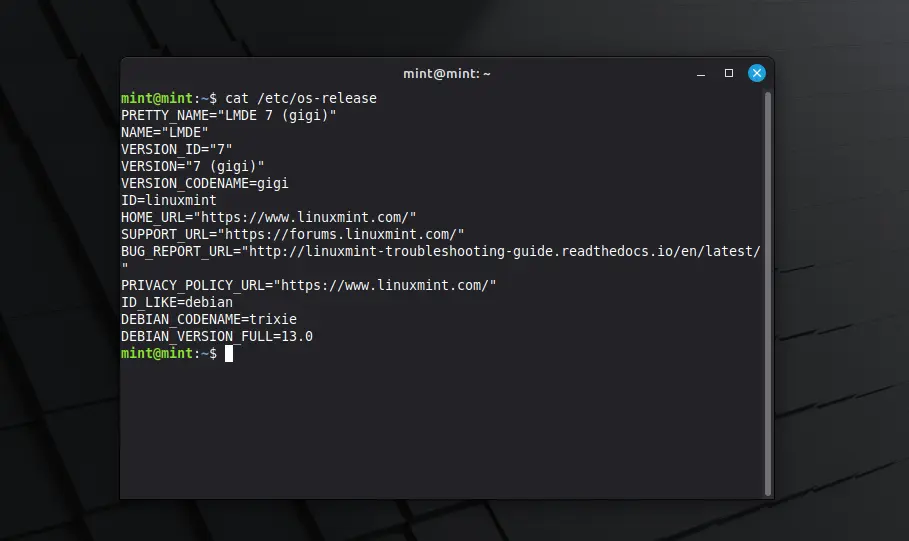
LMDE stands for Linux Mint Debian Edition. As the name says, itโ€™s a Linux Mint edition based on Debian, aims to continue to deliver the same user experience if Ubuntu was ever to disappear.

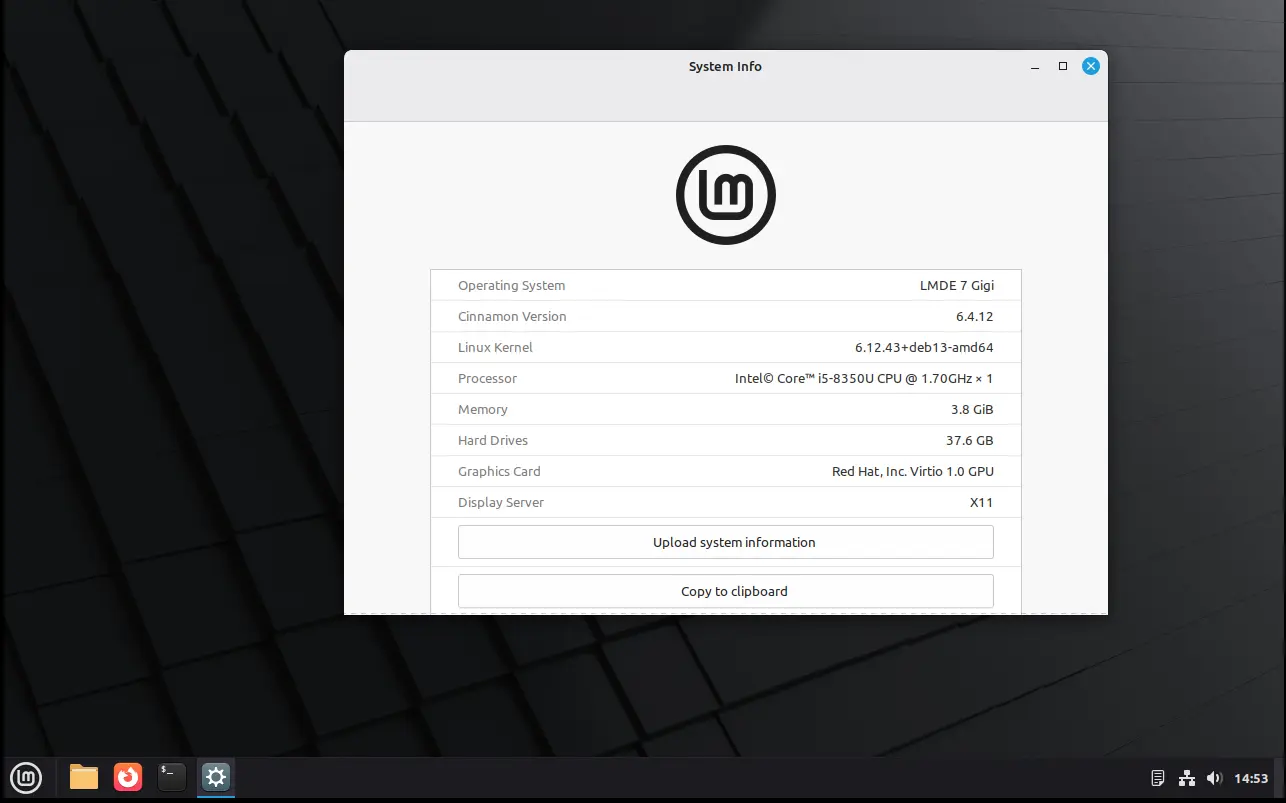
After less than a month of Beta testing, LMDE7, the new major release of this Linux Mint edition based on Debian 13 trixie, is now available to download. It features Kernel 6.12, Cinnamon desktop 6.4.12, and Debian 13 package base.

In my experience, Debian is a bit more stable and reliable than Ubuntu. Itโ€™s perfect for server and advanced user use. While, LMDE is a fork makes it friendly for beginners.

However, LMDE lacks major kernel version updates and most recent drivers (e.g., NVIDIA proprietary driver), unless upgrading the entire system to a new version (e.g., from LMDE 6 to LMDE7). If they are not big deal for you, then itโ€™s a great choice!

Besides the difference between Kernel version and systems theyโ€™re based on, LMDE and normal Linux Mint edition deliver almost the same user experiences!

And, LMDE 7 so far features Cinnamon only desktop, with following changes in Linux Mint 22.2:

  • New XApp Fingwit provides graphical interface to manage user fingerprints.
  • Improved Sticky Notes app with rounder corners and Wayland support.
  • Add โ€œTheater Modeโ€ and โ€œBorderless Modeโ€ mode for Hypnotix IPTV player.
  • Display user avatar in the login screen.
  • Add blur effect to the panel and user selection dialog box in login screen for better appearance.
  • Patch LibAdwaita with theme support, including Mint-Y, Mint-X and Mint-L themes.
  • Add accent colors support for LibAdwaita Flatpak apps.
  • New xapp-aiff-thumbnailer thumbnailer for cover art in .aiff audio files
  • Add iOS app for Warpinator file sharing utility.
  • Configurable EDID-based color correction (disabled by default) in XViewer.
  • Support editing description field in WebApp Manager.
  • Support leading zeros when renaming multiple files and using enumerations
  • Add description in Software Manager to tell the difference between Flatpak and system packages.

Download LMDE 7

The .iso image for LMDE 7 (torrent) is available to download via the link below:

For choice, you may download it from a mirror that near to you. See this page for the download mirrors all over the world.

Hardware Requirements include: 2 GB RAM (though 4 GB recommended for smoother experience), 20 GB disk space, and 1024ร—768 resolution display.

For LMDE 6, it easy to upgrade to LMDE 7 by running the commands below one by one:

NOTE: LMDE 7 has no i386 support! Backup important data first, and connect to power supply for laptop.

  • Refresh cache and install mint-upgrade tool:
    sudo apt update
    sudo apt install mintupgrade
  • Start the upgrade tool, and follow on screen intructions:
    sudo mintupgrade
  • When done successfully, remove the tool and reboot your computer:
    sudo apt remove mintupgrade
    sudo reboot

For more, see the official guide in Linux Mint website.

Linux Mint Releases LMDE 7 โ€œGigiโ€ Based on Debian 13

14 October 2025 at 21:02

The Linux Mint project has officially announced the release of LMDE 7 (โ€œGigiโ€), the latest version of its Debian-based edition. The new release continues Mintโ€™s effort to maintain a fully Debian-backed variant that remains operational even without Ubuntu as an upstream base. The Linux Mint Debian Edition (LMDE) aims to ensure long-term independence for the [โ€ฆ]

The post Linux Mint Releases LMDE 7 โ€œGigiโ€ Based on Debian 13 appeared first on UbuntuPIT.

How to Upgrade LMDE 6 to LMDE 7

13 October 2025 at 20:58

LMDE 7 Upgrade

A quick and painless tutorial on how to upgrade your Linux Mint Debian Edition (LMDE) 6 installations to Linux Mint Debian Edition (LMDE) 7.

The post How to Upgrade LMDE 6 to LMDE 7 appeared first on 9to5Linux - do not reproduce this article without permission. This RSS feed is intended for readers, not scrapers.

LMDE (Linux Mint Debian Edition) 7 Is Now Available for Download

12 October 2025 at 07:21

LMDE 7

Linux Mint Debian Edition (LMDE) 7 distribution is now available for download based on the Debian GNU/Linux 13 "Trixie" operating system. Here's what's new!

The post LMDE (Linux Mint Debian Edition) 7 Is Now Available for Download appeared first on 9to5Linux - do not reproduce this article without permission. This RSS feed is intended for readers, not scrapers.

Linux Mint Released LMDE 7 Beta, based on Debian 13

By:Ji m
19 September 2025 at 23:40

For Linux Mint users who prefer Debian package base, LMDE 7 code-name โ€œGigiโ€, is available for beta testing!

LMDE stands for Linux Mint Debian Edition. As the name says, itโ€™s a Linux Mint edition based on Debian, aims to continue to deliver the same user experience if Ubuntu was ever to disappear.

LMDE 7 is the next major release of this Linux Mint edition based on Debian 13 trixie, which was released a month ago. It features Kernel 6.12, Cinnamon desktop 6.4.12, and Debian 13 package base.

In my experience, Debian is more stable and reliable than Ubuntu. Itโ€™s perfect for server and advanced user use. And, LMDE makes it friendly for beginners.

However, it lacks major kernel version updates and most recent drivers (e.g., NVIDIA proprietary driver), unless upgrading the entire system to a new version (e.g., from LMDE 6 to LMDE7). If they are not big deal for you, then itโ€™s a great choice!

Besides the difference between Kernel version and systems theyโ€™re based on, LMDE and normal Linux Mint edition deliver almost the same user experiences!

And, LMDE 7 Beta so far features Cinnamon only desktop, with following changes in Linux Mint 22.2:

  • New XApp Fingwit provides graphical interface to manage user fingerprints.
  • Improved Sticky Notes app with rounder corners and Wayland support.
  • Add โ€œTheater Modeโ€ and โ€œBorderless Modeโ€ mode for Hypnotix IPTV player.
  • Display user avatar in the login screen.
  • Add blur effect to the panel and user selection dialog box in login screen for better appearance.
  • Patch LibAdwaita with theme support, including Mint-Y, Mint-X and Mint-L themes.
  • Add accent colors support for LibAdwaita Flatpak apps.
  • New xapp-aiff-thumbnailer thumbnailer for cover art in .aiff audio files
  • Add iOS app for Warpinator file sharing utility.
  • Configurable EDID-based color correction (disabled by default) in XViewer.
  • Support editing description field in WebApp Manager.
  • Support leading zeros when renaming multiple files and using enumerations
  • Add description in Software Manager to tell the difference between Flatpak and system packages.

Download LMDE 7 Beta

The official announcement as well as the download link for LMDE 7 Beta is available in Linux Mint website via the link below:

For choice, you may download it from a mirror from this page. Though, as Beta itโ€™s usually available in โ€œtestingโ€ directory.

Hardware Requirements include: 2 GB RAM (though 4 GB recommended for smoother experience), 20 GB disk space, and 1024ร—768 resolution display.

โŒ