Reading view

Firefox 146.0 added Native Wayland Fractional Scaling Support

After a month of beta development, Firefox 146.0 is available to download for Linux, Windows, and macOS users.

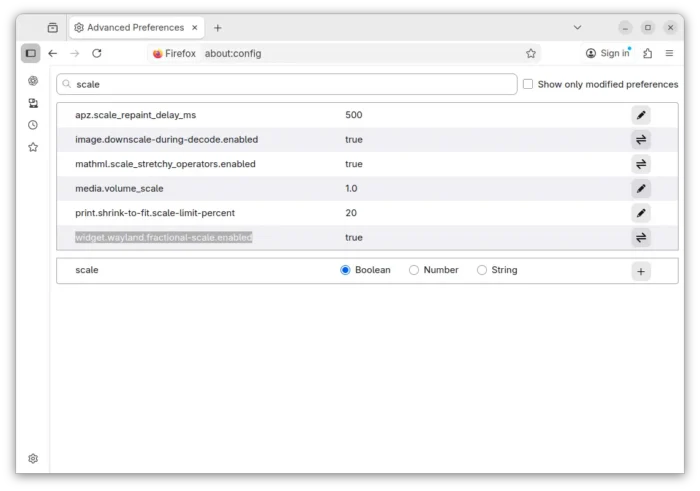
The new release of this web browser finally added native support for fractional scaling on Linux with Wayland session (e.g., Ubuntu 22.04+ and Fedora Workstation).

Mozilla Firefox merged Wayland fractional-scale-v1 support more than 2 years ago. The feature was however disabled by default due to bugs.

Now with Firefox 146.0, Wayland fractional scaling is natively supported and enabled by default, thus text, icons, and UI elements will render more effective on HiDPI displays with 125%, 150% etc scaling.
For user in the EU and some other countries, there is a New Tab Weather opt-in workflow available. And, user can choose whether to enable location detection or manually search for a location.

When type in search bar, Firefox 146.0 can now show you the direct results in the drop-down suggestions box. Though, this is a progressive roll-out feature that’s only available for small percentages of users.
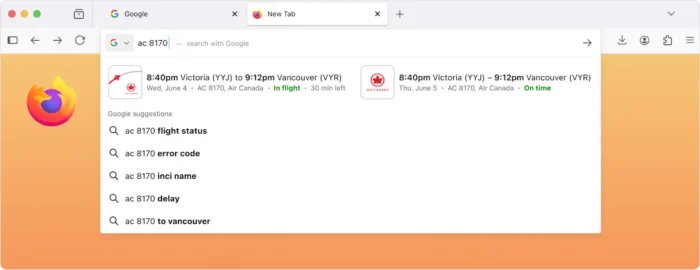
image from mozilla.org

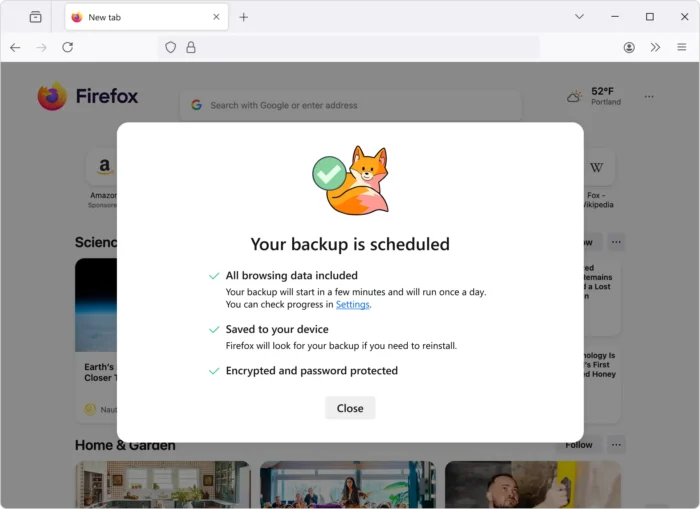
For Windows, the new version introduced a scheduled backup feature, that automatically backup the passwords, bookmarks, and browsing data daily, and save them on local device.

The backup can be encrypted with a password and used to restore a fresh install of Firefox on any operating system to the status where you left off. Though, this is also a progressive roll-out feature so far only works in Windows, and will be coming to other operating systems soon.
Also for Windows, the Direct2D hardware accelerated 2D graphics rendering support has been removed! For those who still require this feature, it’s recommended to switch to Firefox ESR 140.0 or higher.

And for macOS, Firefox now has a dedicated GPU process by default. It includes WebGPU, WebGL, and Firefox’s own WebRender. With it, fatal errors in graphics code will no longer crash the browser, instead transparently restart the GPU process.

Other changes in Firefox 146.0 include:

  • Firefox Labs is now available to all users, for trying out experimental features.
  • Improve ‘Colors’ dialog in Settings to make it easier to understand.
  • Show English-language suggestions for holidays and other important dates for users in France, Germany, and Italy using the English-language versions of Firefox.
  • Support the contrast-color() CSS function.
  • Add support the @scope rule.
  • Introduce text-decoration-inset property.
  • Support legacy -webkit-fill-available keyword for CSS width and height properties.
  • Support ML-KEM for WebRTC.
  • Support compressed elliptic curve points in WebCrypto.
  • Update Skia graphics library with improved rendering performance and compatibility.
  • Hide unused CSS custom properties.
  • Provide full keyboard and assistive technology support, when the timepicker is enabled for <input type=\"time\"> and <input type=\"datetime-local\">.
  • Various security fixes.

Get Firefox 146.0

This post is written according to the Github release-note, while the official announcement and download link will be available soon via the link below:

If you can’t wait, then go to this page to get Firefox 146.0.
  •  

How to Disable All the AI Features in Firefox Web Browser

Firefox introduced AI chatbot, AI powered link preview, and search images with Google Lens etc AI powered features in the past releases.

According to the Firefox Privacy Notice, it does NOT have access to the AI conversations or what user input, but do collect technical and interaction data, such as how often a chatbot provider or suggested prompts are used, and the length of selected text.

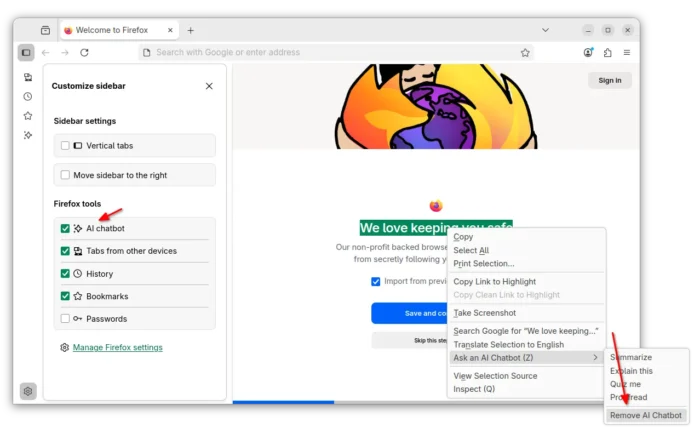
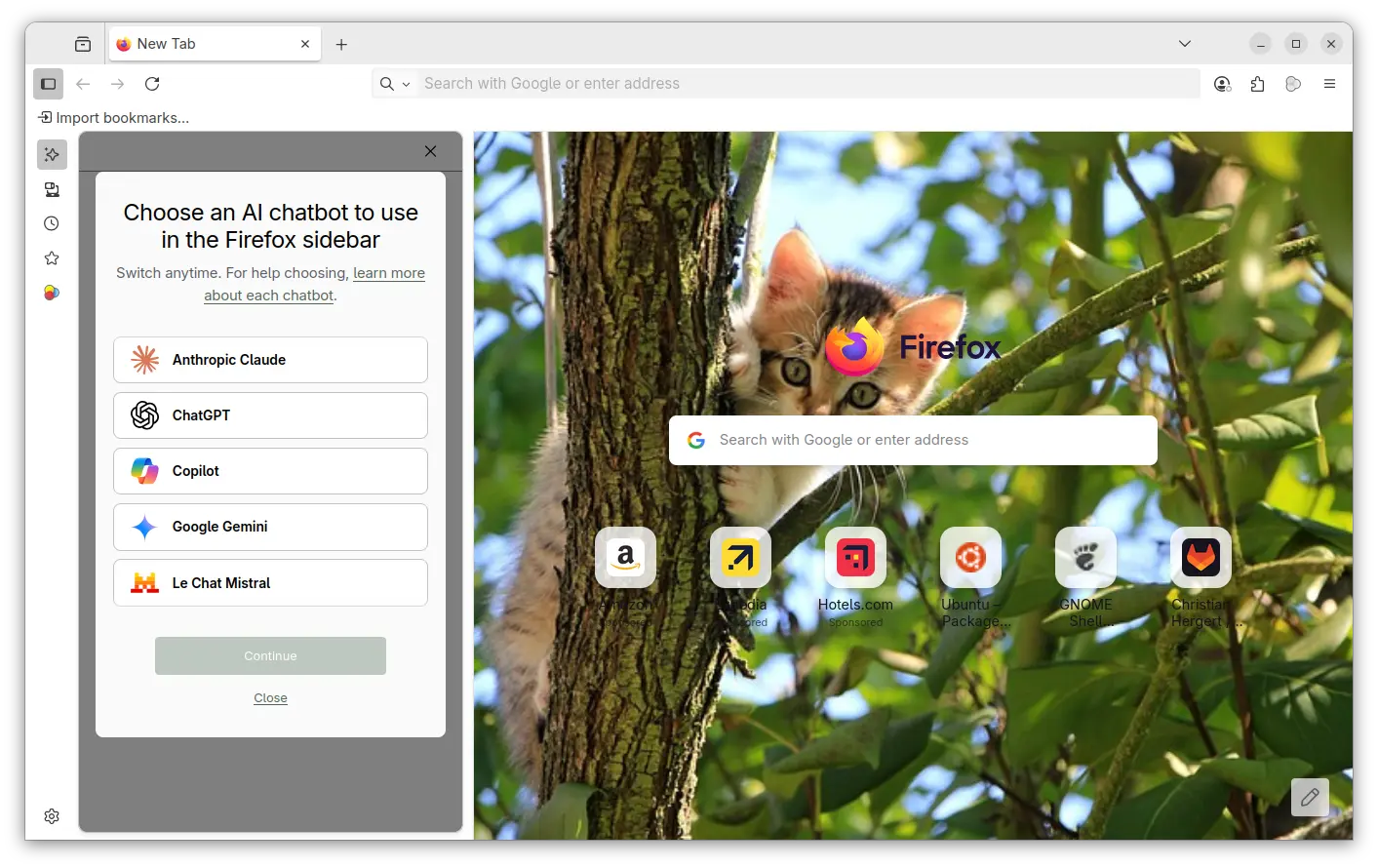
AI chatbot in Firefox sidebar

If you don’t like the AI chatbot feature, you can hide them from side-bar settings page, or remove the shortcut from the context menu of a text selection.

Hide AI chatbot

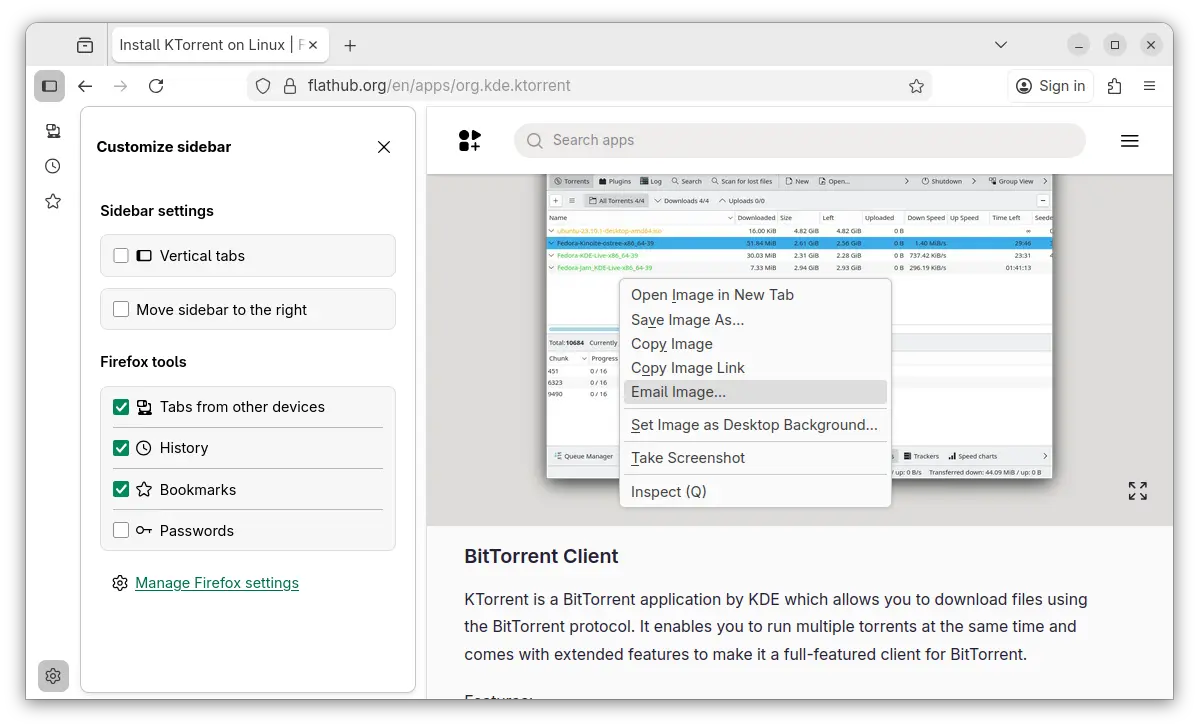
While, in this tutorial I’m going to show you how to disable them so that they will disappear along with the settings option, link preview, and image search with Google Lens.

No AI chatbot, no configure options, and no Google Lens image search

NOTE: This tutorial is tested in Ubuntu 24.04 with Firefox 145. As time go on, Firefox will release new versions and may add, remove, or change the AI related preference keys.

Option 1: Disable AI LLM through about:config

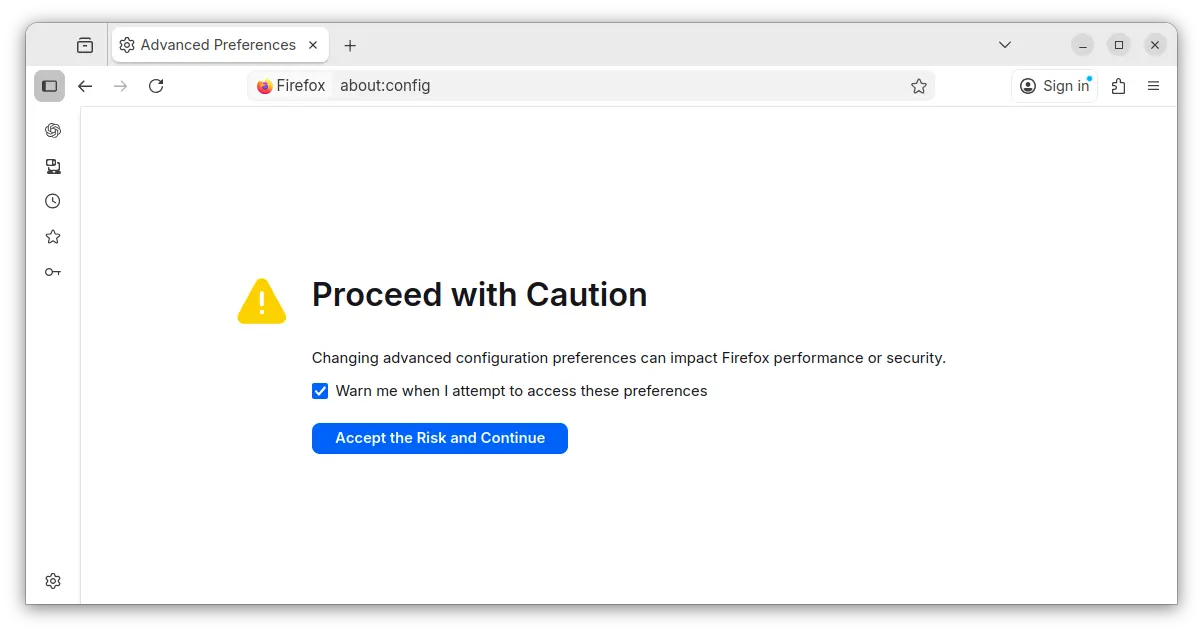
For current profile only, type about:config in address bar and hit Enter, then click the blue “Accept the Risk and Continue” button to access the advanced configuration page.

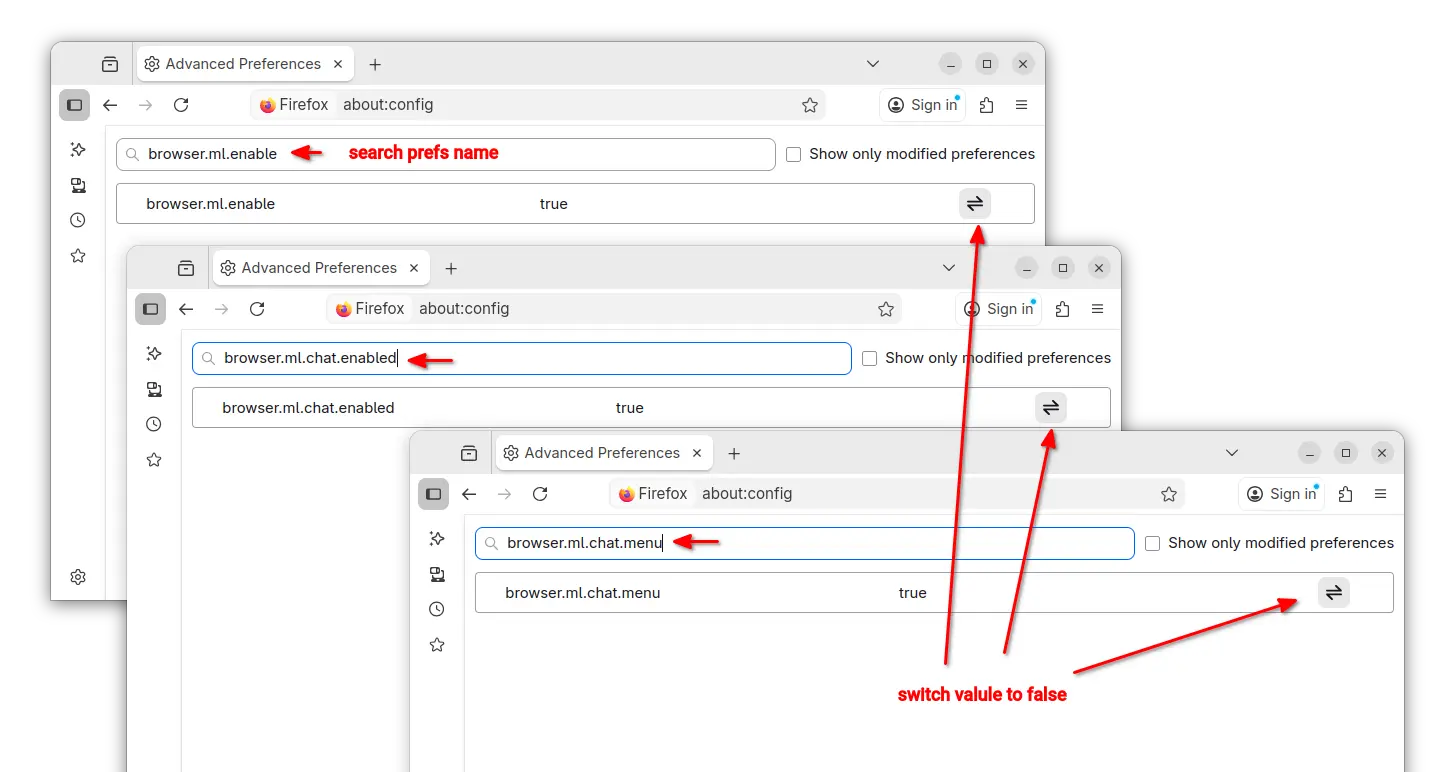
Next, search following preference names and set them to “false” one by one:

  • browser.ml.enable
  • browser.ml.chat.enabled
  • browser.ml.chat.menu
  • browser.ml.chat.page
  • browser.ml.chat.page.footerBadge
  • browser.ml.chat.page.menuBadge
  • browser.ml.linkPreview.enabled
  • browser.ml.pageAssist.enabled
  • browser.tabs.groups.smart.enabled
  • browser.tabs.groups.smart.userEnabled
  • extensions.ml.enabled
  • browser.search.visualSearch.featureGate

And, it should apply the changes immediately after you set them all to false.

Option 2: Add configuration file to disable AI features

If you have multiple user profiles for Firefox, and you want to disable AI for them all, then it’s better to add user.js config file instead of configuring the preference keys one by one.

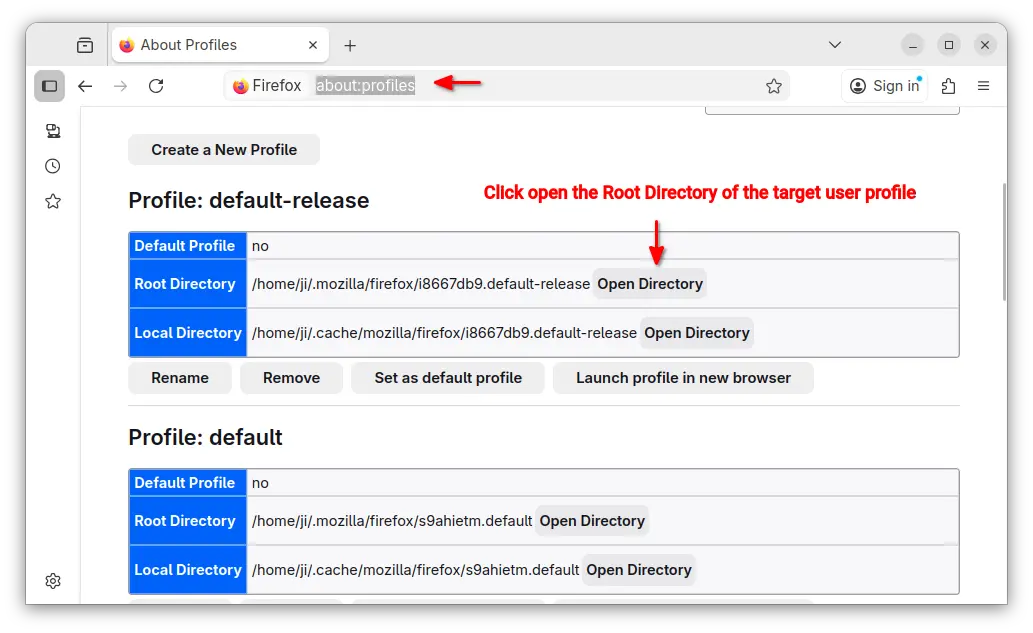
First, type about:profiles in address bar and hit Enter to access the profile management page.

Then, click “Open Directory” button to open the Root Directory of the target user profile.

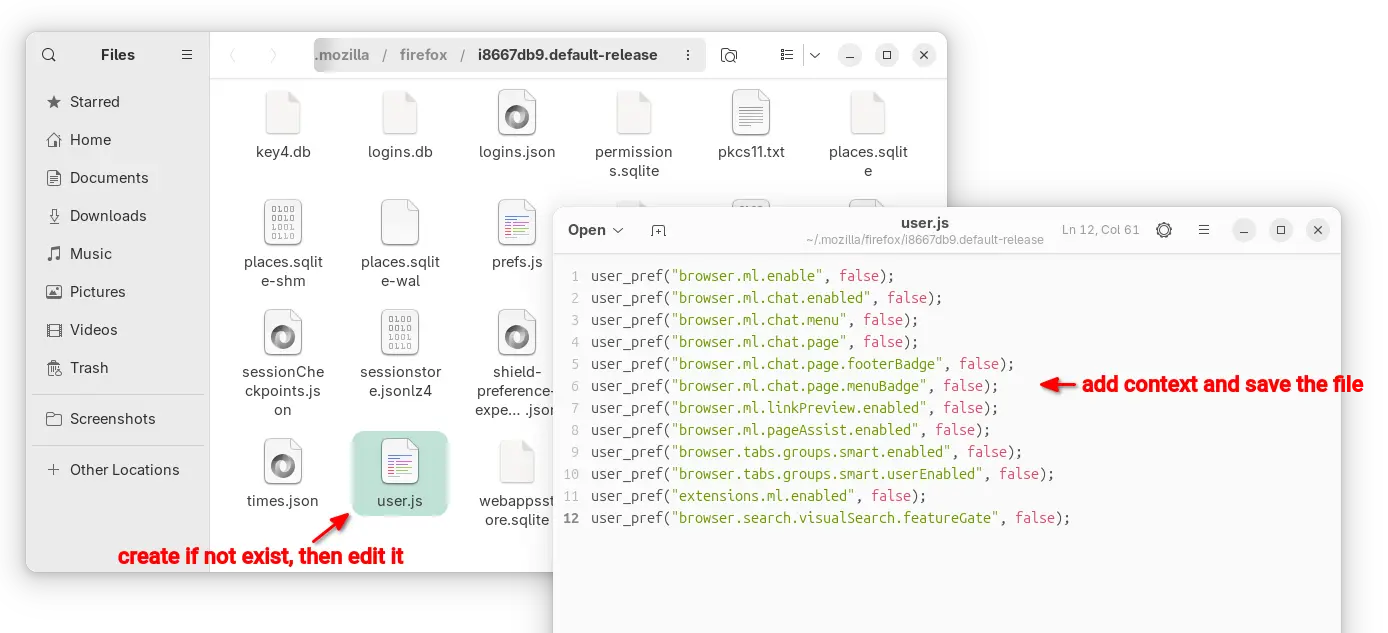
In the opened folder, create user.js file if it does not exist. Finally, edit the file and write following content into it.

user_pref("browser.ml.enable", false);
user_pref("browser.ml.chat.enabled", false);
user_pref("browser.ml.chat.menu", false);
user_pref("browser.ml.chat.page", false);
user_pref("browser.ml.chat.page.footerBadge", false);
user_pref("browser.ml.chat.page.menuBadge", false);
user_pref("browser.ml.linkPreview.enabled", false);
user_pref("browser.ml.pageAssist.enabled", false);
user_pref("browser.tabs.groups.smart.enabled", false);
user_pref("browser.tabs.groups.smart.userEnabled", false);
user_pref("extensions.ml.enabled", false);
user_pref("browser.search.visualSearch.featureGate", false);

After that, you may click “Launch profile in new browser” button to open Firefox window with that profile and see if it works. And, copy the user.js file to root directories for other profiles if need.

  •  

Firefox 145.0 is out! Removed 32-bit Linux Support

After 9 Beta releases, Mozilla Firefox 145.0 is finally available to download.

The new browser version introduced new phase of privacy protections. For Private Browsing or when using Enhanced Tracking Protection set to Strict, the amount of Firefox users track-able by fingerprinters is reduced by half. See this page for more details.

In addition, Enhanced Bounce Tracking Protection stateless mode is now enabled by default in ETP Strict, blocking more advanced tracking techniques based on redirection.

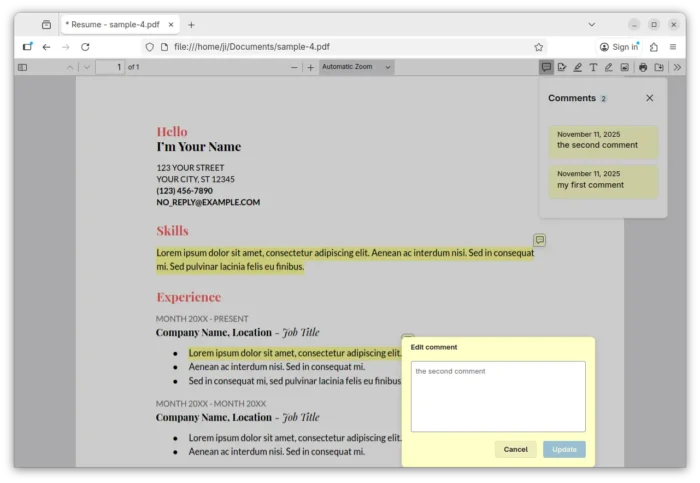
Firefox 145.0 improved PDF editing by adding comment support. By selecting the desired text or area in your PDF content, it will show a small pop-up menu with option to add, remove, or edit comment. And, a comment/message icon is added to tool-bar with ability to view all the comments.

The release also improved tab group support. For the collapsed tab groups, simply hover over a tab group name will show a preview of the tabs inside without opening it.

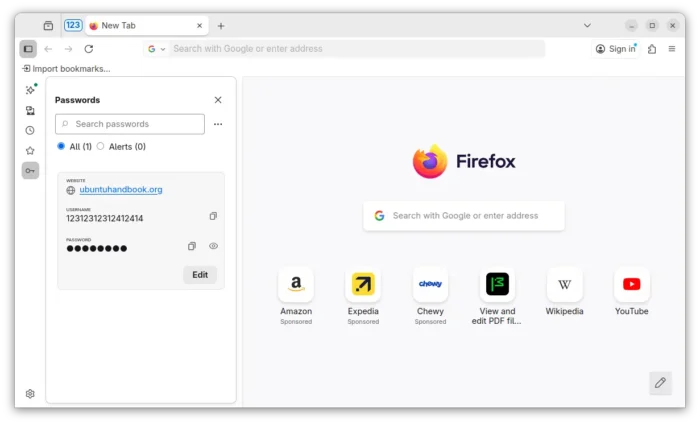
The built-in password manager now can be accessed from the sidebar. Simply open settings from the side-bar, then enable “Passwords” option under Firefox tools, you can finally access and manage your saved passwords without opening a new tab or window.

Access and manage passwords from sidebar

For most Windows users, a small desktop launcher program is introduced to replace the existing desktop shortcut. If Firefox is installed, the desktop launcher will launch it. If not, it will prompt the user to install Firefox.

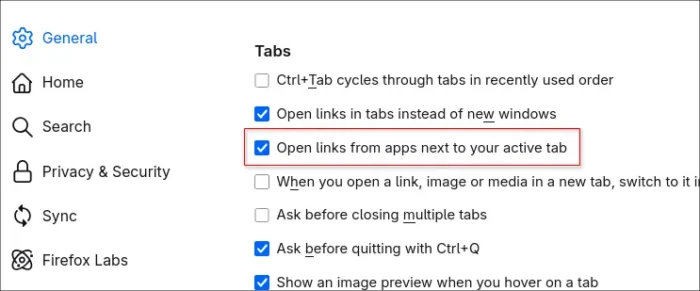
In General settings page, a new “Open links from apps next to your active tab” option is added. With it enabled, links from other applications will open next to your active tab in Firefox instead of at the end of the tab strip.

Other changes include:

  • Remove 32-bit Linux support.
  • Extensions button now shows description and link to Firefox Add-ons store, when no extensions are installed.
  • Use Zstandard compression for local translation models.
  • Improved translation experience when translating between languages with different script directions.
  • New brand-inspired wallpapers for new tab.
  • Update default automation preferences to better support Agentic browsing
  • Add support for Atomics.waitAsync proposal.
  • Support the new Integrity-Policy header for enforcing sub-resource integrity for scripts.
  • Improve Matroska support for the most commonly used codecs: AVC, HEVC, VP8, VP9, AV1, AAC, Opus, and Vorbis.
  • Add the text-autospace property support.
  • Add the WebGPU DOM API for macOS 26 (Tahoe) on Apple Silicon.

Get Firefox 145.0

The official release note for Firefox 145.0 as well as the download link will be available soon in the link below:

At the moment, you may go to this ftp.mozilla.org page to download it.

  •  

Firefox 144.0 is out! Perplexity AI Search & AES-256-CBC Encryption

Firefox 144.0, the October release of Mozilla’s web browser, is available to download today!

The new browser release continues improving the tab group feature support. It now supports dragging a tab into a collapsed tab group without automatically expanding it.

The profile management is now available to all users globally. You can now name profiles and customize them with avatars and color themes, then quickly switch between them while keeping bookmarks, tabs, and browsing history completely separate.

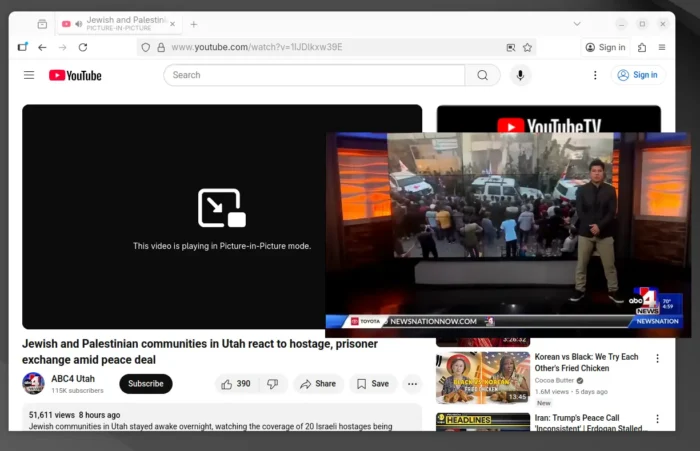
The picture-in-picture (aka pop-out video) now supports Shift + Click on the close button or use Shift + Esc shortcut key to exit (meaning merge back browser window) while keeping playback uninterrupted.

video playback in Picture-in-picture mode

Firefox 144.0 now includes Perplexity AI search for desktop users, allowing to get AI-powered conversational answers directly from the address bar via the unified search button.

The AI search engine seems to be disabled by default, at least in my case, as I can’t find the option and the about:config page shows the “browser.urlbar.perplexity.hasBeeninSearchMode” key set to false.

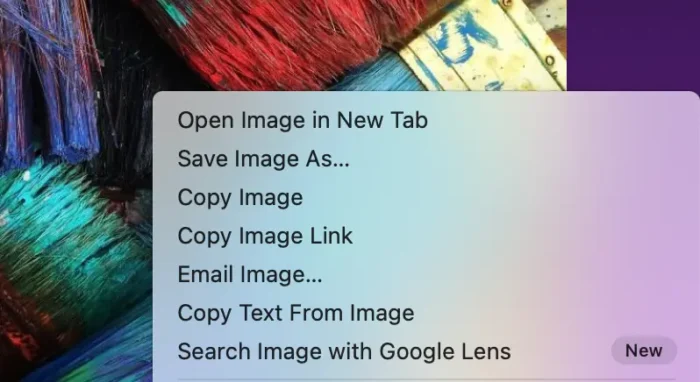
Besides that, it added new “Search Image with Google Lens” option when you right-clicking on any image in browser. Which, allows to quickly find similar products, places, or objects, copy, translate, or search text from images. Though, you need to set Google as default search engine for being able to use the feature.

image from mozilla.org

For security reason, the passwords stored in Firefox are now encrypted on disk using AES-256-CBC algorithm, while logins synced through Firefox Sync already use AES-256-GCM. The new encryption algorithm is much faster and secure than the older 3DES-CBC, which is deprecated.

Other changes in Firefox 144.0 include:

  • New Azerbaijani, Bangla, and Icelandic translations.
  • Only use or open window in current virtual desktop, when open link from another application in Windows.
  • And various security fixes.

They are as well many changes for web developers:

  • Support the Element.moveBefore API.
  • Add support math-shift compact.
  • Support PerformanceEventTiming.interactionId, allowing to group related input events.
  • Support the command and commandfor attributes.
  • Add support the View Transitions API Level 1.
  • Disable dithering when linear-gradient, conic-gradient, and radial-gradient are rendered using hardware WebRender.
  • Add support upsert proposal.
  • Support the lock() and unlock() methods of ScreenOrientation interface on Windows tablets and Android devices.
  • Support worker transfer for RTCDataChannel.
  • Add support the resizeMode getUserMedia constraint, allowing to crop and downscale video captured from a camera.
  • Add support the WebGPU GPUDevice.importExternalTexture API on Windows.
  • WebCodecs on Windows now has a batch-encoding path for VideoEncoder.
  • Rename Gecko-specific CSS2Properties to CSSStyleProperties.
  • Jump to a CSS custom property’s definition from within the var() function in style rules.

Get Firefox 144.0

The official release note as well as the download link will be soon available in Firefox website via the link below:

While the source code, and installers for Linux, Windows, and macOS are available to download at this page.

  •  

Firefox 143.0 is out with Microsoft Copilot AI Integration

Firefox 143.0, the new monthly release of the popular free open-source web browser, is available to download.

The new release of Mozilla’s web browser added support installing websites as web apps for Windows user.

For running website, there’s a new “Add tab to taskbar” icon in the right corner of address bar. By clicking on it, will install the website as web app, and pin it into task bar.

The web app uses the website’s favicon as app icon. It runs in a separate header-less browser window without losing access to your installed add-ons. The features so far is only available for Windows, but not for Firefox installed from Microsoft Store.

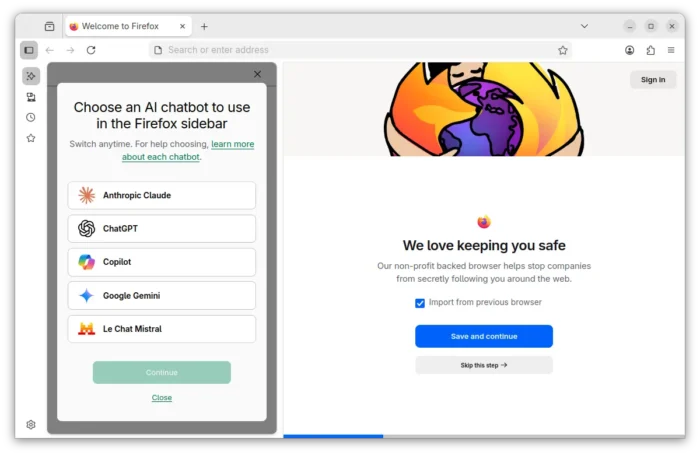
For AI users, the new Firefox release added Microsoft Copilot support. It so far supports “Quick response” and “Smart (GPT-5)” chat mode in my case, with ability to generate text, image, and code, and analyze image. It’s free without login required, though a pad version is available for choice that needs an account.

Also for Windows, the browser release added support Windows UI Automation, which improves support for accessibility tools such as Windows Voice Access, Text Cursor Indicator and Narrator. Though, it’s a progressive roll-out feature that may be not ready for you.

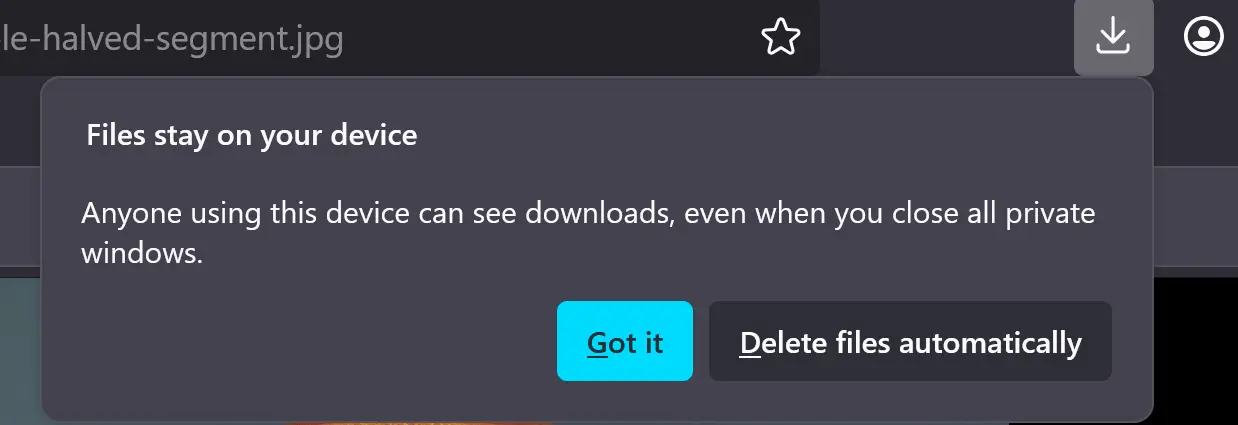
When downloading a file in the Private mode, Firefox now asks whether to keep or delete it after that session ends. You have the choice to disable this behavior, by navigating to “Files and Applications” in Settings page.

Other changes in Firefox 143.0 include:

  • Pin a tab by dragging to the start of the tab strip.
  • Preview camera inside the permission dialog.
  • Display events and dates in address bar, for users in United States, United Kingdom, Germany, France, and Italy regions.
  • xHE-AAC audio playback on Windows 11 22H2+, macOS, and Android 9+
  • Expand Fingerprinting Protection by reporting constant values for several more attributes.
  • Various security fixes.

As well there are some change for developers, including:

  • updated grid sizing algorithm
  • <input type=color> now recognizes the CSS <color> format in addition to the color hex format
  • Uncheck the Group Similar Messages now prevents successive similar messages from being grouped.
  • Remove restrictions that prevent setting the display property on <details> elements, added a ::details-content pseudo-element to style the expandable/collapsible contents of those elements.”,

Get Firefox 143.0

The official release note and download link are available in Firefox website via the link below:

The link is not ready at the moment of writing, and this tutorial is written according to the Github release note.

For Ubuntu, user may either choose download the official package, or install it via Snap, Flatpak or Ubuntu PPA.

  •  

Firefox 142.0 Available with More Flexible ETP Strict Exceptions

Firefox 142.0, the August release of the free open-source web browser, is available to download.

The official release note for the new version is not ready at the moment of writing, though the source tarball and installers for Windows, Linux, and macOS are out!

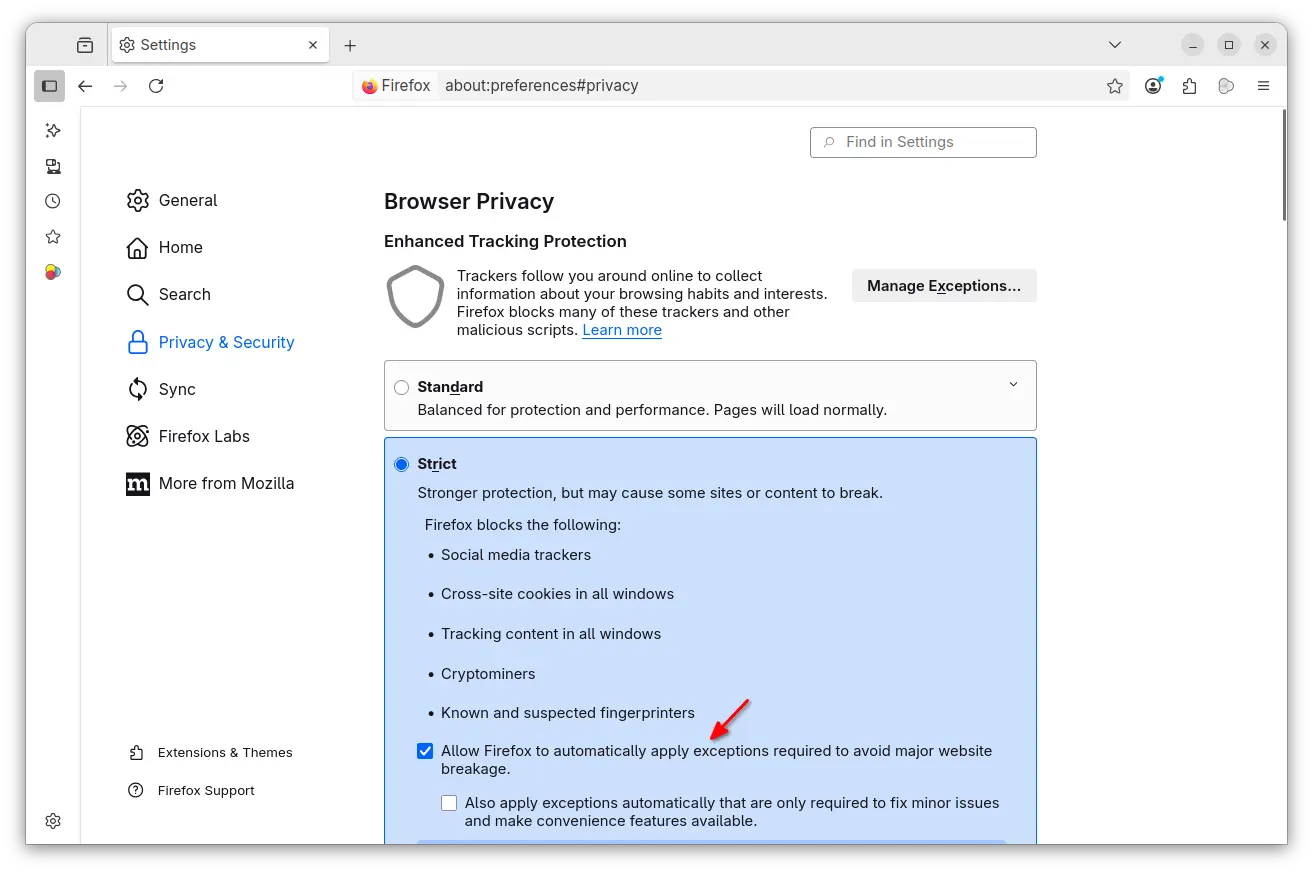
According to the Github releases page, Firefox 142.0 added new ETP stick mode options to automatically apply required exceptions to avoid website breakage. Exceptions are split into baseline (core functionality) and convenience (extra features). And, it’s also available when working in ETP Custom mode.

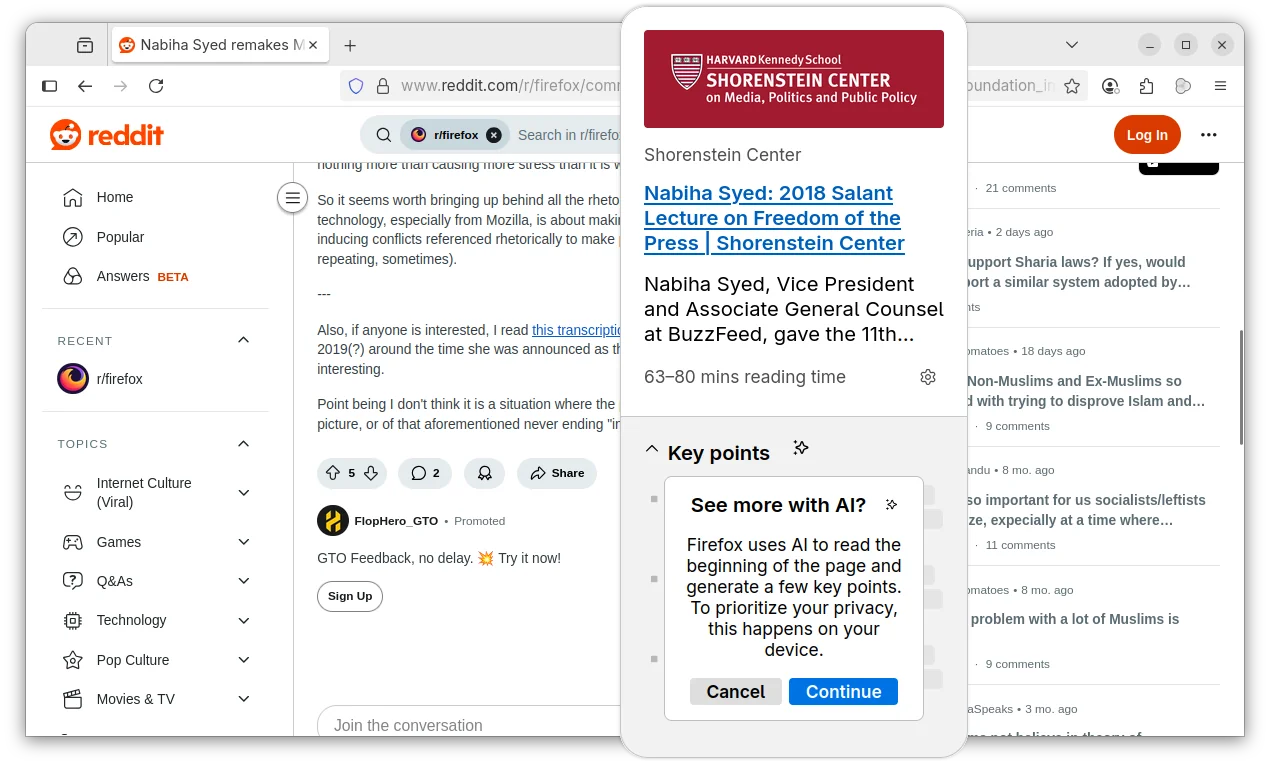
The AI-powered link preview feature that was introduced as experimental since version 139.0, now is generally available for en-US, en-CA, en-GB, en-AU users.

The feature allows to long press (or right-click and choose “Preview Link”) a link to preview the page that can optionally include AI-generated key points. The AI content are processed on user’s local device, though it recommends more than 3 GB of available RAM.

And, this features is gradually rolling out and so far only enabled for users mentioned above. While, others can get it in Firefox Labs setting page.

For users in United States, Firefox now groups article recommendations on New Tab page into topic sections, like Sports, Food, and Entertainment. And, you can block ones that you’re not interested in.

On Windows, clicking a persistent notification when Firefox is closed / restarted will now properly open the browser with the relevant web-page, instead of opening the main page of the website.

In Firefox 142, when you click collapse a tab group, the active tab in that group is still visible. This can keep your header tidier when working with many tabs open in active tab group.

Other changes in the release include:

  • Add Remove from Sidebar option to side-bar extension icon.
  • Improve search results from browsing history via the address bar.
  • Improve drag-and-drop support for blob images.
  • Various security fixes.

There are as well new features and improvements for developers. They include wllama API for extensions support, allowing developers to integrate local language model (LLM) into add-ons, and:

  • Prioritized Task Scheduling API, to assign and manage task priorities.
  • Selection.getComposedRanges() API, to accurately get selected text ranges across shadow DOM boundaries.
  • URLPattern API, to match and parse URLs using a standardized pattern syntax.
  • Display Request Headers/Cookies/Params in the Network panel even request isn’t finished yet.

Get Firefox 142.0

For more changes and the download link, go to its website via the link below:

As mentioned, the release note is not ready at the moment of writing. If you can’t wait to try it out, download it from this FTP page.

  •