❌

Normal view

Received yesterday β€” 19 December 2025

GIMP 3.2 Release Candidate 2 Brings a Glut of Fixes

16 December 2025 at 07:59

GIMP Wilber logo in front of a brick texture with the number 3.2 graffitied on itA second GIMP 3.2 release candidate (RC) is now available for testing, should you fancy sampling the various changes on course for the upcoming stable release. GIMP 3.2 iterates on the huge GIMP 3.0 release that landed earlier this year, which took more than 7 years to get in to shape. No lengthy gap for GIMP 3.2 or successors as the team switches to an accelerated development cycle. Below I run through what’s changed since GIMP 3.2 RC1. That build, along with the GIMPΒ 3.1.2Β &Β 3.1.4 dev releases, added lots of new features. There are no new features here, as the point […]

You're reading GIMP 3.2 Release Candidate 2 Brings a Glut of Fixes, a blog post from OMG! Ubuntu. Do not reproduce elsewhere without permission.

Received before yesterday

GIMP 3.2 RC2 added Barrel Rotation support for Mypaint Brushes

By:Ji m
15 December 2025 at 23:31

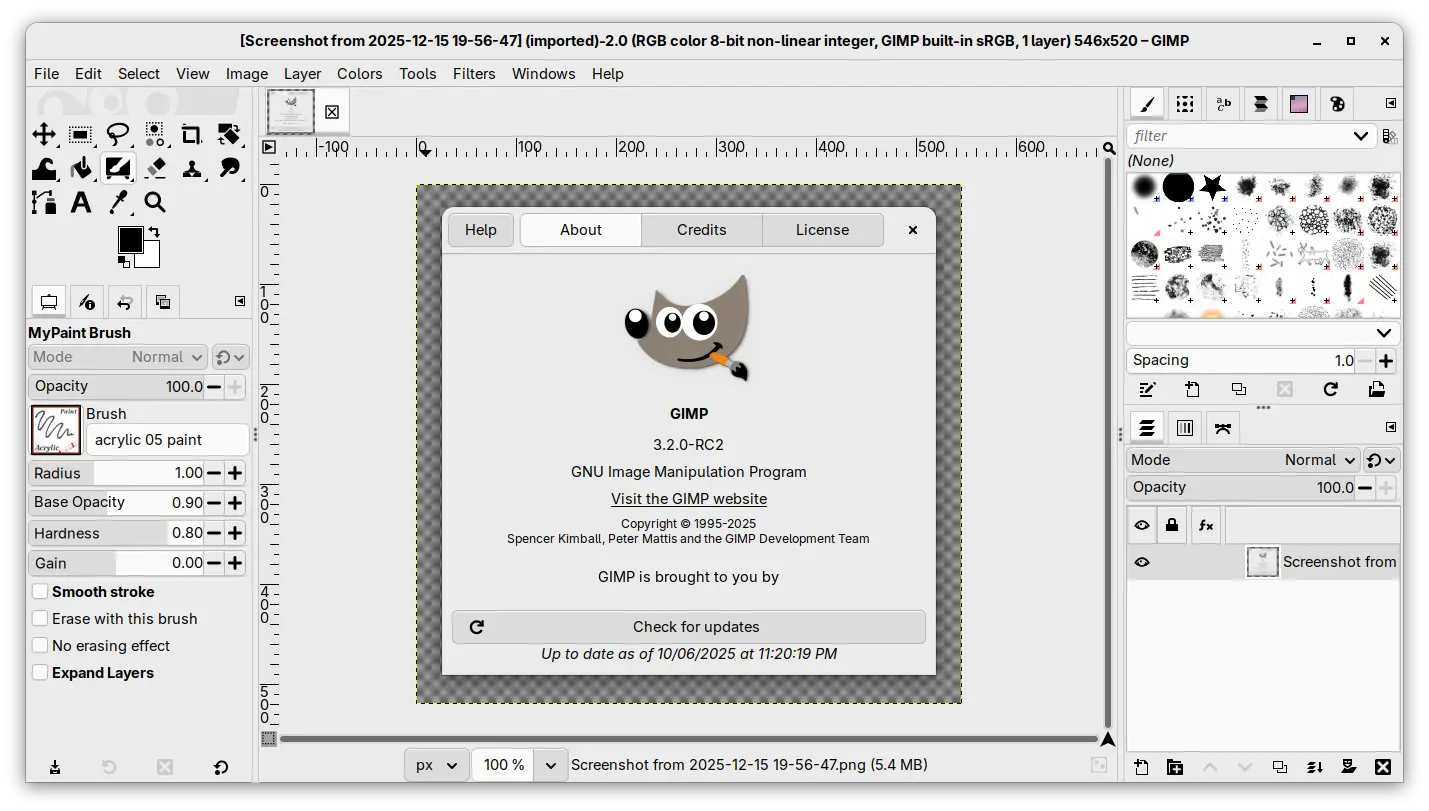
The second RC development release for the GIMP image editor 3.2 is out!

The new release introduced less features compare to the last RC1, but focused on improvements to performance and existing features and vulnerability fixes.

First, for user with a stylus pen, the MyPaint Brushes tool now support barrel rotation when relevant to the specific brush selected. The feature however is not tested because the developers don’t have a stylus to try it out.

Unfortunately I can’t test as we don’t have any stylus with such barrel rotation feature (and unfortunately this hardware feature is discontinued and getting a stylus with this is extra-hard now), but that should work. And at the very least, it does match with MyPaint’s implementation.

This RC also improved the Paint Select support. It’s an experimental feature introduced since version 3.0. User may try the feature by starting GIMP with --show-playground option, then go to preferences -> playground to enable it. Though, the gegl library needs to be compiled with workshop enabled.

In the release, it added progression feedback and improved local region computation to this experimental feature. And, it now processes more events, reset the scribbles at every stroke.

GIMP 3.2 RC2 also removed the restriction that prevented saving and exporting when no drawables are selected, raised the clipboard brush and pattern max size limit to 8192 for 64-bit processors, while it stays 1024 on 32-bit architecture, and it greatly improved the speed for initial font loading.

It now has a much more robust path importing from SVG by latest C-based librsvg code, and uses opaque path IDs for the β€˜id’ attribute for SVG exporting, but not the GUI-visible path name anymore, to match the SVG specs.

To prevent infinite loops with cycling links, it also added a few safety checks when creating new link layers and when loading XCF files with link layers.

Other changes include:

  • New startup splash.
  • Set default PS/EPS export unit to millimiter instead of inch.
  • Import legacy PSD Outer Glow layer style.
  • Add Bash completion for the command line interface.
  • Vulnerability fixes: ZDI-CAN-28311, ZDI-CAN-28273, ZDI-CAN-28158.
  • Other fixes and build updates.

Get GIMP 3.2 RC2

The new RC2 is not announced at the moment of writing, though you may keep an eye on its news page for announcement.

For the source tarball, as well as the official packages for Linux, Windows, and macOS, they are available to download via the link below:

For Linux, select download the AppImage for either x86_64 (AMD/Intel) or aarch64 (for e.g., RasPi or SnapDragon X processors), then run to launch the image editor after adding executable permission.

Though, Ubuntu since 22.04 needs to install libfuse2 package for being able to run AppImage:

sudo apt install libfuse2

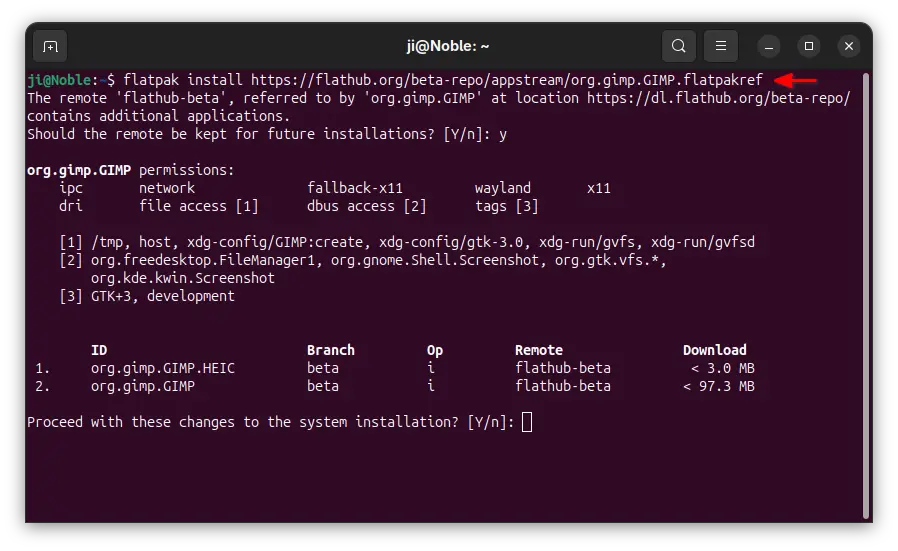
For those who prefer the Flatpak package, it’s also available to install via:

flatpak install --user https://flathub.org/beta-repo/appstream/org.gimp.GIMP.flatpakref

And, users who already installed the package can update it via command:

flatpak update org.gimp.GIMP//beta

GIMP 3.2 Hits Release Candidate with Improved Text Editing + More

19 November 2025 at 03:53

GIMP Wilber logo in front of a brick texture with the number 3.2 graffitied on itPaintbrushes at the ready, as the first GIMP 3.2 release candidate is available for testing. New features and a flurry of fixes are on offer β€” more details inside!

You're reading GIMP 3.2 Hits Release Candidate with Improved Text Editing + More, a blog post from OMG! Ubuntu. Do not reproduce elsewhere without permission.

GIMP Announce Official Snap Package for Ubuntu

19 October 2025 at 22:12

GIMP mascot overlaid on graffiti rendition of the Snapcraft logo.GIMP's developers have taken ownership of the Snap package on Canonical's Snap Store. The build had previously been maintained by a third-party project.

You're reading GIMP Announce Official Snap Package for Ubuntu, a blog post from OMG! Ubuntu. Do not reproduce elsewhere without permission.

GIMP 3.0.6 Update is a Bug-Fix Backport Bonanza

7 October 2025 at 06:55

GIMP logo in front of the numbers 3.0GIMP 3.0.6 is the latest 'micro release' update to the current 3.0.x stable series, containing a bug and crash fixes, UI tweaks and other assorted changes.

You're reading GIMP 3.0.6 Update is a Bug-Fix Backport Bonanza, a blog post from OMG! Ubuntu. Do not reproduce elsewhere without permission.

GIMP 3.0.6 Update Patches Key UI, Security, and Platform-Specific Bugs

6 October 2025 at 22:05

The GIMP team has shipped GIMP 3.0.6, the latest stable micro-release, delivering a significant number of bug fixes and performance improvements. The update focuses on enhancing stability across all major platforms by backporting numerous patches from the upcoming 3.2 release candidate, allowing users to benefit from the fixes immediately. This version brings critical workarounds for […]

The post GIMP 3.0.6 Update Patches Key UI, Security, and Platform-Specific Bugs appeared first on UbuntuPIT.

GIMP 3.0.6 Is Now Available for Download with Improved Photoshop Brush Support

6 October 2025 at 10:49

GIMP 3.0.6

GIMP 3.0.6 open-source image editor is now available for download with improved Photoshop brush support and many other changes. Here's what's new!

The post GIMP 3.0.6 Is Now Available for Download with Improved Photoshop Brush Support appeared first on 9to5Linux - do not reproduce this article without permission. This RSS feed is intended for readers, not scrapers.

GIMP 3.0.6 Fixed Printing Support for Flatpak & Snap [PPA updated]

By:Ji m
7 October 2025 at 00:35

GIMP 3.0.6, the third maintenance update for 3.0 release series, is out today!

The new GIMP release fixed various bugs and regressions, improved flatpak support, added security updates, and back-ported some changes from the 3.1.2 and 3.1.4 DEV releases.

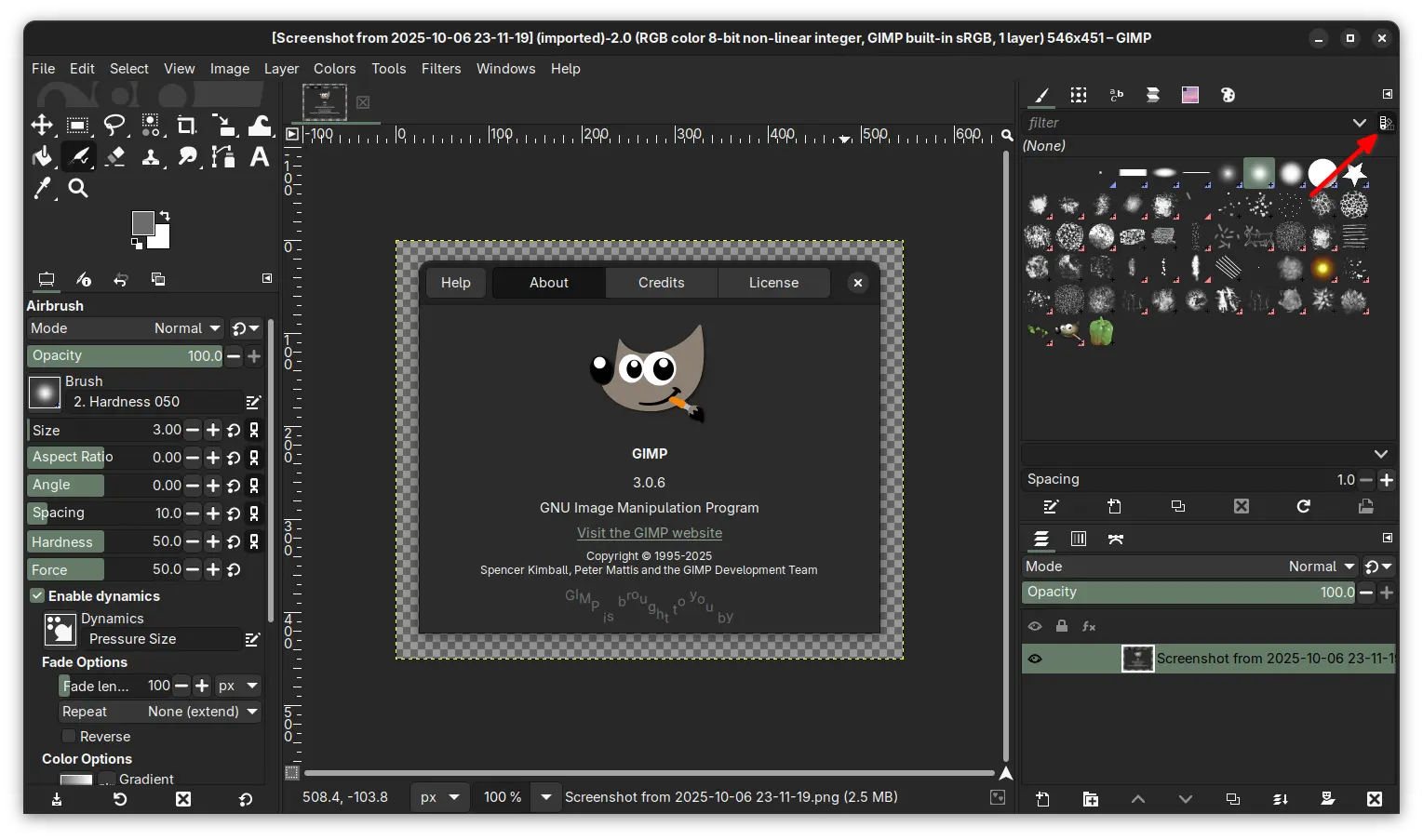
new brush preview toggle button

Previously, the brush previews and font previews are always rendered with light background. In the new release, it added a new toggle button (back-ported from 3.1.2) allowing to optionally follow the color theme. Meaning, when the app is in dark mode, the brush previews can be set to well fit by using a darker background.

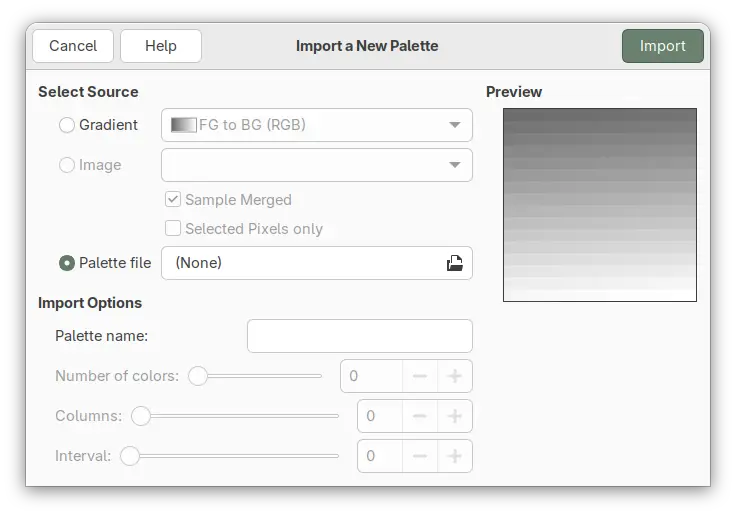
The new GIMP 3.0.6 improved palette import. It fixed Lab & CMYK ACB palette import, and added new select source from Palette file option. Meaning that you can easily find out what palette formats that currently supported through the file chooser dialog, and hide irrelevant files by choosing a specific file format.

import palette from file

For Flatpak and Snap packages that run the image editor in sandbox environment, the release also fixed the issue that the Print dialog previously did not show the β€œImage Settings” tab.

Other changes include:

  • Remove GIMP_ICONS_LIKE_A_BOSS environment variable.
  • Show Lock Content as an undo step.
  • Add alpha channel on filter merge (when necessary) and for certain transforms.
  • Ability to apply NDE filters to channels.
  • Make Seamless Clone tool work again (Experimental).
  • Improved Photoshop brush support.
  • Show frames again in animation playback process bar.
  • New gimp_prop_toggle_new() API function.
  • New GimpTRCType enum type.

There are as well many other fixes and changes, see the official release note for details.

Install GIMP 3.0.6

GIMP website provides official packages for Linux, Windows, macOS, which are available to download via the link below:

For Linux, either download Flatpak package, then install by running command below after enabled Flatpak support.

flatpak install drag-and-drop-flatpakref-file-here

If you’ve already installed the GIMP flatpak package, then simply run the command below to update it:

flatpak update org.gimp.GIMP

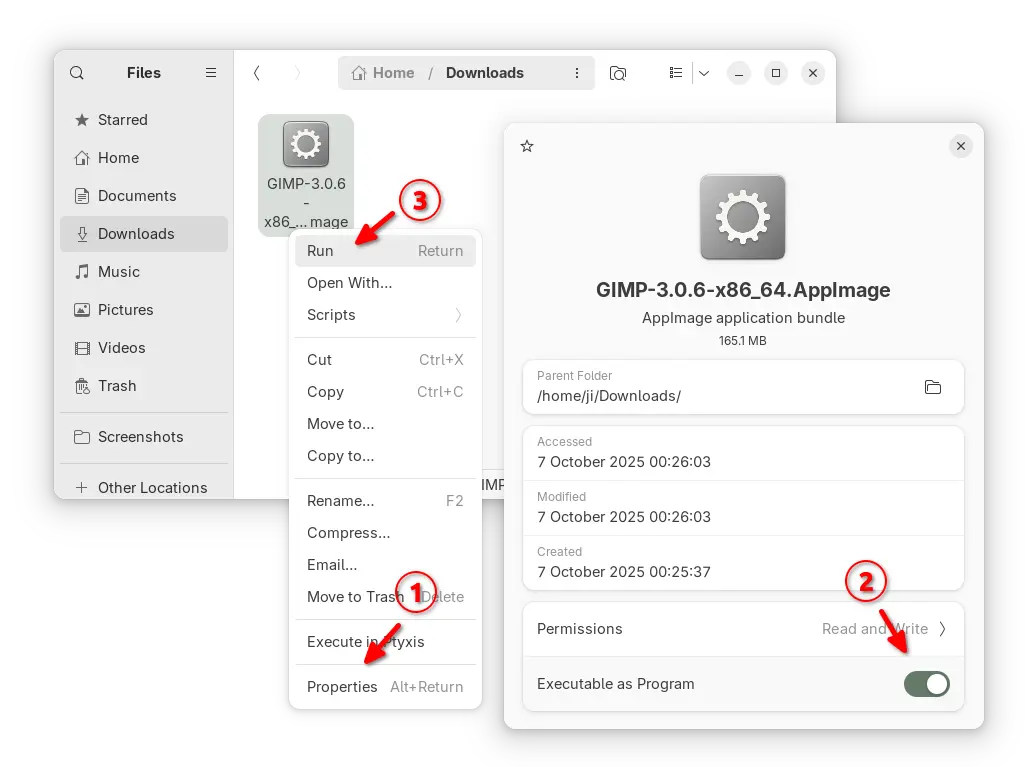
Or, select download the AppImage package, add executable permission from file properties, and run to launch the image editor.

For Ubuntu users, it’s also can be easily installed from App Center (or Ubuntu Software) via Snap package, though it’s community maintained.

For those who prefer the native .deb package, I’ve uploaded the new package into this unofficial PPA for Ubuntu 24.04, 25.04 and 25.10, while Ubuntu 22.04 package is on the way.

To add PPA and install GIMP, run commands below one by one:

sudo add-apt-repository ppa:ubuntuhandbook1/gimp-3
sudo apt update
sudo apt install gimp libgegl-0.4-0t64 -t "o=LP-PPA-ubuntuhandbook1-gimp-3"

GIMP 3.1.4 Released! Link Layers, Vector Layers & MyPaint Brushes 2

By:Ji m
4 September 2025 at 00:08

GIMP 3.1.4, the second development release for next major 3.2, was released few days ago!

The new release of this popular image editor introduced some exciting new features, including link layers, vector layers, MyPaint brushes version 2, and more.

First, by using File -> Open as Link Layer... or press Ctrl+Alt+Shift+O on keyboard, user can now open an image as link layer.

In the case, you may make changes to the image file via any other image editors (e.g., Krita, Inkscape), and see it instantly updated inside GIMP!

You can also non-destructively scale and rotate the link layer without impacting the quality of the original image. And, use β€œDiscard Link Information” context menu option to convert it to a normal raster layer.

GIMP 3.1.4 also implemented the vector layer feature. After drawing a path (via Paths tool), user can now click β€œCreate New Vector Layer” button to generate a vector layer associated with that path, then set the fill and stroke colors and other properties.

You can continue to edit the path, as the vector layer will automatically update. It as well has a β€œDiscard Vector Information” context menu option to convert it to a regular raster layer.

The release also updated MyPaint Brushes to version 2, along with 20 new brushes from the Dieterle set. They include the long requested arrow brush and Posterizer brush.

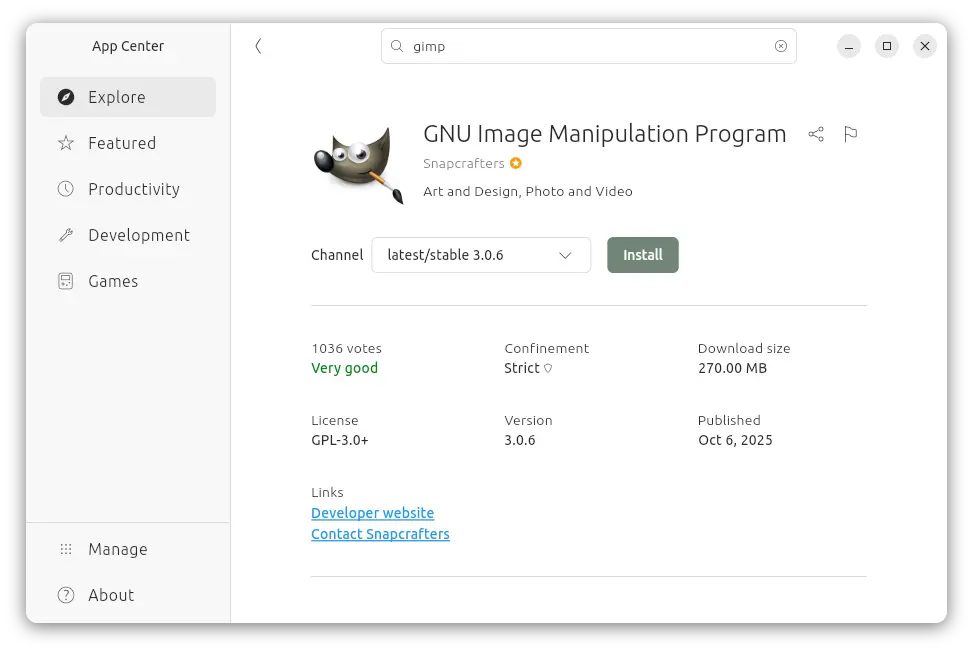
For Ubuntu users, GIMP is going to make official SNAP package, which can be installed directly from Ubuntu Software or App Center, and also be installed in other Linux.

The current GIMP Snap package is maintained by the snapcrafters developers. The GIMP developers are talking to them to pass over the ownership, so they can maintain it as official package.

GIMP Snap package in APP Center. GIMP to take over this community maintained package

Other changes in GIMP 3.1.4 include:

  • New GEGL Filter Browser.
  • New Gain slider in MyPaint Brush tool, to adjust strength of input pressure.
  • Add boldd, italicize, underline keyboard shortcuts for Text tool.
  • Live preview outline color for text tool.
  • Add import support for HRZ, signed JPEG 2000, non-DXT PAA textures, Seattle Filmworks (SFW93A, SFW94A).
  • Support loading TIFF layer visibility, blending modes, and color tags
  • Support System Colors theme for macOS.
  • New API to change the paintbrush fade length and repeat settings.
  • New public API for creating vector layers.
  • Add ARM64 build of nightly Flatpak pacakge.

Compare to current GIMP 3.0 stable, there are as well many changes introduced since 3.1.2:

  • Add system color scheme support for Linux (Flatpak package) and Windows.
  • New brush preview toggle.
  • New overwrite paint mode.
  • New Outline Direction option for text tool
  • Import support for Photoshop RGB and grayscale patterns, APNG animations, multi-layer OpenEXR images, Over-the-Air Bitmap format, Jeff’s Image Format (.jif).
  • Export Krita .kpl, PSB Photoshop Large format, JPEG 2000, HEJ2.
  • Support Photoshop .acv and .alv presets in GIMP Curves and Levels filters.

For more about GIMP 3.1.4, see the official release note.

How to Install GIMP 3.1.4

The official GIMP packages for Windows, Linux, and macOS are available to download at the link below:

Linux user may choose the non-install AppImage package, which can be run directly to launch the image editor, after adding executable permission.

NOTE: Ubuntu since 22.04 needs to run command in terminal (Ctrl+Alt+T) to install required library first:

sudo apt install libfuse2

Or, run the command below to install the Flatpak package instead which runs in sandbox environment.

flatpak install https://flathub.org/beta-repo/appstream/org.gimp.GIMP.flatpakref

If you already have GIMP 3.1.2 installed as Flatpak, then try the command below to update it:

flatpak update org.gimp.GIMP//beta

If you have both the Devel and Stable versions of GIMP installed as Flatpak, and don’t know which icon to use, then use the command below to start the GIMP 3.1.4 from terminal:

flatpak run org.gimp.GIMP//beta

New GIMP 3.2 Development Release Brings Link Layers and Vector Layers

2 September 2025 at 07:02

GIMPΒ 3.2

GIMP 3.2 open-source image editor has a new development release available for public testing, promising many new features and enhancements. Here’s what's new!

The post New GIMP 3.2 Development Release Brings Link Layers and Vector Layers appeared first on 9to5Linux - do not reproduce this article without permission. This RSS feed is intended for readers, not scrapers.

GIMP 3.1.4 Dev Release Adds Link Layers, Vector Support

3 September 2025 at 01:31

GIMP 3.1.4 is out, a fresh development snapshot of what will become the next major stable release. It introduces two long-awaited new features.

You're reading GIMP 3.1.4 Dev Release Adds Link Layers, Vector Support, a blog post from OMG! Ubuntu. Do not reproduce elsewhere without permission.

πŸ’Ύ

❌