 Login
LoginKodi 22 “Piers” Preview Shows FFmpeg 8 Upgrade and New Format Support
19 December 2025 at 17:42


There are so many benefits of using a VPN (Virtual Private Network), some of which include keeping you safe on
The post How to Setup Your Own IPsec/L2TP VPN Server in Linux first appeared on Tecmint: Linux Howtos, Tutorials & Guides.L2TP (which stands for Layer 2 Tunneling Protocol) is a tunneling protocol designed to support virtual private networks (VPN connections)
The post How to Setup an L2TP/IPsec VPN Client on Linux first appeared on Tecmint: Linux Howtos, Tutorials & Guides.A second GIMP 3.2 release candidate (RC) is now available for testing, should you fancy sampling the various changes on course for the upcoming stable release. GIMP 3.2 iterates on the huge GIMP 3.0 release that landed earlier this year, which took more than 7 years to get in to shape. No lengthy gap for GIMP 3.2 or successors as the team switches to an accelerated development cycle. Below I run through what’s changed since GIMP 3.2 RC1. That build, along with the GIMP 3.1.2 & 3.1.4 dev releases, added lots of new features. There are no new features here, as the point […]
You're reading GIMP 3.2 Release Candidate 2 Brings a Glut of Fixes, a blog post from OMG! Ubuntu. Do not reproduce elsewhere without permission.

Linux has always been more than just a kernel, it’s a living, breathing world of innovation, community collaboration, and divergent use cases. As we roll into 2026, the landscape is poised for exciting growth. From continuing evolution of core kernel infrastructure to newfound momentum in areas like gaming, AI-augmented tooling, hardware support and security, the coming year promises both refinement and transformation. Whether you’re a developer, system administrator, gamer, or casual user, here’s what you can expect from the Linux world in 2026.
The Linux kernel remains the beating heart of the OS. In 2026, we’ll likely see:
New Long-Term Support (LTS) Baselines: With releases like 6.18 already declared LTS and successor branches maturing, distributions will rally around kernels that offer both performance gains and security longevity.
AI-Driven Infrastructure: Kernel subsystems may start experimenting with machine-learning-informed scheduling, resource management, or dynamic power/performance tuning, not via heavy inference at runtime, but via control-plane advice integrated at build or boot time.
Security Innovation: Hardware vulnerabilities like VMScape and speculative execution side channels have taught us that kernel mitigations remain crucial. Expect continued work on microarchitecture hardening, pointer tagging, and improved isolation.
The overall trend points to a kernel that is both more performant and more robust, without compromising the modularity that makes Linux adaptable across systems from supercomputers to handhelds.
For desktop users, 2026 should bring visible improvements to everyday workflows:
Wayland Maturity: Wayland adoption continues to solidify across distributions, with fewer fallbacks to legacy X11 backends. Compositors and toolkits will refine scaling, multi-monitor behavior, and screen capture APIs.
Accessibility Gains: Distros will invest more in accessibility, bringing improved screen reader support, better keyboard navigation, and wide internationalization.
Distribution Diversity: More polished newcomers and revitalizations of existing distros will continue, especially projects aimed at lowering the barrier to entry for users migrating from Windows or macOS.
The promise here is a Linux desktop that feels friendly without diluting depth for advanced customization.
Linux powers the backbone of the modern server and cloud world. In 2026:
Armbian Imager is out now as the official utility for flashing the Armbian Linux operating system to your single-board computer. Here's our first look!
The post Meet Armbian Imager, the Official Flashing Utility for Armbian Linux, Beta Out Now appeared first on 9to5Linux - do not reproduce this article without permission. This RSS feed is intended for readers, not scrapers.
Flatpak 1.16.2 Linux app sandboxing and distribution framework is now available for download with various enhancements and bug fixes. Here’s what’s new!
The post Flatpak 1.16.2 Linux App Sandboxing Framework Enables VA-API for Intel Xe GPUs appeared first on 9to5Linux - do not reproduce this article without permission. This RSS feed is intended for readers, not scrapers.
For .NET developers and users, Ubuntu is finally adding the latest .NET 10 support for Ubuntu 24.04 LTS, Ubuntu 25.04/25.10, and next Ubuntu 26.04 LTS.
.NET 10 is the Long Term Support (LTS) version that was released a month ago. It features 3 years support until November 10, 2028.
The new version features JIT enhancement with various inlining improvements, improved code generation for struct arguments, and loop inversion.
It added Advanced Vector Extensions (AVX) 10.2 support for x64-based processors. And, it updated NativeAOT’s type preinitializer with support for all variants of the conv.* and neg opcodes, further optimizing runtime performance. For more features about .NET 10, see it in MS website.
Microsoft provides official .NET packages for Linux through portable tarballs, which are available to download at this page. User may select download it, decompress, and run the executable directly from the extracted folder.
As you may know, Ubuntu announced the collaboration with Microsoft more than 3 years ago, to provide enterprise-grade .NET support through native .deb packages in the universe repositories.
Canonical has packaged .NET 6/7 for Ubuntu 22.04, .NET 8 for 22.04/24.04 & higher, and .NET 9 for Ubuntu 25.04/25.10.
For .NET 10, it’s already made available for Ubuntu 25.10 and Ubuntu 26.04, while the support for Ubuntu 24.04 and 25.04 will be available soon.
The .NET packages in system repositories are well tested by Ubuntu developers, and keep receiving security updates. They provide better integration with your system, as they are built with Distro specific patches and PATH and environment variables setup out-of-the-box.
And, user may ask for community support (from e.g., AskUbuntu and Ubuntu Discourse) and report bugs for the packages in launchpad.
To install .NET 10 in Ubuntu from 24.04 to 26.04, open terminal (Ctrl+Alt+T) and run command:
sudo apt update && sudo apt install dotnet10
Besides installing the full SDK and run-times, you may select install only the SDK or runtime that you need:
sudo apt install dotnet-sdk-10.0
sudo apt install dotnet-runtime-10.0
sudo apt install aspnetcore-runtime-10.0
NOTE: For Ubuntu 24.04 and 25.04, .NET 10 is being rolled out gradually, so far for one-fifth of users. If you can’t get it, just wait. It will be available in next days if everything goes well.
For Ubuntu 22.04, the maintainer team has made .NET 10 into this PPA repository.
Both the PPA and official Ubuntu packages are maintained by same team members. However, the PPA package is NOT officially supported by Ubuntu.
To add the PPA, open terminal and run commands:
sudo add-apt-repository ppa:dotnet/backports
sudo apt update
After that, you may run the apt install command above to install .NET 10 SDK and runtimes.
The 25.12.0 version of Kdenlive video editor is finally available to download!
The new version of this KDE’s software added a welcome dialog at app start, allowing to open or create new project, or create new from a profile.
For new users, the welcome screen also provides options to select prefer color scheme, and configure default profile resolution, frame rate, layout orientation, and video/audio tracks number etc.
The new version also introduced new widget docking system, allowing to easily re-arrange the video editor components by dragging on their tab-bars.
Simply click down on the tab-bar of the target component then drag, it will show you the layout thumbnails. Just drag the cursor icon onto target layout position, then you’re done moving the component. Or, you may double-click (on tab-bar) to cancel the dragging, or even leave it to be outside of the video editor window.
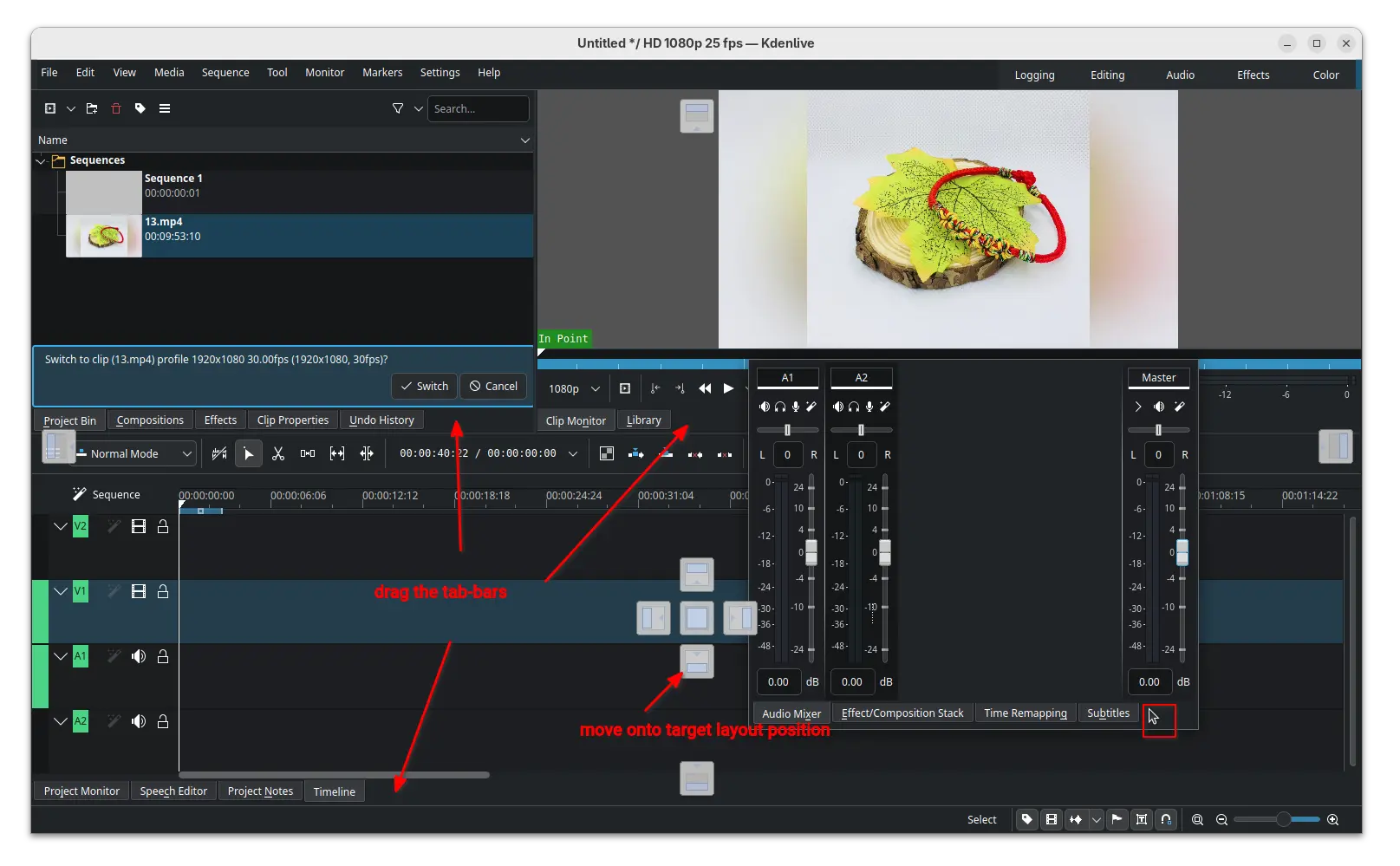
Besides that, the release also updated the clip monitor and project monitor (video preview section) with enhanced audio display, 1080p monitor scaling, and hamburger menu options to create mark from zone.
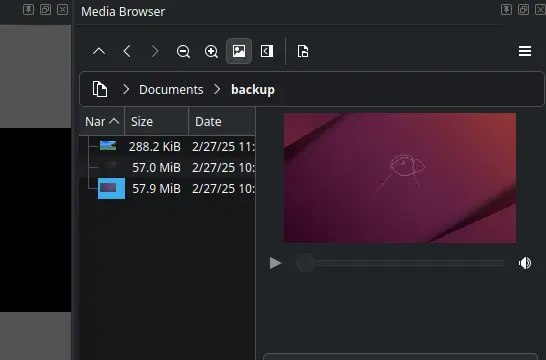
The add marker dialog now has time span support, letting to easily set the end time and duration. Media browser now has preview support, making easy to find out the file that you want. And, Safe Zone button is added in monitor toolbar, vertical safe zone layout and zoom reset.
The new version also updated audio waveform support by adding reset/cycle actions, and moving zoom control from A1 track header to status bar.
It brings back snapping when resizing for non-rotated frames, supports snapping when moving a rotated frame, and snapping for all edges when moving instead of only top-left.
And it added power management option to disable sleep while rendering and playing, switched av1 encoder to the highly optimized software dav1d encoder, and added SVT-AV1 to codecs which use crf option.
Other changes include:
There are as well numerous other improvements and tons of bug-fixes in this release. For details, see the change-log in the KDE announcement page.
The official packages for Linux, Windows, and macOS are made available in the KDE website via the link below:
For Linux, it’s an AppImage for AMD/Intel platform, which can be run directly to launch the video editor, after adding executable permission.
There’s also an official Flatpak package for most Linux on both amd64 and arm64 processors, though not updated at the moment of writing.
For Ubuntu user who prefer native .deb package, the new release has been made into Ubuntu 26.04 repository, and I’ve uploaded the package into this unofficial PPA for Ubuntu 25.10 and Ubuntu 25.04.
To add the PPA and install Kdenlive deb package, run commands below one by one:
sudo add-apt-repository ppa:ubuntuhandbook1/kdenlive
sudo apt update
sudo apt install kdenlive
Linux has long been known as the operating system of developers and power users, but today it’s far more accessible than ever before. Thanks to user-friendly distributions that prioritize simplicity, stability, and support, even someone who’s never used Linux can get up and running quickly. In this guide, we’ll explore some of the best Linux distributions (distros) for beginners, what sets them apart, and who each one is best suited for.
Whether you’re switching from Windows or macOS, using a PC for the first time, or simply curious about Linux, there’s a distro here that fits your comfort level and workflow.
Why it’s great: Ubuntu is one of the most recognizable Linux distributions, and for good reason. It offers a polished graphical interface, a massive community, and extensive documentation. If you’ve ever wanted a desktop that “just works,” Ubuntu delivers with minimal setup.
Key Features:
Intuitive GNOME desktop environment
Regular releases and a Long-Term Support (LTS) version with five years of updates
Large software repository and excellent hardware support
Strong community forums and extensive official documentation
Good for: Users completely new to Linux or those switching from Windows or macOS.
Best for: Desktops, laptops, beginners.
Why it’s great: Linux Mint focuses on a familiar desktop experience. Its Cinnamon edition resembles the classic Windows layout, making the transition easier for users coming from that platform. Mint is stable, fast, and comes with many tools that simplify daily tasks.
Key Features:
Traditional desktop layout (like Windows)
Comes bundled with multimedia codecs and essential apps
Excellent performance on older hardware
Multiple desktop options (Cinnamon, MATE, Xfce)
Good for: Windows switchers looking for a gentle introduction.
Best for: Desktops, older machines, learners.
Why it’s great: Zorin OS is designed with newcomers in mind. It’s polished, modern, and “comfortable” for users who may find traditional Linux desktops intimidating. Its interface can mimic Windows or macOS out of the box, and Zorin includes tools to effortlessly install popular applications.
Key Features:
Look-and-feel switcher (Windows, macOS styles)
