Normal view

Received — 17 December 2025 Linux News & Update

Emmabuntüs Debian Edition 6 Is Now Available Based on Debian 13 “Trixie”

16 December 2025 at 20:49

Emmabuntüs Debian Edition 6

Emmabuntüs Debian Edition 6 distribution is now available for download based on the Debian GNU/Linux 13 “Trixie” operating system. Here’s what’s new!

The post Emmabuntüs Debian Edition 6 Is Now Available Based on Debian 13 “Trixie” appeared first on 9to5Linux - do not reproduce this article without permission. This RSS feed is intended for readers, not scrapers.

OpenShot 3.4 Open-Source Video Editor Released with New Effects and Features

16 December 2025 at 19:53

OpenShot 3.4

OpenShot 3.4 open-source video editing software is now available for download with new features, improved performance, and other exchiting updates. Here’s what’s new!

The post OpenShot 3.4 Open-Source Video Editor Released with New Effects and Features appeared first on 9to5Linux - do not reproduce this article without permission. This RSS feed is intended for readers, not scrapers.

SparkyLinux 2025.12 “Tiamat” Released with Debian Forky Base, Linux Kernel 6.17

15 December 2025 at 18:30

SparkyLinux 2025.12

SparkyLinux 2025.12 distribution is now available for download based on Debian Testing/Forky and powered by Linux kernel 6.17. Here's what's new!

The post SparkyLinux 2025.12 “Tiamat” Released with Debian Forky Base, Linux Kernel 6.17 appeared first on 9to5Linux - do not reproduce this article without permission. This RSS feed is intended for readers, not scrapers.

Scribus 1.6.5 Open-Source Desktop Publishing App Released with Various Changes

15 December 2025 at 17:59

Scribus 1.6.5

Scribus 1.6.5 free and open-source desktop publishing software is now available for download with various updates and bug fixes. Here’s what’s changed!

The post Scribus 1.6.5 Open-Source Desktop Publishing App Released with Various Changes appeared first on 9to5Linux - do not reproduce this article without permission. This RSS feed is intended for readers, not scrapers.

Commands for Installing Bottles on Any Ubuntu Version

16 December 2025 at 16:42

If you’ve ever tried running Windows software on Linux, you know the frustration of wrestling with Wine configurations. “Bottles” changes that entirely. It’s a modern, graphical Wine prefix manager that wraps all the complexity into a clean interface—letting you run Windows apps and games without touching cryptic config files. This guide provides the exact terminal […]

The post Commands for Installing Bottles on Any Ubuntu Version appeared first on LinuxShout.

Distribution Release: Mabox Linux 25.12

17 December 2025 at 03:15
The DistroWatch news feed is brought to you by TUXEDO COMPUTERS. The Mabox Linux team has announced the release of Mabox Linux 25.12. The new version includes a series of updates and improvements to the desktop, volume controls, and introduces autotheming to the live session. "The panel configuration menu was recently enhanced to allow for quick configuration of the....

Distribution Release: Rhino Linux 2025.4

17 December 2025 at 00:12
The DistroWatch news feed is brought to you by TUXEDO COMPUTERS. Rhino Linux is an Ubuntu-based distribution which offers a rolling-release upgrade approach. the project's latest snapshot improves on its Lomiri interface support and makes Lomiri available for its PINE64 devices: "As mentioned previously, our collaboration with UBPorts stipulated that we would be assisting in the development of Lomiri....

BSD Release: MidnightBSD 4.0

16 December 2025 at 22:30
The DistroWatch news feed is brought to you by TUXEDO COMPUTERS. The MidnightBSD project has announced a new major release, version 4.0, which is available for 32-bit and 64-bit x86 machines. A long list of changes to the base platform and ports collection are covered in the release notes: "Removed libdispatch from base. rc.subr(8) now honors ${name}_env in all....

Distribution Release: Kicksecure 18.0.8.7

16 December 2025 at 21:10
The DistroWatch news feed is brought to you by TUXEDO COMPUTERS. The Kicksecure team has announced the availability of a new version of its security-focused, Debian-based distribution. The new version switches from using the Xfce desktop by default to running LXQt and the base system has been updated to use Debian 13. "port to Debian 13 'Trixie' ram-wipe -....

OpenShot 3.4 Released with Overall 32% Speed Up & New Effects

By:Ji m
16 December 2025 at 20:06

OpenShot, the free open-source and easy-to-use video editor, released new 3.4 version yesterday.

It’s been almost a year since the last! The new release improved the overall performance with 32% speed up, and introduced many new effects.


According to the official announcement, the new version has 14.9% to 63% speed up for the performance of frame mapper, mask, crop, ffmpeg reading/writing, and other effects.

It also features 23% faster export by integrating the caching thread into the Export dialog, faster waveforms for long audio plus time-curved clips, and faster FFmpeg decoding.

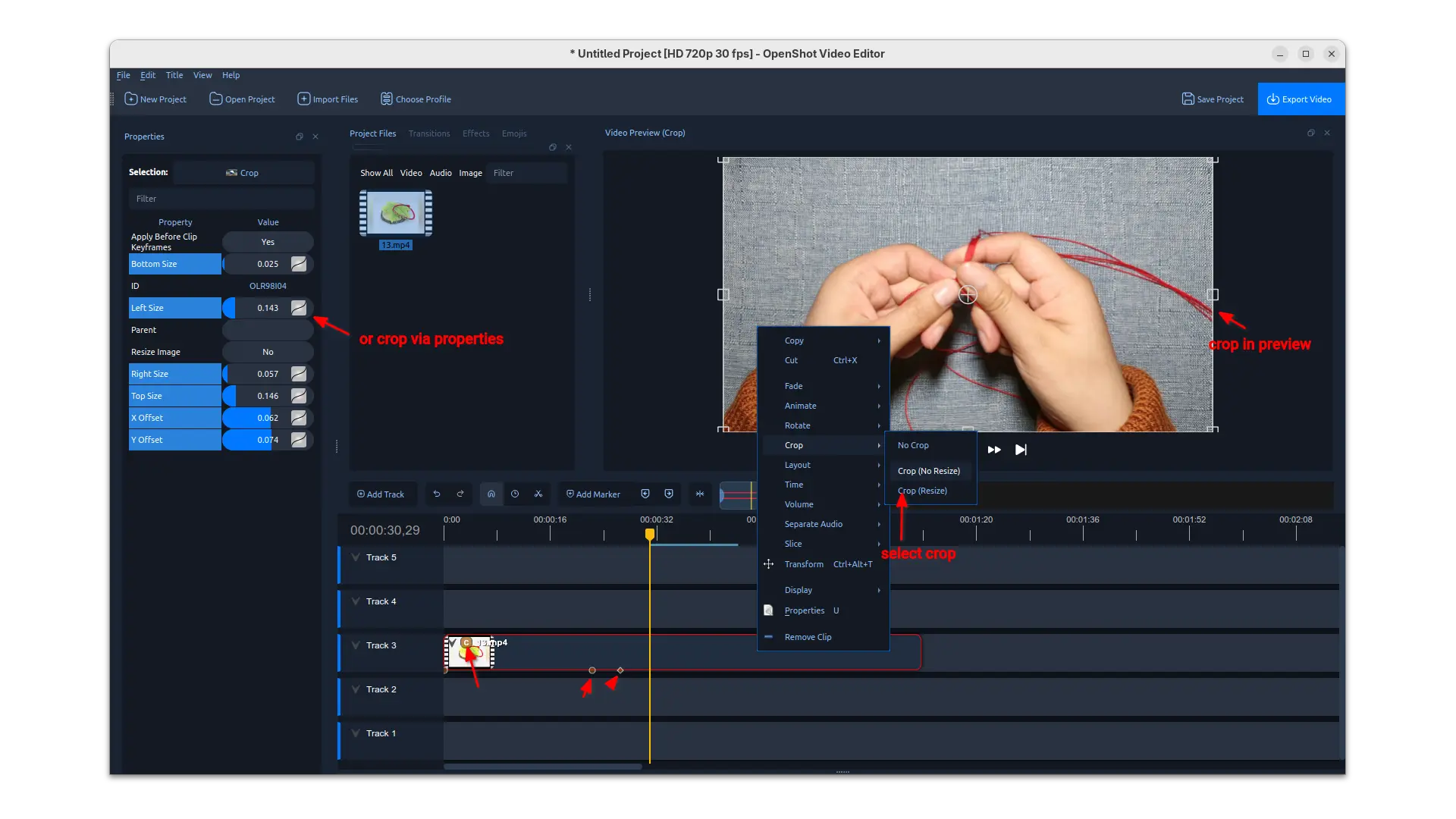
Besides the significant performance improvements, the release also introduced interactive cropping support in preview.

Simply, right-click on your video clip and choose a crop method, then you may drag resizing and moving the rectangular selection in preview to crop the video clip from current position in timeline. While, you may also input the corresponding values in left to crop using properties.

The release also added new experimental timeline which can be enabled in Preferences dialog. The new timeline added buttons to do move up/down, lock, delete actions in track header. It as well features smoother scrolling/zooming on large timelines, new Keyframe panel and in-timeline keyframe editing.

OpenShot 3.4 also added following new filter effects:

  • Sharpen – boost edge contrast to make video details look crisper.
  • Color Map (LUT) – adjust colors using 3D LUT lookup tables.
  • Spherical Projection – Flatten and reproject 360 or fisheye inputs into a rectilinear view with yaw, pitch, and FOV. Support Equirect and multiple fisheye lens models.
  • Lens Flare – simulate sunlight hitting a lens with flares and spectral colors.
  • Outline – add outline around any image or text.

Other changes include:

  • Timing toggle button to re-time by dragging clip edges, similar to trimming.
  • Dragging keyframes on the timeline with live preview while dragging.
  • Add new Repeat / Loop / Ping-Pong options into Time context menu.
  • Copy/Paste files into Project Files from system clipboard.
  • New Benchmark tool in libopenshot.
  • Improved EDL and Final Cut Pro XML import/export.
  • Update AppImage to work better on newer Linux Distros.

How to install OpenShot 3.4

The video editor provides official packages for Linux, Windows, ChromeOS and macOS. Along with the source code, they are available to download via the link below:

For Linux, it’s an AppImage for AMD and Intel platforms. It can be run directly to launch the video editor after adding executable permission.

For Ubuntu, there’s also an official PPA, though it’s not updated for the new release at the moment of writing.

It’s also available to install as Flatpak package, which runs in sandbox environment and support both amd64 and arm64 CPU processors.

Received — 16 December 2025 Linux News & Update

GIMP 3.2 RC2 added Barrel Rotation support for Mypaint Brushes

By:Ji m
15 December 2025 at 23:31

The second RC development release for the GIMP image editor 3.2 is out!

The new release introduced less features compare to the last RC1, but focused on improvements to performance and existing features and vulnerability fixes.

First, for user with a stylus pen, the MyPaint Brushes tool now support barrel rotation when relevant to the specific brush selected. The feature however is not tested because the developers don’t have a stylus to try it out.

Unfortunately I can’t test as we don’t have any stylus with such barrel rotation feature (and unfortunately this hardware feature is discontinued and getting a stylus with this is extra-hard now), but that should work. And at the very least, it does match with MyPaint’s implementation.

This RC also improved the Paint Select support. It’s an experimental feature introduced since version 3.0. User may try the feature by starting GIMP with --show-playground option, then go to preferences -> playground to enable it. Though, the gegl library needs to be compiled with workshop enabled.

In the release, it added progression feedback and improved local region computation to this experimental feature. And, it now processes more events, reset the scribbles at every stroke.

GIMP 3.2 RC2 also removed the restriction that prevented saving and exporting when no drawables are selected, raised the clipboard brush and pattern max size limit to 8192 for 64-bit processors, while it stays 1024 on 32-bit architecture, and it greatly improved the speed for initial font loading.

It now has a much more robust path importing from SVG by latest C-based librsvg code, and uses opaque path IDs for the ‘id’ attribute for SVG exporting, but not the GUI-visible path name anymore, to match the SVG specs.

To prevent infinite loops with cycling links, it also added a few safety checks when creating new link layers and when loading XCF files with link layers.

Other changes include:

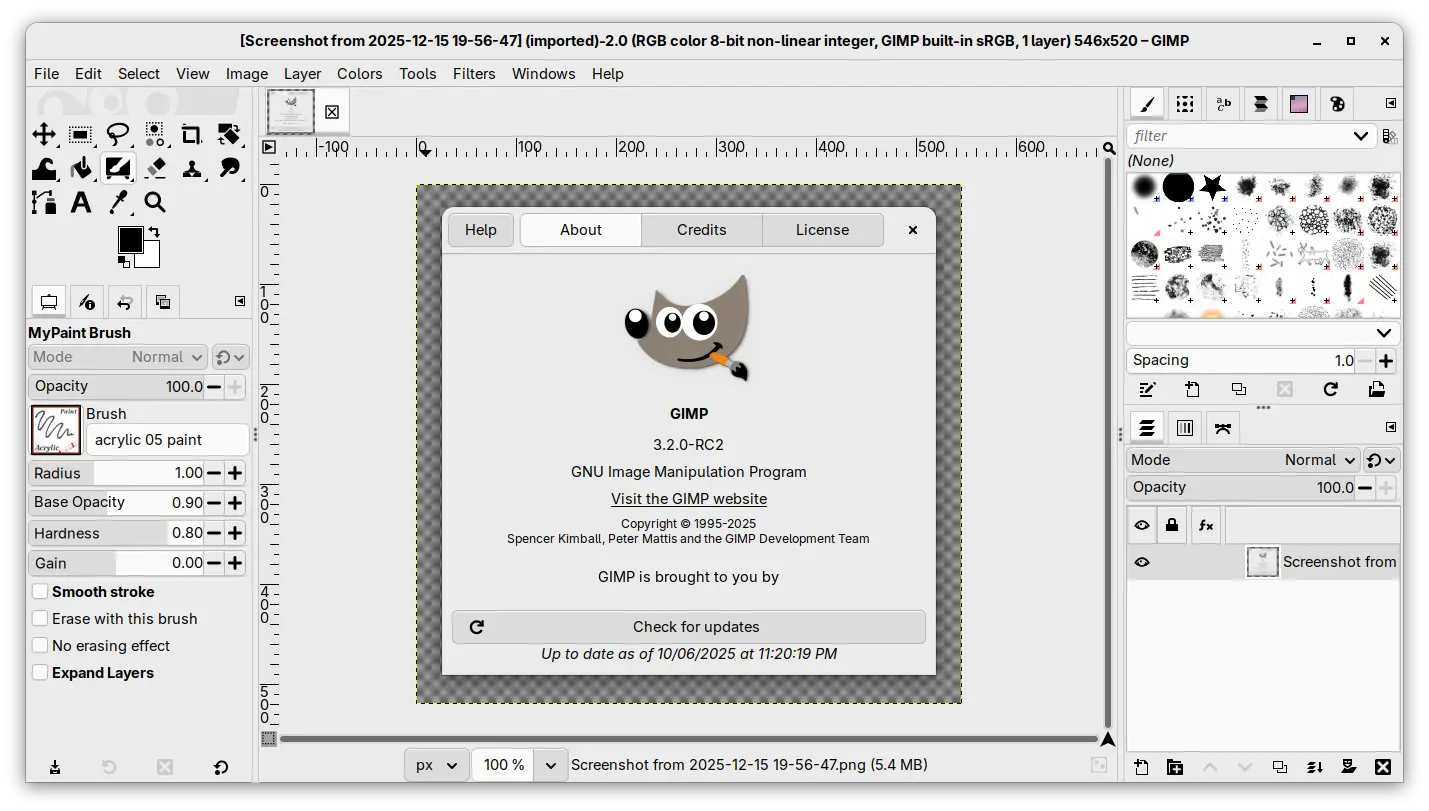
  • New startup splash.
  • Set default PS/EPS export unit to millimiter instead of inch.
  • Import legacy PSD Outer Glow layer style.
  • Add Bash completion for the command line interface.
  • Vulnerability fixes: ZDI-CAN-28311, ZDI-CAN-28273, ZDI-CAN-28158.
  • Other fixes and build updates.

Get GIMP 3.2 RC2

The new RC2 is not announced at the moment of writing, though you may keep an eye on its news page for announcement.

For the source tarball, as well as the official packages for Linux, Windows, and macOS, they are available to download via the link below:

For Linux, select download the AppImage for either x86_64 (AMD/Intel) or aarch64 (for e.g., RasPi or SnapDragon X processors), then run to launch the image editor after adding executable permission.

Though, Ubuntu since 22.04 needs to install libfuse2 package for being able to run AppImage:

sudo apt install libfuse2

For those who prefer the Flatpak package, it’s also available to install via:

flatpak install --user https://flathub.org/beta-repo/appstream/org.gimp.GIMP.flatpakref

And, users who already installed the package can update it via command:

flatpak update org.gimp.GIMP//beta

Scribus 1.6.5 Released with Dozens of Fixes [Ubuntu PPA]

By:Ji m
15 December 2025 at 21:55

Scribus, the free open-source desktop publishing software, released new 1.6.5 version few hours ago.

It’s been 8 months since the last point release, and the new 1.6.5 is also a maintenance release that contains only bug-fixes and improvements.

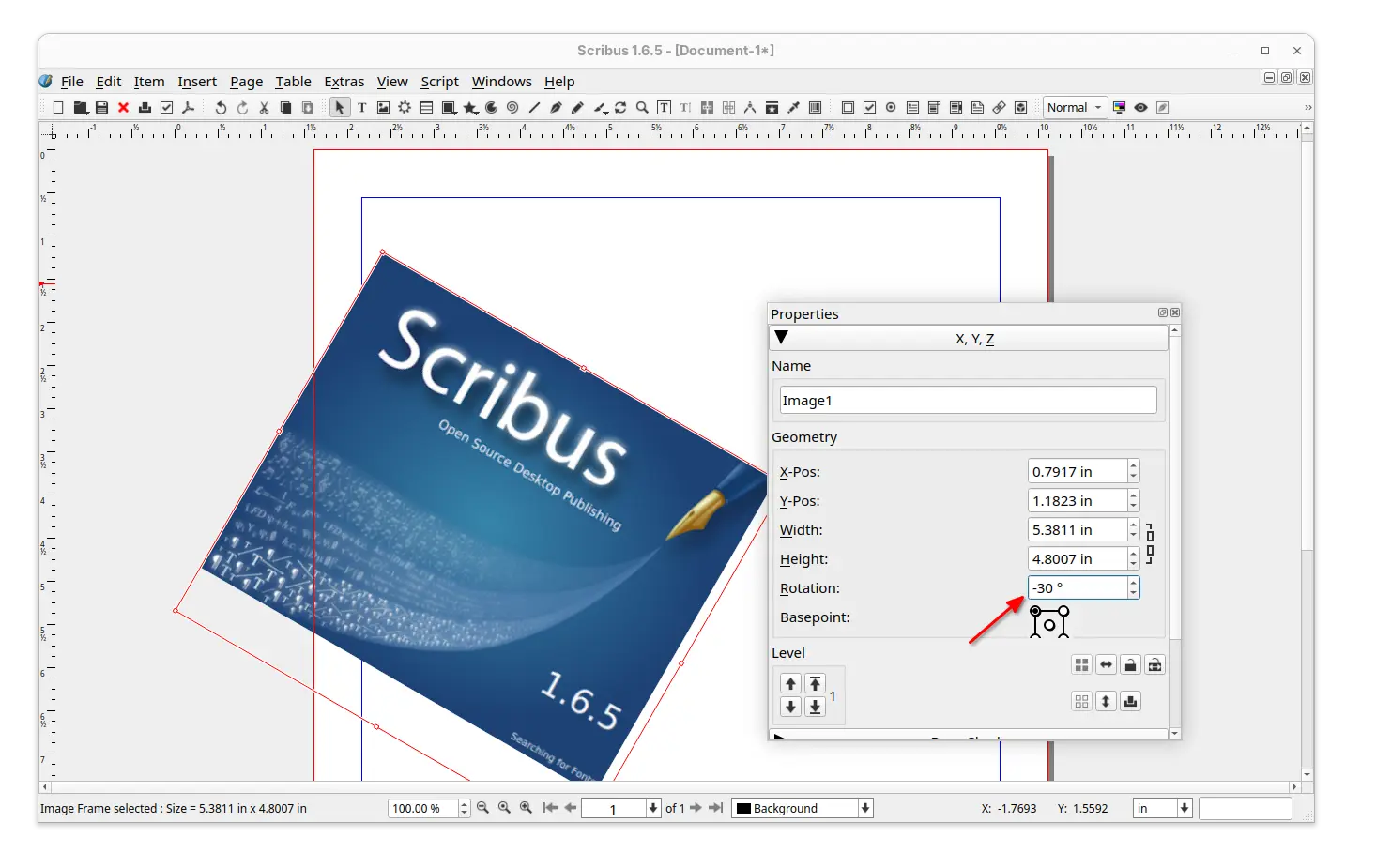
First, the new version added negative values support for the rotation in the properties palette. For example, you may input “-30” to automatically get “330” when hitting enter or leaving the properties.

For scripters, it added the document for scribus.ImageExport: transparentBckgnd, which corresponds to the ‘No Background’ checkmark in the ‘Save as Image’ dialogue, and, the function getBoundingBox() which was missing from HTML docs. And, it fixed that unknown/misspelled named parameter in API call crashed Scribus instead of giving an error message.

It also updated the print dialog, which fixed the inconsistency between output filename extension and printing language, and crop marks not present in output if it’s the only option selected in the “Marks”.

For fonts, the Additional Font Path Setting was cleared if any other setting is modified and saved while one document is open in Scribus. And, font rendering with non-integer font sizes (e.g., 9.90pt) went different after PDF export. Now, both the issues are fixed in the new 1.6.5 release.

The users who prefer dark color scheme, the new release fixed the poor menu appearance, though 3rd level menus are still in-visible in my case in Ubuntu with kvantum-dark theme.

menus were not looking good in dark color scheme

Other fixes in the release include:

  • NTLM hash leak.
  • Crash when loading a .sla file created by v1.4.6.
  • Crashes when exporting PDF with PDF-Push-Button or other PDF-thingy via Python.
  • Color picker (eyedropper) always returns “black”.
  • Layer disappears after editing inline object.
  • Documents become partially invisible when zooming or scrolling.
  • Not able to set “line spacing mode” for sub-style.

For more, see the Changelog file in source tarball (see the link below).

Install Scribus 1.6.5

The source tarball as well as installers for Linux, Windows, and macOS are available to download in sourceforge via the link below:

For Linux on AMD/Intel platform, it’s an AppImage that can be run directly to launch the software, after adding executable permission.

For Ubuntu, Linux Mint, Zorin OS users who prefer the classic .deb package format, I’ve uploaded the new release package into this unofficial PPA for Ubuntu 22.04, Ubuntu 24.04, Ubuntu 25.04 and 25.10.

Simply open terminal (Ctrl+Alt+T) and run the 3 commands below one by one to add PPA, refresh cache, and install the package:

sudo add-apt-repository ppa:ubuntuhandbook1/scribus
sudo apt update
sudo apt install scribus

Also, there’s a community maintained Flatpak package for most Linux, though it’s still at v1.6.4 at the moment of writing.

Distribution Release: Emmabuntüs DE6-1.00

16 December 2025 at 04:59
The DistroWatch news feed is brought to you by TUXEDO COMPUTERS. The Emmabuntüs project has announced a new version of their Debian-based distribution. The new release is based on Debian 13 and places a focus on accessibility options: "This new version of our distribution mainly focuses on accessibility improvements, developed as part of our collaboration with our friends at....
Received — 15 December 2025 Linux News & Update

9to5Linux Weekly Roundup: December 14th, 2025

15 December 2025 at 07:37

9to5Linux Roundup December 14th

9to5Linux Weekly Roundup for December 14th, 2025, brings news about Firefox 146, Cinnamon 6.6, pearOS, KDE Gear 25.12, KDE Plasma 6.5.4, KDE Frameworks 6.21, COSMIC on Pop!_OS 24.04 LTS, Thunderbird 146, Tails 7.3.1, AerynOS 2025.12, Parrot 7.0 Beta, Raspberry Pi Imager 2.0.2, NVIDIA 580.119.02, Kali Linux 2025.4, Grml 2025.12, Linux 6.19 RC, Mixxx 2.5.4, and more.

The post 9to5Linux Weekly Roundup: December 14th, 2025 appeared first on 9to5Linux - do not reproduce this article without permission. This RSS feed is intended for readers, not scrapers.

Mixxx 2.5.4 Open-Source DJ App Improves Support for Korg KAOSS DJ, Pioneer DJ CDJ

15 December 2025 at 04:21

Mixxx 2.5.3

Mixxx 2.5.4 open-source virtual DJ software for performing live mixes is now available for download with various improvements and bug fixes. Here’s what’s new!

The post Mixxx 2.5.4 Open-Source DJ App Improves Support for Korg KAOSS DJ, Pioneer DJ CDJ appeared first on 9to5Linux - do not reproduce this article without permission. This RSS feed is intended for readers, not scrapers.

Linus Torvalds Announces First Linux Kernel 6.19 Release Candidate

15 December 2025 at 01:33

Linux 6.19 Release Candidate

Linus Torvalds announced the general availability of the first Release Candidate version of the upcoming Linux 6.19 kernel series for public testing. Here’s what to expect!

The post Linus Torvalds Announces First Linux Kernel 6.19 Release Candidate appeared first on 9to5Linux - do not reproduce this article without permission. This RSS feed is intended for readers, not scrapers.

❌