Normal view

Received — 5 September 2025 Linux News & Update

Distribution Release: Linux Mint 22.2

4 September 2025 at 19:21
The DistroWatch news feed is brought to you by TUXEDO COMPUTERS. The Linux Mint team have announced the release of Linux Mint 22.2 "Zara", an Ubuntu-based version which will receive updates through to 2029. The 22.2 release includes several new features, including new full screen options for the Hypnotix IPTV player, a version of the libAdwaita library to support....

Miracle-wm 0.7 Released, Completes IPC Implementation

5 September 2025 at 01:02

miracle-wm article thumbnailA new version of miracle-wm, the Mir-based compositor/tiling window manager looking to rival Hyprland, is out with a welcome set of improvements.

You're reading Miracle-wm 0.7 Released, Completes IPC Implementation, a blog post from OMG! Ubuntu. Do not reproduce elsewhere without permission.

How DevOps Teams Are Redefining Reliability with NixOS and OSTree-Powered Linux

How DevOps Teams Are Redefining Reliability with NixOS and OSTree-Powered Linux

This article explores how modern DevOps teams are redefining stability and reproducibility in production environments by embracing truly unchangeable operating systems. It delves into how NixOS’s declarative configuration model and OSTree’s atomic update mechanisms open the door to systems that are both resilient and transparent. We'll explain the advantages, technologies, comparisons, and real-world use cases fueling this shift.

The Paradigm Shift: From Mutable Chaos to Immutable Assurance

  • Why the change happened: The traditional model, logging into servers, tweaking packages, and patching in place, has led to unpredictable environments, elusive bugs, “snowflake” systems, and configuration drift as environments diverged over time. Immutable infrastructure treats machines like fungible artifacts: if you need change, you don’t fix the running system, you replace it.

  • Key benefits:

    • Reliability at scale: Automated, reproducible deployments, no divergence across servers.

    • Simplified rolling back: If something breaks, spin up the previous, working version.

    • Security by design: Core systems are read-only, reducing the attack surface.

Immutable Foundations in Action

NixOS: The Declarative, Version-Controlled Linux
  • How it works: System configuration, including packages, services, kernels, is expressed in the Nix language in a config file. Rebuilding produces a new system “generation,” which can be booted or rolled back.

  • Why DevOps teams love it:

    • Reproducibility: Exact environments can be rebuilt from config files, promoting parity across development, CI, and production.

    • Speed and consistency gains: In one fintech case, switching to NixOS reduced deployment times by over 50 percent, erased environment-related incidents, shrank container sizes by 70%, and cut onboarding time dramatically.

    • Edge readiness: Ideal for remote systems or stateless servers rebuilt nightly to ensure fleet consistency with easy rollback.

    • Personalization meets immutability: With tools like Home Manager, even user-specific configurations (like dotfiles or shell preferences) can be managed declaratively, and consistently reproduced across machines.

Linux Mint 22.2 Released with New Fingerprint Manager App

By:Ji m
4 September 2025 at 19:15

Linux Mint, the popular Ubuntu LTS based Linux Distro, announced new 22.2 point release today.

Linux Mint 22.2, code-name “Zara”, is the second update for the 22 release series that’s based on Ubuntu 24.04 with support until 2029.

The release introduced new XApp called Fingwit, which provides a graphical interface to record and manage your fingerprints, and configure to enable fingerprint authentication for login screen (screensaver), sudo commands, and admin apps.

The app uses system default libfprint daemon to detect if your computer has a supported fingerprint reader. Meaning it won’t work (e.g., ThinkPad T480s in my case) for those using third-party libraries.

Besides new XApp, there are many improvements to other apps. The Sticky app now has rounded corners (top 2 corners), supports running in Wayland session, and a new d-bus method has been added to reload the notes.

The Hypnotix IPTV player app now has 2 new “Theater Mode” and “Borderless Mode”, allowing to toggle the app window to hide all the controls and menus, and even window borders. And, it’s now faster on startup and searching with large playlists.

Linux Mint 22.2 also improved its login screen (handled by LightDM display manager). It now displays user avatars, and applies blur effect to the panel and user selection dialog box for better appearance.

image from linuxmint.com

Linux Mint supports Flatpak out-of-the-box. As so many great applications use LibAdwaita for their modern user interface, the release patched LibAdwaita with theme support, and added it support for Mint-Y, Mint-X and Mint-L themes.

Some apps, e.g., gnome-calendar, baobab (Disk Usage Analyzer), and simple-scan (Document Scanner), have been updated with the new LibAwaita library, so they follow the themes mentioned above.

Other changes in the release include:

  • Add accent colors support for LibAdwaita Flatpak apps.
  • Fork LibAdwaita with libadapta with theme and extra features support.
  • New xapp-aiff-thumbnailer thumbnailer for cover art in .aiff audio files
  • Add iOS app for Warpinator file sharing utility.
  • Configurable EDID-based color correction (disabled by default) in XViewer.
  • Description field is now editable in WebApp Manager.
  • Add possibility to use leading zeros when renaming multiple files and using enumerations
  • Add description in Software Manager to tell the difference between Flatpak and system packages.
  • Improve search accuracy in MATE application menu.

For more, see the official release note.

Download or Upgrade to Linux Mint 22.2

The official Mint 22.2 .iso images for Cinnamon, MATE, and XFCE desktops, are available to download via the link below:

For Linux Mint 22.1, simply launch Update Manager, refresh and install new version of mintupdate or mint-upgrade-info. Finally, go to Edit -> Upgrade to “Linux Mint 22.2 Zara” to start the upgrading process.

Received — 4 September 2025 Linux News & Update

GIMP 3.1.4 Released! Link Layers, Vector Layers & MyPaint Brushes 2

By:Ji m
4 September 2025 at 00:08

GIMP 3.1.4, the second development release for next major 3.2, was released few days ago!

The new release of this popular image editor introduced some exciting new features, including link layers, vector layers, MyPaint brushes version 2, and more.

First, by using File -> Open as Link Layer... or press Ctrl+Alt+Shift+O on keyboard, user can now open an image as link layer.

In the case, you may make changes to the image file via any other image editors (e.g., Krita, Inkscape), and see it instantly updated inside GIMP!

You can also non-destructively scale and rotate the link layer without impacting the quality of the original image. And, use “Discard Link Information” context menu option to convert it to a normal raster layer.

GIMP 3.1.4 also implemented the vector layer feature. After drawing a path (via Paths tool), user can now click “Create New Vector Layer” button to generate a vector layer associated with that path, then set the fill and stroke colors and other properties.

You can continue to edit the path, as the vector layer will automatically update. It as well has a “Discard Vector Information” context menu option to convert it to a regular raster layer.

The release also updated MyPaint Brushes to version 2, along with 20 new brushes from the Dieterle set. They include the long requested arrow brush and Posterizer brush.

For Ubuntu users, GIMP is going to make official SNAP package, which can be installed directly from Ubuntu Software or App Center, and also be installed in other Linux.

The current GIMP Snap package is maintained by the snapcrafters developers. The GIMP developers are talking to them to pass over the ownership, so they can maintain it as official package.

GIMP Snap package in APP Center. GIMP to take over this community maintained package

Other changes in GIMP 3.1.4 include:

  • New GEGL Filter Browser.
  • New Gain slider in MyPaint Brush tool, to adjust strength of input pressure.
  • Add boldd, italicize, underline keyboard shortcuts for Text tool.
  • Live preview outline color for text tool.
  • Add import support for HRZ, signed JPEG 2000, non-DXT PAA textures, Seattle Filmworks (SFW93A, SFW94A).
  • Support loading TIFF layer visibility, blending modes, and color tags
  • Support System Colors theme for macOS.
  • New API to change the paintbrush fade length and repeat settings.
  • New public API for creating vector layers.
  • Add ARM64 build of nightly Flatpak pacakge.

Compare to current GIMP 3.0 stable, there are as well many changes introduced since 3.1.2:

  • Add system color scheme support for Linux (Flatpak package) and Windows.
  • New brush preview toggle.
  • New overwrite paint mode.
  • New Outline Direction option for text tool
  • Import support for Photoshop RGB and grayscale patterns, APNG animations, multi-layer OpenEXR images, Over-the-Air Bitmap format, Jeff’s Image Format (.jif).
  • Export Krita .kpl, PSB Photoshop Large format, JPEG 2000, HEJ2.
  • Support Photoshop .acv and .alv presets in GIMP Curves and Levels filters.

For more about GIMP 3.1.4, see the official release note.

How to Install GIMP 3.1.4

The official GIMP packages for Windows, Linux, and macOS are available to download at the link below:

Linux user may choose the non-install AppImage package, which can be run directly to launch the image editor, after adding executable permission.

NOTE: Ubuntu since 22.04 needs to run command in terminal (Ctrl+Alt+T) to install required library first:

sudo apt install libfuse2

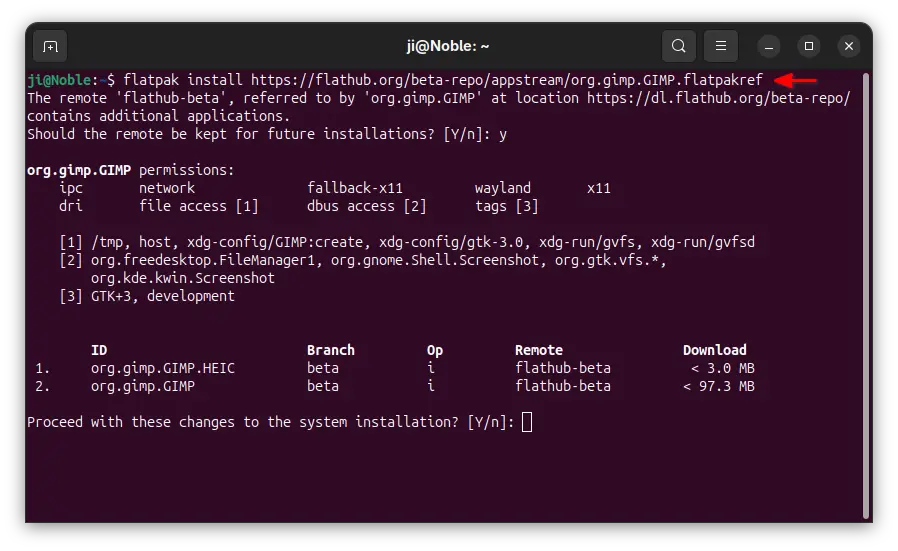
Or, run the command below to install the Flatpak package instead which runs in sandbox environment.

flatpak install https://flathub.org/beta-repo/appstream/org.gimp.GIMP.flatpakref

If you already have GIMP 3.1.2 installed as Flatpak, then try the command below to update it:

flatpak update org.gimp.GIMP//beta

If you have both the Devel and Stable versions of GIMP installed as Flatpak, and don’t know which icon to use, then use the command below to start the GIMP 3.1.4 from terminal:

flatpak run org.gimp.GIMP//beta

NVIDIA 580.82.07 Added Smooth Motion for RTX 40 Series GPUs

By:Ji m
3 September 2025 at 19:48

For NVIDIA users with GeForce RTX 40 Series GPUs (e.g., 4060, 4090), it finally supports Smooth Motion frame generation for better gaming performance in Linux.

NVIDIA Smooth Motion is a feature designed for games without native DLSS support. It uses AI to generate additional frames between two rendered frames for overall smoothness of game-play.

The feature was initially added for Linux via NVIDIA 575 driver series, but only for RTX 50 series GPUs. Now with NVIDIA 580.82.07, the feature also works for RTX 40 GPUs. While, Windows users will probably get it in 590 driver series.

As the latest production branch driver, NVIDIA 580 also added fifo-v1 protocol support to reduce visual inconsistencies and potential stuttering for apps/games running in Wayland with Vulkan backend.

It as well enabled RMIntrLockingMode feature by default, which can help reduce stutter especially when using virtual reality (VR).

There are as well new “OutputBitsPerComponent” MetaMode attribute, allowing to control the number of bits per color component transmitted via a display connector in Xorg with multiple displays.

Other changes in NVIDIA 580 so far include:

  • Feature to reduce time spent in the interrupt top half for low latency display interrupts by deferring the work until later.
  • Update GPU clock value reporting in nvidia-settings, NVML, and nvidia-smi to show clocks before thermal and idle slowdowns.
  • Fix Bigscreen Beyond Head Mounted Displays compatibility.
  • And various bug-fixes.

How to Install NVIDIA 580.82.07

The official package and release note for NVIDIA 580.82.07 is available at the link below:

For Ubuntu, it’s HIGHLY recommended to wait the Ubuntu’s official package, though it’s still in proposed testing stage at the moment.

Or, use either the popular “Graphics Drivers” team PPA which now contains NVIDIA 580.82.07 for Ubuntu from 18.04 to 25.04, or “Canonical Kernel Team” team PPA for 22.04 and higher.

To add the Canonical Kernel Team PPA, open terminal (Ctrl+Alt+T) and run command:

sudo add-apt-repository ppa:canonical-kernel-team/nvidia-graphics2

Then, you may either use “Additional Drivers” (graphical tool) to install nvidia-580 for desktop, or nvidia-580-server for server computing use.

Or run one of the commands below instead in terminal to install the driver:

sudo ubuntu-drivers install nvidia:580
sudo ubuntu-drivers install --gpgpu nvidia:580-server

GNOME 49 Restores Ability to Launch X11 Desktop Sessions

4 September 2025 at 10:07

GNOME desktop foot logoGNOME 49 re-enables X11 session support in GDM after it broke the ability to launch other desktop environments. It plans full removal in GNOME 50.

You're reading GNOME 49 Restores Ability to Launch X11 Desktop Sessions, a blog post from OMG! Ubuntu. Do not reproduce elsewhere without permission.

Linux Mint 22.2 Finally Released, This is What’s New

4 September 2025 at 06:40

Laptop with white text in front reading "Linux Mint 22.2 New Release"The new Linux Mint 22.2 release is available for download. It features theme changes, fingerprint support, and updated apps. More details inside.

You're reading Linux Mint 22.2 Finally Released, This is What’s New, a blog post from OMG! Ubuntu. Do not reproduce elsewhere without permission.

💾

💾

Warp (AI Coding Tool) Touts New ‘Prompt to Production’ Workflow

4 September 2025 at 00:57

Warp, the Agentic Development Environment, for Windows, macOS and Linux has launched a suite of new features to improve prompt-based coding.

You're reading Warp (AI Coding Tool) Touts New ‘Prompt to Production’ Workflow, a blog post from OMG! Ubuntu. Do not reproduce elsewhere without permission.

Received — 3 September 2025 Linux News & Update

Google Can Keep Paying for Firefox Search Deal, Judge Rules

3 September 2025 at 06:43

US judge in antitrust case rules Google can keep paying Mozilla and other companies for default search placement, but bans exclusive contracts.

You're reading Google Can Keep Paying for Firefox Search Deal, Judge Rules, a blog post from OMG! Ubuntu. Do not reproduce elsewhere without permission.

Compile FFmpeg 8.0 in Ubuntu with NVIDIA GPU Acceleration

By:Ji m
2 September 2025 at 21:44

This is a step by step guide shows how to manually compile & install FFmpeg 8.0 from source with NVIDIA GPU acceleration support through cuda-nvcc and enable-libnpp in Ubuntu 24.04 & 22.04.

FFmpeg 8.0 so far is the latest version of this popular multi-media library, that features APV and ProRes RAW decoders, hardware accelerated VP9 and VVC encoding, and new Vulkan compute-based codecs support for FFv1 (encoding and decoding).

This tutorial is tested in Ubuntu 24.04 & 22.04, though it should also works in Debian, Linux Mint

Before Getting Started

FFmpeg now supports hardware accelerated NVENC encoding (AV1, H.264, HEVC) and NVDEC decoding (H.264, HEVC, MJPEG, MPEG-1/2/4, VP8/VP9, VC-1, AV1) through ffncodec, and scale_cuda filters to replace scale_npp.

They are usually enabled by default in FFmpeg packages from Ubuntu system repository or PPAs (e.g., my PPA and Rob Savoury’s PPA).

Meaning, you don’t need to build FFmpeg by yourself, just install it from one the previous sources, then you have the basic NVIDIA GPU acceleration support.

FFmpeg in Ubuntu & PPA repositories has nvenc & nvdec out-of-the-box

You ONLY need to follow this tutorial, when you need specific or more advanced CUDA-dependent features and/or scale_npp only filters.

And, you need:

  • a NVIDIA GPU that support NVENC/NVDEC (see the support list).
  • Install NVIDIA proprietary driver, though either Additional Drivers utility or ubuntu-drivers CLI tool. See the official guide.

Step 1: Install Nvidia Codec SDK headers

nv-codec-headers, the FFmpeg version of Nvidia Codec SDK headers, is available in Ubuntu repositories, but a bit old.

For the most recent version, press Ctrl+Alt+T on keyboard to clone the source code:

git clone https://git.videolan.org/git/ffmpeg/nv-codec-headers.git

Run sudo apt install git to install git first, if you don’t have it.

Then, run the command below to navigate to the source folder, and install it:

cd nv-codec-headers && sudo make install

Step 2: Install Build Dependencies

To build the source, we need some dependency libraries.

First, run command in terminal (Ctrl+Alt+T) to install the essential dependency packages:

sudo apt install build-essential nasm cmake libtool libc6 libc6-dev unzip wget libnuma1 libnuma-dev nvidia-cuda-toolkit pkg-config

For choice, you may install more via sudo apt install package-name (replace package-name) for more features, e.g.,

  • libvulkan-dev, for Vulkan compute-based hardware acceleration (the package in 22.04 is outdated).
  • libjxl-dev, for JPEG-XL support (the package is not available in 22.04).
  • libgme-dev, for Game Music Emu.
  • libvpx-dev, for VP8, VP9 decoding and encoding.

And, below are the packages I use for building FFmpeg into PPA:

libmp3lame-dev zlib1g-dev libvorbis-dev libsdl2-dev libxvidcore-dev liblzo2-dev texinfo libgcrypt-dev libx264-dev libtheora-dev libgsm1-dev libsnappy-dev libdc1394-dev libbs2b-dev libspeex-dev libopencore-amrwb-dev libfreetype-dev libopenmpt-dev nasm libopenjp2-7-dev libharfbuzz-dev libvdpau-dev libtesseract-dev libopencore-amrnb-dev libxfixes-dev libgl-dev libbz2-dev libssl-dev libass-dev libasound2-dev libva-dev libjack-jackd2-dev libvpx-dev frei0r-plugins-dev libvo-amrwbenc-dev libsctp-dev libopus-dev gnutls-dev frei0r-plugins-dev libsoxr-dev linux-libc-dev ladspa-sdk libaom-dev libfontconfig-dev libfdk-aac-dev libpulse-dev libzvbi-dev libiec61883-dev libavc1394-dev libleptonica-dev liblzma-dev libx265-dev libxext-dev libcaca-dev libopenh264-dev librubberband-dev libwebp-dev libgme-dev glslang-dev opencl-c-headers libshine-dev libfribidi-dev libxcb1-dev libxcb-shm0-dev libxcb-xfixes0-dev libcdio-paranoia-dev libcodec2-dev ocl-icd-opencl-dev libzimg-dev libmysofa-dev libbluray-dev libzmq3-dev libaribb24-dev liblensfun-dev liblilv-dev flite1-dev librsvg2-dev libtwolame-dev libopenal-dev librabbitmq-dev libvulkan-dev libxavs2-dev libsrt-gnutls-dev libdavs2-dev libomxil-bellagio-dev libxml2-utils libsmbclient-dev libchromaprint-dev libunwind-dev libdvdnav-dev libdvdread-dev

Step 3: Compile & install FFmpeg 8.0

1. Download & extract the source

Now download FFmpeg 8.0 source tarball from its website, decompress, then right-click on extracted folder and choose “Open in Terminal” to open terminal with source folder as working directory.

open FFmpeg source folder in terminal

For Ubuntu server without GUI, run the command below to download the source:

wget https://ffmpeg.org/releases/ffmpeg-8.0.tar.xz

Then, decompress and navigate to the source folder:

tar -Jxf ffmpeg-8.0.tar.xz && cd ffmpeg-8.0

2. Configure the source

Now, configure the source by running command:

./configure --enable-nonfree --enable-cuda-nvcc --enable-libnpp --extra-cflags=-I/usr/local/cuda/include --extra-ldflags=-L/usr/local/cuda/lib64 --disable-static --enable-shared

Here, you may add more configure options, e.g.,:

  • --enable-libvpx, need ‘libvpx-dev’ to be installed.
  • --enable-vulkan, need ‘libvulkan-dev’ to be installed.
  • --enable-libjxl, need ‘libjxl-dev’ to be installed.

And even more. See either configure file, or run ./configure --help to list more choices.

Configure the source

3. build & install FFmpeg

If configure is done without error, you may then run the command below to build it:

make -j4

Here j4 means to start 4 threads in parallel. You may replace it with j8, or even j16 depends on your CPU, or use -j$(nproc) to use all CPU cores.

build with ‘make’ command

If everything goes well, finally install FFmpeg by running command:

sudo make install

install ffmpeg via ‘make install’

Step 4: Verify

After installed FFmpeg, run the command below to print its version and configuration.

ffmpeg

If it said error while loading shared libraries, then run command to add /usr/local/lib as LD_LIBRARY_PATH environment variable, which works for current terminal session.

export LD_LIBRARY_PATH="/usr/local/lib:$LD_LIBRARY_PATH"

Or, write the command into end of .profile or .bashrc file in user home to make it permanent for current user.

Finally, try to transcode with GPU acceleration via command (replace input.mp4 with path to an existing media file):

ffmpeg -hwaccel cuda -i input.mp4 -vf scale_npp=-1:720 -c:v h264_nvenc -preset slow output.mkv

Uninstall:

To uninstall, open the source folder again in terminal and run command:

sudo make uninstall

If you’ve already deleted that folder, then manually remove the executable files from /usr/local/bin and libraries from /usr/local/lib:

GIMP 3.1.4 Dev Release Adds Link Layers, Vector Support

3 September 2025 at 01:31

GIMP 3.1.4 is out, a fresh development snapshot of what will become the next major stable release. It introduces two long-awaited new features.

You're reading GIMP 3.1.4 Dev Release Adds Link Layers, Vector Support, a blog post from OMG! Ubuntu. Do not reproduce elsewhere without permission.

💾

Received — 2 September 2025 Linux News & Update

How to Install Zip and Unzip in Linux

The post How to Install Zip and Unzip in Linux first appeared on Tecmint: Linux Howtos, Tutorials & Guides .

Zip is a command-line utility tool used for compressing files and folders. Compression of files & folders enables faster and

The post How to Install Zip and Unzip in Linux first appeared on Tecmint: Linux Howtos, Tutorials & Guides.

Linux App Release Roundup (August 2025)

2 September 2025 at 06:59

This is a recap of Linux app releases in August 2025, taking in updates to Qemu, Constrict, Gradia, Zen Browser, PeaZip and more!

You're reading Linux App Release Roundup (August 2025), a blog post from OMG! Ubuntu. Do not reproduce elsewhere without permission.

Distribution Release: Linux From Scratch 12.4

2 September 2025 at 03:13
The DistroWatch news feed is brought to you by TUXEDO COMPUTERS. The Linux From Scratch project (also called LFS) has announced the release of version 12.4 of the project's guide. This guide walks the reader through the steps to create a minimal Linux distribution from source code. The release announcement reads: "The Linux From Scratch community announces the release....
❌