❌

Normal view

Proton Launches Encrypted Spreadsheets (Browser-Based)

6 December 2025 at 05:11

Proton has launched Sheets, an encrypted spreadsheet app available to use in any browser with CSV/XLS import, real-time collaboration and more – for free!

You're reading Proton Launches Encrypted Spreadsheets (Browser-Based), a blog post from OMG! Ubuntu. Do not reproduce elsewhere without permission.

PeaZip 10.8 Open-Source Archive Manager Overhauls Previewing Inside Archives

6 December 2025 at 17:56

PeaZip 10.8

PeaZip 10.8 open-source archive manager is now available for download with a new image viewer component and various improvements. Here’s what’s new!

The post PeaZip 10.8 Open-Source Archive Manager Overhauls Previewing Inside Archives appeared first on 9to5Linux - do not reproduce this article without permission. This RSS feed is intended for readers, not scrapers.

New Jolla Phone Now Available for Pre-Order as an Independent Linux Phone

6 December 2025 at 04:35

Jolla Phone

Jolla kicked off a campaign for a new Jolla Phone as the independent European Do It Together Linux phone, shaped by the people who use it.

The post New Jolla Phone Now Available for Pre-Order as an Independent Linux Phone appeared first on 9to5Linux - do not reproduce this article without permission. This RSS feed is intended for readers, not scrapers.

TUXEDO Gemini 17 Gen4 Linux Laptop Launches with NVIDIA RTX 5070 Ti GPU

5 December 2025 at 22:07

TUXEDO Gemini 17 Gen4

TUXEDO Gemini 17 Gen4 Linux laptop launches with Intel Core i9-14900HX, NVIDIA GeForce RTX 5070 Ti, up to 96 GB RAM, and up to 8TB storage.

The post TUXEDO Gemini 17 Gen4 Linux Laptop Launches with NVIDIA RTX 5070 Ti GPU appeared first on 9to5Linux - do not reproduce this article without permission. This RSS feed is intended for readers, not scrapers.

Calibre 8.16 Open-Source E-Book Manager Adds More AI Features, Bug Fixes

5 December 2025 at 11:47

Calibre 8.16

Calibre 8.16 open-source e-book management software is now available for download with various new AI features and several bug fixes. Here's what's new!

The post Calibre 8.16 Open-Source E-Book Manager Adds More AI Features, Bug Fixes appeared first on 9to5Linux - do not reproduce this article without permission. This RSS feed is intended for readers, not scrapers.

Audacity 3.7.6 Audio Editor Adds FFmpeg 8 Support, Spectrogram Wavelet Analysis

5 December 2025 at 02:46

Audacity 3.7.6

Audacity 3.7.6 open-source digital audio editor and recording software is now available for download with FFmpeg 8 support, Spectrogram Wavelet analysis, and other changes. Here's what's new!

The post Audacity 3.7.6 Audio Editor Adds FFmpeg 8 Support, Spectrogram Wavelet Analysis appeared first on 9to5Linux - do not reproduce this article without permission. This RSS feed is intended for readers, not scrapers.

Raspberry Pi OS Now Lets You Safely Eject HDD and NVMe Drives Connected via USB

5 December 2025 at 02:23

Raspberry Pi OS USB

Raspberry Pi OS 2025-12-04 is now available for download with the ability to safely eject HDD and NVMe drives connected via USB and other changes. Here's what's new!

The post Raspberry Pi OS Now Lets You Safely Eject HDD and NVMe Drives Connected via USB appeared first on 9to5Linux - do not reproduce this article without permission. This RSS feed is intended for readers, not scrapers.

This Add-On Brings Adaptive UI Colour to Firefox

5 December 2025 at 07:14

Want Firefox to dynamically match website colours? This free add-on changes toolbars based on page colours for Vivaldi-style theming. Works on all platforms.

You're reading This Add-On Brings Adaptive UI Colour to Firefox, a blog post from OMG! Ubuntu. Do not reproduce elsewhere without permission.

Linux Distros Designed for Former Windows Users Are Picking Up Steam

Linux Distros Designed for Former Windows Users Are Picking Up Steam

For years, Windows users frustrated with constant changes, aggressive updates, and growing system bloat have flirted with switching to Linux. But 2025 marks a noticeable shift: a new generation of Linux distributions built specifically for ex-Windows users is gaining real traction. One of the standout examples is Bazzite, a gaming-optimized Fedora-based distro that has quickly become a go-to choice for people abandoning Windows in favor of a cleaner, more customizable experience.

Why Many Windows Users Are Finally Jumping Ship

Microsoft’s ecosystem has been slowly pushing some users toward the exit. Hardware requirements for Windows 11 left millions of perfectly functional PCs behind. Ads on the Start menu and in system notifications have frustrated many. And for gamers, launcher problems, forced reboots and background processes that siphon resources have driven a search for alternatives.

Linux distributions have benefited from that frustration, especially those that focus on simplicity, performance and gaming readiness.

Gaming-First Distros Are Leading the Movement

Historically, switching to Linux meant sacrificing game compatibility. But with Valve’s Proton layer and Vulkan-based translation technologies, thousands of Windows games now run flawlessly, sometimes better than on Windows.

Distros targeting former Windows users are leaning into this new reality:

  • Seamless Steam integration

  • Automatic driver configuration for AMD, Intel and NVIDIA

  • Built-in performance overlays like MangoHUD

  • Proton GE and tools for modding or shader fixes

  • Support for HDR, VR and modern controller layouts

This means a new Linux user can install one of these distros and jump straight into gaming with almost no setup.

Bazzite: A Standout Alternative OS

Bazzite has become the poster child for this trend. Built on Fedora’s image-based system and the Universal Blue infrastructure, it offers an incredibly stable base that updates atomically, similar to SteamOS.

What makes Bazzite so attractive to Windows refugees?

  • Gaming-ready out of the boxΒ no tweaking, no driver hunts

  • Rock-solid performance thanks to an immutable system layout

  • Support for handheld PCs like the Steam Deck, ROG Ally and Legion Go

  • Friendly workflows that feel familiar to new Linux users

  • Customization without the risk of breaking the system

It’s no surprise that many β€œI switched to Linux!” posts now mention Bazzite as their distro of choice.

Speed up Ubuntu PPA Apt Downloading in Ubuntu / Linux Mint

By:Ji m
4 December 2025 at 17:52

Use apt or apt-get to install/upgrade PPA packages but the download speed is slow? Here’s a workaround to speed it up in Ubuntu or Linux Mint.

By choosing a download mirror that nears to me using β€œSoftware & Updates” usually can fix slow downloading issue when installing packages from official Ubuntu repositories.

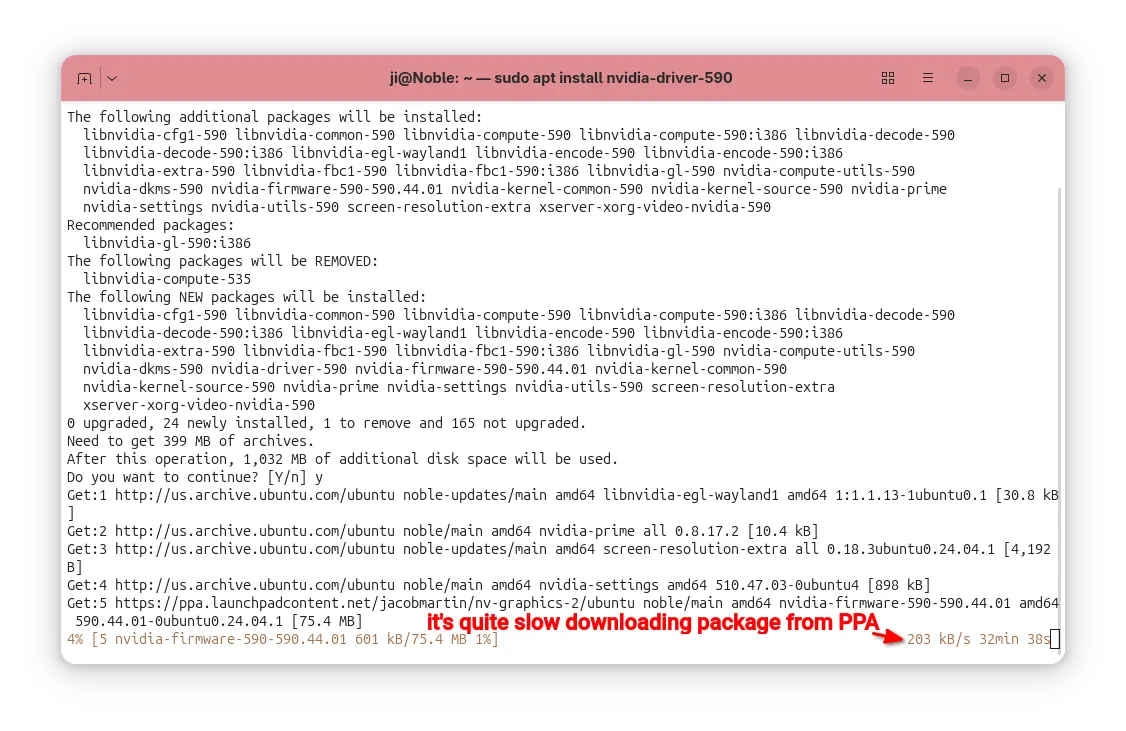
But for app packages from Ubuntu PPAs, in most time it downloads at a speed of few hundreds KB/S.

It’s OK for small apps, but for PPA packages with large file sizes (e.g. NVIDIA driver from Graphics Driver Team PPA, or Plasma Desktop from KUbuntu PPA), it can take half an hour and even more time to install due to slow download speed.

downloading packages from PPA using apt is quite slow

In the case, apt-fast can help!

It’s a free open-source shell script wrapper for apt/apt-get, by using aria2 multi-connection download utility. It works by splitting large file into multiple small pieces, then downloading them from multiple sources in parallel.

Though, the launchpad PPA does not have mirrors, it can still speed up the large file downloading probably due to multi-connections. In my case, it reduced the nvidia-590 packages downloading time from about 30 minutes to less than 3 minutes.

Step 1: Install apt-fast

apt-fast has an official PPA that contains the most recent packages for all current standard supported Ubuntu releases (e.g., Ubuntu 22.04, Ubuntu 24.04, Ubuntu 25.04/25.10), as well as the old Ubuntu 20.04, 18.04, 16.04, and even 14.04 LTS releases.

To add the PPA, press Ctrl+Alt+T to open terminal and run command:

sudo add-apt-repository ppa:apt-fast/stable

Type your user password when it asks (no visual feedback) and hit Enter to continue.

All current Ubuntu releases will automatically refresh cache while adding PPA. But for Linux Mint and old Ubuntu, you may run the command below to update cache manually:

sudo apt update

Finally, install the wrapper by running command:

sudo apt install apt-fast

After installed the package, it will automatically run the post-install script to configure the basic things, like which package manager (apt, apt-get, or aptitude) to use for installing packages, maximum allowed number of connections, and, whether to ask for confirmation before downloading.

Step 2: Configure apt-fast (Optional)

Besides the basic settings you set above, you can configure more about apt-fast, including:

  • add/change downloads mirrors, if you want to use it for getting packages from Ubuntu repositories.
  • change the minimum size of each piece, and piece selection algorithm.
  • adjust the β€˜aria2c’ download command.
  • change the temporary download folder, and apt cache directory.
  • enable/disable APT authentication support.
  • change the colors, and more.

Simply, run the command below to open the configuration file via nano command line text editor:

sudo nano /etc/apt-fast.conf

Then edit according to the description text if need, finally Ctrl+S to save and Ctrl+X to exit.

Step 3: How to use apt-fast

You can use apt-fast just by replacing apt or apt-get in all install, upgrade, etc commands with apt-fast.

For example, install app packages:

sudo apt-fast install package1 package2 package3

Install all available updates, but never remove existing packages:

sudo apt-fast upgrade

Install all available updates, allow removing existing packages if required:

sudo apt-fast full-upgrade

Clean download files in cache directory and temporary download folder:

sudo apt-fast clean

For more, see manual by running man apt-fast command.

Uninstall apt-fast (Optional)

If something goes wrong, or you don’t need it anymore, then open terminal (Ctrl+Alt+T) and run command to remove it:

sudo apt remove apt-fast aria2 libaria2-0

And, remove the PPA either by using β€œSoftware & Updates -> Updates”(or Software Sources for Linux Mint) utility or by running command:

sudo add-apt-repository --remove ppa:apt-fast/stable

Also, you may need to run sudo apt update to refresh cache afterward in Linux Mint or old Ubuntu 14.04.

NVIDIA 590.44.01 Beta Released! Removed GeForce 10 Series & Earlier Support

By:Ji m
3 December 2025 at 23:44

NVIDIA 590, the next new feature branch driver for Linux, is available for beta testing.

This beta driver is NVIDIA 590.44.01, which however does not introduce any new features, but raised the minimum system library requirements and fixed some bugs.

The new driver now requires wayland >= 1.20 for the modern Wayland session, xserver 1.17 or higher for classic Xorg session, and glibc library >= 2.27. For Ubuntu, 22.04 and higher match the Wayland requirement, while 18.04 and 20.04 with Xorg are still supported.

Besides the minimum requirements update, the release also removed support for GeForce 700, GeForce 800M, GeForce 900/900M, GeForce 10 series, as well as GeForce MX100, MX200, MX300 series notebooks.

And, it improved the performance of recreating Vulkan swap chains. The swap chain is essentially a queue of images waiting to be presented to the screen. By improving the performance of swap chains recreation, it can help prevent stuttering when resizing Vulkan application windows.

Others are mostly bug-fixes. They include:

  • Fix that β€œPowerMizer” preferred mode drop-down menu in the nvidia-settings control panel didn’t not function correctly on Wayland.
  • Fix that the Dots Per Inch (DPI) to be incorrectly reported for some monitors, such as Samsung Odyssey Neo G9.
  • Fix Vulkan applications not working in VMs using Venus VirtIO virtual GPU.
  • Fix system freezes on PREEMPT_RT real-time kernels

For more about NVIDIA 590.44.01 as well as the official .run installers for x86_64 processors, see this nvidia webpage. Or, go to this page for aarch64 processor, FreeBSD, and Solaris.

How to Install NVIDIA 590.44.01 in Ubuntu

If nothing goes wrong, Ubuntu will add the official NVIDIA 590 driver package for next Ubuntu 26.04, and perhaps backport it for current Ubuntu 25.10 and 24.04/22.04 LTS releases. Though, the process can take few months. Keep an eye on this page for the official NVIDIA 590 package by Ubuntu.

For choice, you may add the long standing Graphics Driver Team PPA, which usually adds the new driver package earlier that the official package mentioned above.

For those who can’t wait, the Ubuntu developer Jacob Martin has made NVIDIA 590.44.01 into this personal PPA for Ubuntu 22.04, Ubuntu 24.04, and Ubuntu 25.10 for testing purpose!

NOTE: the PPA package is for testing only purpose. Don’t try it on production machine!!! It breaks my wi-fi in my case when trying to restore NVIDIA 580.

To add the PPA, open terminal (Ctrl+Alt+T) and run command:

sudo add-apt-repository ppa:jacobmartin/nv-graphics-2

Then, try launching β€œAdditional Drivers” utility to install the driver. Or run the command below instead in terminal:

sudo ubuntu-drivers install nvidia:590

When done, reboot computer.

If the driver does not work properly for you, then try running the command below to uninstall:

sudo apt --purge remove '*nvidia*590*'

OnlyOffice Desktop Editors 9.2 added AI Agent & Macro Recording

By:Ji m
3 December 2025 at 16:02

OnlyOffice desktop editors, the free open-source office suite for Linux, Windows, and macOS, released new 9.2 version yesterday.

The new release added AI agent support, customizable keyboard shortcut, macro recording for repetitive actions, and Windows on ARM support.

In the bottom left of the app window, an β€œAI agent” option is added, allowing to connect to either Anthropic, OpenAI, TogetherAI, or OpenRouter AI models through API key, or Ollama local hosted AI model.

After that, you may chat with AI to ask questions, find and open files on your computer, create new documents, presentations, or PDFs, generate text or HTML from files without open them, fill forms, and do more actions.

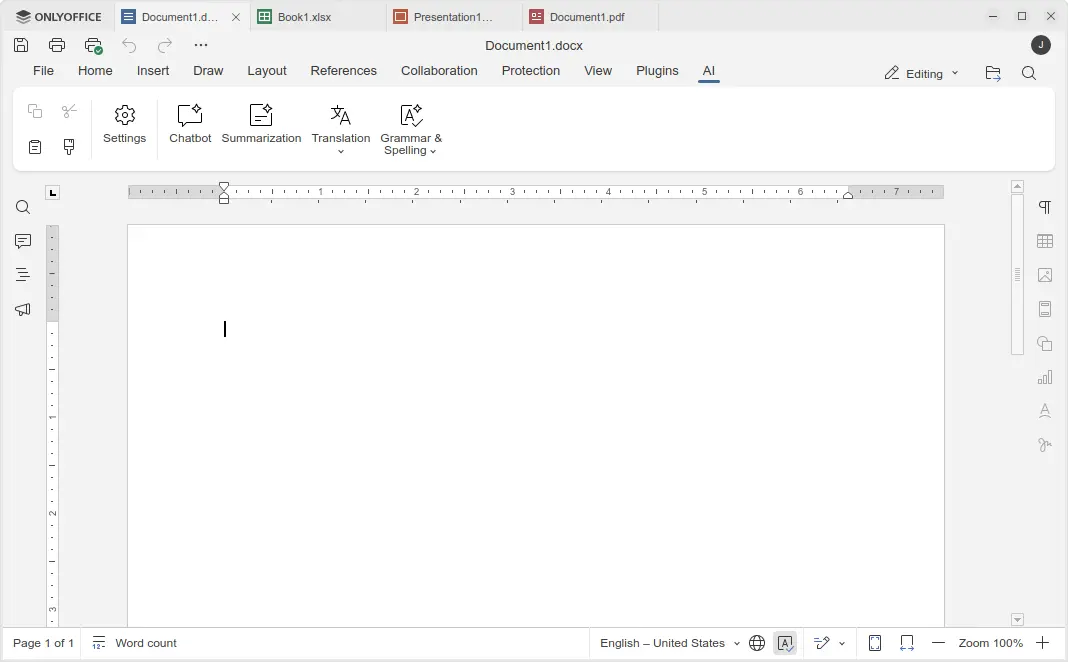
Besides that, the Document, Spreadsheet, Presentation, and PDF editors have AI toolbar options, allowing to do AI-powered translations, summarization, grammar correction and spell-checking. Though, they all need an AI model connected as mentioned above.

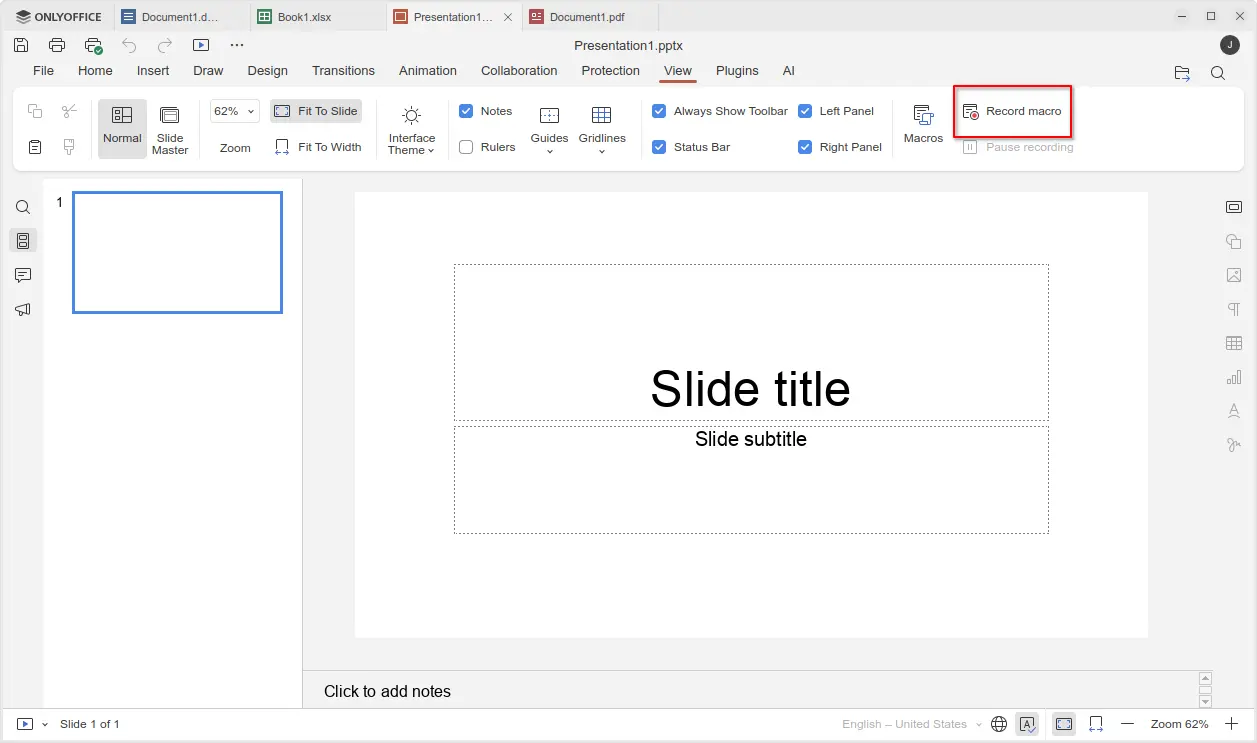
For those who often perform repetitive actions with OnlyOffice, the new version added View -> Record macro menu option, allowing to automate your actions by recording them as macros.

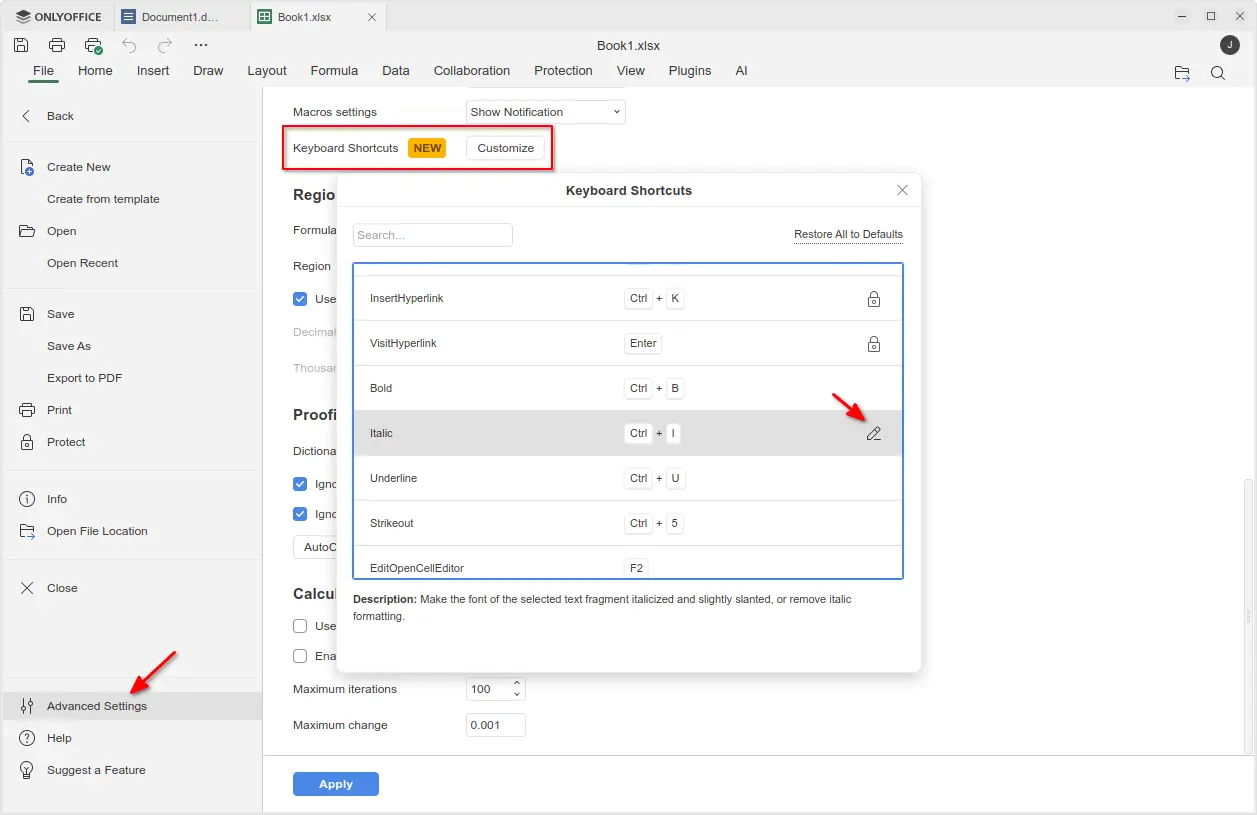
The new version also added support changing the keyboard shortcuts. Simply go to File -> Advanced Settings -> Keyboard Shortcuts, then click on β€œCustomize” button. In pop-up dialog, find out your desired shortcut and either double-click or click β€˜edit’ icon to change it.

Though, many shortcuts are locked as unchangeable, and a β€œRestore All to Defaults” option is available to reset them all.

Moreover, the new version added official support for Windows on ARM64 computers, such as Surface Laptop 7, Galaxy Book4 Edge, etc laptops with Snapdragon X series processors. And, ARM64 support for Linux is coming in future releases.

Other changes in OnlyOffice Desktop Editor 9.2 include:

  • Custom color support for the Redact feature in PDF editor.
  • Ability to add descriptive text labels to checkboxes and radio buttons.
  • Assign specific roles to new fields when inserting them into form.
  • For more, see the official release note.

Get OnlyOffice Desktop Editor 9.2

For Ubuntu, the office suite can be installed easily through the App Center (or Ubuntu Software for 22.04). It’s the official Snap package that runs in sandbox environment. Though, at the moment of writing, it’s still at version 9.1.

For choice you may download the app package for Windows, Linux, and macOS from its website. Where, Ubuntu user may choose download:

  • native DEB package, then click open with App Center or Ubuntu Software to install.
  • non-install AppImage, that can launch the office after adding executable permission.
  • or Flatpak package which runs in sandbox environment.

TLP 1.9.0 Released! β€œAdded back” Graphical Power Mode Settings

By:Ji m
2 December 2025 at 23:05

TLP, the popular battery power saving tool for Linux laptop, released new 1.9.0 version yesterday!

The new release of this free open-source software introduced its own power profile daemon called tlp-pd, which in certain respects added back the GNOME/KDE/Cinnamon’s built-in power mode settings.

TLP 1.9.0 added its own power profiles daemon

As you may know, TLP conflicts with power-profiles-daemon, the background service for common Linux providing ability to switch between Performance, Balanced, and Power Saver power profiles. Thus, installing TLP will remove the built-in power mode options in GNOME, Cinnamon, and KDE desktop environments.

Now with TLP 1.9.0, tlp-pd is introduced to replace power-profiles-daemon by implementing the same D-Bus API that GNOME, KDE, Cinnamon use. So, the power mode options in your desktop seem just like they are never gone.

tlp-td power profile daemon

Besides that, it added new tlpctl command. Without sudo permission, it allows you to switch power profile from command line, query current power profile, or run custom command using a specific power profile.

Meaning that you may start your games or certain apps in performance mode, while leaving all others running in balanced or power saver.

For example, the command below will start the SuperTuxKart game in performance mode, no matter what power profile you set system wide.

tlpctl launch -p performance /usr/games/supertuxkart

tlpctl command to switch profile, or run command using a specific power profile

Moreover, it updated the /etc/tlp.conf configuration file. Now, all parameters end with _AC will work when Performance profile is active, parameters end with _BAT will work for Balanced profile, and parameters end with _SAV will work for Power Saver profile. While, all other parameters work for all profiles.

And, it added new TLP_AUTO_SWITCH option in configuration file, that controls the automatic switching of the power profile. It can be set to:

  • 0, never switch power profile, and use the value of TLP_DEFAULT_MODE if set.
  • 1, auto switch to performance when AC connected, or balanced when running on battery.
  • 2, retain the manually selected profile (e.g., via your desktop’s built-in option) even when the power source changes.

Other changes in TLP 1.9.0 include:

  • Add Battery Care (battery charge start/stop threshold) support for Tuxedo/Clevo laptops.
  • Add TLP_DISABLE_DEFAULTS to deactivate all intrinsic defaults of TLP, so only parameters activated in config file applied.
  • Fix tlp discharge to a target percentage for Chromebooks, Framework laptops.
  • Fix Thinkpad X201, X220 discharge.

For more, see the changelog in Github.

How to Install TLP 1.9.0

TLP has an official PPA that supports Ubuntu 22.04, Ubuntu 24.04, Ubuntu 25.04/25.10, and their based Distros, e.g., Linux Mint 21/22, Zorin OS 17/18.

To add the PPA and install TLP 1.9.0, press Ctrl+Alt+T on keyboard to open terminal and run the commands below one by one:

sudo add-apt-repository ppa:linrunner/tlp
sudo apt update
sudo apt install tlp tlp-pd tlp-rdw

After installed the software, you may just forget it, as the default settings are already optimized for battery life. Though, you may follow the official documentation to install it on other Linux Distributions, or configure it to fit your need.

Uninstall:

To uninstall tlp in Ubuntu or Linux Mint, open terminal and run command:

sudo apt remove tlp tlp-pd tlp-rdw

Also run the command below to remove the PPA:

sudo add-apt-repository --remove ppa:linrunner/tlp

And, install back the system built-in power profiles daemon package:

sudo apt install power-profiles-daemon

AMD Confirms Linux Gaming Unaffected by RDNA Driver Changes

2 November 2025 at 23:57

AMD’s recent decision to move its RDNA 1 and RDNA 2 Windows GPU drivers into maintenance mode sparked concern among Radeon users, but Linux gamers have nothing to worry about. The company confirmed that both architectures will continue to receive game optimizations, and Phoronix verified that AMD’s Linux driver development remains entirely separate from its […]

The post AMD Confirms Linux Gaming Unaffected by RDNA Driver Changes appeared first on UbuntuPIT.

Steam Survey October 2025: Linux Gamers Finally Cross 3% Mark

2 November 2025 at 23:19

Linux gaming has reached a new milestone. According to GamingOnLinux, the October 2025 Steam Hardware & Software Survey shows Linux systems now account for 3.05% of all active Steam users, the first time the platform has broken the 3% barrier. The surge highlights continued momentum in Linux gaming adoption, likely boosted by the approaching end […]

The post Steam Survey October 2025: Linux Gamers Finally Cross 3% Mark appeared first on UbuntuPIT.

Bazzite Fall Update Arrives with Fedora 43, Handheld Expansions, and Nvidia LTS Support

31 October 2025 at 15:13

The Bazzite Fall Update has officially landed, bringing the Fedora-based gaming image up to Fedora 43. The release introduces expanded handheld device support, renewed Nvidia compatibility, and updated desktop environments, making this one of the most comprehensive refreshes for Linux gamers this year. Bazzite’s latest build focuses on real-world performance, hardware coverage, and long-term reliability. […]

The post Bazzite Fall Update Arrives with Fedora 43, Handheld Expansions, and Nvidia LTS Support appeared first on UbuntuPIT.

LibreOffice 25.2.7 Released: Final Update Before Major 25.8 Upgrade

30 October 2025 at 23:40

The Document Foundation (TDF) has announced the release of LibreOffice 25.2.7, the final maintenance update in the LibreOffice 25.2 series, now available for download at www.libreoffice.org/download. The foundation urged users of the 25.2 branch to upgrade to LibreOffice 25.8.x, as the 25.2 line nears its end of support. Recommended: 10 Best Free Office Suites for […]

The post LibreOffice 25.2.7 Released: Final Update Before Major 25.8 Upgrade appeared first on UbuntuPIT.

Mesa 25.2.6 Bugfix Release Arrives with Broad GPU Driver Improvements

30 October 2025 at 17:09

The Mesa team has released version 25.2.6, a routine but important bugfix update in the 25.2 series. Announced by Eric Engestrom on October 29, 2025, the update refines driver stability, shader handling, and Vulkan compatibility across multiple backends. The next bugfix release is expected on November 12. Among the key highlights, Alyssa Rosenzweig contributed D3D-compatible […]

The post Mesa 25.2.6 Bugfix Release Arrives with Broad GPU Driver Improvements appeared first on UbuntuPIT.

TrueNAS 25.10 β€œGoldeye” Brings NVMe-oF, OpenZFS 2.3.4, and Enterprise Virtualization Upgrades

29 October 2025 at 16:01

Building on the foundation of TrueNAS 25.04 β€œFangtooth,” iXsystems has released TrueNAS 25.10 β€œGoldeye”, a major update designed to enhance performance, simplify system management, and strengthen enterprise capabilities. The new release incorporates modern storage technologies, refined data handling through OpenZFS 2.3.4, and expanded virtualization support for high-performance environments. TrueNAS 25.10 introduces NVMe over Fabric (NVMe-oF), […]

The post TrueNAS 25.10 β€œGoldeye” Brings NVMe-oF, OpenZFS 2.3.4, and Enterprise Virtualization Upgrades appeared first on UbuntuPIT.

❌